
I’ve been a music fan since age zero, and a digital music
and photography buff for several years now. Being a full-time computer nerd,
the concept of digitizing music and photos into a format that could be carried
around on a disk just amazes me.
Sitting at the bottom of my home entertainment stack is a
300-disc Sony CD changer, which currently holds 240 CDs. That box is a pain to
move … with that many CDs in it, I’d wager that it weighs in excess of 100
pounds. I always wondered what it would be like to convert that massive
paperweight into ones and zeros and make it ultra-portable. Until recently I
just fiddled around with flash players like the iRiver iFP-390T, which sported
256MB of RAM. I was able to cram about 50 songs into its memory, which seemed
to be enough for workouts and long walks, but a song or two was always missing
from the playlist.
As of last Thursday, I no longer have that problem.
Enter the iPod Photo. This fabulous device comes in two
flavors (40 or 60GB), sports a backlit LCD color screen, and comes with a dock
and both USB 2.0 and FireWire cables. Both models appear to be the same size,
whereas previous models of the iPod varied in size from the smaller to larger
capacities. This one is the biggest yet, ¾ of an inch thick and weighing in at
6.4 ounces. They’re a bit pricey though, with the 40GB model being $499 and the
60GB model priced at $599.
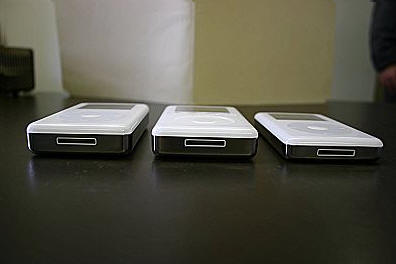
From left to right is 60GB iPod Photo, 40GB 3rd gen iPod, and
20GB 4th gen iPod
Tech Specs:
Dimensions: 4.1” x 2.4” x 0.75”, 6.4 ounces
Capacity: 40GB or 60GB
Battery life: Up to 15 hours (music only); 5 hours for slideshow/music
Skip protection: 17 minutes
Display: 2-inch (diagonal) 220 x 176 pixel 65,536-color LCD with LED backlight
Ports: Dock connector, remote connector, headphone jack (supports video output)
Dock ports: Dock connector, line out, S-video
Connectivity: FireWire 400 (6-wire) and USB 2.0
Included accessories: photo dock, earbud headphones,
carrying case, AC adapter, FireWire cable, USB 2.0 cable, A/V cable.
I had never really played with an iPod before buying this
one, so I can’t make comparisons between the new click wheel models and the 1st
through 3rd generation iPods. The finish on the outside of the
device is excellent, though I am dreading the first time that it gets
scratched. The white plastic outer cover looks like it could be nicked just by
looking at it.
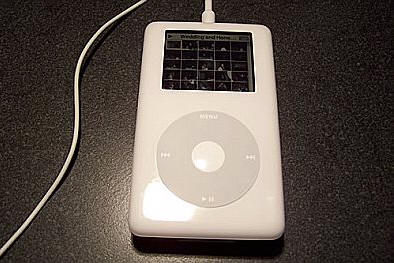
As far as ports and connections are concerned, they all
appear to be pretty standard. The dock connector on the iPod and the dock
itself look to be the same as the ports on my friend’s 3rd generation
iPod.
Using the iPod’s controls is a no-brainer, even for this
first time user. The click wheel is very easy to use, and the circular menu
navigation method is just ingenious. Leave it to Apple to finally do away with
up/down and left/right arrow buttons! My grandmother would have no problem with
this device.
Installation and configuration was a snap, once I realized
that I would need to install a FireWire card in my aging Dell Dimension (USB 2.0
wasn’t an option due to a BIOS conflict). As with any new battery-operated
device, I plugged it into the wall and let it charge for a couple hours. The
manual states very plainly that you must have a good charge on the iPod battery
before connecting it to the PC. The reason is simple: While the iPod will
normally charge through the USB 2.0 or FireWire cable, it will not charge while
its internal drive is running. Therefore, if the battery is weak and the device
shuts down during the sync process, you might end up with corrupted music and
photos on the iPod.
While I waited for the battery to charge, I upgraded my
iTunes to version 4.7 and begin the task of importing some of my CDs to the
computer. If you haven’t used iTunes before, you will be surprised at how
simple it is to import your music…and completely fill up your hard drive. After
rectifying that situation, both my iPod and my PC were ready to be introduced.
When the two devices make contact, iTunes takes over and
begins the process of synchronizing your mobile music collection with the files
on your PC. Depending on the amount of music you have on your PC, this may take
a while the first time, but subsequent sync operations will only copy over items
that have changed since the last hookup.
One thing I always hated about MP3s was the fact that they
just sounded bad, at least in my ears they did. The lows and highs always
sounded a little clipped, and just about every one of my MP3s had some static,
clicks or other problems that just annoyed me to no end. I was pleasantly
surprised, however, at how good the iTunes-encoded files sounded from the iPod.
It is very difficult to detect differences between the original CD and the
ripped song on the device.
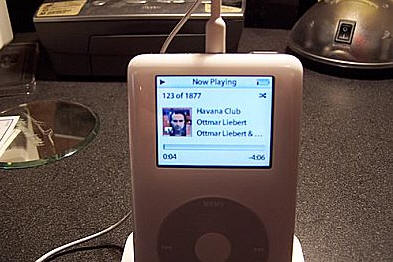
One nice addition to the musical capability of the iPod is
the ability to display the album cover of the music you’re listening to. This
is very slick, but be warned: only the album art for music purchased through the
iTunes music store is automatically imported. If you want the covers for CDs
you’ve imported, you’ll have to do it yourself. I just used Google’s image
search to find each album cover in a JPG format, then dragged it into the iTunes
software.
And now a word about the photo capabilities of the iPod.
The manual states that you can either sync your Adobe Photo Album images, or
instruct iTunes to just copy images out of folders on your PC. The software
automatically found all of the photo folders that were in my My Pictures folder,
and I instructed it to upload about 980 photos. The photos are not stored on
the iPod in their native high resolution format (though the manual states you
can add those to your iPod as an option). The software converted each photo
into something readable by the iPod, and the process took about twenty minutes.
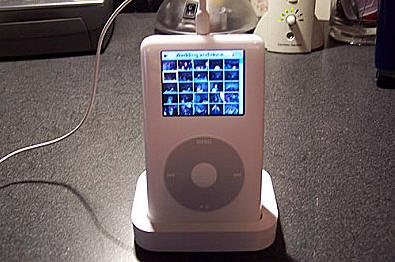
Navigating through your photos on the iPod is a lead-pipe
cinch. With the click wheel, choose “Photos”, then the group of photos you’d
like to see (each sub-folder within your My Pictures folder becomes one group).
The screen shifts to display thumbnails, 25 at a time. Choose any one of them
and click the center button to see it full-screen. Occasionally, a photo would
not load when clicked on, but if you swirl around the click wheel and come back,
it will appear. This appears to be a bug, and hopefully Apple will come up with
a patch soon (the software on the iPod is v1.0).
You can also choose for the iPod to display a slideshow of
your photos. There is a full screen of options available, including the time to
display a slide, whether or not to play music during the slideshow, how you want
them shuffled, and whether you’d like them displayed on your TV.
Wait a minute! Did you say TV?
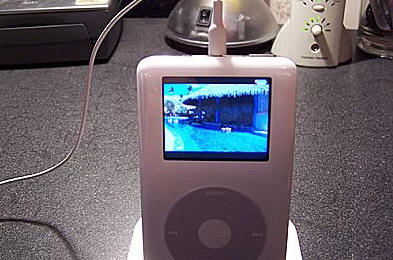
With the supplied A/V cable, connecting the iPod to your TV
is easy. Plug the cable into the headphone jack (or the dock line-out jack),
then plug the three RCA ends of the cable into your TV’s left and right audio
and video connectors (you can also opt for S-video from the dock). When you
instruct the iPod to display a slideshow now, it will ask you if you want the
output to be redirected to the TV. The end result is a nifty presentation,
full-screen on your TV, accompanied by music of your choice if you desire. The
slideshow adds some cool transition effects between photos to keep it
interesting. And if you’re the person sitting on the floor in front of the TV
during one of these slideshows, you can still see the photo on the screen of the
iPod.
Battery life so far has been pretty good. Apple claims 15
hours of music playback and 5 hours of slideshows with music in the background.
I charged it overnight and brought it into work today. It has run constantly
from 7am to 5pm and is almost dead, but it’s still playing. For the last half
hour, I’ve had the backlight on constantly and I still have a little sliver of
red showing in the battery bar as the device plays my music. It looks like I’m
going to get a little more than 10 hours on this charge, which isn’t bad
considering that I was fiddling with the device all day, turning the backlight
on and off, moving through my playlists, etc.
Other extras that came with this iPod are:
- Games – Brick (like Breakout), Music Quiz, Solitaire and
Parachute. - Notes
- Alarm clock – with your choice of a beep or a playlist
as an alarm - Contacts, calendar and notes
I’ve been walking around with this thing in my hand for
several days, but I am much happier when it is protected by the supplied
belt-clip carrying case. It’s the same one that’s been around for years with
other iPods that I’ve seen, and while it protects the device pretty well, it
scares me a little. The material inside the case isn’t the softest around, and
I worry that it will scratch the delicate finish on the iPod. Also, the top and
sides are a bit exposed. As soon as iSkin releases a cover that fits this
device, I’m buying one.
So there you have it. All in all, the device is
excellent. My only complaints are the intermittent photo bug and the price. My
concerns about how delicate the device is will probably turn out to be
unfounded, but for now I’m still a little worried about it.
Price: $499 (40GB) to $599 (60GB, the one I
tested).
Pros:
iPod quality
60GB storage, plenty of room
iTunes supports it flawlessly
Windows or Mac, does not matter
USB or FireWire
Sounds great, and photos look awesome, especially on your TV
Cons:
Very expensive (but Apple provides financing, har har)
A little heavier than previous iPods
Photo display bug
Device’s cosmetic delicateness a bit scary
![[MINI SIZE. ULTRA PORTABLE CHARGER]: Roughly the size of an AirPods Pro case, this smallest power bank packs 10,000mAh of long lasting power into a tiny, nano footprint. Easily slide this ultra slim, credit card size charger into your skinny jeans, a...](https://m.media-amazon.com/images/I/41rATpm6dyL._SL160_.jpg)
INIU Portable Charger, Ultra Mini 10000mAh 45W Fast Charging with Detachable Cable, Flight-Safe Travel USB C Power Bank External Phone Battery Pack for Xiaomi iPhone 17 16 Samsung S26 Google iPad etc
(as of June 12, 2026 18:49 GMT -05:00 - More infoProduct prices and availability are accurate as of the date/time indicated and are subject to change. Any price and availability information displayed on [relevant Amazon Site(s), as applicable] at the time of purchase will apply to the purchase of this product.)
tomtoc 7L Sling Backpack Crossbody Bag for Men Women, EDC Daypack Chest Shoulder bag for 14-inch MacBook Pro M5 Pro/Max, 13" MacBook Air/Neo, 13" iPad Air M4/Pro M5, Organized, Daily Use, Work, Travel
(as of June 12, 2026 18:42 GMT -05:00 - More infoProduct prices and availability are accurate as of the date/time indicated and are subject to change. Any price and availability information displayed on [relevant Amazon Site(s), as applicable] at the time of purchase will apply to the purchase of this product.)Product Information
| Price: | 499.0 |
| Manufacturer: | Apple |
| Pros: |
|
| Cons: |
|

Gadgeteer Comment Policy - Please read before commenting
how do i erase music form my i pod.