
Yesterday I reviewed the ShareCentral
1 USB sharing device from Kensington. I liked the simplicity of their product, but couldn’t help wanting more
from it. Today I want to show you the USB Super 16-Port Hub from Brando.
Yes, I said 16 ports! Yowza! I know this isn’t quite the same thing as the ShareCentral, but it’s close…
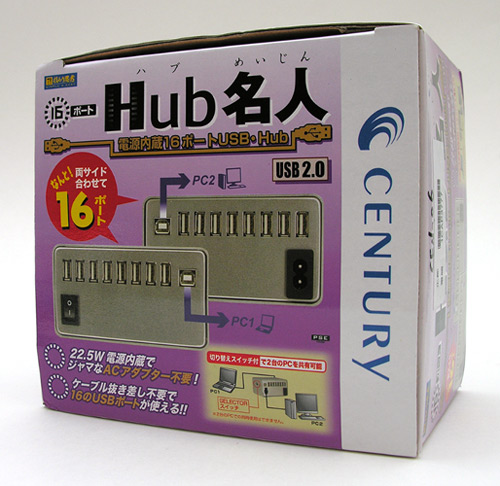
Hardware Specs
16 USB 2.0 ports
Voltage: 100V-240V
22.5V built in power supply
Dimension: 116 x 67 x 63mm (approx.)
Weight: 373g
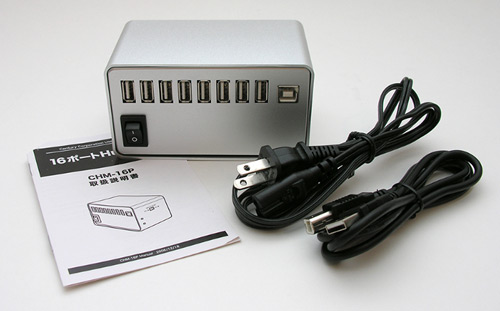
Package Contents
16 port USB hub
Power cord
1 USB type A to B cable
User Manual (Japanese)
Made in Japan, the USB Super 16-Port Hub doesn’t come with any English instructions for its operation. That’s ok
though as it’s pretty much a no-brainer to set up.
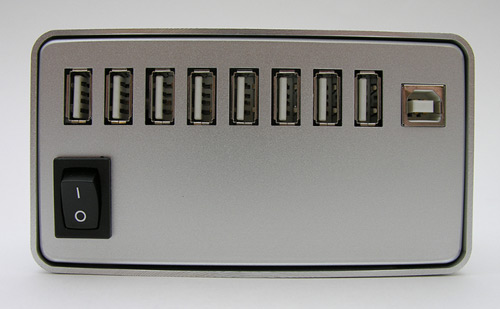
The hub is made of brushed aluminum and reminds me of a Mac Pro tower. The word
‘stylish’ doesn’t exactly come to mind when you look at it, but I don’t think
it’s super ugly either.
It’s not hard to find a USB hub with seven ports, but each side of this hub has
eight USB 2.0 ports, for a total of sixteen! I run out of space with my seven
port hub all the time, but I don’t think I’d ever run out of ports with this bad
boy.
Besides the eight ports on each side of the hub, there is also a USB type B
connector. One side has a power switch…
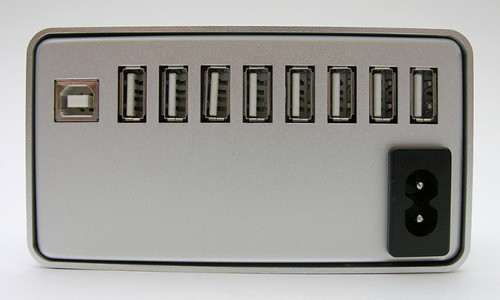
…while the other side has a second USB type B connector and a power cord
connector. This hub has a power supply built into it, so no AC adapter is
needed. Yay! As for the power switch, I’m not quite sure why one is needed as
I’ve never had the desire to turn my USB hub off. Have you?
Are you wondering about the two USB type B connectors? That’s why this hub is
similar to the ShareCentral device. You can connect it between two computers.
One thing to note right away is the fact that only one USB A/B cable is included
in the box. If you wish to connect this hub to two computers, you’ll need to dig
up or purchase another cable.
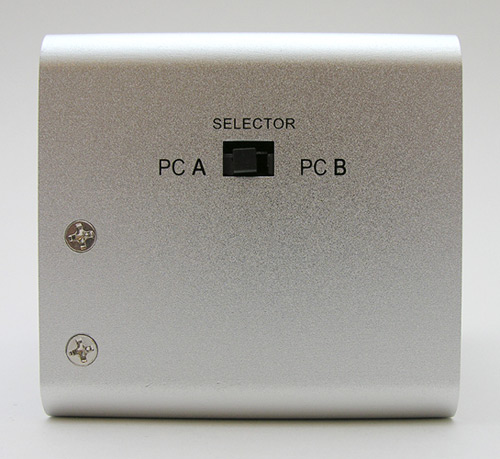
A slide switch on one side gives you the ability to swap all 16 ports from
one computer (PC, Mac, Linux box, whatever) to the other connected computer.
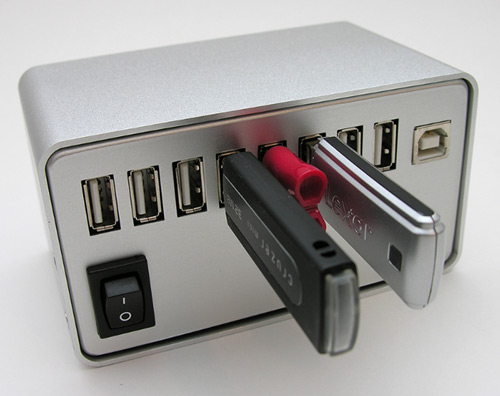
I tested this hub with a variety of USB flash drives, card readers, a flatbed
scanner, sync / charge cables, etc. and had no problems with it as far as
functionality. The only real issue that I have with this product is its design.
Connecting it between two computers results in an ugly arrangement of cables.
While I think it’s fine to have eight ports on each side, both USB type B
connectors should have been located on the same side of the hub along with the
power switch and power cable connector. That way you could route the cables
easier to each computer. As it is, you have to wrap one cable around the side of
the hub to get it out of the way. Other than that complaint, this hub should
give you enough ports so that you won’t have to plug and unplug your favorite
USB gadgets again. If you run out of ports with this hub, you I want to meet you
:o)

2-Pack LED Video Light Kit, NiceVeedi Studio Light, 2800-6500K Dimmable Photography Lighting Kit with Tripod Stand&Phone Holder, 73" Stream Light for Video Recording, Game Streaming, YouTube
(as of June 8, 2026 12:59 GMT -05:00 - More infoProduct prices and availability are accurate as of the date/time indicated and are subject to change. Any price and availability information displayed on [relevant Amazon Site(s), as applicable] at the time of purchase will apply to the purchase of this product.)
ALTSON 60 LED Portable Selfie Light Video Conference Lighting with Clip & Camera Tripod Adapter Rechargeable 2200mAh CRI 97+, 3 Light Modes for Phone iPhone Webcam Laptop Photo Makeup
(as of June 8, 2026 12:59 GMT -05:00 - More infoProduct prices and availability are accurate as of the date/time indicated and are subject to change. Any price and availability information displayed on [relevant Amazon Site(s), as applicable] at the time of purchase will apply to the purchase of this product.)Product Information
| Price: | 139.0 |
| Manufacturer: | Century Corporation |
| Retailer: | Brando USB |
| Pros: |
|
| Cons: |
|

Gadgeteer Comment Policy - Please read before commenting
This is what to give for a geek who has just about anything! What a find! I think I am going to buy one. The product, however, does have some shortcomings:
Hai:
I agree that the ports are close together, but if you are plugging in standard USB cables, you’ll be fine.
Just wanted to say that I’ve had cause to power-cycle a USB hub: I’ve got a few devices that seem to get wacked out on occasion, and it’s easier to drop power to the entire hub than remember which black cable is the one that goes to this troublesome device. (Sometimes it’s the device, sometimes it’s the driver, either way it is an easy way to cycle the connection.)
Besides, a switch means you can save power if you want to…
DStaal:
Although I can’t recall ever needing to reset a USB device in the manner that you describe, you do make two valid points. :o)
Good effort but it seems that Cambrionix in the UK takes the prize for the biggest and best USB 2.0 hub with a whopping 49 ports each capable of the full 500mA output current!
Product details: http://www.cambrionix.com/CBRX49PH001A/49Port_USB-2_Hub_CBRX49PH001A_DocRev2-03.pdf
i m here to ask for what setlctor switch is ………….
any one tell me….ya sy
please suggest me that it is applicable for web cam …..can many web cam operate this device