
Product Requirements:
Device:
Windows 98, 98SE, ME, 2000, XP &
MAC
Update 3/17/05 (see comments below in red)
Over the past several months, the Digital Mind
Corporation’s (DMC) Xclef 500 has
been my personal treadmill partner as I train for my first Indy 500
mini-marathon. It accompanies my wife on her pursuit of health through exercise
too. So when Julie approached me with the opportunity to review the new personal
digital music player from DMC (8270 model), I jumped at the chance.
Hardware Specs
Digital Audio Format : MPEG 2 and MP3 (8-320Kbps.Vbr), WMA (32-192Kbps), and
Ogg Vorbis
File System : FAT 32
Capability : 20 GB
Hard Disk Type : 1.8", Low Power HDD, ATA I/F
Buffer Memory : 16MB
MP3 Encoding (64kbps – 192kbps)
FM Tuner & FM recording – 10 presets
Navigation: by ID3 tag and by folder
Support Windows DRM
Firmware upgradable via USB
Voice Recording (64kbps)
Playback Time: 15 hours
Display : 160 x 160, with Backlit LCD
Rechargeable 1400 mAh Li-Ion battery
ID3 Tag : Ver 1.0/1.1/2.0 supported
Multi-Language supported – English, Spanish, German, French, Italian, Dutch,
Finnish, Scandinavian, Chinese, Simple Chinese, Japanese
Equalizer(EQ) with over 20 presets
Playback Mode : Single, Directory, All, A <-> B repeat, Shuffle
Music Management : Play List(M3U), Bookmark, Search, Tree view
Personal Information Manager (PIM) and Calendar can sync up to Microsoft Outlook
User Interface : Text View, User’s Logo Display(*.BMP)
Four preset games (Tetris, Snake, Othello, and Sokoban)
PC Interface : USB 1.0/1.1/2.0, Mass Storage Device
Audio Input : Line-in, Built-in microphone
Audio Output : HeadPhone Out
S/N Ratio : 90dB
Frequency Range : 20Hz – 20KHz
Dimension : 4" x 2.6" x 0.75"
Weight : 6 oz
Package Contents
Ear bud earphones
USB Cable
CD for Win 98SE Driver
AC Adapter
User Manual
Line-in Cable
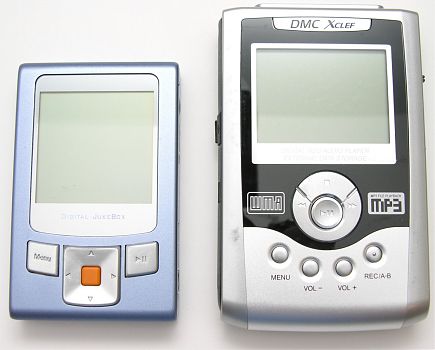
Upon first laying eyes on the DMC 8270, two things immediately caught my
attention. First, the 8270 is drastically smaller than it’s older, bigger
brother (Xclef 500). Comparing the measurements (height x width x depth) results
in a difference of (-)1” x (-)0.6” x (-)0.05” and 3 oz. less in weight. The 8270
has a built-in 1.8” drive instead of the Xclef’s 2.5”.
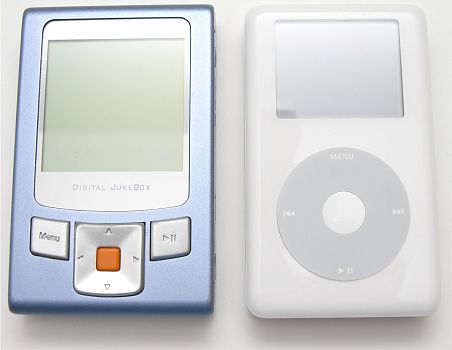
How does the 8270 compare to a 4th
generation 40GB iPod? The differences are basically unnoticeable, (-)0.1” x
(+)0.2” x (+)0.18” and 0.4 oz. more in weight.
Secondly, what is up with that orange button? Reminds me of a button on my
parent’s first VCR’s remote control, which was not too remote since it was
connected to the unit by a 4-foot cord. Not a look that really screams cool, to
say the least. To credit DMC, they appeared to do away with the orange button on
the new 8280 model.*
The 8270’s casing has a blue-metallic finish and the other buttons are
silver. The LCD is a good size, allowing multiple lines of text and has a blue
back light that helps when needed. Of course, the display is a magnet for
fingerprints and smears, so constant polishing or a case is necessary.
The Play/Pause button is multi-functional; besides play/pause, you can stop
it by holding it down for approximately 2 seconds, it also turns the device
on/off by holding it down for approximately 5 seconds. The Menu and the large
navigational buttons help you maneuver through the multi-tier menu structure.
The Hold button has been removed but the function is still available by holding
down the Menu button and then pressing the Play/Pause button when the player
alerts you.
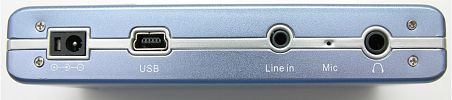
On the right-side of the player is the Line-in jack, Microphone/Headphone
jack, USB port and power connector. Using the included Line-in cable, you can
actually use the 8270 to record audio from other devices, while the Microphone
jack allows you to use this device as a voice recorder too. The 8270 does not
have the rubber flap protecting the USB port, as the earlier Xclef 500 and
DMC800 models. This flap was often difficult for my short, practically no nail
fingers to open.
One thing, in my opinion, that made the DMC Xclef model so nice was the ease
of use. Just plug and play, as the device appears as another hard drive when
connected to your computer with the USB cable. The 8270 still has the ability to
plug and play, drag and drop files from computer to device but the functionality
has be altered. DMC has moved towards the use of software to manage the music
transfer process.
The 8270 includes a CD that contains the Win98SE driver, plus two software
packages (Audiophile and MusicMatch). The Audiophile software enables you to
upload/download music, as well edit ID3 tag information (like artist, album and
genre) and execute maintenance utilities. My issue with the Audiophile software
is that it lacks any Help functionality. Now I am a typical human being, let
alone a male, thus, I would rather figure something out then read instructions
but when I finally wave the white flag and am looking for a lifeline, I expect
to be able to find help.
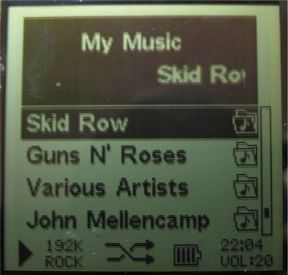
The one complaint I had is when you drag and drop files on to the device, the
file folders are not sorted in alphabetic order. So Aerosmith might not appear
before Mellencamp. The order is set by when the file folders were copied to the
device. I emailed DMC Support to clarify this finding, since the DMC Xclef does
not have this requirement. I was told that:
A previous strike against the previous DMC models was the inability to charge
the device when the unit is turned off. That has been rectified in the 8270.
When the unit is off, a small battery icon appears at the bottom, off-center to
alert you that the battery is charging.
The specifications say 15 hours of playback time per a full battery charge. I
tested the 8270 by playing it for 10 hours straight. At the conclusion of the
test, the device still had life and the battery icon still had a bar showing. So
I think it can handle a long trip.
Navigating the 8270 was probably the most frustrating difference, which
crushed my expectations built from using the Xclef 500. Navigating the menu
structure is not easily intuitive upon picking it up for the first time. Upon
turning the 8270 on, the following options are presented (in this order) “Play
My Music”, “FM Radio”, “Voice Record”, “Music Record”, “PIM” (last option
visible without paging down), “Game”, “Preferences”, “Information” and “Power
Off”.
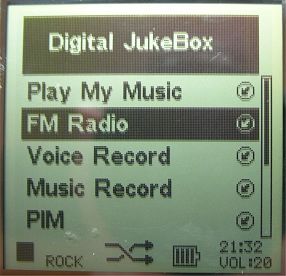
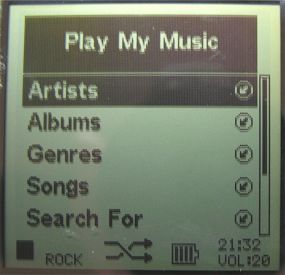
Select “Play My Music” and the following options were presented: “Artists”,
“Albums”, “Genres”, “Songs”, “Search For” (last option visible without paging
down), “Play Lists”, “List Manager” and “My Music Files”. My biggest complaint
is that the “Artists” through “List Manager” options are only usable if you use
the Audiophile and/or MusicMatch software packages to import your music files on
the device. Bummer!?!
I do like the ability to create and manage your own playlists. That way you can
create your own unique musical arrangements for certain occasions. You can have
your “Cruising”, “Workout” and “80’s Hair-Bands” lists with your favorite songs,
for the specific occasion. Cool!!! Again, the playlist features are only useable
if you use one of the software packages to load your music on the device.
Previous reviews of DMC’s devices mentioned the long boot up time required
when it was turned on. This is still true with the average time of 19 seconds to
boot (5 tests). Julie mentioned the reasoning in her DMC 800 review. You also
experience another brief delay when accessing the “My Music Files” option but
the delay is minor, on average 4 seconds (5 tests), compared to the boot up
time. Still, 24 seconds to get to you music files seems a bit too much.
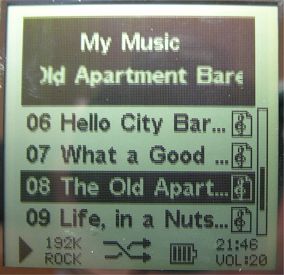
As the device is playing a song, the artist and song title scroll across the
top while the total song length and current song playing time sit directly
below. Other options like “Volume”, “Equalizer”, “Play Options (Repeat, Random,
etc…), “Upcoming Songs” (view what songs are coming up) and “Play Songs” (view
what songs you have played) are presented below.
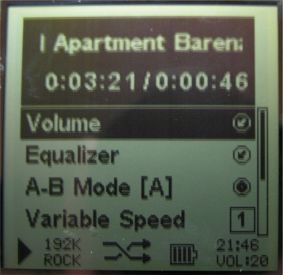
I found the volume mechanism challenging, especially to control while working
out. You have to be at the song level to control the volume. The Xclef 500 has
the volume buttons on the front-face of the device, making it simple to turn it
up or down. Now you do have the option to preset a volume level, which is nice
in case you were jamming the last time you used the device and you forgot to
turn it down before turning it off. Plus the volume level is constantly visible,
along with the time, in the bottom-right corner of the interface.
The 8270 has many more features like a PIM (Personal Information Management)
and a Calendar that can sync to Microsoft Outlook, a voice-recorder, FM tuning
and recording (20-presets) and games (Tetris, Snake, Othello, and Sokoban) but
how many features do you want in your music player. Besides the FM tuner, I
doubt that I would ever use the others. Maybe I am in the minority.
A great thing about all the DMC devices is the ability to use it as an
external hard drive that is extremely portable. The 20 Gb, 8270 can have roughly
3,000 of your favorite songs and still have plenty of space to hold pictures
from your digital camera, for instance. This functional versatility makes it a
handy addition to your gadget belt.
How does the 8270 stack-up, in terms of cost? The $249 price tag is
reasonable with the market; compared to the 20BG iPod at $299 and the Dell DJ at
$279.
Overall, I think the 8270 has a lot to offer but in my opinion it beats out
its older brother, the Xclef 500 model, only in size. I would love to see the
Xclef 500 functionality shrunk into the package of the 8270, but I have to give
DMC credit for continuing to push the envelope and introducing new
functionality. The future could be interesting.
In the
process of writing this review, DMC replaced this model with the 8280. The
8280 is pretty much identical to the 8270 model except that instead of an orange
select button, it now has a dark grey button. A 30gb version is also available.
Price: $249 (20GB), $299 (30GB)
Pros:
Size
Functions as USB storage device
Great sound quality
Supports Ogg Vorbis format
Ability to update firmware and hardware
Ability to create and edit playlists
Ability to charge the battery while the device is off
Cons:
That orange button
Start up time too long
Navigation is confusing
A lot of features rely on the use of a third-party software to import songs
64GB MP3 Player with Bluetooth 5.2, AiMoonsa Music Player with Built-in HD Speaker, FM Radio, Voice Recorder, HiFi Sound, E-Book, Earphones Included
(as of June 12, 2026 13:21 GMT -05:00 - More infoProduct prices and availability are accurate as of the date/time indicated and are subject to change. Any price and availability information displayed on [relevant Amazon Site(s), as applicable] at the time of purchase will apply to the purchase of this product.)
AGPTEK 64GB MP3 Player with Bluetooth, M3 2.4 inch Music Player with Speaker and FM Radio, Touch Buttons, Supports Up to 128GB(Purple)
(as of June 12, 2026 16:25 GMT -05:00 - More infoProduct prices and availability are accurate as of the date/time indicated and are subject to change. Any price and availability information displayed on [relevant Amazon Site(s), as applicable] at the time of purchase will apply to the purchase of this product.)Product Information
| Price: | |
| Manufacturer: | Digital Mind Corporation |

Gadgeteer Comment Policy - Please read before commenting
Post your comments here on the DMC 8270 Audio Player Review.
http://www.the-gadgeteer.com/dmc-8270-review.html
Just click the POST REPLY button on this page.