
Program Requirements:
Device:
PalmPilot Personal, PalmPilot Professional, IBM WorkPad, or
Palm III
Palm OS v2.0 or later
105 K free RAM (Maps and directions take up additional space)
Desktop:
Windows 95/98 or NT 4.0
The Earthmate is Delorme’s 2nd generation GPS
that can work with a Laptop or PalmPilot. For those of you that don’t know what GPS is, it
stands for Global Positioning System. GPS applies modern technology to the ancient basics
of navigation. The US Department of Defense has developed and launched a series of
positioning satellites in an orbiting “constellation”. These satellites are used
as reference points and let a GPS receiver determine your position anywhere on the globe.
A GPS device can also provide accurate information about your latitude, longitude,
elevation, speed and direction of travel.
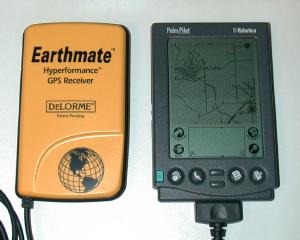
The Earthmate is a small light weight (close in size to the PalmPilot) yellow plastic
unit. The unit has no buttons or displays, all it has is one standard 9pin serial cable
coming out of it and a battery compartment that holds 4 AAA batteries. It is solid and
well made. A separate cable is required to connect the Earthmate to the Pilot. It’s
a short serial to hotsync cable.
The Earthmate comes with Street Atlas USA 6.0. This software runs on your Windows PC
and enables you to download maps and create trip directions that can then be downloaded
into your PalmPilot. This software will also directly interface with the GPS if you
run it on a Laptop with the Earthmate attached to the serial port. Note: I will only be
reviewing the Earthmate with respect to using it with a PalmPilot.
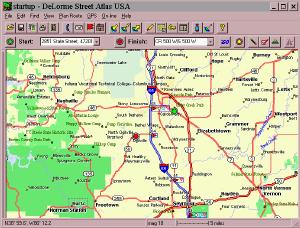 |
Street Atlas USA is a nice program. With it, you can look up an address and then create a map of the area. You can also create a trip by inputting start and end destination addresses. SA-USA will then give you step by step directions to navigate you through your trip. You can add additional stops on your trip and the directions will change accordingly. You can also add little text notes to the map to point out road names or places. Once you have your trip planned, you then send the map and directions to the PalmPilot. It’s as easy as clicking one button and hotsyncing the copied files.Street Atlas USA has many features making it a great program for creating maps and travel directions. I’ll mention that if you use the Earthmate with a Laptop, SA-USA will even speak the directions to you as you are driving. I didn’t actually test this though. |
I found that SA-USA didn’t do a very good job of finding rural roads. I live in a
rural area with an address like 7522 South 500 West. SA-USA could not locate that
address. I had to manually find 500 West on the map. I have had this same problem
with other mapping programs so I guess I can’t complain that much.
On the PalmPilot side of things you use a program called Solus Pro to interface with
Earthmate. Installing and setting up the software on the Pilot was very easy. The first
step to actually using the GPS is to attach it to your Pilot using the optional cable. You
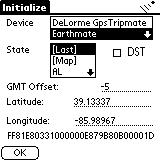
then turn on the Pilot and start Solus Pro. An initialization screen will let you choose
your state, whether you are using the Earthmate, Tripmate (1st generation Delorme
receiver) or NMEA Compatible receiver. The first time you initialize the unit, it can take
15mins.
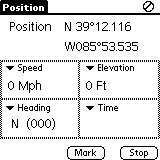 |
Once the Earthmate is initialized, you have the choice of 4 different screens on which to view the GPS data. The Position screen shows your Latitude and Longitude, Speed (Mph), Elevation, Heading and Time in four small data windows. If you would rather view other data on this screen, you can change each box by tapping on the pulldown menu. Other options that you can view are: date, tripometer, time to next turn, distance to next turn, time to finish, distance to finish, avg. speed, max speed, course, bearing, pdop (I have no idea what this is), or battery voltage (Pilot’s batteries).At any time you can mark or stop the GPS tracking by pressing the buttons at the bottom of the screen. This will save the batteries in your GPS. |
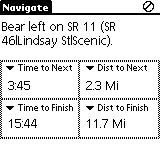
| Another screen that you can view is the Navigate screen. This screen will display instructions on what your next turn will be. As you are traveling, the PalmPilot will beep 60 seconds before your next turn. You’re also given the time in mins/secs till next turn, distance to next turn, time to finish your trip and distance till your trip is finished. This a pretty handy screen as it can give you all the info you need in order to keep on the right track during a trip. Like the Position screen, you can change the 4 data windows to display other info if you desire by tapping on each pull down menu. |
 |
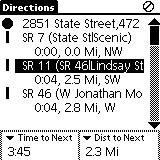
The Directions screen displays a list of directions for your trip with the next turn
highlighted. Different symbols show what type of road you are traveling on. A thick line
is a highway, double line is an interstate and a dotted line is a county road. At the
bottom of the screen is the time to the next turn and distance to the next turn. If you
would rather see other information in these two data windows, you can change them by
accessing the pulldown menu. As in the Navigate screen, the PalmPilot will beep 60
seconds before an upcoming turn.
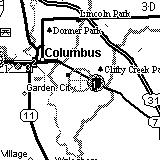
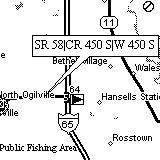
The last screen is the actual graphical map that displays the roads that you are
traveling on. A gray circle with crosshairs marks your current position. This circle moves
along the map as you move. I found this to be really cool….but, the bad thing is that it
is hard to see. I think it would be much better if it was a dark circle…maybe even a
flashing circle. If you look at the middle picture above, you’ll also see a dark filled in
circle with a gray circle around it. This shows the starting point on your trip. A similar
circle marks the ending destination on the map. As mentioned above, with Street Atlas USA,
you can add text markers that show street/road names. The rightmost picture above
demonstrates this.
I’ll admit that the Earthmate was my first exposure to GPS. It has been alot of fun
playing around with it. Hardware-wise, the Earthmate is rugged and works well. I
never had a problem with it receiving the satellite data. I was even able to use it inside
the place where I work which is a big concrete / steel factory building that has over a
100 computers running. It uses the Rockwell Jupiter chipset that locks on to satellites
very well. That said, I came to find out that I could not use any other existing PalmPilot GPS / mapping software with the Earthmate
because it is not an NMEA (National Marine Electronics Association) compliant device.
Instead it uses a binary proprietary output format. Delorme’s first gen. Tripmate was an
NMEA compliant device though. Note: Update
11/30/98 Atlas and PlaceTrace now supports the Earthmate.
In talking with others, I’ve come to find out that this is a real handicap. I’d have
to agree because the only software that you can use with the Earthmate is Solus Pro and
isn’t the best.
While Solus Pro does work, it is a bit clunky and you have to pay extra for it. It’s
hard to navigate through the different screens if you’re driving at the same time. There
needs to be a way to use the hardware buttons to switch between the different screens. It
is also hard to see your current position on the map due to the light gray circle that is
used.
Other features that would be nice to see: A way to directly annotate the maps on the
PalmPilot. I would like to make my own little notes and attach them to certain
points on the map. Another feature I’d like would be zooming in and out on the
graphical map using the hardware scroll buttons. It would also be great if while
looking at the graphical map view that when the unit beeped to alert you to an upcoming
turn it would also flash the road info on the screen for a few seconds and then go back to
the map view.
In summary, the Earthmate is a terrific little GPS. The only thing that really
limits it is the fact that it is not NMEA compliant. Using Solus Pro is usable but not
optimal. The price of the whole package is $258.90 which is expensive for something that
locks you into one piece of software that can work with it. I would advise that if
you are interested in this package that you try it out BEFORE you buy it.
Price: $199 (Earthmate and Street Atlas USA v6.0), $39.95
(Solus Pro PalmPilot software), $19.95 (Earthmate to Pilot cable)
Pros:
Rugged compact unit.
Locks on to satellites easily.
Street Atlas USA included.
Runs on it’s own batteries (10hrs).
Cons:
Not NMEA compliant so you can’t use other GPS/Mapping programs with it.
Solus Pro isn’t the best.

Samsung 14" Galaxy Chromebook Go Laptop PC Computer, Intel Celeron N4500 Processor, 4GB RAM, 64GB Storage, ChromeOS, XE340XDA-KA2US, Student Laptop, Silver
(as of June 8, 2026 18:53 GMT -05:00 - More infoProduct prices and availability are accurate as of the date/time indicated and are subject to change. Any price and availability information displayed on [relevant Amazon Site(s), as applicable] at the time of purchase will apply to the purchase of this product.)
HP Everyday Laptop • 2026 Edition • 8GB RAM • 256GB SSD • Microsoft Office 365 Included • Thin & Portable • Fast Charge and Up to 12 Hours Battery Life • Windows 11
(as of June 9, 2026 01:34 GMT -05:00 - More infoProduct prices and availability are accurate as of the date/time indicated and are subject to change. Any price and availability information displayed on [relevant Amazon Site(s), as applicable] at the time of purchase will apply to the purchase of this product.)Product Information
| Price: | $199.00 |
| Manufacturer: | DeLorme |
| Pros: |
|
| Cons: |
|
