
Product Requirements:
Device:
Sharp Zaurus SL5500
I’ve always liked
Extreme Limit cases, but I’ll admit that after writing reviews of what must
be a dozen or more, I wasn’t all that excited when they said they were going to
send me yet another one to review. This time it was a case for the
Sharp Zaurus which made things a
little more interesting since there aren’t that many cases available for that
particular PDA. But still, I wasn’t chomping at the bit to write about it since
I had written one for them
previously. I thought it was just going to be a slightly updated case. Boy was I
wrong!
The case they sent me is the Limited Edition Metal & Leather Suit for the
Zaurus. Yes, you read that correctly, Metal & Leather. Extreme Limit has
outdone themselves this time. This case is just too cool! It is made of smooth
grained black Italian leather with 0.4mm thick aluminum panels sewn into the
front and back. You can buy a case with either black, gold, silver or red
aluminum panels. I was sent the silver version for review.
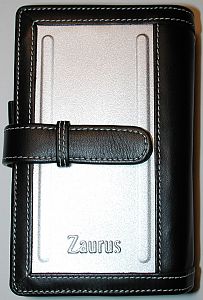
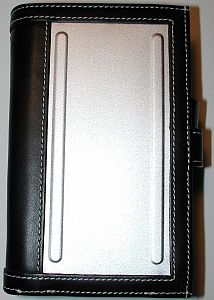
The panels are rigid and really add to the style as well as the stability of
the case. The word Zaurus is embossed on the front cover. I would rather it
wasn’t there, but that’s not a big deal. It would be great if you could have
your initials or name embossed instead.
This is a book style case with several extra touches. First of all, the
cover opens left to right instead of the other way around. Some people may find
this awkward, but it hasn’t bothered me. The cover is held closed securely with
a long leather tab that fits into a leather loop.
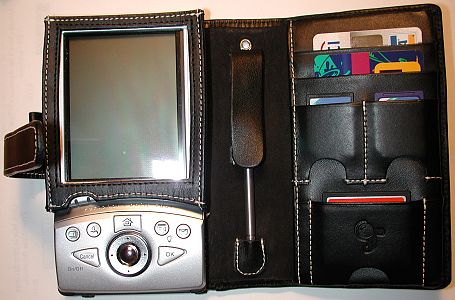
The Zaurus is held in the case with a holster of sorts. This holster fits
around the screen portion of the PDA. It is a snug fit, so you won’t have to
worry about the PDA falling out accidentally. Actually it is a little bit of a
pain to get the Zaurus out of the holster. And unless you have a cable, you’ll
have to remove the PDA from the case in order to sync and charge with a cradle.
Two L shaped metal brackets keep the PDA from sliding out of the case. They also
help support the PDA when you use the slide out keyboard.
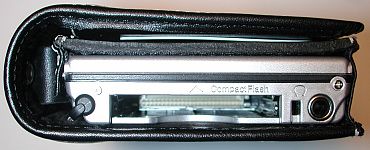
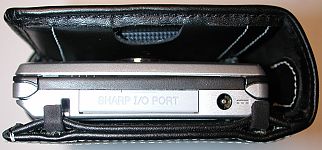
The holster has cutouts for every feature that the Zaurus has. The top is
completely open, allowing access to the CF card, earphone jack and stylus silo.
The left side has cutouts for the IR port, and SD card slot. The front of the
holster even has a cutout for the status LEDs. The only features you can’t
access while the Zaurus is in this case are the battery compartment and reset
switch.
The left side of the case also has a loop that can hold a pen or pencil. An
extra stylus holder is available in the middle (spine) area of the case. A thin
leather flap covers the stylus to protect it and the leather holster. Nice
touch.
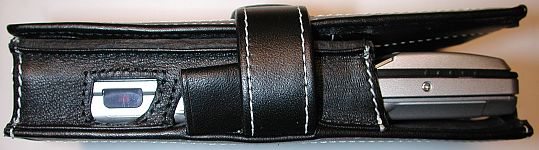
The right side of the case which is also the cover, has tons of storage for
cards, and media. There are two nice sized credit card slots, two SD card slots
and one CF card slot. Behind all of the slots is one large vertical slot for
folded papers or folded bills. The great thing about the media card slots is the
half-moon cutouts on the bottom. They make it really easy to remove the cards if
you push them all the way into the slots.
This is a quality case made with quality materials. I couldn’t find any
defects or anything to complain about as far as workmanship. I guess the only
thing that some people might see as a CON is that the case is not slim. It does
add bulk to your PDA. Even so, I just love the look of it. It has an almost
retro feel to it. I like this case so much, that it almost makes me want to
switch to the Zaurus as my main PDA just so I can use the case! Is that nuts or
what? :o) I hope Extreme Limit starts making more PDA cases in this metal &
leather combo style.
Price: 8650 JPY = ~ $72.00
Pros:
Stylish
Protective
Lots of storage
Cons:
Can’t access reset switch and battery compartment while in the
case
Can’t sync / charge with cradle while in the case
Bulky


Gadgeteer Comment Policy - Please read before commenting
Post your comments here on the Antec Notebook Cooler.
http://www.the-gadgeteer.com/antec-nb-cooler-review.html
Just click the POST REPLY button on this page.
My 1GHz T22 gets really hot (it’s old CPU technology), and I’ve tried several active and passive coolers (mostly that I bought in Japan). This Antec makes the biggest temperature reduction by far. i even switched to a larger laptop case so I can travel with it.
–Doug
Just yesterday I read a German review of the Antec coolpad that said that it was of no real use as the temperature only comes down by 1 degree Celsius (compared to have sitting the notebook just on the desk) and that the vents of the coolpad just blow directly on the desk and don’t lead away the hot air from under notebook.
Judie, did you measure the temperature difference?
I picked up one of these a month or so back, for use with my 12″ PowerBook – which can get extraordinarily hot under some circumstances. The Antec *will* cool it off, from “unpleasant” to “cool”, in 15 minutes or so.
However, two things to note: (1) The antec, and any fan-cooler, is useless if the laptop doesn’t have intact Little Rubber Feet! (the powerbooks are noted for losing them, with older units you can just pop into an apple store, they usually have replacements handy – with the 12″PB, they want to send it in for repair. Instead, get some from a hardware store. They are *not optional* for external cooling.) The 12″PB is just big enough to block all of the airholes, as well, so they do no good, without the feet.
(2) I found the antec loud – if the a/c is running in the office, it doesn’t seem to add much, until I power it off later and realize just how much *quieter* it gets. I haven’t measured it formally [hmm, I wonder if there’s a calibrated mac app] and it doesn’t seem to bother my officemate, but I certainly don’t leave it running, I only turn it on when I need it.
I may just be picky, in that regard, though – I do, after all, still use it.
It also raises the laptop above the desk more than I’m happy with, but others may not care or may even find it an improvement.
Did I read that right…the fans blow down? So the cooler is working against physics and the fans in my notebook…..
Though I didn’t really have problems with my laptop shutting down due to overheating until I installed 3rdparty temperature monitoring software.
That was so annoying….couldn’t figure out why the machine would spontaneously shutdown without any warning, etc. I did multiple scans, and such….even though the machine always came back as clean….I was worried that it was infected. It wasn’t. Had to think back months to see if I installed anything strange….
Anyways…right now I’m using a Lapworks Laptop Desk from http://www.lapworksinc.com/ I’m planning to get the MouzPad option soon. It does a nice job…no more burning sensation in my lap….though I get strange indentations on my legs now. Of course, that’s what you get for not wearing pants while working a laptop…. 😮
The Dreamer
I have done a simple crude measurement of how much this device lowers the temperature of my Thinkpad T22: about 30 degrees F as measured at the hottest spot on left center of the bottom.
–Doug
WOW!!! Thanks for doing that test!! That is truly impressive!
Judie :0)
What is the difference between the two of these Antec Notebook Cooler The only difference I see between the two of them is one has a pearl edge and the other has a black edge. Sometimes the price is different between the two Antec notebook cooler. I also see that they also sell an optional ac adapter for the Antec notebook cooler as well. Has anyone purchase the optional ac adapter for the antec notebook cooler?