
Product Requirements:
Device:
Palm IIIc
The Extreme
Limit Palm IIIc “Body Suit” is a pebbly black leather, wallet
style, play through case. This case is a belt clip model, with a removable clip.
I had never heard of Extreme Limit before I was presented with this Palm IIIc
case for review, so I was pleasantly surprised when I visited their website, to
see that they make a wide array of cases for many different PDAs and Laptop
Computers. They are a Japanese company, and they have been kind enough to
provide a Yen converter on their order page, just so you know what you are
getting yourself into.
Well, on to my review….
As you might have become aware, I have a strong need for
aesthetics coupled with function. This case is on the right track.
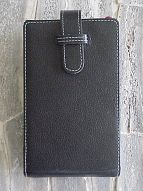
The first thing you will notice about the Extreme Limit case
is the contrasting white stitching that goes around all of the edges. It looks
really sharp. The next thing you’ll see is that there is a tab closure, also
with the contrasting stitching. Right away, I am thinking that this is a very
upscale looking case. The black pebbly leather is thick and stiff, and has a
quality look to it. On the backside, there is a metal button that the removable
belt clip attaches to. Also, in the rear bottom right, is an embossed Extreme
Limit logo. My first impression of this case was that it reminded me of how
Hermes uses contrasting stitching on their Birkin bag line. Those purses cost
thousands of dollars; this case would go perfectly with one, if you were so
inclined. It would be nice if it were possible to get this case without the belt
clip button, if you were going to carry it in a purse or “man-bag”,
instead of on your “bat-belt”. This is a case that either a man or
woman would be proud to carry.
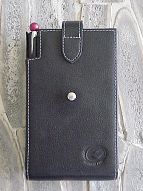
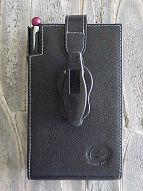
When the wallet flap is covering the screen of your Palm, it
seems to offer quite a bit of protection. It is thick & stiff enough that I
believe it could protect the Palm screen from sudden knocks.
Now, as you can see by the pictures, the Extreme Limit case
is very rectangular. None of your Palm’s sexy little curves are going to show
when you insert it in this case. However, the case looks nice enough that you
may decide to forgive it for that. You will also notice that this case covers
every bit of your Palm, except for the top of the stylus silo and the top strip,
making the infrared port very accessible – once you push the tab flap out of
the way.
Upon opening the case, you will find that the Palm slides
into the top, where it will nestle in a satin lined, fitted area with cutouts
that perfectly match where they need to be. Once again, there is contrasting
white stitching around every edge. There is nothing actually holding your Palm
in the case, as the top slot is open. The tab flap crosses the top of your Palm
when it is closed, and when it is open, the sides of the case will grasp your
Palm sufficiently that it won’t fall out – unless you plan on turning the
case upside down and shaking your Palm onto the floor.
The bottom half of the case, when it is opened, has two slots
for an ID & credit card. There is also a deep top-loading slot behind the
credit cards into which you can slide folded bills, or another credit card. I
made the huge mistake of allowing one of my cards to slide into this slot a
little too far. I held up a line at a local convenience store trying to dig my
Amex Corporate Card out of the depths of this slot. People were behind me, and
it made me feel really tense. Needless to say, I am not storing anything that I
need immediate access to in that slot any more. I suppose it would be a perfect
place to hide $20, just so you knew that you had some cash on you, should you
need it.
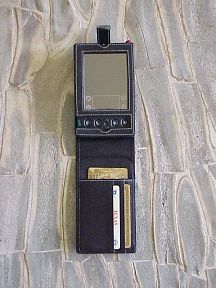
There is a rectangular cutout at the bottom of the pocket that cradles your
Palm, designed so that you can use the travel charger or the hot-sync travel
cable while your Palm is in the case. Of course, you will not be able to use the
regular hot-sync base charger without removing your Palm. It is very simple to
extract your Palm from the Extreme Limit case; all you have to do is use a
finger to push your Palm up from the bottom cutout, and then grasp the top of
your Palm as it exits the top slot.
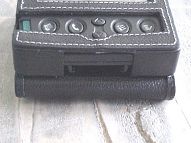
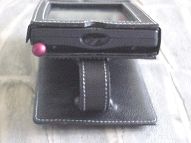
I would like to point out that the cutout around the Palm’s
screen is the perfect size, and that the cutout for the buttons is also generous
& almost perfect. I say “almost”, because the cutout that goes
under the bottom scroll button was just a little off-canter to the left. I
don’t know if this is a flaw unique to the case that I received, or if it is
common to all the Palm IIIc cases. It in no way hampers your use of the button,
but it is noticeable if you are being picky.
You will notice that Extreme Limit was smart about the space
for the power button; instead of trying to make it a separate hole, they simply
extended the window for all the other buttons to include the power button. This
makes it very easy to turn your Palm on and off, and also is more visually
pleasing.
There is also the clever little “dip” at the top of
the case to show your charge light. It looks like even the IIIc case makers are
waiting for the hack that will allow this light to flash when an alarm goes off.
Helllloooo – are any of you programmers listening to my plea?? J
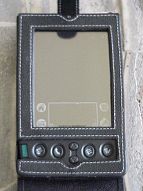
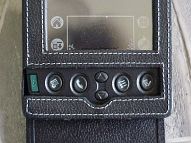
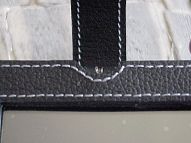
One thing that I feel I should point out, is the fact that the left side of
the power button cutout appears to have been made with an Exacto knife. I say
this because you can almost see the cut marks, and it is not quite symmetrical.
This in no way detracts from the case, I am just being particular.
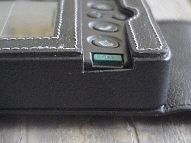
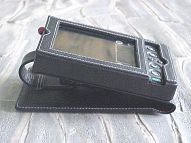
Now, I will inform you of one of the really nifty little tricks that this
case does: You can fold the wallet portion of the case underneath, and stick the
tab into it’s slot, instantly creating a handy easel for your desktop. This
also beautifully exposes the charging/syncing cutout that I referred to earlier.
I found that I used this feature quite often, since it was easier than removing
the Palm from the case, to insert it into the base charger for the same purpose.
There has been some thought placed into the design of the wallet portion of
this case. As this is a “top-loading” case, picture this scenario: You
are in a checkout line, and the case is installed on your belt. You release the
case by pushing the little plastic button on the clip’s top with your right
hand. You are already lifting the case in an upright manner, most likely in your
left hand. The tab is at the top. You will flip the tab with your right hand,
exposing the Palm at the top of the case as it sits in your left hand, with the
wallet freely swinging below. The two ID card slots are aimed to the right –
perfectly placed for you to slide the cards out with your right hand. This works
as long as you are right-handed. I can see where a lefty might have some trouble
with this operation.
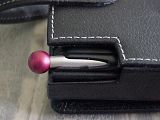
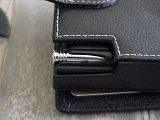
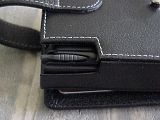
This is a case that will let you use your stylus of choice. As you can see in
the pictures I have taken, the Stabo stylus (my current favorite) fits just
fine. As a matter of fact, the stock stylus even works fine, as there is a very
generous cutout around the stylus silo entry. For that alone, this case has
earned brownie points with me. For comparison purposes, I am showing the Stabo
stylus, the PDA Panache stylus, and the stock stylus.
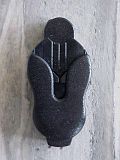
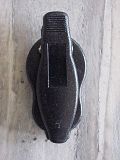
Now for a word on the belt clip attachment: This is a very clever little
clip, that will fit up to a 1 ½” belt easily. It can spin 360°
, and it only adds about ¾” to the thickness of the case. It is
comfortable, and looks nice on your belt. I found that if I placed it on my
front or rear hip, I hardly noticed it. It felt bulky if I placed it in my
natural hip indention. I don’t know if it would affect a man in the same
manner.
In summary, this is a fine case, that I believe couples style with function
quite nicely. Personally, it seems a little blocky, but you do get used to it. I
would like it if Extreme Limit would also make a non-clip version.
Price: $47.50 (depending on current Yen/Dollar
exchange rates)
Pros:
Looks very sharp
Can use any stylus easily
Cons:
Deep pocket in wallet can be hard to retrieve items from
Looks blocky
Only available as belt clip model

Summer Palm Tree Vacation Beach Case for iPhone 12/12 Pro
(as of June 8, 2026 18:42 GMT -05:00 - More infoProduct prices and availability are accurate as of the date/time indicated and are subject to change. Any price and availability information displayed on [relevant Amazon Site(s), as applicable] at the time of purchase will apply to the purchase of this product.)
Summer Palm Tree Vacation Beach Case for iPhone 13
(as of June 8, 2026 18:42 GMT -05:00 - More infoProduct prices and availability are accurate as of the date/time indicated and are subject to change. Any price and availability information displayed on [relevant Amazon Site(s), as applicable] at the time of purchase will apply to the purchase of this product.)Product Information
| Price: | $47.50 |
| Manufacturer: | Extreme Limit |
| Pros: |
|
| Cons: |
|

Gadgeteer Comment Policy - Please read before commenting
Post your comments here on the ClearGuard PDA Screen Protectors.
http://www.the-gadgeteer.com/clearguard-protectors-review.html
Just click the POST REPLY button on this page.
Did you tried to use a few liquid soap between the screen and the screen protector to prevent bubbles to appear ?
(I know it sounds weird.)
I honestly thought about using some sort of liquid under the protector to smooth it out – but since this is an electronic device, I didn’t want to take the chance of a liquid going under hte edges of my PDA’s screen and frying the interior. Know what I mean?
Judie :0)
I understand what you mean.
I did it on my iPAQ 3630 to put a protection from something like http://www.freescreenprotector.com (it is still in place but i don’t like it and always says I will change it).
I did it without any problem. I may had the perfect liquid soap for this (not a too liquid one. I used one for handwashing I think. I don’t remember exactly).
I just put a little on the screen protector (or on the screen ?) and spread it with my finger.
And no bubble, and it was done really quickly without any effort.
Thank you the tv show I seen on housework for this tip !