
Product Requirements:
Device:
Palm m100, III, V, VII series and Handspring Visor
Keylink.prc 17k (driver)
PDA input devices have become very popular accessories. Even though Palm OS devices have several ways to enter data via the stylus (on screen keyboard, graffiti, etc.), there are people out there that still want the old fashion input abilities of a physical keyboard. Take one look at the popularity of the ThinkOutside’s
Stowaway Folding Keyboard, and you’ll understand what I mean.
The Stowaway is a design marvel due to the fact that it can fold up into a very compact package. But, to use the Stowaway, you need a hard, flat
14 x 5in (36 x 13cm) surface. What do you do if you want/need an even more
compact input solution?
Enter the Half Keyboard by Matias
Corporation. The Half Keyboard is just that, half a keyboard. The left half actually… or at least that is what it appears to be. In reality, it is a full keyboard
stuffed into the body of half a keyboard. Imagine folding a standard keyboard in half with the right keys folded underneath the left keys. That’s basically what the Half Keyboard is.
The whole package is quite compact at 5.75 x 3.25 x .75in (14.61 x 8.26 x
1.91cm). As you can see below, the Half Keyboard really is half the size of a
standard keyboard. This makes it very portable.
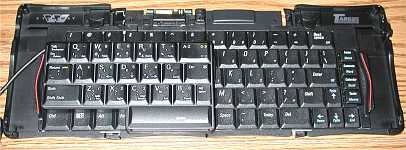 (Half Keyboard on top of a
Stowaway keyboard)
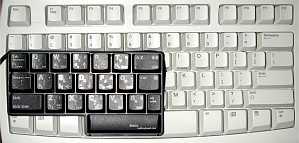 (Half Keyboard on top of a
standard desktop keyboard)
The connector for the PDA is attached to a 10″ cord that wraps around
the keyboard and stores itself in a slit along the edge of the device.
The Half Keyboard does not require batteries, it gets power from the PDA that
it is attached to. During the review period, I did not notice any significant
drain in battery life.
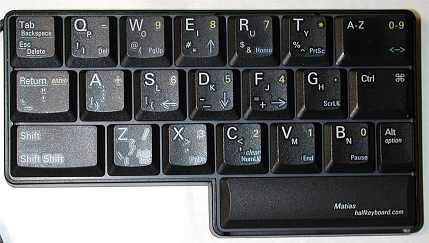
The Half Keyboard keys are almost identical in look, size, travel and feel to
the Stowaway keyboard keys. The F key even has a small bump on it to
denote the home row. Each key has its associated characters printed on the top.
The largest character being the default.
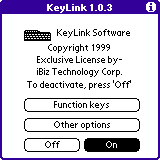
A small driver file must first be installed on the Palm device so that you
can start using the Half Keyboard. The driver is pretty simple. You can turn it
On or Off, assign function keys, adjust repeat speed, key delay speed and key click. More
about the actual driver’s performance in a minute.
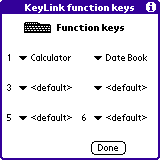
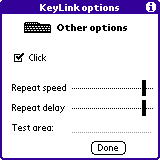
Although the Half Keyboard is still a standard QWERTY style board. It is only
the left side of the QWERTY keyboard. In order to access the right hand keys,
you must hold down the space bar. When the space bar is held down, the Half
Keyboard re-maps to the layout of the right side of a regular keyboard. So for
example, if you wanted to type the word fantastic, you would need to hold
down the space bar to get the letters N and I.
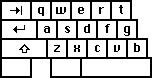 (keys accessed without
pressing spacebar)
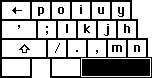 (keys accessed while spacebar
is pressed)
You can also re-map the Half Keyboard into a numeric keypad or cursor keypad
using the mode switch button. This is the top right button that is labeled A-Z,
0-9, <->. The default mode is the A-Z mode which is accessed by
pressing the button once. To switch to numeric 0-9 mode, you press the
button twice. And to switch to cursor mode, you press it three times in a row.
Now, I consider myself a pretty fast two handed touch typist. I was very
skeptical about this device. I was worried about the learning curve involved
with using it. But, I was blown away by the easy, almost no thought required to
adapt to typing on it. The keyboard is designed in such a way that your left
fingers type the usual left hand characters, and then also type the mirror image
of your right hand. It sounds confusing, but it’s not. If you are already a
touch typist, your brain is already ‘wired’ to use this keyboard. It feels a
tiny bit awkward at first, but only for a few minutes… From the get go, my
fingers knew how to type the right side keys. I didn’t need to look at the keys
to see which letters went with each key.
On the other hand, I’m not sure what it would be like for a non-touch typist
to learn to use this device. It’s hard to say, it may be very difficult… But,
for me, it wasn’t hard at all. I couldn’t type as fast as on a regular keyboard,
but with practice, it’s possible that my speed would increase
significantly.
Now before you think that this is going to be a glowing review, I have to
tell you that there are some problems with this device. The biggest problem that
I found was with the keyboard driver. I found it to be somewhat buggy. Mainly,
the driver would freak out and start repeating characters across the screen or
would play the key click sound continuously as if someone was typing at 1,000
miles an hour. I could produce this problem almost every time, if I happened to
turn the PDA off, and then back on again while it was still plugged into the
keyboard. Tapping a key on the keyboard a couple times would usually stop the
problem though.
Also, hotsyncing disables the driver requiring you to toggle it on again.
And, IR beaming is disabled while using the Half Keyboard.
I’d also like to mention is the fact that I was never able to figure out how
to access the Function keys. The driver allows you to set 6 Function keys that
will launch any application that you associate with them. I tried almost every
key combination that I could come up with, and was not able to get the Function
keys to work…
Another problem with the Half Keyboard is that there is no PDA stand like on
the Stowaway keyboard. You can either lay the PDA flat on your desk while
you type, or you could hold the PDA in your hand (I found this to be
awkward). You can use the included CaseLogic case (which is quite
nice by the way…) as a pseudo stand. But unfortunately, the case will not hold
both the Half Keyboard and your PDA for transport.
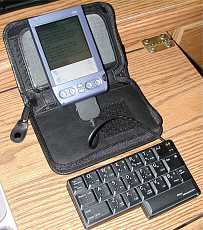
And the last problem that I noticed with the Half Keyboard is that I could not
get some of the printed key functions to work. Printed in Blue (from what I
understand, these are the cursor mode keys), are functions such as END, HOME,
HELP, CLEAR, etc. No matter what I tried, none of these functions worked. The
only thing I can figure is that Matias also makes a PC version of the Half
Keyboard and maybe these functions are only for that version…
Despite these problems, the Half Keyboard is a unique input device. It’s a real QWERTY keyboard with
a twist…or ummm, fold. I could see this peripheral being useful for a mobile
touch typist that wants to pack very light, a field worker for data entry, or a physically
challenged person that may only have the use of one hand. If Matias can fix some
of the driver problems, I think this device could become pretty popular for
people that want something ‘different’ in an input device.
Price: $99.00 (wearable version available for $199)
Pros:
Very compact package
Touch typists won’t require much of a learning curve
Available in a wearable version
Cons:
Sometimes driver will freak out and keys will repeat across the
screen
Driver disables IR beaming
Hotsyncing disables the driver
No CAPS lock

Now retrieving an image set.
One Handed Half Keyboard Mouse USB Spilitter Type-C Adapter Gaming Combo with RGB LED Backlit 7200DPI CPI Customize 4 Port Adapter Mini Size Small Wired Set for LOL/Wow/fortnite/Dota/PUBG
(as of June 12, 2026 16:39 GMT -05:00 - More infoProduct prices and availability are accurate as of the date/time indicated and are subject to change. Any price and availability information displayed on [relevant Amazon Site(s), as applicable] at the time of purchase will apply to the purchase of this product.)
Summer Palm Tree Vacation Beach Case for iPhone 12/12 Pro
(as of June 12, 2026 21:30 GMT -05:00 - More infoProduct prices and availability are accurate as of the date/time indicated and are subject to change. Any price and availability information displayed on [relevant Amazon Site(s), as applicable] at the time of purchase will apply to the purchase of this product.)Product Information
| Price: | $99.00 |
| Manufacturer: | Matias Corporation |
| Pros: |
|
| Cons: |
|

Gadgeteer Comment Policy - Please read before commenting
WE NEED A NEW READER OF THE MONTH, SOME ONE SEXY PLEASE FOR ONCE!!! NO MORE 40 YEAR OLD COUCH POTATOS PLS!!!!
How about you write us up a profile, include a picture, and we can read about you for a change.
Judie :0)
Hey I don’t need to prove anything, your lore won’t work on me. It’s just too simple. You know… need to liven things up abit around here, it just seems like a downer looking at those profiles, it’s either they are gay lookin i.e. justin(chinese dude, as i remember) or some guy that looks like he/she has obsessive compulsive disorder or fetishes with gadgeets or something. Maybe I’am too hard on you on what I really want, but hey, it’s another person’s voice, which does makes a difference, even in the slightest bit.
Why does it matter what the person LOOKS like? Why do you even care? Are you really that shallow? It’s their story that should be the focal point, not their face.
I agree with Judie, let’s see what YOU look like, and what YOUR story is. If you can criticize everyone else, let us get a chance to criticize you!
Well put Julie 😎
Hey hey, just don’t forget we’re all human, and we use emotions a great deal to satisfy ourselfs. Now, their physical appearance does matter but not a great deal. I’am looking at this at a bussiness persective. If you were to put an attractive young lady on that GOTM(Gadgeeteer of the month), watch the page hit on that thing fly! I don’t know what your purpose of this site is? Money, or just pure hobby. But sometimes, think like a bussiness man, as far as I know, all the GOTM’s could be all made up, and for the other audiences, they just think “why would they lie anyways”. This is not to far from the truth, and if YOU were to know this piece of probability, you can easily toy with our(not me) naiveness and put one good show for us, ie, Playboy that collects gadgeets, or hot college interns that digs gadgeets. Hey they’d all believe it. Just don’t make it too outragous. This is the bussiness view, it ain’t shallow if you can just shift your angle.
I don’t WANT to shift the angle of the site. It doesn’t need shifted as it is doing just FINE thank you very much.
If that is the kind of gadget site that you prefer to peruse, please go over to T3 Magazine Online:
http://www.t3.co.uk/
They have gratuitous bimbo shots sprinkled in with the actual tech info for guys with short attention spans. I think this might be right up your alley…
Took a glance, looks like an alright site, nothing special from the ordinary joes that I see. As for the bimbo shots, thats not want I meant. I can get tones of those if i just gave the right search word in google.
No point going further on this subject.
My Mom taught me that if you didn’t have anything nice to say about someone then say nothing. Seems to me that Reader is a Lurker and should be bounced. What does it matter what someone looks like to be GOTM. If you want that kind of stuff go someplace else.
Diz
THE READER NEEDS TO GO BACK TO SCHOOL…
Given that everyone is entitled to their own opinion
since this is a free country, please make sure to at
least check the spelling of your comments before
posting them.
In my humble opinion this READER probably needs to go
back to vocabulary school since he/she clearly does
not have the command of the English language. To quote
the READER “I’am looking at this at a bussiness
persective.” I’m sure your grammar teacher would be
proud of you…that is if you even went to grammar
school.
The READER also said “But sometimes, think like a
bussiness man” and “This is the bussiness view”. I’m
just curious as to what type of B-U-S-I-N-E-S-S you
are in and what type of clients you have. Maybe you
need to change your company name to A**HOLES R
US…since you like those double ‘S’ so much.
I apologize to Julie and Judie if my comments were out
of line but dolts like THE READER needs to be put in
their place once in a while. Thank you to both of you
and keep up the good work!
Oh by the way THE READER…if you don’t know what
D-O-L-T means look it up and you’ll find your face
next to the definition.
I guess you had nothing better to say than to correct my english, 3 posts on your stats. If I was in school, I’d spell check, but not wasting my time here. I just assumed people with a reasonable IQ can get pass a few mistakes. But you are changing my assumptions.
Sorry Judie and Julie for the harsh replies. haha.
Way. Too. Friggin’. EXPENSIVE!!!!! OVER 500 BUCKS NEW AT THE WEBSITE!!!!!
Oh, and, to almost everybody who posted on posts 1-11, take this pointless debate to the chat room. The comments section is to talk about the post, not to bitch about other people’s comments! But, be that as it may, I am going to do some “off-topic talking” here. Assuming “The Reader” is a female, I think she is an indignified and extremely rude person. I assume that the Reader uses her words like this because she is in fact a 40-year-old couch potato and does not want us to see her as one. And, if I am correct in my assumption, I hope she is very ashamed of herself and her rudeness. Please, do us all a favor and use your damn manners! Julie, you are a very rude person also, but, here is this case, I think you have the right. Judie, no comment. Dizzy Devil, your mother is right in saying this, but, no matter how many times this phrase is drilled into peoples heads, it doesn’t register with two percent of them. But hey, every little bit helps! xx_nightwing_xx, you are also very rude. Even though some people like us use correct spelling and grammar on everything from essays to internet posts (I see that you NEVER, EVER use incorrect spelling and take extreme pride in your skill, judging by your very forceful post) , many people are too lazy and/or cannot type very fast, so they use slang, abbreviations, incorrect spelling, and symbols to express their words. It is a great time saver. Remember, other people are not as fortunate as you to have such skill in english and comedy. No offense intended towards The Reader. And, yes, I agree with Masterchief, “Well put, Julie!”