
Product Requirements:
Device:
Almost any portable music device with a headphone
jack and an FM radio
It is an inevitable thing that you may have the "world’s greatest" stereo
system in your car or house; but the music that you want to hear at some point
and time will happen to be in a format that you can’t listen to over that
particular system.
In the past, listening to music from an alternative source might have
involved buying a cassette adapter that plugged into your device – with a cable
hanging from your device to the cassette player of your stereo. But what if you
didn’t have a cassette player?
Enter the irock!,
a clever little device that can assist you in listening to music from virtually
any portable player that has a headphone jack, by porting it to any player that
has a built in FM radio.
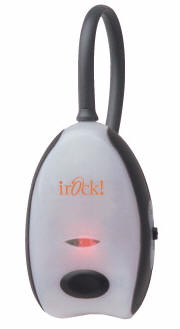
Photo courtesy of
myirock.com
The irock! consists of a small (2.0" x 3.0" x 1.0") plastic transmitter that
includes a flexible 7" antenna. The end of the antenna is actually a 1/8" stereo
audio input connector. Two AAA batteries will power the device for up to 20
hours, according to the website.
Although it isn’t necessarily made to be held in your hand while being used,
I found the irock! to be pleasant to hold, and the rubber trim made it feel
rather cool.
The large black button on the front allows you turn the transmitter on and
off, and a bright red light will glow while the transmitter is turned on.
Once the irock! is plugged into your electronic device, you simply tune your
FM radio to any of the following stations: 88.1, 88.3, 88.5, or 88.7 MHz. You
will also need to select the frequency from the slider on the right side of the
irock!, and then you can enjoy your music – that’s all you have to do!
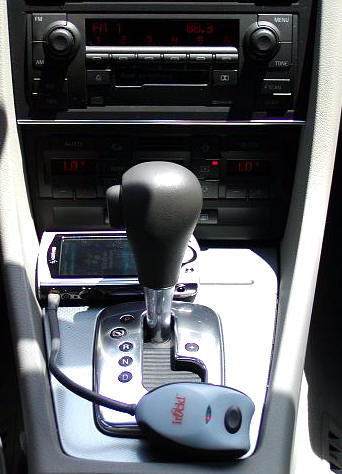 |
The first obvious application for the irock! would be for listening to MP3s from your PDA in the car. Here you can see my E-200 I tested the irock! by placing it all over my fiancé’s car – including Obviously you aren’t limited to just PDAs, though. You can also use the A less obvious application might be playing music directly from your It might be cool to use the irock! with a voice GPS system, too… |
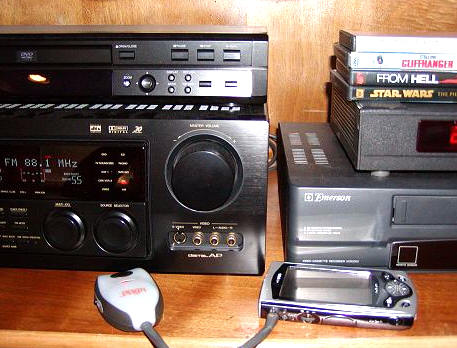 |
Here you can see the irock! being used with our home theater system. If you are the adventurous type that would like to DJ a party from your PDA, this would be the easy way to do it. The irock! sent a strong |
The irock! is a clever way to effortlessly listen to alternative music
sources over your stereo system – either in your home or car. When you aren’t
using it, it is small enough to stow in the glove box or door pocket, and it
seems rugged enough to withstand reasonable daily abuse.
With it’s recently lowered price, the irock! is affordable and convenient.
Price: $29.99
Pros:
Ability to listen to music over your stereo system without using wires or
adapters
Inexpensive
Portable
Cons:
None



Gadgeteer Comment Policy - Please read before commenting
I bought one, and within 24 hours took it back.
My biggest (and pretty much main) complaint was that the screen doesn’t re-orient itself the way I would like.
When open in ‘laptop’ mode, I didn’t mind it too much. But when moving it to ‘PDA’ mode (screen rotated and folded back down), the screen stays horizontal. And the Graffiti area is vertical. ICK!
Also, battery life is DISMAL. Manual says 2.5 hours if you do nothing but solid Wi-Fi with the backlight off (pretty sure it was off). I got to less than half a charge in 25 minutes with backlight on.
I decided to take it back and swapped for a Tungsten C. Wi-Fi times are much better.
I agree about the lack of a portrait mode. What was Sony thinking??? :rolleyes:
The vertical Graffiti area feels very awkward to me. As a lefty, I was really hating it till I found that I could switch it to left side of the screen. Now I just dislike it intensely.
To Sony’s credit, the audio quality (listening to MP3’s) through earphones is outstanding!
So far my battery life has been okay – but I have mainly been loading programs and reading eBooks on it at half-brightness. Which brings me to the jog-dial, or in this case jog-wheel. It is horrible! Placed in an impossible location – I honestly can find no comfortable one-handed way to hold the UX and flick the wheel (for turning pages). IMO, the jog-wheel should have been on the side where the on/off/hold slider is. 🙁
Judie :0)
Ack! I hate typing in a reply, then having my browser time out. Now I need to try and remember what I said. Forgive me if it isn’t as eloquent as it was the first time. 🙂
The jog wheel gave me issues, especially when trying to click it. I usually ended up giving it a nice spin. Also, my problem with Graffiti entry in general was the included stylus. It being collapsible, and small, led to me having it collapse on me quite a bit. This didn’t happen to my wife, so I chalked it up to having large hands.
I will agree that the audio from the Sony was excellent, but since I have an MP3 player for listening to music, I don’t find myself minding the mono output of the Tungsten C.
I wasn’t that impressed with the UX50 at first because the screen was so small compared to the NX80 that I exchanged for it. However after now having the device for 10 days I can say that I think I have found a device that will keep me happy for quite some time (at least until Palm OS6 devices come out:D ).
In the 10 days, I have never once used Grafitti to input anything and rely solely on the keyboard. I mean this is why I wanted a device with a thumb keyboard so why use the strange Grafitti area? While the display is a bit small, it is very evenly lit, bright, and images and photos looks so much better than on a Palm device. Multimedia rocks on the device with great sound output and fast video playback. The keyboard is very nice, but Sony could have done a better job with the drivers so we could simulate a OK, Done, Cancel button press. I know sometimes the Back button works for Cancel, but I want to leave the stylus in its silo all the time.
My battery life is absolutely miserable and I am going to CompUSA tonight to exchange my unit and get my 10% off refund (saving me $70 so I can buy the extended battery). I read that pt and others were getting decent battery life, but mine drops 50% after about 25 minutes of Bluetooth surfing and regularly is down in the teens within 2 hours. I have NEVER had to charge a PDA as much as this and I feel it is unacceptable for a connected device since you are trying to stay away from cables and not have to walk around with your charger. Hopefully, the replacement has a better battery life.
I can’t believe that I’ve been waiting desperately for you gals to get back from NYC to review the UX50, and now you tell me I have to wait another two weeks for the definitive Gadgeteer review?! Well, I’m still not buying one until I hear it from you, but it’s going to be very tough to wait that long…
🙂
We are shooting for Monday the 29th…so it should be more like 1 week from now. 🙂
Palmsolo:
I don’t have my unit anymore, but I had heard rumors from other ‘previews’ that the UX-50 internal battery is tiny (hence the overall size of the unit). That way that can get you to spend another $120 to make it ‘usebale’ buy forcing you to buy the extended battery.
When I returned mine to Best Buy and cited Battery Life and screen orientation as reason for return, their response was, “That is what everyone is saying.’
I guess waiting until you’ve had a chance to really put it through the paces is what makes it a definitive gadgeteer review… >sigh<
I read that is was 1000mAh (http://www.cliebattery.com/), which is not too bad of a size for PDA batteries. I think my iPaq 2215 has a 950mAh battery and does fairly well. In this thread (http://www.cliesource.com/forums/showthread.php?s=&threadid=26638&highlight=battery), pt stated he got over 3 hours on full brightness, on wifi on irc (internet relay chat). I am lucky to get an hour using these settings so that is why I think mine is highly suspect.
It drops super fast and I wonder if it is good to constantly be taking it down to 10% before recharging.
palmsolo,
I don’t think it is ever good for this type LiIon battery to be used to such low levels. Everything I have ever heard has been that it would be damaging to the battery’s life.
If phillip (pt) is getting significantly better battery life than you are with the same settings and applications running, then you are probably right that yours is defective.
Judie :0/
The manual stated 2.5 hours using Wi-Fi with no backlight would deplete it to unusable conditions (someone WITH a manual feel free to correct me if I am wrong on this).
Also, supposedly the Sony add-on is going to extend your battery life 3x normal. If the battery is only 1000 mAh (from the link you posted), I shudder to think that is three times the built-in battery.
Again, I am anxious for a thorough review by this site, and C|Net to see what they come up with in battery life tests.
I think the person who claimed over 3 hours full bright and Wi-Fi is seriously exaggerating. 🙂
As it stands, I don’t regret taking mine back. It didn’t fit my needs at all.
The link was to the internal battery. I couldn’t find specs on the extended battery anywhere. It is like Sony wants to keep it a secret or something. I checked Sony and even Googled for the PEGA-EB40 Extended Battery Pack. All I could find was the 3x statement.
OK, my error there. So the Sony’s internal battery rates about 500 mAh smaller than the Tungsten C then. Explains why I can sit using it longer. 🙂
All I know is a co-worker had his Tungsten C (bought the same day I bought my Sony). My Sony hit critical levels mid-shift and was dropped on the charger. His Tungsten did not.
By the end of my shift the Sony’s charge lamp (approx 2 hours later) FINALLY went out, saying it was fully charged.
So I traded mine in. Brought home my new Tungsten, and within 24 hours had to buy my wife one, else I’d never get to use it at home. 🙂
She didn’t take more than a glance at the Sony, at that time she preferred her Palm 505.
Of course, this is all my opinion, and everyone else’s mileage with the Sony may vary. Obviously it will be someone’s perfect PDA, otherwise Sony has no clue. 😀
I went to CompUSA as planned last night, but had to drive another 20 miles to the next one since the UX50 is in short supply here in Western Washington. I also received a store credit for $76 due to the tip regarding a new 10% off on ALL PDAs this week at CompUSA.
I charged the UX50 for the full time until the orange indicator light went off. This morning during my commute I connected via Bluetooth to my Nokia 3650 and surfed for 30 minutes straight and my battery indicator still shows 100%. I had the backlight on full for 15 minutes and then went down to about 25% because it was too bright in the dark hours of the morning. I am much happier with this kind of battery life because before I would have been down to something like 60-65% after this amount of time.
How can I purchase the Irock transmitter for my car?
@Jeff That review is 8yrs old. It doesn’t appear that this product is available any longer. Sorry. There are many wireless FM transmitters on the market though. Use google, it’s your friend 🙂