
Product Requirements:
Device:
PC or compatible computer with USB port
Your main interface to your desktop computer is typically through a mouse and
a keyboard. Some people don’t care about looks, and only care about
functionality. I’m not one of those people, I want both! When I recently
remodeled my computer room, I realized just how crummy my old white Microsoft
Internet keyboard looked next to my black Samsung SyncMaster 710n LCD and
Logitech MX Laser wireless
mouse. So, I started looking for a black keyboard. But, I didn’t want just any
old keyboard, I wanted something Gadgeteer worthy. Most of the keyboards that I
found in my searches were either too big or too ugly. But then I found the
Kensington SlimType Keyboard.
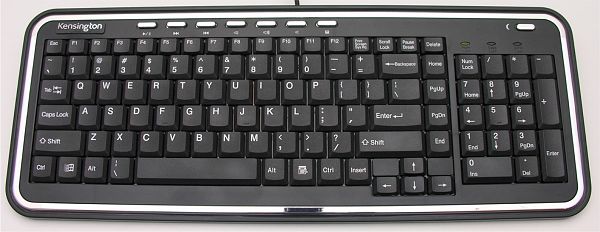
The SlimType keyboard is everything that my old Microsoft keyboard isn’t. It’s
smaller, thinner, quieter, and definitely higher on the Gadgeteer scale.
Available in black for the PC and what appears to be clear for the Mac, this USB keyboard is 16.5 x 6.25 x 1.25in when propped up on its fold out legs.
The keys on this input device use scissor-switch technology that is typically
found in laptop keyboards. As such, the keys on the SlimType have a low profile
and a shallow travel distance when you press them. The action is crisp
comfortable. I really like the fact that typing doesn’t produce hellish clickity
clackity noise that can be heard throughout the house. Yes, there is some noise
while typing, but it’s minimal and not disruptive to those around you.

This keyboard reminds me very much of the original
ThinkOutside’s folding keyboards in key size,
and action. The SlimType has the familiar QWERTY layout with a separate number
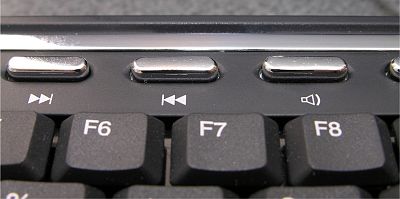
pad and separate set of 4 arrow keys. A set of 8 chrome buttons run along the
top of the keyboard that control media playback. There is a button for
Play/Pause, Next Track, Prev Track, Volume Down, Volume Up, Mute, Calculator and
Sleep. No drivers are required for this keyboard, plugging it into a free USB
port enabled the special button functions automatically. I tested them with both
iTunes and Windows Media Player. All the functions worked fine except in iTunes
the Play/Pause feature would not resume paused video playback for some reason.
The Sleep button puts your PC in Stand-by mode. Pressing any key while in this
mode will bring your computer back to life.
I’ve been using this keyboard exclusively for the past 3 weeks with my main
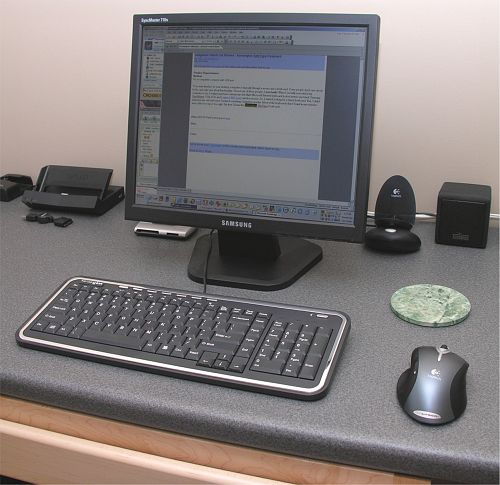
PC (a home built Athlon). I like the small footprint that it requires on my
desktop and its cool style. Of course, typing is the main objective here, and so
far I have no gripes to speak of. Although this is a small keyboard, I have not
found that my hands/fingers feel cramped while typing. My hands are not small,
so even people with large hands should be able to comfortably type with this
peripheral.
My only gripe, and yes, I do have at least one, is that the SlimType does not
have any additional USB ports built into it. I have grown used to the 2 built
into my Microsoft keyboard, and really missing having them to use for
thumbdrives and other USB devices. That said, so far I am very happy with this
keyboard and will allow it to live on my desk until I find a worthy replacement.
Price: $29.99
Pros:
Small footprint
Multimedia function keys
Quiet typing
Cons:
No additional USB ports


Gadgeteer Comment Policy - Please read before commenting
Post your comments here on the Kensington SlimType Keyboard review.
http://www.the-gadgeteer.com/kensington-slimtype-keyboard-review.html
Just click the POST REPLY button on this page.
I myself don’t like huge, heavy clickity-clackity IBM/Lexmark keyboards either, but I also don’t favor the cramped ultra-low profile, short keystrokes of those attached to notebooks. My preference is somewhere in between, with computers I’ve built having anything from $5 computer show throw-aways to $100 wireless Logitechs. And given a preference for daily use I love my Logitech Elite and Cordless Desktop Duo (but tire of dealing with batteries). The Bluetooth Logitech DiNovo looks mighty interesting, but I can’t justify the $250 price tag to myself (and it has ultra-low profile notebook keys).
Being a compact, the Dell “Performance USB Keyboard” has a noticibly smaller footprint than a full size keyboard, and has membrane-based key switches instead of notebook scissor-type. Keystrokes are relatively quiet and don’t sound off any overly mechanical clicks when typing. The latest version has been redesigned slightly and I actually prefer the older one (which seems to have been discontinued very recently) sans volume knob.
It has two USB ports along the top edge on the left and right sides, perfect for daisy chaining a mouse, but apparently doesn’t provide enough power for a memory key. The main USB cable (a tad thicker than average) is over 6′ long and permanently attached to the top center of the chassis, with no channels provided to route it off to either side. There are a row of Internet/audio hotkeys across the top for web browser Back, Forward, Home, Stop and Refresh functions as well as Volume Up/Down and Mute.
The Dell packs up quite well with a smooth back/bottom (unless you count the huge Dell logo emblazoned upon it) and softly curved edges all around, which slips neatly behind my LCD display carry straps — it’s currently in use with my LAN-party Shuttle PC and Mac Mini (which recognizes some but not all of the hotkey functions). Two small rubber pads at the bottom front prevent it from slipping across your desktop and two flip-out legs at the top back prop it up to adjust typing angle. My biggest gripe is their decision to vertically orient the six keys in the Page Up/Page down cluster instead of the defacto 3×2 horizontal standard.
Retails for about $30 and can be found for considerably less if it’s still in stock.
The “old” Dell Performance USB Keyboard
http://www.directron.com/dellsk8125.html
http://us.st7.yimg.com/store1.yimg.com/I/directron_1843_22195674
The “new” Dell Performance USB Keyboard
http://accessories.us.dell.com/sna/ProductDetail.aspx?sku=310-3157&c=us&l=en&cs=04&category_id=5840&first=true&page=productlisting.aspx
This DEll is just what I have been looking for. Love the idea of usb in the keyboard.
thanks 🙂