
Product Requirements:
Laptop Computer
If you own a small laptop computer, a fair bet is that it probably didn’t
come with a built-in system for raising its rear end. In my opinion, this is a
serious oversight – especially on a model such as mine that does not include a
built-in cooling fan. The addition of "feet" allows hot air to escape and cooler
air to circulate under the notoriously hot belly of most laptops. It also allows
for a more ergonomic positioning, by raising the keyboard and screen to better
heights for the user’s comfort.
LapWorks, maker of
the Laptop
Desk I reviewed several years ago, has come out with a ingenious new product
that solves the footless-laptop problem:
Laptop Legs™.
This is one of those "why didn’t I think of that??" products.
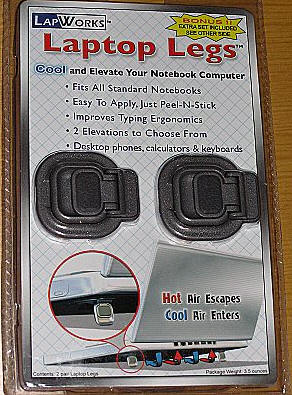
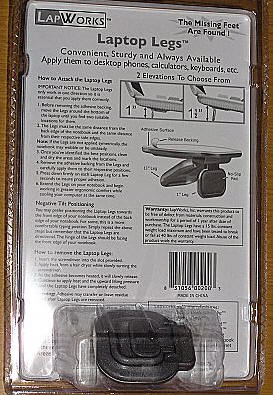
Included in the package are four self-stick feet. They measure approximately
2" tall x 1.75" wide x 0.25" thick. The Laptop legs are composed of grey plastic
and their backside is covered in a strong adhesive.
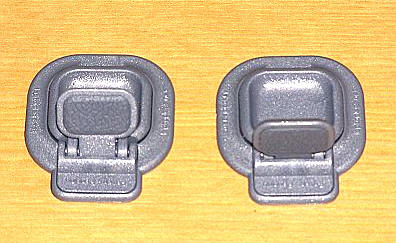
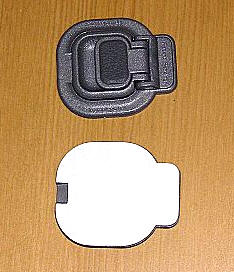
Each leg has three portions:
Closed: – where the non-slip pad is flush with the surface upon which the laptop
is resting
Short leg open: which raises the laptop 1"
Long leg open: which raises the laptop 1 ⅜"
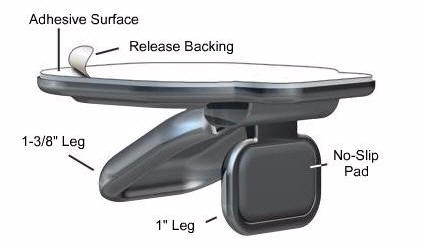

Photos courtesy of the LapWorks website
Here you can see the underside of my Fujitsu 2110. It has rubber pads that
extend ⅛", but certainly not what I would
consider an adequate rise to contribute to beneficial air circulation .

Installing the Laptop Legs is as simple as picking a place to put one,
peeling off the paper backing, and sticking it on.
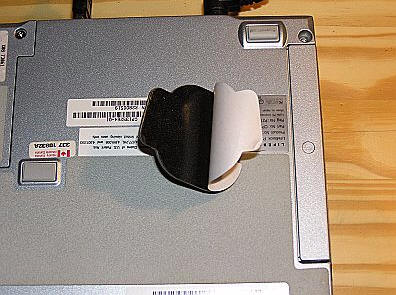
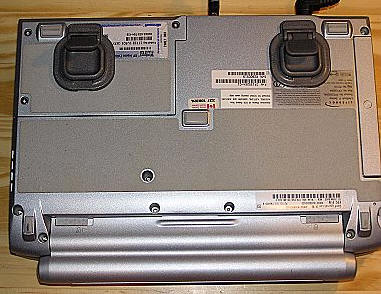
Viola, the laptop now has feet!
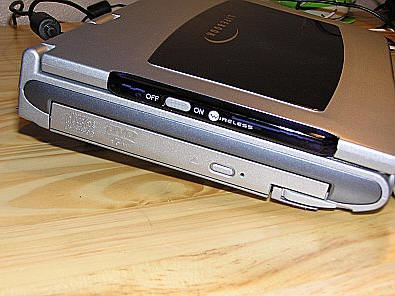

With the Laptop Legs installed, the laptop is now better able to cool, still
extremely portable, and more comfortable to use. This is the perfect solution
for someone that travels with their laptop as there is nothing else to carry in
the gearbag. The added "bulk" to the laptop is negligible, mine still manages to
slide right into its form-fitting
WaterField SleeveCase.
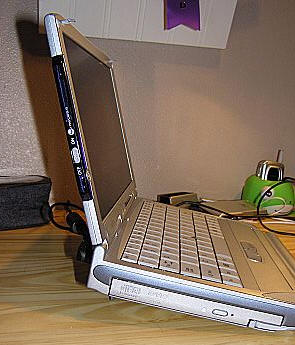
On the desk, I didn’t notice my laptop sliding anymore than usual, because it
still had the non-slip pads on the front to keep it from scooting.
Laptop legs can even be applied to the front edge of a laptop for those that
prefer a negative tilt when entering data. According to the LapWorks site, these
legs can be applied to laptops with insufficient legs, for those that want a
greater height. These legs can also be used on other items, such as keyboards,
calculators, phones – basically anything that sits on a desk that would benefit
from a better tilt. Since four come in a package, after the two are applied to
the user’s laptop, there will still be two left for experimentation – or to give
a friend. I’m sending mine to my parents-in-law to use with their laptop.
It’s a love/hate situation when I come across a product such as
LapWorks
Laptop Legs™.
I love that they are so simple and so well done and that they do exactly
what I hoped they would do… but I hate that I didn’t think of them myself!
LapWorks Laptop Legs™ and Mac Feet™ are
available here.
Price: $24.95 ($19.99 until April 30, 2005)
Pros:
Add negligible bulk to laptop – extremely portable
Four in the package
Easy to apply
Do exactly what they say they will – raise the laptop and help it cool
More ergonomic
Cons:
None



Gadgeteer Comment Policy - Please read before commenting
I actually bought a similar product called Laptop Smart Feet. It added the extra benefit of a cable organizer which helped me manage my Macbook cables on the side. Found it at newpcgadgets