
I have had my eyes on a flash drive for some time and finally decided to go
ahead and get one. I found a Lexar
JumpDrive Sport 1GB
Model for a great price online and went with that. Then I saw that Lexar also
had a companion MP3 player, the
JumpGear, that went with the flash drive. For the price I thought, had could
I go wrong?
So I placed my order and a week later I had them. Here are pictures of the flash
drive with a quarter for size comparison and the MP3 player on top of an Altoid
tin. After all, everyone knows what size those are right?
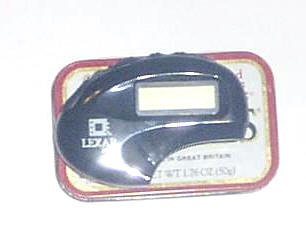
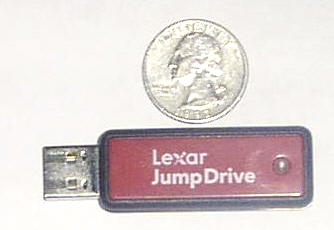
The flash drive comes with a rubber cover which fits very snugly on the drive.
The cover has to be removed to fit into the player, but for me that’s fine, it
will live in the player aside from when I’m moving files from the PC. The drive
also has a small green LED that lets you know when it’s reading/writing.
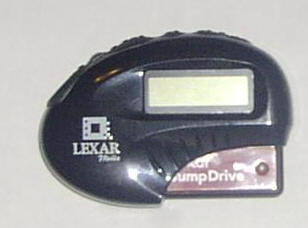
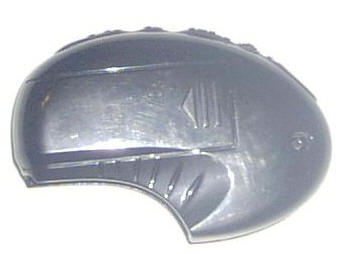
I did my own version of the Gadgeteer creak test and the MP3 player is a solid
little plastic unit. The black plastic does hold fingerprints but that doesn’t
really bother me. On the front is the display, a 2 line black and white LCD with
a blue backlight.
On top are the mini-headphone jack, volume toggle, play/pause button, forward
button, reverse button and lock switch.
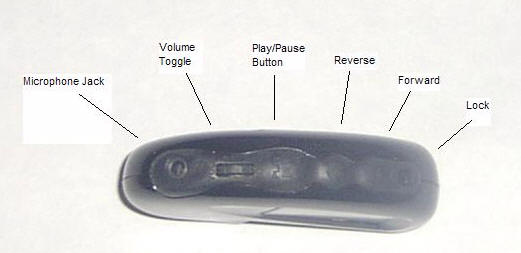
The volume toggle also serves as a menu activation button by pressing on it
instead of pushing it up or down.
I didn’t include pictures of the menus as my camera puts out far too much flash
glare. They are pretty straightforward and simple. There is a built in equalizer
for different sound modes: Normal, Jazz, Rock, Pop and Classic. Other menu
options are for setting the level of Contrast, the length of the Backlight,
setting Repeat Modes, Navigating through folders and Viewing system information
(space used/remaining).
To use the player you need to copy WMA or MP3 files onto your flash drive which
plugs into any USB slot. The unit will play DRM’d WMA files after you download a
utility from the Lexar website.
As a USB flash drive, you can just drag files and folders onto the drive or use
the Windows Media player to move files for you. As it’s not an iPod, iTunes
won’t move files to it (which I don’t like).
Plug the flash drive into the player and press the play button. The unit powers
up. At this point you can press the play button (for 2 seconds) and play will
start from the first song on the player right through to the last. You can use
the forward and reverse buttons to change the current song selection or to
select a song before you start play.
To start in a folder you use the navigation menu to find the folder and then
press play.
The player uses two AAA batteries and after 6 or so hours of use the battery
gauge still shows full for me.
I like the ability to use the flash drive to store other files along with my
music and move them between computers. I don’t need to worry about bringing
along any extra cables or pieces either.
The player came with some stock earbuds but after a couple of hours of those,
I’m going to use something else, they sound decent enough but their shape hurt
my ears.
So, for $37.49 plus the price of a flash drive, I have an MP3 player. Lexar
offers flash drives in 128Mb, 256Mb, 512Mb and 1Gb sizes.
Price: MP3 player: $37.49
Flash Drive: $74.00 (for the 1Gb size)
Pros:
Inexpensive
Flash drive doubles as universal storage
Rugged design
Cons:
Won’t interface with iTunes
No belt clip
Uses two AAA batteries

ESR for MagSafe Wallet, 5 Card Holder with RFID Blocking, MagSafe Sticker Included, Slim Magnetic Wallet for iPhone 17e/17/16/15/14/13/12 Series and Selected Samsung Devices, Not for 13/12 Mini, Black
(as of June 8, 2026 18:53 GMT -05:00 - More infoProduct prices and availability are accurate as of the date/time indicated and are subject to change. Any price and availability information displayed on [relevant Amazon Site(s), as applicable] at the time of purchase will apply to the purchase of this product.)
KRTALS Stronger Magnetic RFID Leather Mag-Safe Card Holder for iPhone 16 Series, Mag-Safe Accessories Stick on Series of iPhone 17/16/15/14/13/12 and Pro/Promax, Black
(as of June 8, 2026 16:42 GMT -05:00 - More infoProduct prices and availability are accurate as of the date/time indicated and are subject to change. Any price and availability information displayed on [relevant Amazon Site(s), as applicable] at the time of purchase will apply to the purchase of this product.)Product Information
| Price: | |
| Manufacturer: | Lexar |

Gadgeteer Comment Policy - Please read before commenting
did other pendrive can also used to this media player???