
It never seems as if I have enough storage space for all of the
“stuff” that magically gravitates to the limited surface space of
my desk. I’m talking about the type things that I may not need
right now, but that I can’t misplace; things like
extra earpieces or jack adapters for a set of headphones, a stick
of lip balm, loose memory cards, or a pair of earrings I just
removed and don’t want to roll off the side of my desk and under
the couch – or worse, be eaten by my dog.. Since I have a desktop
box that also serves as the base for my monitor, it only seems
natural that it should also function as a catch-all for crap
(errrr, things) that need to be perched somewhere safe until
needed. On any given day there will be a small pile sitting there –
the sight of which never ceases to aggravate me because I really
don’t like clutter.
When Julie asked if I would like to give the MyKeyO Keyboard and
Organizer a try, my reasons for accepting were two-fold: I had
already killed the letters silk-screened upon the more frequently
used keys
of my Saitek (yeah, evidently I bang the keys that hard
when I type), and I really liked the premise of the MyKeyO – a
sectioned organizer hidden underneath the keyboard. After all,
clutter is okay as long as it’s unseen, right?
It wasn’t long before I had received not just one, but two
MyKeyO keyboard samples, one in black and the other in white. A
quick tour of their site showed that it won’t be long until
custom printed
versions are also available; what an intriguing gift idea! But
I digress…
Included in the boxes were the MyKeyO keyboard, two plastic
extension feet, a multimedia keyboard driver (for computers running
pre-Windows Me), and a user’s guide. The MyKeyO will work with all
Microsoft Windows® computers and Apple computers. The MyKeyO
has a full sized keyboard, directional keys, function keys, and a
dedicated number pad.
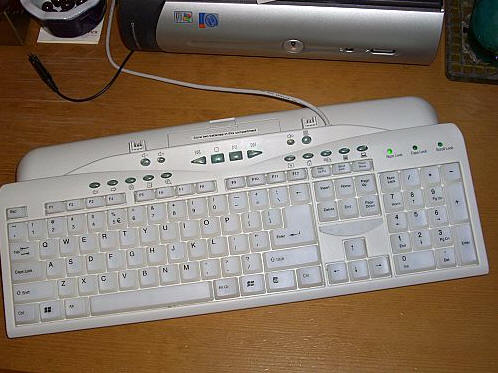
Like everything else, keyboard technology has evolved to the
point where much of the formerly utilized space inside the typical
keyboard is now empty – yet most keyboards have still retained
their forbears’ larger footprint. The MyKeyO measures approximately
17.5″ wide x 8″ wide x 1.5″ thick. There are four small anti-slip
pads on the back, the bottom two are the only ones that will touch
when the feet are installed.
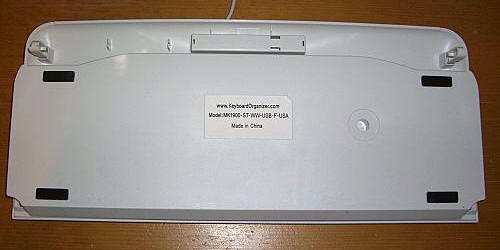
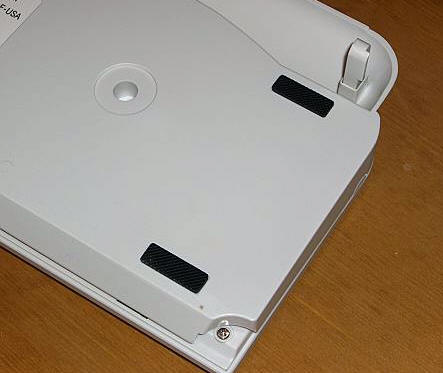
With the two plastic extension feet installed, it stands 2.25″
at its tallest point. These feet just slide into the receiving
brackets on the rear, but can be removed and stored inside the
keyboard if not needed. One improvement I would like to see would
be a rubber coating on the removable feet, which would help keep
the keyboard from scooting on a smoother desk.
An organizer built into a basic keyboard would be a great idea,
but the MyKeyO goes a step further. This is a fully functioning
multimedia keyboard, and as such it has some very handy built-in
features. Let’s take a look…
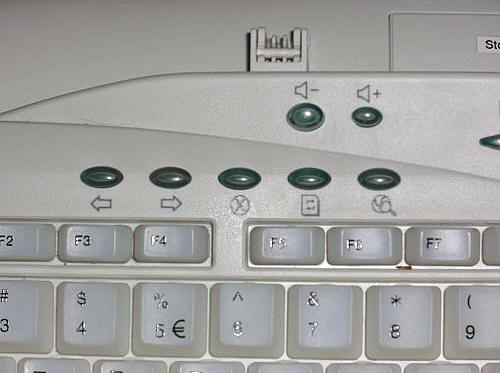
We’ll start with the lower row, where the left arrow returns the
browser to its previous page, and the right arrow take the browser
forward when it has been backed up. The circled “X” button stops
the browser when it is loading, and the next button refreshes the
browser page. The last button launches the computer’s Search
feature. Above this longer row of buttons are the Volume Up and
Volume Down buttons which directly control the system volume
levels.
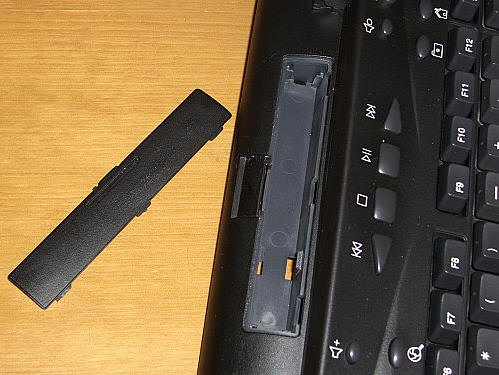
At the top center of the keyboard are the media player control
buttons which will control the default player. Directly above the
buttons is a 4.25″ long compartment that is labeled “Store two
batteries in this compartment.” Well, I thought it was a pretty
ugly label, so of course I had to remove it.
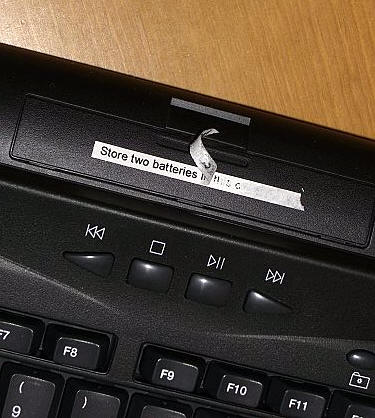
However, the sticker was not the type to leave without a fight;
unless you want this constant reminder, you’ll need to break out
the Goo-Gone. The compartment can also be used to store loose
rubber bands or paperclips if battery storage is not needed.
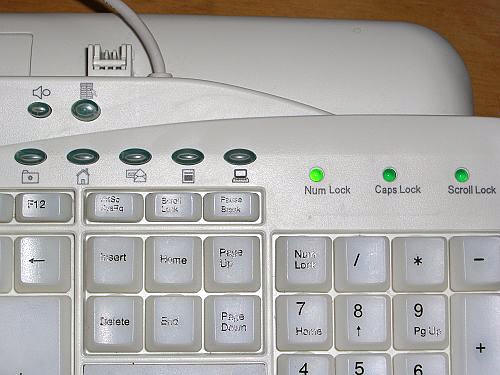
To continue on with the button explanations, we’ll start at the
upper two. The one on the right mutes the system volume, and the
one on the left opens the default media player. On the lower level,
the buttons are as follows: the file labeled button opens and docks
the internet browser’s favorites list on the left of the browser
window. The home button takes the user to their internet home page,
and the email button will open the user’s default email program.
The next button opens the computer’s calculator utility, and the
button with the computer icon opens the main My Computer / Computer
file. The typical LEDs for numbers, caps and scroll lock are
present and will glow when activated.
The keys on this keyboard have a fair bit of travel as they are
pushed – they will sink down about 0.25′. These keys will “clack” a
bit, so if you are used to a quiet, more muted keyboard, this one
may sound a bit jarring at first. I have to admit that there
is something quite satisfying about clicking and clacking
away on a keyboard though…
From the front and sides the keyboard looks very similar to many
other flat styles, but of course this keyboard has a secret…
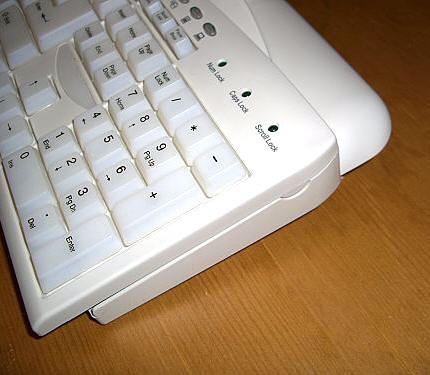
Cutaway finger tabs on the bottom of the right and left front
corners allow the user to hook a finger underneath and easily lift
the keyboard’s hood.
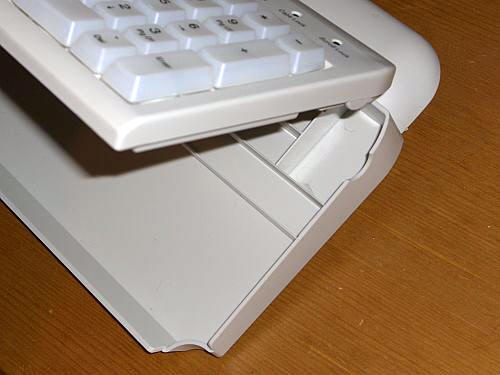
When lifted, the raised keyboard reveals a sectioned storage
area that can hold a variety of smaller items.
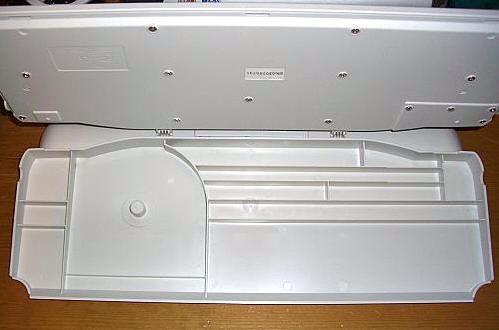
The depth of the items that can be held varies depending on
whether the slot is nearer the bottom or top of the board. Those on
the bottom are more shallow – about 0.25″, while the slots in the
back have a deeper 0.75″. Included are a variety of slots,
including one with a built-in CD spindle. The larger section near
the bottom is perfect for stamps, smaller post-it notes, or other
relatively flat items. Thicker items stored here will cause the
keyboard to sit a bit cock-eyed, so even though my 4G iPod looked
like it would easily fit, it was a bit too thick. Ah well, perhaps
it’s just what I needed – yet another excuse to buy a new
8GB nano. ;0)
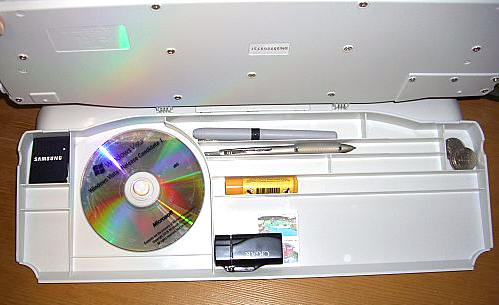
(The keyboard will stay propped open on it’s own when fully
lifted)
The only real disappointment was that there was no place to keep
a standard pad of post-it notes, which measure 3″ x 3″. The bottom
compartment’s certainly wide enough, it’s just slightly too short.
Smaller sized pads will fit, so if you are terminally addicted to
this office standby, a slight down-sizing may be in order.
The MyKeyO Keyboard Organizer will not appeal to everyone; there
are those that will think that it is too utilitarian, that it isn’t
ergonomic or “natural” enough, that the keys are too noisy, or that
it doesn’t have the one particular feature which they love on their
present keyboard. However, anyone that needs a convenient and
completely out of the way place to stow the little loose items
which always seem to multiply when one’s back is turned…well,
they’re the ones that will see the value of this keyboard
immediately.
The
MyKeyO Keyboard Organizer can be purchased here.

Now retrieving an image set.
NOTMBESTM Universal Wall Mount Storage Organizer for Keyboard, Display Wall Rack Holder Fit for Kindle, E-Book, Tablet Desktop Space-Saving Solution, Anti-Slip Protective pad, Fixed by Screw (Black)
(as of June 8, 2026 16:32 GMT -05:00 - More infoProduct prices and availability are accurate as of the date/time indicated and are subject to change. Any price and availability information displayed on [relevant Amazon Site(s), as applicable] at the time of purchase will apply to the purchase of this product.)
Now retrieving an image set.
