
Product Requirements:
Device:
PC running Windows 98/2000/ME/XP (Windows 2000 and XP require admin rights to install)
or Mac OS 9.1 or higher/Mac OS X, v10.1.2 to v10.2.6 (Mac OS X requires admin rights to install)
With the release of three new PDA models, this sure has been a busy month for Palm. We’ve already taken a look at the Tungsten|T3, their high-end offering, as well as the Zire 21, their entry level device. Today we will take a close look at Palm’s middle child: the Tungsten|E. Like all middle children, they receive some hand-me downs from their older siblings. Does the TE get enough of these hand-me downs to make it a great device? Or is it destined to become the Jan Brady of PDAs?
Hardware Specs:
Processor: 126MHz Texas Instruments OMAP 311 ARM Processor
Operating System: Palm OS software version v.5.2.1
Memory: Total 32 MB (28.6 MB available)
Display: TFT color display with backlight, 320 x 320, 65,000 colors
Interface: USB (for HotSync® operation), Infrared
Dimensions and Weight: 4.5 x 3.1 x 0.5in, 4.6 oz. (including stylus)
Power: 120VAC, 60Hz
Battery: 840mHa Lithium-ion polymer rechargeable battery (internal – non user removable)
Expansion: SD card slot (Secure Digital), supports MMC and SDIO cards
Impressions:
Included in the Tungsten|E’s packaging is the handheld itself, USB HotSync cable, AC adapter, leather flip cover, installation CD-ROM, and instruction manuals.
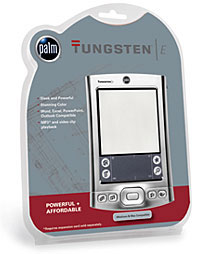
The plastic see-thru packaging, lets you know right away that the TE is a product that has value as one of its top objectives. Just looking at the PDA through the package, I was sure that it was going to be a light weight and cheap feeling device. I’m happy to report that I was wrong on both accounts.
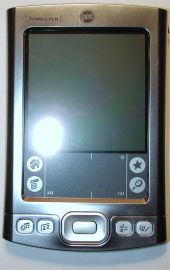
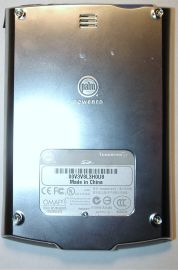
Although not quite as svelte and sexy as the popular m515, the new Tungsten|E does look like a cross between that now out of production series of m500 devices and the Zire 71. It has a nice shape and weight to it that makes it comfortable to hold and use. It is a very solid device and passed the Gadgeteer Creak Test with flying colors.
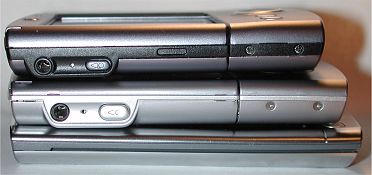
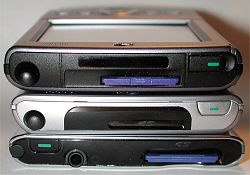
Top to bottom: Tungsten|T, Tungsten|T3, Tungsten|E
The outer shell of the TE appears to be made of chrome metal. I’m not 100% sure, but I think it is actually plastic. I do know that the outer surface is very slick and unfortunately, shows finger prints and smudges very prominently. Eck.
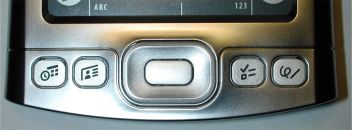
The application and 5-way navigation pad layout are a combination of old versus new styling. The app buttons are flat and square like the buttons on the Zire 71. They are easy to press and have excellent tactile feedback. The 5-way nav pad on the TE is very similar to the same nav pad on the T3. The TE’s button is more square in shape though. Just as I said in my T3 review, I don’t care for this new button style. Although it has adequate tactile feedback when you press it in the left or right directions, the feedback is lousy when you press it up or down. I don’t think avid game players will like it at all.
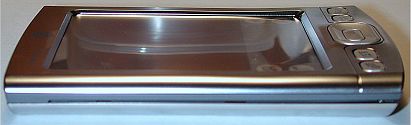
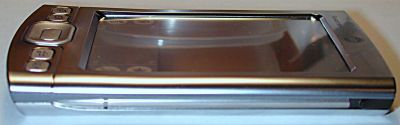
The left side of the PDA has a thin slit that can accommodate the included leather flip cover, while the right side has the stylus silo. See, I told you it reminded me of the m500 series devices. I actually like this flip cover much better than the one included with the T3. This one lays flat. The included stylus is similar to the same ones included with the m500. It has a metal barrel, and plastic ends. The top end unscrews to reveal a reset pin.
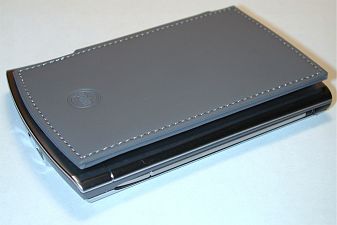
The reset switch is located on the back of the PDA, along with the speaker holes. The speaker on the TE is ok, but not near as deafening as the one on the new T3. I would say that it is about 75% as loud.
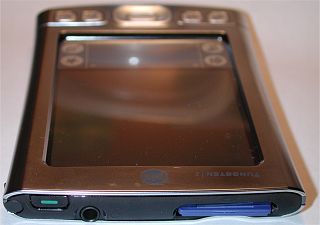
The top of the TE has the power button, IR port, SD slot and earphone jack. The IR port seems pretty weak; the maximum distance that I could get between the TE and T3 for beaming contacts was only 2.5 feet. On the other hand, sound quality through earphones is GREAT! Maximum volume levels will make your ears bleed. I typically set the volume to less than 25%.
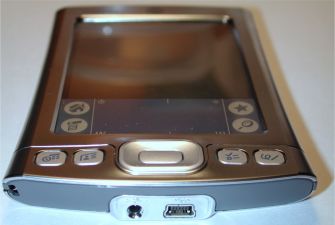
The bottom of the TE has the AC adapter connector and the USB cable connector. Nope, no Universal Connector here folks… This is probably my only major complaint about an otherwise great PDA. I don’t get it Palm, if you call your connector ‘universal’, then why isn’t it used universally throughout your product line? As it is, you will be unable to use all of the great accessories that are already on the market. Those people that were planning to upgrade from previous models that did employ the universal connector, won’t be able to use their keyboards, sync / charge cables etc. This is very disappointing if you ask me.
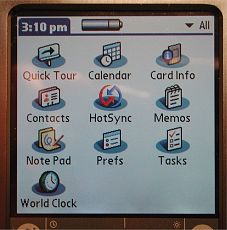
On a more positive note, the TE’s display is excellent. It is bright and crisp and has vivid colors. It’s just too bad it isn’t a 320 x 480 display with a soft input area though… If it was, this would be a kick-ass PDA given the form factor and all. Oh well, I guess we just can’t have everything, can we?
System performance is fast. Not as blindly fast as the T3, but very snappy all the same. Battery life appears to be quite good as well. A typical user should be able to get a couple of days work out of this PDA before needing to charge. Of course, if you use the TE primarily to watch videos or listen to MP3s, you’ll need to charge much more often.
Let’s take a look at the software bundle now.
Software Specs:
The Palm OS version on the TE is v5.2.1. This version includes quite a few updates that Palm users have been waiting a long while for. The applications included in ROM are:
Core Functions
Contacts – This used to be called Address Book, but the name has changed to better match the same PIM applications in Microsoft Outlook. I think Palm realized that a large percentage of their user base syncs with Outlook and not their own desktop application. Some of the changes in this new version of Contacts include the addition of a website field, instant messenger name field, work and home addresses, and a birthday field with a reminder option.
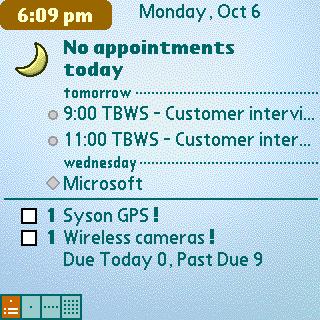
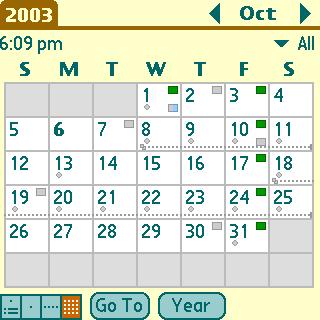
Calendar – Of course, this used to be called the Date Book. Some of the new features include an updated Agenda view that looks very similar to the Today screen on a Pocket PC. It lists your upcoming appointments, Tasks and Email info. Events can now be categorized, categories have their own color bullet next to them in the date view, and you can add a location for an event. Also, events can now span midnight.
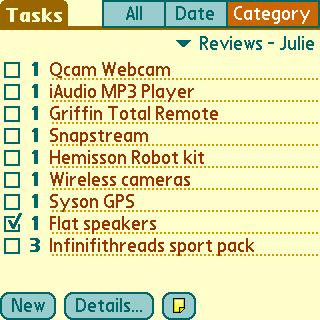
Tasks – Was the To Do List application. Not much has changed with this application except for the addition of alarms per task and the ability to view by due and past due settings.
Memos – Was Memo Pad. Can I get a drum roll please? Ok everyone, hold on to your hats… Are you ready for this? I’m warning you, this will come as a shock… Palm FINALLY fixed the 4k size limit on memos! Wheeeeeeeeeeeeeeee! Better late then never right? Other than that major change, the Memo application (not sure why they didn’t name it Notes to match Outlook) remains unchanged.
Hotsync, Note Pad, and World Alarm Clock – Remain unchanged from previous OS versions.
Card Info – Displays data about the SD memory card in the slot.
Missing from the core apps is a file manager and a backup / restore app. Come on Palm! Also missing from the core apps is the Expense application and the basic Calculator. The Calculator has been replaced by the PowerOne calculator which is installed on the first HotSync.
Bonus Software (included on CD)
The TE comes with a very nice software bundle, and with 28mb of memory and an SD slot, you should have plenty of room to install everything you are interested in. The freebies include:
Adobe Reader – PDF file viewer.
Palm Reader – My favorite e-book reader!
Phone Link, Dialer, and SMS – Mobile phone apps.
VersaMail – Latest version allows you to view Word and Excel attachments (up to 5mb in size).
Handmark’s PDA Money, MobileDB and Magic Dogs card game.
Kinoma – Video player. I’m still not as impressed with Kinoma as I am Media Player on the Pocket PC. I don’t care for the fact that I have to convert the movie to a different format before being able to play it. Kinoma movies are still not as smooth as MPEG movies on a PPC.
Photos – Slideshow application.
RealOne – MP3 player. Does the job, nothing fancy.
Documents-to-Go – Word, Excel and PowerPoint viewer and editor that can read and write native files. No more conversions are needed.
powerOne Calculator – Installs on first HotSync and takes the place of the built-in calculator.
Kinoma Producer – Desktop application that allows you to convert your favorite home movies and animated videos – MPEG-1, QuickTime, AVI – to a format you can view on your handheld.
Conclusion:
Overall, I’d have to say that the Tungsten|E is a solid PDA that gives you a good value for your money. The TE really has a lot going for it, for both newbies and people upgrading from older Palms. Of course as the ‘middle child’, it is missing a few things that some of the other Palm models have. But, if you don’t need a Voice Recorder, Universal Connector, LED alarm, Vibrating alarm, Bluetooth, Camera, or HotSync cradle, then the TE’s great screen, snappy performance and nice form factor might just make it your next ‘main brain’. Even if it’s not for you, I think the Tungsten|E will be very popular this next holiday buying season.
Price: $199
Pros:
Gorgeous screen
Good system performance
Good price
Cons:
Lack of Universal connector
Lack of file manager application


Gadgeteer Comment Policy - Please read before commenting
Post your comments here on the Palm Tungsten|E Review.
http://www.the-gadgeteer.com/tungsten-te-review.html
Just click the POST REPLY button on this page.
Im surprised this review was so luke warm. I think this unit is great.
So what if you don’t get a camera (i have the Zire 71 and never use it). Bluetooth – got an iPaq with it – never use it. Vibrating/LED alarm – what’s wrong with one that makes a sound.? True a voice recorder can be useful, and the lack of a Universal connector is weird – but if you are upgrading from a V series or older, you aren’t going to miss it.
I think this one really does hit the spot for business users, the one’s who got a V series a few years back, who want a new toy, but are jealous of the Pocket PC crowd, with their outlook synching, and word/excel/powerpoint capabilities. This Palm hits a home run in all these areas, it’s a direct competitor to the latest line of Pocket PC’s – even price wise. And if you are upgrading from an older model, it’s going to sync all your stuff automatically.
I think Palm did some serious thinking about how to get people who are/were thinking about Pocket PC’s to stay with them, or convert them back.
And BTW – Kinoma Producer can also makes Mp3’s to play on your Palm – which makes the multimedia capabilities second to none.
I think for $200 (a great price point) you get a LOT of functionality. I think this will fly off the shelves.
I am seriously considering a Tungsten E for my next PDA. But the lack of a collapsible screen area a la HandEra 330 (my current PDA since May 2001) is holding me back from going out to get one.
My HE is still working, so I’ll probably keep using it and watching the Palm world for the next round of new devices. With three new devices released about the same time, Palm may very well have other new devices just around the corner. One of them, a Tungsten E2 with collapsible screen perhaps?
🙂 😀 :wow:
Thanks for the review. I’ve been thinking about replacing my m130 (yeah, I know, it’s not that old, but I’m quickly outgrowing it), and I’ve been thinking about either this or the T3.
I agree that the lack of a Universal Connector is a deterrent to this unit, but I don’t need Bluetooth (but I’d love WiFi, for work), vibrating alarms or the somesuch.
You’ve got me thinking now!
Actually, crazy as it may sound, I think Palm’s doing a decent thing there. The port on the bottom there looks like a standard Version 2.0 MiniUSB port. In other words, it appears that they’re moving towards an industry-wide standard connection instead of one they and they alone regularly use, and that’s *definitely* a Good Thing – especially if other PalmOS devices start following suit.
Of course, the frequent changes are annoying, but just imagine what it’d be like if you could use, say, most standard USB devices with your Palm…
Yeah, it IS a usb port. That means you could go and get a cable in any half decent computer/electronics store, and NOT need to pay palm for a cradle/cable. It DOES make sense.
I think Palm have dropped the ball basically on every iteration of Palm device and connectivity. Too many changes in too short a time.
At least now they have their smrtest device in ages – a keyboard that links to a Palm device via the infrared port.
http://www.palmone.com/us/products/accessories/peripherals/#keyboards
I’d say that 90% of the handheld owners I know (and I know quite a few) never use any peripherals with their handhelds. A couple have keyboards, a few use charge cables and I know one guy who has a sync cable (besides me — I have all three, but I’m a power user). This is out of a sample size of about 100.
I think most people who consider this model won’t be seriously deterred by the fact it lacks a Universal Connector… the point has already been made that with the generic USB connector and power connector, special cables are no longer required.
The most popular peripheral add-on for Palms is a keyboard, and Palm’s latest model uses IR.
About the only thing I liked about this PDA was the screen. All of the buttons are terrible, the material is too shiny and retains fingerprints and I cannot believe there is no universal connector. This is inexcusable and is clearly a marketing decision. Palm is so obviously trying to get people to spend another $100 on the T3. I guess they have forgotten about the Pocket PC competition out there. Typical Palm, one step forward, two steps back.
Every heard of a cradle? Most people want one.
Business users want a cradle. Most corporate customers buy Pocket PC’s. This will not sway them.
😡 this pda is has dissapointed me alot. U might ass well throw your money down the drain. It doesnt even have a universal connecter.OMG
dont
buy the only ok thing is the screen.
but the usb port might be a big step back!
I agree with the other comments here about the lack of the UC. IMO this is a major mistake by Palm. Granted they are going after a slightly different user base and needed to keep the price under $200 but many of the upgraders will be coming from the M5xx ranks. A lack of both a cradle AND UC to me is just wrong.
Mike
I think you must have pasted some of this review from your T3 review because it mentions a “larger screen” and “landscape mode” which the E obviously doesn’t have.
Ooops, I did copy out some of the software part since it was pretty much identical. I’ll go take a look… 😮
I’m an old time Palm user, coming from a III to my now-aging Vx. I would like to know size-wise how does this new device compare to the PalmV series, and if it’s possible for Julie to post a comparison picture of both devices.
I don’t really care much about a cradle, since I’m always on the go. Universal connector is not a major consideration for me since I’ve never bought any sort of peripherals such as keyboards, cameras, etc.
I would like to know about the following:
– Is the screen viewable outdoors?
– How (in)compatible is OS5 with OS4 apps?
– Is MP3 playing on the device actually usable?
– Can I run software off the SD card?
I’d like to hear your comments about this device.
Thanks!
jnaazgul:
I’ll see what I can do about getting a picture of the TE and Palm V (I actually still have my old Palm V).
As for your other quesitons:
– Is the screen viewable outdoors? Yes.
– How (in)compatible is OS5 with OS4 apps? I’ve not had any probs.
– Is MP3 playing on the device actually usable? Yes, sound quality is great!
– Can I run software off the SD card? You sure can.
I picked up a TE yesterday as a replacement for my aging M515. This really is an awesome unit!!! The universal connector complaints are semi-legit, but I didn’t let it stop my purchase. Bluetooth….don’t need it, don’t have anything else that uses it anyway. WiFi…great if I had it, but am I going to pay $100-$200 more for it….no, not for my use. Others may have different priorities. If price is a selling point, this one hits it. It has lots of the new features (faster processor, OS 5, screen) without the high-priced addons that are more niche items. $200…awesome!!! Great (but not top of then line) perfomance, great (but not top of the line) features, great (but not top of the line) price. Perfect match….it will sell like crazy!!!
I just wish I knew Palm’s long-term plans. The universal connector was a great idea (key here is universal), but then they put out the TE with only mini-USB. Is that the direction they are headed, or was this a price point/manufacturing decision?
Not sure, but I really love my TE!!!
It’s a marketing decision and a stupid one at that. Plam just made sure that lots of people buy a Pcoket PC instead of a decent Palm for $199.00 Stupid, stupid.
I dont get it – you just paid $200 more (okay – $150 more with a $40 gift certificate) for voice recording, bluetooth, a sliding screen and twice the memory. Oh, and of course, your universal connector. That’s fine and good for you, but there are people who don’t think your way.
http://www.the-gadgeteer.com/vbbs/showthread.php?threadid=512&goto=newpost
I think there are plenty of people who whave enought loyalty to Palm to want to go out and get an updated Palm, see one with a LOT more functionality than their current unit for $200, and who dont want to spend $350, or $400 for those other features.
I still believe that Palm will have a huge success with this one – it will be a big big holiday item.
Forrman…that was exactly my point….for those who the features are important…great. But the TE for its features and price point is a winner. Is the lack of the universal connector a pain?…yes, but a minor one. ….FOR ME. For others, it may be more of an issue. I got the faster machine with the better screen for only $200. That’s what I wanted, that’s what I got. If you want more, you’ll have to pay more.
Maybe the mini-usb was a mistake, maybe not. We’ll see.
I still think these things will fly off the shelves.
Lat
BTW…is the mini end of the USB standard or proprietary? I’ve never used one, so I’m not sure if the funky shape of the mini end is standard or Palm specific.
The mini end is NOT proprietary – i have a DMG Mpio MP3 player that uses the same connector. They aren’t the easiest of things to find, but they are out there.
jeez tthiel, stop trolling. If you don’t liek the darned thing, guess what, you DONT have to buy it!! wow! amazing, huh?
Anyways, This is what a lot of people have been wanting a m5xx/vx sized, no frills os5 pda. This might end up being my next palm. I’m still using a handera 330 at the moment. And whats the big deal with no UC? If you want to use the few decent accessories that use the UC then get a different palm model.
199.00 price point, if you do a pricegrabber search on the tungsten E you’ll find that it can be had brand new for 174+shipping at the lowest, mine came to 181.98 dollars shipped. Funny some sites had it for 215 dollars or more and did not include free shipping. Palm is offering free shipping right now, so 199.00 is what you’ld pay there. Anyways saved 17.02 which is going to help towards paying for my new 55.99 128mb sandisk card 🙂
Man got to love competition and resellers, same product yet hopes of selling things by quantity = more money as you sell by bulk = profit = bank!
🙂
The expandability compared to a m105, even a m125, without color. And this one has color, julie/judie any good screen protectors yet for this one or recommendations? Prefer the stick on, bought one for my m105 and it wouldn’t fit so doing the stupid thing I popped the lid off/removed the case and pushed aside the little sponge separator, now the screen protector when it moves jams the power switch or something else so it doesn’t power off or freezes until I re-adjust it.
Since the formats looks similar, is there any chance that m5xx styli and cases fit the Tungsten E?
I have been closely following the new handhelds released by Palm in the last year and, frankly, none of them have persuaded me to upgrade from my trusted M515. My Palm is loaded with third party applications and I have no problems with my 16MB of Ram. Of course, I also have a 128MB sandisk card to hold all of my e-books.
The following are some of my thoughts.
Tungsten|T3 : The form factor for this unit is horrible. It is heavy and bulky. The sliding mechanism takes away from the “solid” feel of the older V or M5x series Palms. Yes, it has a faster processor, built-in Bluetooth and a great screen. But, really, I need to be able to carry my Palm around with me at all times. I usually carry it in the inside pocket of my suit jacket. The T3 would bulge out and be uncomfortably heavy. Yes, the processor is faster, the screen is beautiful and, oh yeah, built-in Bluetooth. Although Bluetooth sounds great, I would have to upgrade all of my hardware. Hmmm, only really useful option there is the ability to print direct to my printer. But hey, if you’re near your printer then chances are you’re near your desktop and you could print directly after a hotsync.
No way am I going to trade in a sleek, light M515 for a bulky T3 with a slider mechanism (although I would love to have that 320X480 screen and faster processor- damn it!)
Tungsten|E : Now you got my attention. Appears that Palm duplicated the form factor of the old V and M5x series when it manufactured this beauty. Problem is that beauty is only skin deep and this applies to the Tungsten|E. Palm forgot all of the guts. Where’s the universal connector? What is the point of calling something “universal” and then not including it in your most recent model! Also, where is the 320X480 screen with virtual graffiti area. As always, can’t judge a book by its cover. Palm got my attention and then lost it, quickly.
So all you Palm M5x series owners hold on a little longer. I strongly believe that the dream unit is just around the corner. What is the dream unit? Well, the dream unit is the Tungsten|E2 or Tungstent|E3. It comes with the form factor and lightness of the Tungsten|E but has the guts of the Tungsten|T3. That means universal connector, 320X480 screen with virtual graffiti, built-in Bluetooth, 64-128MB of RAM, along with the Palm essentials.
Hmmmm, maybe they’ll call it the Tungsten|ET – coming soon to your planet.
Those are my thoughts, I’d be interested to hear from others whether they agree with me or whether they think I should open my horizons and trade in my M515 at this time for something else on the market that would suit my needs.
I understand that the Tungsten|E slides into its case from the bottom up rather than from the top down. Apparently, this was to prevent the unit from falling out when being held by its case or leather cover.
As for the stylus, don’t know if it’s compatible with the m5x series but, knowing Palm, probably not.
I have had many Palm devices over the years, I think the TE is fantastic! My last device was the 505, what a difference. The screen is 10 times brighter & much sharper. The speed is many times faster. The size weight & memory are great. I bought a Palm hard case for it, really nice. I love this unit! I can’t believe it was only $199. This has to be the best value out there. At first the lack of a UC was bothering me, but for me it’s really no big deal. The unit is so great that it doesn’t bother me. In fact, who knows, maybe they will standardize on this configuration.
Mike
PalmGeek, I agree with most of your comments. I’m currently using a m515 with a few 3rd party appls and hacks.
I never did like the T form factor – I like to be able to use the PDA one handed & without having to opening anything else but maybe the protective case.
The E seems almost there – I just don’t like the non-metal (?) construction & the lack of vibrating alert (I’ve found this very useful & essential during meetings). I can live with the current screen & processing power (& the price!).
Here’s hoping that the E2 will get closer to the dream PDA.
The Tungsten E almost has what I want but lacks the following, which I would pay an extra $100(CND) for:
MUST HAVES:
A SOLID metal, brushed (non shiny) case
Good tactile feel to the 4 way button
Connector to their keyboards… I gather the IR one isn’t perfected yet.
Cradle
Long battery life – being able to turn off the backlighting
Remaining thin and using side mounted leather flip cover.
WOULD LIKES:
Voice recorder.
Some style. V’s and 500’s led the way and continue to have style other PDA’s don’t. Probably not enough to dissuade me if everything else was there though.
TO DISTINGUISH IT FROM T3:
No Bluetooth and other additional stuff.
Im a lawyer and I think most of my colleagues I’ve talked to agree about what is missing (many think style is very important, perhaps more than me). We all want to pull it out and enjoy using it (tactile, feel, heft, etc.) and the keyboard is very very useful. The cradle is one of the most useful things Palm ever invented for those of us who work by a computer. In and out. In and out…easily. Palm are you listening?
I’m going to wait a little longer to update.
Does anyone know could turn off the screen of Tungsten while listening MP3?
Has anyone seen the new advertisement for the Splash Photo v. 4.0?
http://www.splashdata.com/splashphoto/index.htm
That’s the dream unit I was talking about. Looks like a Tungsten|E with a 320×480 screen, sleek looking unit without a slider!
Wonder why SplashData decided to use a photo of a unit not yet available on the market….unless they know something we don’t!!!!!
Looks like a mock up to me.
I dont think this is available anywhere but Photoshop.
I agree its a mock in the picture but it may be based on something more substantial. All other advertisements by SplashData have used real units. Why use a mock now?
Just a curious (and a little hopeful) mind.
Using Real Player, the screen will automatical blank out after a minute or so of playing.
Julie,
Think you could post a picture comparison between the Tungsten E and the Palm V? Size is rather critical for me, and I would like to know about the subjective size comparison.
Measurements are one thing, look&feel is quite another.
J.
Unfortunately, I can’t as I no longer have the PDA. It went back to Palm. I do still have my Palm V though, and I would say that the TE does feel a bit thicker and longer. But not be a lot.
As you can see this pda is still relatively new, got a lot of apps installed etc. but my big complaint is the casing. Its getting a bit scratched. Wish I had a camera but plastic as shiny as this one once it gets a scratch it stands out big time. Proporta better ship out my hard case quick or deliver my neoprene case a little quicker.
Also does anyone know how palm hooked up the little speaker in back,,, funny thing is that everyonce in a while no sound comes out until I tap the back. THis has happened like 3 times since I bought it. Think I’ve dropped it like twice on my carpet but nothing major no hard thump I think.
I’ve been on this site for years so I’m hardly trolling. This is a disucssion board, that means people DISCUSS things back and forth. Understand now? The big deal with the UC is there’s no cradle which is really stupid and because they only did it to get people to buy the higher priced versions. Also Palm promised a Universal connector for the next five years. I guess they lied.
I just bought the TE as an emergency replacement for my tired m515.
So far, I’m quite pleased.
A few good and bad points below (some of them have already been discussed, I know), but my overall feeling is GOOD.
The screen is good. It is difficult to read outdoors with the sun on your back, though, as the silver casing is then very shiny, whatever your angle. I also find that the contrast in a bright outdoors lighting is fairly poor (dark grey fonts on light grey background quite of effect). This might be also due to the protection screen I use, which lessens unwanted reflections, but takes a bit of the screen clarity.
Oh, and I heard lots of people complaining about screen more bright than others, but what about “too bright”? I like to read in bed, and I wish the lowest setting would allow me to do this comfortably. But it is a little bit too bright for this…
About the silver casing, it is a little bit too shiny, and like it has been said a lot, it is a shame it shows fingerprints very easily.
I have a problem with the down button. I have to press it from above to make it work, so it is a) unnatural and b) makes me press the middle button accidentally. I suspect this is a problem with this specific unit.
The other buttons feel a bit “cheap”, but fine. I miss the feel of the m515, though.
USB vs. Universal Connector: I would say that USB is bound to be more “universal” than the UC!?! However, I have a couple of charging/syncing cables from my m515, that I won’t be able to use with the TE.
Actually, the TE might only be a temp unit. I was actually thinking of getting the T3, and the TE would be for my wife. We will then have to carry to sets of charging accessories when we travel.
One last pro for the TE on the charging side: I hate to need a separate charger for traveling, or to carry the bulky desk cradle with twice the amount of cables (power + USB) in order to use the charger bundled with the m515. I guess the T3 will be the same…
I really think the USB connector would be the way to go, but what’s Palm’s long term decision on this???
All in all, I am very pleased with the TE’s specs. I am still considering settling for it. I am just greedy for the little extras the T3 promises… 🙂
By the way, I have crackling sounds when using the earphones. I’m still not sure if it comes from the software or the TE’s connector or the earphones themselves. Has anyone had this kind of problems?
Nice review, two quick questions:
Does the T|E ship with an updated version of Palm Desktop? (to handle multiday spanning appointments, larger memos and tasks with reminders)
Is there a 220v travel power supply? Or could I buy a standard power supply at the correct voltage? Does the USB cable charge the unit also?
Thanks,
Mike
Mterk,
I don’t use Palm Desktop. The Calendar app on the Palm is updated, but I haven’t found out all the enhancements.
About multiday appointments, I have just made a test for you. I created an appointment in Outlook, from Monday 8 AM to Wed 10 AM. I got the following message in the Hotsync log:
I then checked, and yes, I then had three appointments on both, with I could modify individually, but not as a whole.
I’m not sure if this answers your question, as there is no Palm Desktop in it.
Having said that, would anybody know of the main differences between the OUtlook and Palm Desktop PIMs, including compatibility with the Palm PIMs?
The power supply is 100-240 V, and that’s good. It has a changeable plug, as did the m515, but only came with the standard US plug and the UK plug. I am French, so I will need to add a US>France adapter when I go back (small and cheap). No big deal, but why this choice???
FYI: I live in Taiwan, so my model is a Chinese version for the Taiwanese market, and we use US plugs here. I don’t know what the TE comes with in US or European versions.
The shop told me the USB cable didn’t really charge, but it seems it does: although the battery icon doesn’t figure the lightning symbol in the launcher app (meaning “charging”), I have noticed that the charge level goes up when I’m just plugged on USB.
I is probably much slower than the charger, though.
I hope this ansers your questions, Mike.
BTW, about USB vs. UC: although I appreciate not needing the cradle when I’m moving around, I miss the cradle:
– one single and simple gesture and you’re ready to charge and hotsync
– only one cable on your desk
– no need to look for the cables under the mass of papers on my desk (maybe not a standard issue for everyone 😮 ) or on the floor, as it happens
– and finally, the cradle is a good stand for all these quick uses next to your PC.
Ben
You can see a comparison between the T/E and the m500 in this Brazilian forum thread:
http://www.palmforum.com.br/phpBB2/viewtopic.php?t=72
I am thinking of buying Tungsten E, but PalmDirect european store has a very good offer. Zire71 plus the 64MB SD card and a card reader only 100Euro more than T|E…
I would buy Z71 only because it has a better battery life, faster processor and UC (don’t really care about the camera). Z71 has better looks than T|E.
On the other hand T|E has 32 main mem and it is cheaper and with these 100E I could buy some nice peripherals…
Can you help me decide??
I would like a TE2 to have a virtual graffiti area. Otherwise its still just a suped up m515
Well, I’ve just picked up one of these of my own (after having owned – most recent to least – a Palm m130, Handspring Visor Deluxe, Palm IIIx, Palm III, and a Pilot 5000 with and without the Professional upgrade), and I have to say I love this thing to death. It’s my new baby. *cradles* 😉
Some comments:
* On the lack of UC: I honestly don’t think this is nearly as big a deal as so many people are eager to believe. The standard USB port’s Really nice; my audio player (a Neuros HD, which has been reviewed here) uses the same type of port, so that’s one less cable to carry around. And I found a second AC adapter (for work) at a Radio Shack down the street for under $10 – nowhere near the $30 I had to pay for another “Universal Connector” cable that wouldn’t stay hooked onto the bottom of my (dearly departed) m130.
(And before you claim I could have gotten a better deal online for the UC cable – I’m talking about walking down the street and picking something out of the store in both cases. If I ordered an AC adapter online, I prob’ly could have gotten a lower cost too. Having a nearby brick-and-mortar store to get spare parts from is MASSIVELY convenient.)
I used to be a nut for portable keyboards, but after having seldom ever had reason to use them ever since I started using a laptop frequently, they’ve begun to strike me as more of a way of chaining down your PDA rather than getting serious work done.
Oh, and as for certain trolls I could name who posit that this is some huge conspiracy by Palm to force purchases of more expensive hardware – dude, step back and take a few deep breaths for a bit; not every company out there exists to screw over their customer base. :rolleyes:
* On the collapsable Graffiti area – I honestly have yet to find a use for this, but (as I mentioned in the T|T3 thread) I have hopes that it’s finally going to be a stable feature of PDAs to come now that Palm’s starting to come out with it. Beyond that, how is this somehow something that makes this PDA “suck”? I suspect jealousy. 😀
Short version of all of the above: Just because you are not part of the target market for a device <u>DOES NOT MAKE IT SUCK</u>. It just means it’s Not For You.
That said, I’m also waiting to see this hypothetical “Tungsten|ET” (as one poster put it), just so some of these folks will SHUT UP. 😀
Read PIC, there will be new models next month that will take care of most of these problems…
Yeah,i just wanted a replacement to my laptop which is too heavy, or a desktop when I’m not at home. there’s no wi-fi in my country yet, and bluetooth is just catching up. So the lack of these functions in the Tungsten E arent a problem.
anyway, mine has “made in China” at the back. is there a difference where it was made?
It also has a buzzing sound sometimes.
Ilike the usb ’cause it’s not bulky like a cradle. but this is my first time to own a PDA, and i don’t know the difference… As for the mini-USB question,i have a Nokia 5510,,and it has a mini-USB connector too. Works pretty well. It’s not exactly the best in technology but you get what you pay for.
I’ve never owned a PDA, but my wife’s outfit just equipped their entire staff with Tungsten E’s and I was seriously considering buying one for myself.
However, in reviewing the user posted reviews on Amazon and a few other places, I note that many people are reporting problems including complete product mortality after 3-6 months use.
I am wondering if any of the people who posted here and were excited about the Tungsten E before have changed their minds?
I would appreciate reading follow-up comments from any of the posters who have previously responded to this thread, or from anyone else who has been using thier Tungsten E for a year or so.