
Product Requirements:
Device:
Compaq iPAQ 31/36/3700
Series
Compaq iPAQ 38/3900 Series
Universal Palm
Tungsten W
2/17/03: Updates in Blue
I am way big on mounting solutions for your Pocket PC. I LOVE the idea
of being able to easily get to my gadget while I am in the car. In fact, I
have found that I tear into my Targus CH300 case 8 out of 10 times in the car.
This is both good and bad. Its good because I’m getting good use out of my
iPAQ. Its bad because I’ve got to fumble around while the car’s moving to
get my hands on it; and honestly, that isn’t always the wisest thing… and
while I’m thinking about it, let’s get the Disclaimer Guy over here to do his
bit now…
The following article describes a permanent Pocket PC mounting solution for
your vehicle. Neither revolv Design, The Gadgeteer, Christopher Spera
their affiliates, co-workers, designates, delegates, assignees, associates,
affiliates, partners, friends, neighbors, relatives, felines, canines, or
bovines recommend, condone, suggest, attest, or told ya to in any way use or
abuse the revolv Design RoadWriter while your vehicle is in motion. The
revolv Design RoadWriter should not be used in this fashion. Your
attention should be placed on the most important activity while your vehicle is
in motion: legally and appropriately navigating your vehicle. The
aforementioned parties, in perpetuity, are not responsible for ANYTHING bad that
happens to you if you decide to use the RoadWriter and drive at the same time.
You assume all the associated risks and do so freely of your own accord.
Period. In other words, this device will securely hold your gadget while
you drive; but if you want to fiddle with it, pull over to the side of the road
first. If you screw up and have or cause an accident because your
attention was not on the road, it ain’t nobody’s fault but yours. You use
the device at your own risk.
<sigh> Now that that’s out of the way, let’s get down to the
particulars of the review, shall we…
Contents of the Box
When I got the revolv Design RoadWriter, I had no idea what was in the box.
The bloody thing was huge. I also didn’t expect to go through all of the
grief I went through trying to install it either. While it really looks
much more complicated that it actually was, it wasn’t the easiest thing to do
either. If you decide to purchase the RoadWriter, let me give you a piece
of advice: Set aside a good 1.5 to 2 hours to install everything. If you
have as much trouble as I had, then you’ll need as much time to make sure that
everything goes the way its supposed to.
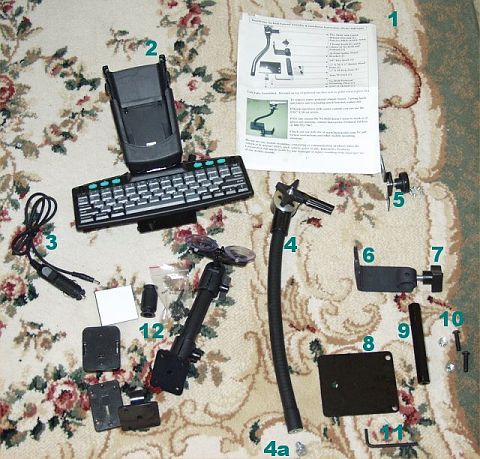 |
| The Contents of the Box… Oy! |
As you can see, there was a lot of stuff in the box. In fact, there was
so much stuff in the box, I started scratching my head. I’m not as handy
as I used to be; and from the looks of all the bits and bobs, I thought this was
going to be a bit of a challenge. It DID end up being a challenge, but not
for the reasons I originally thought. But, before I get into all of that, let’s
address the numbers in the picture…
- The "Destructions, " or everything you never thought you’d need to
know- The RoadWriter Cradle and Keyboard
- Cigarette Power Adapter
- Goose Neck Mounting and fastening bolt (4a)
- Keyboard Security Bolt (for securing the keyboard to the Goose Neck
Mount)- Mounting Bracket
- Mounting Security Bolt (for securing the Goose Neck Mount to the
Mounting Rod: 9)- Mounting Plate
- Mounting Rod
- Mounting Hardware
- Supplied Allen Wrench
- Optional, Additional revolv Design Serial Mount Solutions
Assembling the RoadWriter
I was fine with everything until I actually grabbed the assembly instructions
and took a serious look at how all of this fit together. Essentially, you
have to pick a car seat mounting bolt on the floor of your car, and attempt to
remove it; or at least almost remove it. This is where I spent the bulk of
my time. I have a Honda CR-V. I swear, Honda must have their torque
wrenches set on Way High, because I snapped the small bit adapter from my socket
set in half trying to get the bolt on my car floor loose.
I really thought that I was screwed (pardon the pun). I needed the 3/8
in. socket to get all of this in, and without the adapter, I wasn’t going to be
able to use it to get this thing in. Thankfully, I was able to use the 1/2
in. socket (it doesn’t need the adapter) and fudge my way through. After I got
the bolt on the floor of the car partially unscrewed, I had to monkey the
Mounting Bracket (#6) in place so that I could fasten the floor bolt back down
on top of it.
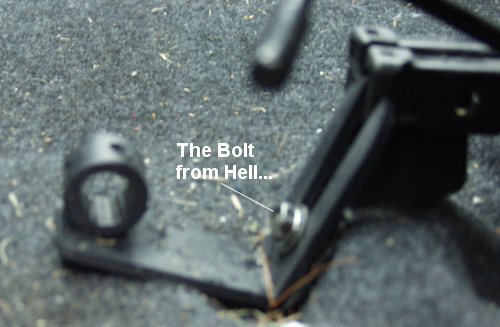 |
| This is the bolt that broke my small socket, socket adapter… |
Next, you should attach the Mounting Rod (#9) to the Mounting Plate (#8),
with the Mounting Hardware (#10); and attach the Goose Neck Mount(#4), to
the assembled Mounting Plate (#8) with the Fastening Bolt (#4a) and the Mounting
Hardware (#10). Attach the completed assembly to the Mounting Bracket on
the floor of your car by sliding the Mounting Rod (#9) through the hole in the
Mounting Bracket (#6), and securing it with the Mounting Security Bolt (#7).
The completed assembly should look similar to what you see below.
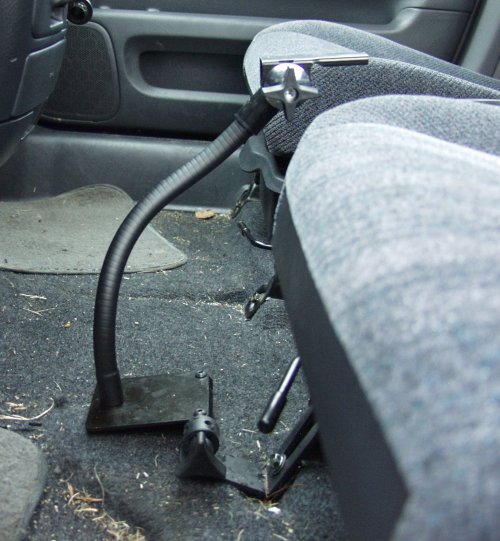 |
| The assembled Goose Neck and Mounting Plate attached to the Mounting Bracket in my car |
Next, take the Keyboard Security Bolt (#5) and attach it to the bottom of the
keyboard, with the rest of the Mounting Hardware (#10). Attach the
RoadWriter to the Goose Neck Assembly by sliding it on the flange on top of the
Goose Neck (#4). Secure it to the flange by tightening the Keyboard
Security Bolt (#5). You can adjust the angle of the keyboard on the Goose
Neck Assembly by loosening knob on the assembly, adjusting the angle, and then
tightening it back down.
Plug the Cigarette Power Adapter into your lighter socket, and the adapter
into the pig-tail power cord, and the RoadWriter is ready to rock.
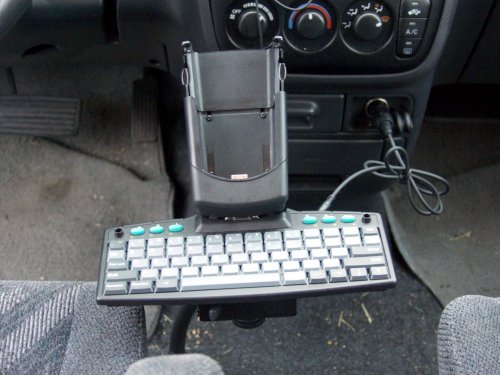 |
| The completely assembled and installed RoadWriter in my car |
Installing the Driver
As I said, when I got this baby, I owned an iPAQ 3835. The
RoadWriter uses a Pocket PC compatible GoType keyboard and driver to work its
magic. As Landware, the makers of GoType products are effectively a Palm
compatible keyboard manufacturer (they also make a Casio E1XX compatible
keyboard), revolv Design and Landware had to roll a Pocket PC 2002 compatible
driver from the ground up. The current driver can be downloaded
here.
Installation of the driver is simple: Download it to your PC and then
copy it to your Pocket PC. A simple double tap on the file name (roadwriter.cab)
will automatically install the software. This shouldn’t be new to anyone
frequenting this site. However, I ran into a number of different problems.
My 3835 for some reason unknown to me, revolv Design or
Pocket PC Techs, would not recognize
the RoadWriter to save its life. It worked with my 3765. It worked with
other 3800’s. It works with my 3955; but it wouldn’t work with my
individual 3835.
I brought this up with Michael Shawver of revolv Design, and he said he
wasn’t surprised. He and his crew had recently run into a number of
different 3800’s that had bad serial ports from the factory. The USB port
that worked out of the same connection on the iPAQ worked fine, but the serial
port didn’t. This, blew my mind. So off it went to Leonard at
PPCTechs.
He had the unit for about 3 weeks trying to make MY 3835 work with the
RoadWriter. It worked with HIS 3800’s, HIS 3900’s. It worked with
every single iPAQ he stuck in the darn thing, except my 3835. He did
confirm that the serial port was bad, and he was easily able to fix it by
replacing the sync board. However, even though the serial port now worked
and it effectively communicated with any and every OTHER serial device BUT the
RoadWriter, it was still dead in the RoadWriter’s cradle.
Leonard finally and quietly cried "uncle" and returned everything to me.
I had purchased a 3955 by that time and had the driver installed on it, waiting
for the keyboard to be returned to me. As soon as I plopped it in the
RoadWriter Cradle, my 3955 recognized the keyboard, and smiled at me, saying,
"See. **I** can work with the RoadWriter even if **IT** can’t." Nyah!"
Using the RoadWriter
As you might know by now, the RoadWriter is a serial cradle on top of
a serial keyboard. The keyboard, while manufactured by Landware, is only
one small piece of the entire package. The RoadWriter is a secure place to park
your iPAQ while your car is moving. The RoadWriter charges your iPAQ while
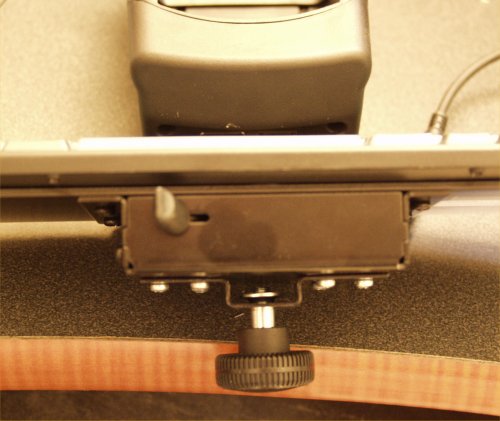
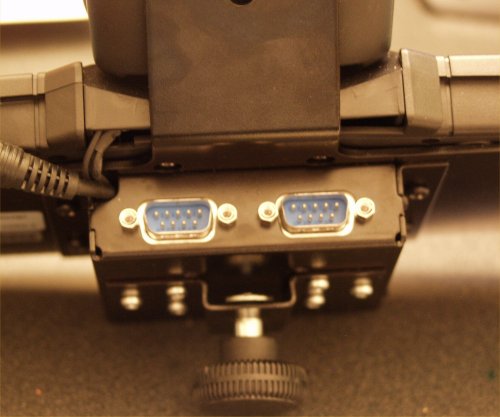
it sits in the cradle. The RoadWriter is a serial communications device,
sporting a 3 positioned switch box and 2 free DB9 serial ports.
 |
 |
| Make sure the switch is set to the middle position |
Two free serial ports! |
As you can see from the pictures above, the most important thing when you
want to use the keyboard is to make sure that the switch box switch is set to
the middle position. Your device won’t recognize the keyboard unless the
switch is set to the middle.
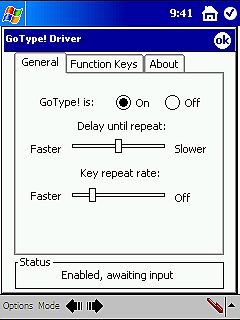
Like its Palm and Casio cousins, the driver for the RoadWriter has some
pretty cool features, Aside from enabling and disabling the keyboard
functionality, you’ll also be able to control the Delay Until Repeat rate (how
long a key is pressed until it repeats) and the Key Repeat Rate (how quickly a
character will repeat). The keyboard’s status is always displayed in the
Status area at the bottom of the dialog box.
 |
 |
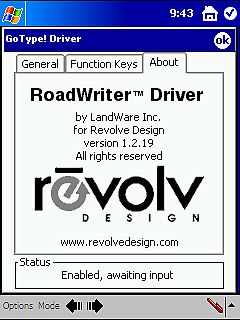 |
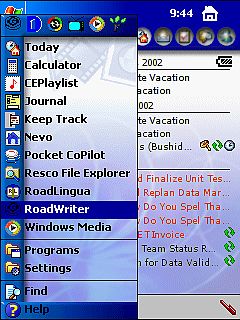
| Once installed, the driver’s control dialog sits on your Start Menu |
The driver’s General Tab |
Driver About Info… |
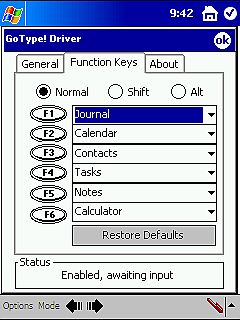
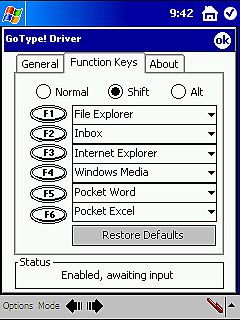
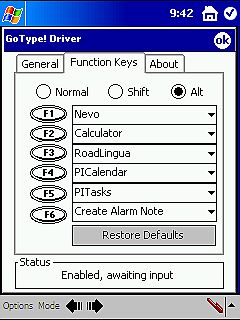
Aside from turning the driver on and off and adjusting the repeat rates, the
driver and keyboard support a number of different function keys. You can
configure up to 18 different functions. Each successive level of functions
is activated with either a Shift or ALT key + the function key combination.
 |
 |
 |
| Normal Function Key Layout |
Shift + Function Key Layout |
ALT + Function Key Layout |
Keyboard Specifics
I’ve been using computers, and specifically laptops since 1990. I bought
one of Radio Shack’s original 8088 HD1500 laptops (I think that’s the right
model number…), and I’m very picky about keyboard layout and feel. I
touch type about 85-90 words a minute, so once I get ta goin’, I go. For
its intended purpose, the RoadWriter does ok. The key’s are smaller than normal
sized keys, measuring 13mm long by 11mm wide (normal keyboard keys measure 13mm
long by 15mm wide). Believe me, the extra width on the keys make a
difference. The rows are substantially shorter than most touch typists are
used to, and as a result, my typing resembled someone with "fat fingers."
In other words, I made a lot of errors, hitting more than one key at a time.
The keys also don’t have a full 3mm worth of travel to them. They feel as
though they’ve only got about 1.5 to 2mm of travel, so they feel a little flat
and clacky.
However, in all honesty and fairness, this is not meant to be the know
all-end all of Pocket PC keyboards. The RoadWriter, in my opinion, is
meant for typing quick notes while traveling in a vehicle. Michael Shawver
told me many times that revolv Design had put many of these in Coca-Cola
delivery trucks. Coke just gave their drivers iPAQ’s so they can track and
update delivery schedules and databases. The RoadWriter is quite
functional and useful for making quick notes in data bases or in other short
text files or fields. I wouldn’t type the great American novel on it,
though with the right word processing program (like TextMaker…Watch The
Gadgeteer for an upcoming review!) you probably could.
Universal iPAQ…ok, Scalpel!
As you’ve no doubt seen so far, the RoadWriter works with all Compaq iPAQ’s.
Please note that I said, "Compaq" and not hp. I have yet to try the
RoadWriter with the new iPAQ 5400 series. And as the current version
RoadWriter is designed to work with an iPAQ in any Expansion Sleeve (EXCLUDING
the Style Sleeve that comes with the 38/3900. The rubber/ soft plastic
sides of the screen cover prevent it from sliding down the cradle and seating on
the serial/ power connector), this version RoadWriter will NOT work with the new
hp 1910. The hp iPAQ 1910 is simply too thin, and doesn’t have the same
rounded bottom as the Compaq iPAQ or the hp iPAQ 5400 series and won’t sit right
in the RoadWriter’s cradle correctly. In all honesty, I don’t have access
to a 1910 or 5450; so I’ve yet to try them in the RoadWriter; but I can say
this: While all current Compaq iPAQ’s will sit in the RoadWriter WITHOUT
an expansion sleeve, the lack of a sleeve puts undo pressure on the serial/
power connector of the keyboard, and is NOT recommended.
However, let’s talk a little more about this whole "universal" thing. I
am a geek; but honestly, I’m not the kind of geek that likes to pull apart the
family toaster simply to see how the thing works. When I got the
RoadWriter, I was honestly a little overwhelmed by the amount of assembly
required to get the thing together. I was also a bit daunted by the amount
of tinkering I had to do to switch the RoadWriter from 38/3900 to 31/36/3700
mode. It ain’t a pretty sight, nor is it for the faint of heart.
In all fairness and reality, the only users that will have to do this on
any kind of regular basis would be Gadgeteers like myself, Julie, Judie and/or any
other geek that has more than one kind of iPAQ. In real world situations,
this really won’t be an issue. However, my RoadWriter
shipped in 38/3900 mode, so if I wanted to use this with my 3765, or if my main
PDA was a 31/36/3700 series iPAQ, I would have had to do this ANYWAY. This
was not the easiest thing to do, and I wasn’t completely comfortable doing it
either. However, after I had done it once, it wasn’t all THAT bad.
However, please note that the steps noted here are described in further details
in the revolv Design iPAQ
Power UniMount User’s Manual.
In order to convert the RoadWriter from 31/36/3700 to 38/3900 mode, follow
the following steps:
- Turn the RoadWriter over and remove the 4 screws from the back of the
"L" bracket holding the Power UniMount to the keyboard. - Disconnect the DB9 Serial cable underneath the Power UniMount.
- Flip the now disconnected Power UniMount over, and remove the 2 recessed
screws holding the bottom of the cradle to the Power UniMount. (See the
picture, below.) - Remove the plastic bottom of the Power UniMount from the unit.
- Carefully lift and FLIP the PCB with the 31/36/3700 connector 180° and
reinsert it back into the tracks you lifted it out of. Take SPECIAL care to
keep the wires out of the way of the screw holes. (See picture, below.) - Replace the plastic bottom of the Power UniMount.
- Replace the 2 recessed screws holding the bottom of the cradle to the
Power UniMount. - Replace the 4 screws on the back of the "L" bracket holding the Power
UniMount to the keyboard.
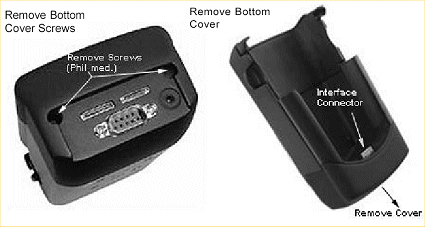 |
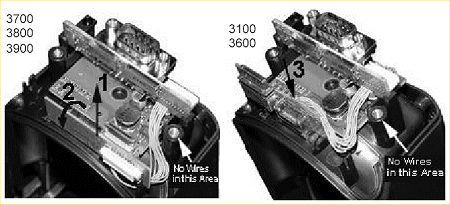 |
| The bottom of the Power UniMount |
Don’t get the wires in the screw holes! You will seriously damage and break the Power UniMount if the wires get cut! |
Update 2/17/03:
Despite what the above pictures say, the 3700 and the
38/3900 do NOT share the same connector. The pictures come from the Power
UniMount manual and are unfortunately, in error. The 31/36/3700’s have a 12 pin
connector that provides serial/ USB connectivity. The 38/3900’s have a 22 pin
connector that provide serial/USB connectivity as well as power.
Interestingly enough, despite the Engineering redesign
to produce the 38/3900 series iPAQ, the 31/36/3700 series devices DO have power
pin outs on the 12-pin connector. revolv Design’s RoadWriter WILL power your
31/36/3700 series devices. I’d like to thank Michael Shawver from revolv Design
for taking the time to explain the technicalities behind this. I’ve tested
this, and it does work. So if you’ve got an older iPAQ and want a cradle to
power your device while travelling, this is the accessory to do it.
I have also had the opportunity to test the RoadWriter
with an iPAQ 5455, and guess what..?! It works! I find that amazing, since
early reports of keyboard use indicated that keyboards could not be shared
between 38/3900 and 5400 series iPAQ’s. In fact, it didn’t give me any trouble
at all. I just copied the driver CAB over to the device, double-tapped it,
completed the install, and stuck it in the cradle. My iPAQ 5455 immediately
recognized the keyboard and power came from the cigarette adapter.
The only problem you are going to have with the
RoadWriter on a 5400 series iPAQ is the placement of the headphone jack. It is
completely obscured by the bottom of the cradle, and as such there isn’t any way
to plug my cassette adapter in so that I can listen to music while I drive. The
5400’s speaker is quite anemic, and if your car generates a lot of road noise,
there isn’t a snowball’s chance that you’ll be able to hear it play anything
from the device speaker. I am relatively certain that revolv Design is going to
address this for the 5400 series iPAQ; but I don’t have any positive
confirmation. I’ll update this review again when I hear back from them.
Quirks,
Quibbles, and Kibbetzing…
I LOVE the revolv Design RoadWriter. I
won’t let my iPAQ rest in anything else while its in the car with me. It
is by far the most secure way to travel with my 3955. However, I’ve had
this baby for a while now and I’ve noticed a few things that really kinda make
me twitch.
- Installation Wasn’t Easy
I felt like I had to dismantle half of my car to get this thing installed.
I’m exaggerating of course, but sheesh! Because it was so difficult to
install, the thought of moving it to another bolt on the floor that might be
more appropriate for it, is completely overwhelming.
- Difficult to Adjust
The Goose Neck isn’t as dynamic as I’d like it to be and I find that when I
do want to adjust the RoadWriter, it takes a bit of doing.
- Stop-n-Go
Traffic is murder on this thing. I’ve already had to remove the goose
neck assembly and retighten it to the Mounting Plate twice because the unit
is naturally top heavy. It moves back and forth in stop and go
traffic, and loosens itself.
- Pricing
While the RoadWriter is awesome, you really have to ask yourself a very
important question: Will I use this thing often enough to justify the
$200 price tag. While I really do love the RoadWriter and use it daily
to hold my iPAQ while I drive, I rarely use the keyboard to type on the side
of the road. If you are the creative type and have to jot down
important thoughts or ideas while you are out and about, or if you are the
kind that drives for your day job a lot and have an iPAQ, then the
RoadWriter should work for you.
One last thought… don’t confuse the revolv Design RoadWriter with ANYTHING
from Arkon or any other company. The revolv Design mounting solutions are
far, FAR superior to any other mounting system I’ve seen. I’ve reviewed
one such solution from Semson’s and Co. here on The Gadgeteer, and 2 others from
Arkon on a competing Pocket PC site. The RoadWriter provides a much more
secure mounting solution for your iPAQ AND
powers your device. You may need a cassette adapter to plug into your
headphone outlet in order to listen to WMA’s or MP3’s while you drive; but
that’s a small price to pay for the security AND
power you get from the revolv Design RoadWriter.
Price: $ 199.95
Pros:
Permanent
Secure Mounting Option
Charge from your Cigarette Lighter
2 DB9 Serial Ports
3 Position Switch Box
Compatible with ALL iPAQ’s
Cons:
Permanent
Challenging Installation
No USB Connectivity
"Universal" iPAQ Compatibility Requires you to be "Tim Allen-esque"
Pricy
Nokia Lumia 1520, Black 16GB (AT&T) (Renewed)
(as of June 8, 2026 11:35 GMT -05:00 - More infoProduct prices and availability are accurate as of the date/time indicated and are subject to change. Any price and availability information displayed on [relevant Amazon Site(s), as applicable] at the time of purchase will apply to the purchase of this product.)
Nokia Lumia 635 Unlocked GSM Windows 8.1 Quad-Core Phone - Black
(as of June 8, 2026 09:34 GMT -05:00 - More infoProduct prices and availability are accurate as of the date/time indicated and are subject to change. Any price and availability information displayed on [relevant Amazon Site(s), as applicable] at the time of purchase will apply to the purchase of this product.)Product Information
| Price: | |
| Manufacturer: | Vaja |
