
Anyone that uses the internet knows that passwords play a necessary role in
the online experience. On any given day a single person may utilize dozens of
passwords while accomplishing such mundane tasks as making posts to a bulletin
board, purchasing an item, or checking their child’s school grades. Over time,
unless the same exact password is always used, managing this large number of
passwords and the sites for which they work will become a challenge.
When a person is using his or her own computer, they have the option
of allowing entered passwords and sites to be stored in the computer’s memory.
This is a very convenient feature, but it’s hardly secure when others are also
sharing computer access. People that use public computers have the added burden
of needing a way to ensure that they will not unintentionally leave a password
trail which will allow unscrupulous persons to steal their online identity.
For quite some time many password users have been aware of the award winning
software RoboForm, which as described by
their site: "Memorizes
your passwords and Logs You In automatically,
Fills long
registration and checkout forms with one click,
Encrypts your
passwords to achieve complete security,
Generates random
passwords that hackers cannot guess,
Fights Phishing by filling
passwords only on matching web sites,
Defeats Keyloggers
by not using keyboard to type passwords,
Backs up your
passwords, Copies them between computers,
Searches for keywords in
your passwords, notes and Internet, and is Neutral: works with
Internet Explorer,
AOL/MSN,
Firefox."
Here is a quick overview of RoboForm for those that aren’t familiar…
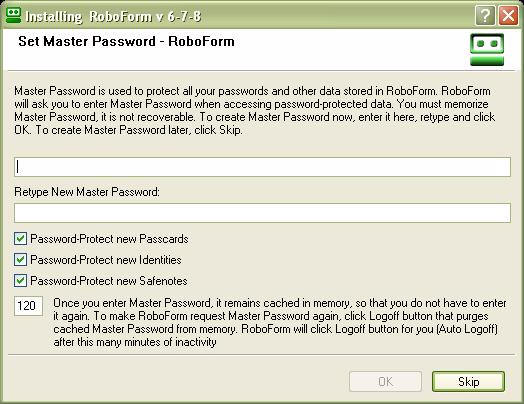
The first time RoboForm is run, a Master Password must be set. When the user
the master password to log into RoboForm on their computer, the user will have
unfettered access to all of their passwords – even if they don’t remember any of
them.
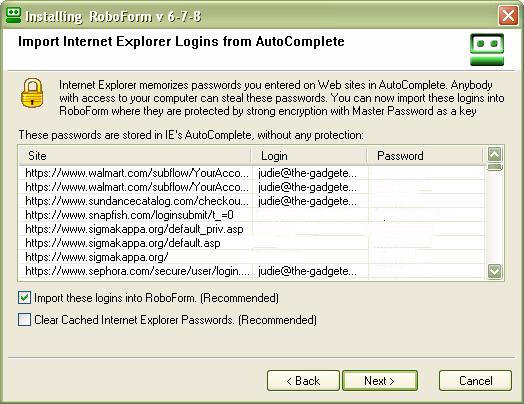
RoboForm will automatically import all current login passwords. The user then
has the choice of whether or not to clear the cached passwords once they have
been imported.
After installation, an additional toolbar will be integrated into the user’s
internet browser. Before getting hostile about the screen’s lost real estate,
let’s talk about the value added by this toolbar…and if you still don’t want
it there, there are work-arounds available.

Clicking the RoboForm button displays all of the RoboForm options; these are
also all accessible from the system try icon if you would like to forego the
browser toolbar.
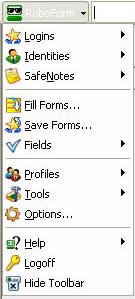
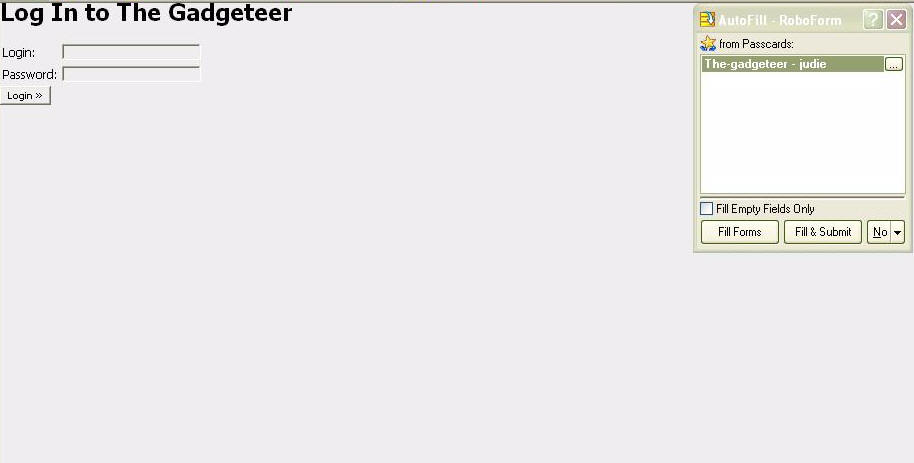
Clicking Logins shows a list of all of the passwords stored in RoboForm. The
button with "Judie Hughes" on it indicates the identity RoboForm is using as it
fills in browser forms. If there is a password associated with a particular
site, it will be offered both in a window automatically shown in the upper right
of the browser as well as in a drop down menu when I hover over the button with
the mouse.
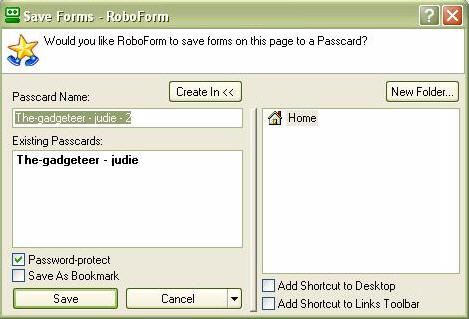
The Save button instructs RoboForm to keep an entered user name and password
for future use.
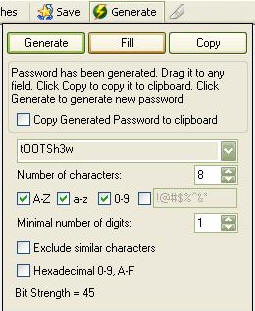
The Generate button allows RoboForm to create an impossible to remember, and
therefore near impossible to guess password.
RoboForm completely integrates with Internet Explorer, and it will also work
with Firefox and Netscape; a
full list of compatible browsers may be seen here. RoboForm is meant to work
with computers running Microsoft Windows 95, 98, Me, NT, 2000, XP, and
Server 2003; it will not work on Mac computers. Multiple password protected
passcards, safenotes and identities may be created with a single license of
RoboForm Pro for multiple users on the same computer.
When using RoboForm on the user’s main computer, the master password is
required for login and RoboForm will continue working until the user logs off.
The user’s information is encrypted with "the strongest encryption available,
including AES, RC6 and Blowfish, to achieve complete security." This is a great
standalone solution unless the user needs to access their password list from
multiple computers. That’s when the RoboForm2Go USB Key and software come in
handy.
Today I am going to take a look at a companion device that can take a
RoboForm user’s simplified and secured password experience from beyond their own
computer to any other computer that they might use.
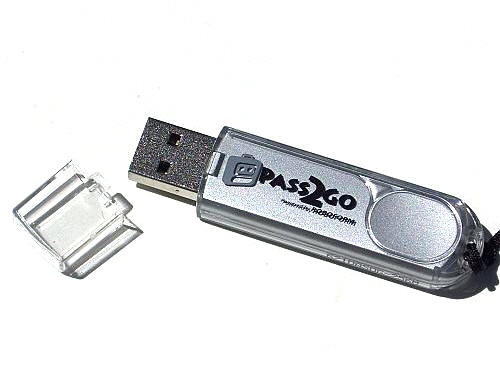
The RoboForm2Go USB Key
is a 2.75" long 256MB thumbdrive that sells for $9.95 when purchased with the
RoboForm2Go software. Let’s take a look
at the hardware first, then we’ll cover the software and how it all works
together…
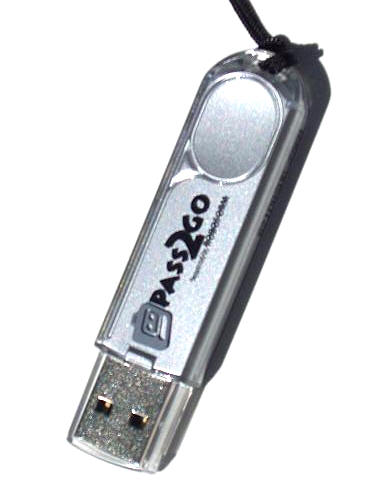
The device I was sent was branded "Pass2Go", which has since been updated as
"RoboForm2Go USB Key"
Included in the package are the RoboForm2Go USB Key (256MB), a neck lanyard
and a USB expansion cord.
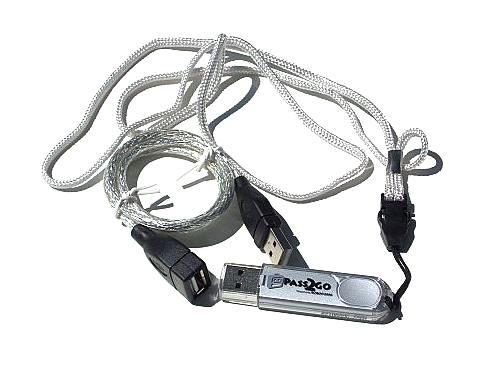
The RoboForm2Go USB Key utilizes USB 2.0 speeds, and it is optimized to
automatically run the RoboForm2Go software when plugged into an empty USB port.
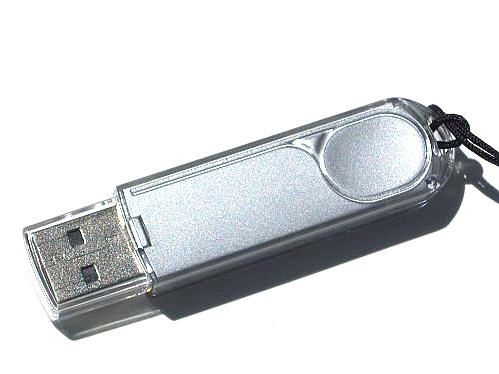
When files are being accessed, a green LED will flicker on the end of the
drive near the loop where the lanyard is attached.
As I mentioned, the RoboForm2Go USB Key must be ordered with the RoboForm2Go
software installed in order to get the $9.99 price. RoboForm2Go can also be
purchased separately for $39.99 if the user already has their own USB drive.
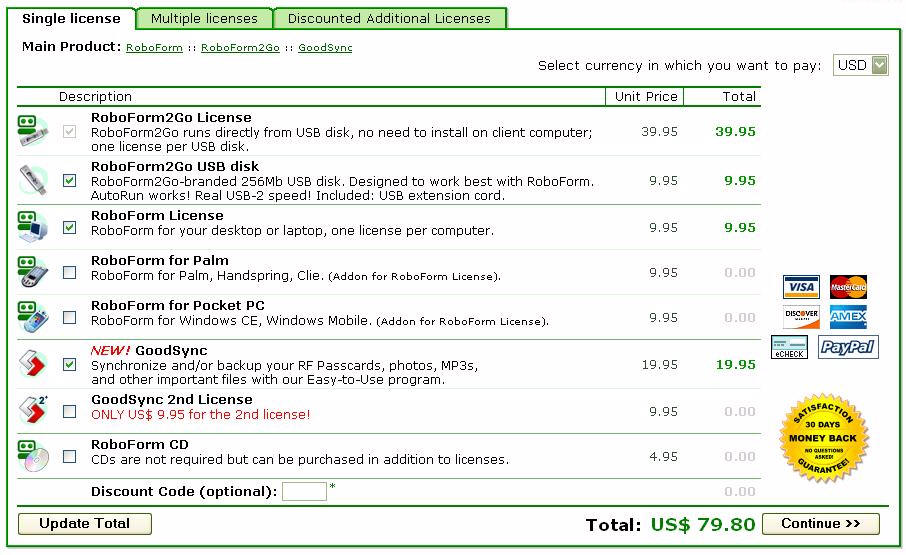
This would be a good time to talk about the various ways in which the USB Key
may be configured; I’ve attached a screenshot of the
order page showing the various options. Mine came loaded with RoboForm2Go, a
free version of the desktop RoboForm software, and a copy of
GoodSync. As tested, the total would be
$69.85. If I wanted to update to the RoboForm Pro, the total would be $79.80.
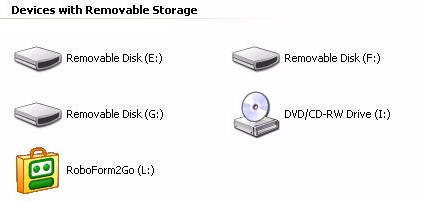
When the RoboForm2Go USB Key is plugged into the computer, it will show as a
separate device with removable storage.
Using the RoboForm2Go USB Key is a simple matter of inserting it in a spare
USB drive. The computer will recognize the plug & play device, and the
RoboForm2Go installation screen will come up if the program has not already been
installed. After installing RoboForms2Go, the installer will copy desktop
passwords to the USB key.
RoboForm2Go stores saved web pages and passwords and allows the user to log
into their accounts automatically on any computer. When the RoboForm2Go is
plugged into a computer, it will immediately begin running – entering passwords
as needed and allowing access to bookmarked sites from the list stored on the
USB Key.
Once RoboForm2Go is running, a browser toolbar similar to the full RoboForm
version will show.

When the USB Key is removed, all passwords – even those newly added – are
contained on the key and will then be removed from the computer.
GoodSync is the other program that can
also be run directly from the RoboForm2Go USB Key. According to its site,
"GoodSync uses an innovative synchronization algorithm to synchronize your data
between desktop PCs, laptops, USB drives and more. GoodSync combines bulletproof
reliability with an extremely easy to use interface. Most synchronization
software claim to synchronize your files, but many simply copy from place to
place. GoodSync offers true bi-directional synchronization, which prevents
deletion of files and data loss."
What GoodSync does is allow the user to keep a folder truly synchronized
between their main desktop and the USB Key. In turn, the USB Key can be
synchronized with a laptop, allowing the user to keep files current on both
devices. Any information that is dropped into a synchronized folder will
immediately be updated when the USB Key is inserted into the synchronized
computer.
So to wrap things up, there are a few choices available here:
1. If you only use one main desktop computer, and you need strong password
protection that will keep family users and guests from getting into your various
accounts, you can use the free version of
RoboForm. But if multiple profiles and logins are needed you should
get RoboForm for $29.95.
2. If you do not have a main desktop at home (or if you don’t want to install
stand-alone software); but you commonly use computers in internet cafes,
libraries or similar public computers, get
the RoboForm2Go USB Key with
RoboForm2Go for $49.95
2. If you normally use a main desktop computer at home, and you need strong
password protection with multiple profiles and logins that will keep family
users and guests from getting into your various accounts; but when you travel
you want to have all of your sites and passwords handy,
get RoboForm Pro and
the RoboForm2Go USB Key with
RoboForm2Go for $59.85
3. If you normally use a main desktop computer at home and you need strong
password protection with multiple profiles and logins that will keep family
users and guests from getting into your various accounts; but when you travel
you want to have all of your sites and passwords handy as well as a way to
synchronize certain files between your desktop and laptop,
get RoboForm,
the RoboForm2Go USB Key with
RoboForm2Go, and GoodSync for $79.80.
Got it?
![[MINI SIZE. ULTRA PORTABLE CHARGER]: Roughly the size of an AirPods Pro case, this smallest power bank packs 10,000mAh of long lasting power into a tiny, nano footprint. Easily slide this ultra slim, credit card size charger into your skinny jeans, a...](https://m.media-amazon.com/images/I/41rATpm6dyL._SL160_.jpg)
INIU Portable Charger, Ultra Mini 10000mAh 45W Fast Charging with Detachable Cable, Flight-Safe Travel USB C Power Bank External Phone Battery Pack for Xiaomi iPhone 17 16 Samsung S26 Google iPad etc
(as of June 8, 2026 21:45 GMT -05:00 - More infoProduct prices and availability are accurate as of the date/time indicated and are subject to change. Any price and availability information displayed on [relevant Amazon Site(s), as applicable] at the time of purchase will apply to the purchase of this product.)
