
What fascinates we humans so much about robots? From the menacing Gort in the movie The Day the Earth Stood Still, to the lovable Rosie the robot maid in the Jetson’s, robots continue to amuse and capture our imagination. Is it that we want to use them as
beasts of burden, or as friendly companions? Whatever the reason, I’ve personally always had an interest in robots and robot toys. I never had one as a child (unless you count the one I made from my Dad’s old Erector set…), so when Scott from ThinkGeek.com asked if I would like to review Robosapien, it didn’t take me long to say heck yeah!
A week or so later, I arrived home after work to see that the UPS person had dropped a big box off on my doorstep. Inside was the Robosapien package.

Photo courtesy of Thinkgeek.com
Included In The Packaging:
The Robosapien robot
User’s manual
Handheld infrared remote control
Black plastic cup
My first thought upon seeing this robot was that it reminded me of a Star Wars Storm Trooper. Only on steroids and really little. ;o) The Robosapien is made of similar looking shiny white plastic with black accents.

Even though his height is only about 14 inches tall, Robosapien is a hefty little robot. He weighs in at approximately 4.5 pounds with batteries installed. Speaking of batteries, I was quite disappointed when I realized that none were included with the robot. He requires 4 D sized cells and 3 AAA sized cells for
the remote. I actually had to wait an extra day and shell out approximately $12 before I could even see this product in action.


Once the batteries were in hand, I was ready to play. The two D sized cells install in a cavity located in the bottom of each of the robot’s feet. A small sized Philips screwdriver is required to remove the battery covers. The 3 AAA batteries install into the handheld remote.
Pressing the power button on the back shoulder of the robot wakes him up. His first actions are to stretch his arms, swivel his hips and make a little uh-huh sound. Too cute! If you ignore him for 2 minutes or so, he’ll go into a sleep mode. After 2hrs, he’ll shut off automatically. You should get about 6hrs of continuous play from one set of batteries.
Not one to read directions before proceeding, I picked up the remote and began pressing buttons. Like a keyboard, each button on the remote has multiple functions. Three to be exact. Each button performs a function after just pressing the button. Pressing the Select button once and the same button causes a different action to execute, and pressing the select button twice with the same button enables a third function. The buttons and functions are labeled and color coded to enable ease of use.

Photo courtesy of Thinkgeek.com
The top grouping of buttons controls the arm movements, while the middle section of buttons control foot movements. The lower section of buttons controls the
programmable features.
The IR receiver is built into the top of Robosapien’s head. Two red LED eyes blink at you whenever he executes a command. The head even moves as he walks or
swings his arms. A visor can slide down over the ‘face’ of the robot to help when lighting may be too bright (outside in the sun) for the IR remote to work.

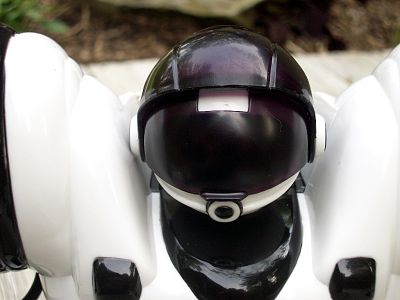
Robosapien has several sensors including one on each heal and toe and one on the longest finger of each hand. Pressing the sensors can wake up the robot when it is sleeping, or cause it to stop and say ouch when it runs into something. There’s also a sonic sensor on the front which senses sounds while in
listen mode. More about that in a minute. It’s too bad that Robosapien can’t ‘see’ things, recognize objects or words like the Sony AIBO can.
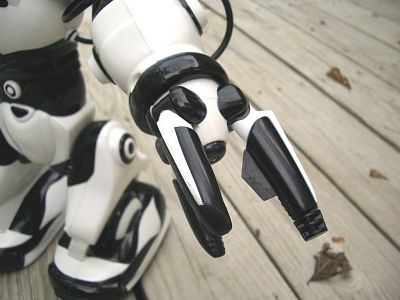
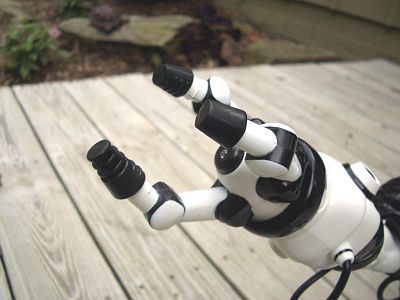
Each arm has a different shaped ‘hand’ attached to the end of it. One hand has flat style fingers while the other one resembles a claw. An LED is located in the palm of each hand. It doesn’t really do anything other than look cool. The different hand shapes facilitate the ability to pick up different types of objects. A
small black plastic cup is included. Check out the video clip that I made of Robosapien picking up and throwing the cup.
Click image to see .wmv movie (700k)
Robosapien has 67 functions that are available through the handheld remote control. These functions include both movements and sounds:
| 1) Right Arm Up 2) Right Arm Down 3) Right Arm In ( LFT) Left Spin/Walk Button 4) Right Arm Out (FWD) Forward Walk/Slow 5) Tilt Body Right (BK) Backward Walk/Slow 6) Left Arm Up (RSD) Right Shoulder Down 7) Left Arm Down (LSD) Left Shoulder Down 8) Left Arm In (RSU) Right Shoulder Up 9) Left Arm Out (LSU) Left Shoulder Up 10) Tilt Body Right (RFO) Right Forearm Out 11) Turn Right 12) Walk Forward 13) STOP Button 14) Turn Left 15) Walk Backward 16) (R>) Right Sensor Program 17) (S>) Sonic Program 18) (L>) Left Sensor Program 19) (R>) Right Sensor Program 20) (P) Master Command Program 21) (SELECT) Advance to GREEN Keys 22) Right Hand Thump 23) Left Hand Pickup 24) Lean Backward 25) Right Hand Throw 26) Sleep 27) Left Hand Thump 28) Left Hand Pickup 29) Lean Forward 30) Left Hand Throw 31) Listen 32) Forward Step 33) Right Turn Step 34) Backward Step |
35) Right Sensor Program Execute 36) Master Command Program Execute 37) Wake Up 38) Reset 39) Left Turn Step 40) (SELECT) Advance to ORANGE Keys 41) Left Sensor Program Execute 42) Sonic Sensor Program Execute 43) Right Hand Sweep 44) High 5 45) Right Hand Strike 1 46) Burp 47) Right Hand Strike 2 48) Left Hand Sweep 49) Talk Back 50) Left Hand Strike 1 51) Whistle 52) Left Hand Strike 2 53) Bulldozer 54) Right Hand Strike 3 55) Oops! 56) Demo1 57) All Demo 58) Power Off 59) Roar 60) Left Hand Strike 3 61) (Select) Return to RED Command Functions 62) Demo2 63) Dance Demo 64) <, < Combination “Right Walk Turn” 65) >, > Combination “Left Walk Turn” 66) Forward, Forward Combination “Slow Walk Forward” 67) Backward, Backward Combination “Slow Walk Backward” |
Besides these simple functions, you can also program Robosapien to execute ‘macros’. These macros can include 14 commands (steps). Although they can’t be saved, they will be retained for up to 2hrs after the robot goes to sleep.
There are 4 programs that can be created:
1. Master Program. General control programs
2. Right Sensor Program. Triggered by touch to finger, toe or heel sensor on right side
3. Left Sensor Program. Triggered by touch to finger, toe or heel sensor on left side
4. Sonic Sensor Program. Triggered by a sharp sound or tap on his body
You can extend the 14 step limitation by linking in a program from all 4 sensors. If you visit the Robosapienonline website, there is even a set of program instructions that you can download to turn your robot into a sentry guard.
I didn’t really get into creating programs for the robot since I knew they would be lost as soon as I turned him off. I enjoyed just pushing buttons and
experimenting with different objects to see if I could get him to pick them up.
Arm and body movements are surprisingly smooth and make a really cool hydraulic type noise. He can also walk well on any hard flat surface. Some of the demo modes will actually cause you to laugh out loud. The many sounds that he can make are also amusing, like the hiiiiiya! karate chop sound. Check out a movie that I made of the Robosapien in dance mode. He’s even playing his own music!

Click image to see .wmv movie (2mb)
Robosapien makes a great toy for both kids and adults. Kids ages 6 and up will have no trouble pressing buttons on the remote in order to control his movements. Just don’t let the kids drop Robosapien. Although he feels pretty sturdy, I’m quite sure that a short fall onto a hard surface would damage him.
Adults can take controlling Robosapien to the next level by using a Palm PDA and an application called SapBench. This program turns the Palm PDA into the handheld remote.
I had a ton of fun playing with this robot. Even my kitten Max made friends!

Even though I’ve never had a robot toy before, I’m pretty sure it’s safe to say that Robosapien has to be one of the best available.
Price: $89.99 from
ThinkGeek.com
Pros:
Fun!
More fun!
Cons:
Batteries not included
Programs aren’t retained after robot shuts off

Gerber Gear Suspension 12-in-1 EDC Multi-Plier Multitool with Pocket Knife, Needle Nose Pliers, Wire Cutters and More, Gifts for Men, Camping and Survival, Grey
(as of August 18, 2026 11:02 GMT -05:00 - More infoProduct prices and availability are accurate as of the date/time indicated and are subject to change. Any price and availability information displayed on [relevant Amazon Site(s), as applicable] at the time of purchase will apply to the purchase of this product.)
Gerber Gear Diesel Multitool Needle Nose Pliers Set, 12-in-1 EDC Multi-Tool Knife, Survival Gear and Equipment, Black
(as of August 18, 2026 11:02 GMT -05:00 - More infoProduct prices and availability are accurate as of the date/time indicated and are subject to change. Any price and availability information displayed on [relevant Amazon Site(s), as applicable] at the time of purchase will apply to the purchase of this product.)Product Information
| Price: | 89.99 |
| Manufacturer: | Think Geek |
| Pros: |
|
| Cons: |
|

Gadgeteer Comment Policy - Please read before commenting
Post your comments here on the Robosapien Review.
http://www.the-gadgeteer.com/robosapien-review.html
Just click the POST REPLY button on this page.
That picture of the robot and the kitten is just too cute!
That’s Max. He’s a gadget freak! 🙂
The weird thing is, they sorta look alike 😀
saw this review on amazon.. it hits the mark..
——————
Not worth the money., July 17, 2004
Reviewer: John Strpko (St. Johns, MI United States) – See all my reviews
The robot has some entertainment value when it first comes out of the box, but that goes away fairly quick. The motion is not very fluid, it kinda shuffles to walk, you don’t have direct control over opening or closing the hands, it basically only has one pre-programmed pick-up motion. It says that it’s programmable, which it is, but it doesn’t remember the programming after it shuts off. This simply is not the NASA designed, fluid motion, humaniod robot that I thought I was getting. I would wait till retailers realize this isn’t a hundred dollar toy, and get it on clearance for under fifty bucks.
F.
As with any toy, it loses it’s “playability” after a while.
If toys didn’t lose their playability, Judie would probably still be using the Palm OS, and we wouldn’t have The Gadgeteer Garage Sales.
And because things lose their playability, we must pay accordingly. If you think you’ll get $100 worth of play out of it, great. If you don’t think you won’t, then don’t buy it, and don’t whine because the price is too high.
I don’t mean to be hateful or mean in any way, but that’s the way I see this.
For what it can do, I think the $90 price for Robosapien is justified. It has not been out too long, so I’m sure the price will go down accordingly. Also, I really can’t imagine anyone believing that this is a ‘real’ robot. What kind of real robot would you get for only $90? This is a toy and is being marketed as such. This is very evident if you go to the http://www.robosapienonline.com website and watch the commercials.
I for one am actually quite impressed with what you get for the price.
Julie, remember the Sony Aibo we reviewed a couple years ago? It was $1500 and couldn’t do all that much more than this little guy can.
Hopefully Robosapien’s creator will continue to develop this toy…and will perhaps eventually release a high end model that can do everything we want a mini-me robot to do…like make me a no-foam cafe latte with 3 sweet&lows and serve it to me on the couch. :wow:
check out my t shirt
http://www.cafepress.com/keerkeer.13815898 😮
keerkeer:
Too funny!!! 🙂
julie,did you know…robosapien comes in different colors. some of them are sold out! :wow: I have a gray robosapien that came in a special edition box! 😀 lucky me! oh,by the way,I was enjoying programing AND pressing buttons.:)
ah,yes! roboapien is now replaced with robosapien V2,It is $200 and coming in june 2007….RS media! theese are the second and third generations of robosapien. but beware! RS media is $350! :wow: f53a_1.JPG
7538_1.JPG
Where can I get the user guide instructions for my Robosapian? I bought mine used at a consignment shop and it didn’t have the instructions with it.I paid a big whoppin’ $4.OO for it
@Glenda Ebert The manual can be downloaded from WowWee’s site: http://www.wowwee.com/en/support/robosapien
If anyone has the remote for sale in canada orr states 403 390 2559
Bought a Robosapien V1 in a flea market for $7, but no remote. If somebody has one for a good price, please email me, [email protected]
Thanks for your review. Because of it, I bought this for my 8 year old grand son. He loves it. I didn’t really want to spend that much, but it was well worth it. And now I’m a pretty awesome grandma!!!