
Product Requirements:
Windows 98, 98SE, ME, 2000
Professional
Pentium (r) 233 MHz with MMX technology or faster (Pentium II 400 MHz
recommended)
64MB RAM or more
128MB available hard disk space (May require additional hard disk space
depending on size of audio files recorded.)
Display with 800 x 600 resolution or higher, High Color or better
CD-ROM Drive (For installation only)
USB Port
Having been a palm user for about 7 years, I decided to reward myself with a new
palm handheld: one with a slew of new features providing an opportunity to gain
a little more functionality from my palm. After a lot of thought, reading of
reviews and testing of different units, I decided on the Sony Clie 760C.
Hardware Specs:
Operating System: Palm OS software version v.4.1
Memory: 4MB (Flash),8MB (DRAM),8MB (Memory Stick/Expandable)
Display: 320×320 Reflective TFT color display with front lights
Power: Lithium Polymer Rechargeable Batteries
Communications: USB (cradle), IrDA
Size/Weight: 2.88 (L) x 4.75 (W) x 0.69 (H) inches, 5.65 oz.
Keep in mind that my review may be a bit biased because of the large amount of
research I did before making this purchase, but hopefully this review will
answer people’s more common questions.
I bought the Clie from a brick and mortar store, I didn’t even make it home
before opening up the box! Scattered on the front seat of my truck were the
various parts that came with the unit.
The Clie itself, is a very clean looking silver unit: quite sleek and smooth.
Coming fresh out of the box, its battery was not charged so I was forced to take
it home before playing with it.
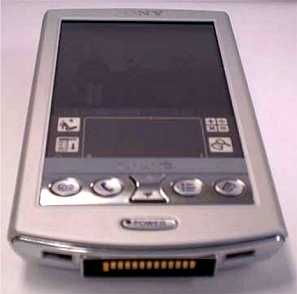
Here is a little information about the unit itself. Coming from a Palm IIIc,
the Clie 760c looks quite a bit smaller, although its screen is about the same
size. The Clie is actually a bit lighter in my opinion then the Palm IIIc, easy
and comfortable to hold and use.
On the top of the Clie is the Sony Memory Stick slot. A simple push downward on
the Memory Stick will cause it to pop out and eject. This is one thing I’m not
too happy about. Because it does not take a lot of force to insert or remove the
Memory Stick, I’ve found several times where I put pressure on the side of the
case and the stick would self-eject. I would prefer some kind of locking
mechanism that can be used to keep the stick inside the unit, not allowing it to
eject.
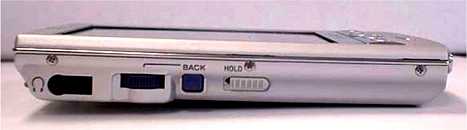
On the left side of the Clie are the jog-wheel, back button and hold. The
jog-wheel? “What a dumb idea,” I thought when I started using the unit. “What is
the point when you can just touch the screen to select objects and items?”
Well In less than a week I found this little addition to be an absolutely
wonderful feature. I can fly though addresses or to-do’s with a flick of my
thumb while driving, on the phone, etc.
Although I really have not got into using the back button very much, I guess I
will learn to utilize that as time goes by. I really do wish that the jog-wheel
was located on the right side of the Clie, as I would then find it to be more
comfortable for my use, but this is merely a preference.
Also located on the left side is a hold slider. This works like the hold buttons
on CD and mp3 players preventing any button from being pressed. I don’t see much
use for this, other then when listening music on the Clie.
The headphone-jack is also located on this side.
The Clie itself if very well built, in the same sturdy manner of Sony minidisk
players. I did Julie’s famous squeeze test and found absolutely no creaking or
shifting of the case, it is very well built.
Now, regarding the screen: OH MY GOD, it’s SOOO nice. The colors are very
bright and clean. While the Clie’s screen does not appear to be quite as bright
as my Palm IIIc, it is easily readable in daylight, which is something I always
had trouble with on my Palm IIIc.
The 320×320 screen makes reading text and e-books an absolute joy. 16bit color
applications really bring things to life.
Sony also supports a special program in Preferences to allow all programs to use
the Sony fonts. This feature did not work with most of my applications though,
it caused them to crash or run very slowly. At least Sony anticipated this and
made allowances so that you can pick the applications in which you don’t want to
use these hi-res fonts. This is a nice idea, but I really don’t use it. The only
applications that I would want to use the hi-res fonts in are my book readers
and they support the hi-res mode natively. I believe that the Clie 760c’s screen
has finally brought the palm OS into the graphic world of the Pocket PC’s but
while keeping the speed and stability of the Palm OS.
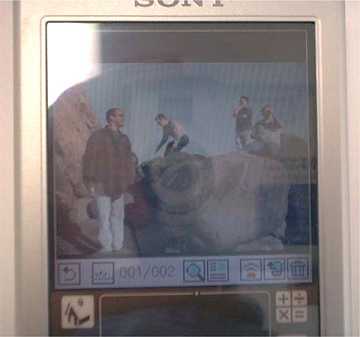
This picture really does not show off how good looking the screen is, but it
begins to show you the high resolution of the Sony’s screen. This shot was taken
on a trip to the coast a few days ago with a Sony Mavica camera. The images on
the Memory Stick transferred directly into the Clie without ever touching a PC,
which I though was pretty nifty.
Another feature of the 760c is MP3 playback. WOW, a Palm with full audio
support! I was impressed, but only for a moment. The audio is not actually done
by the Palm at all, the MP3 part is completely separate, and it’s only
controlled by an application in the Palm OS.
I did benchmarks of the Palm while playing MP3s and while not playing MP3s. The
MP3 playback takes up almost ZERO resources while in use. This means a few
things: basically that the Palm OS can’t actually use it readily to play music
unless it’s stored on the flash card. But some crafty programmers may find a way
to use its zero CPU usage to add background music to games or programs.
The MP3 and video sound quality is wonderful, the Clie sounds great either
through the headphones or though a stereo system. A warning though, I tend to
encode my music with variable bit rates (bit rate changes in song as it’s
needed) This usually saves a bit of space, especially when you have thousands of
songs encoded, but the Sony DOES NOT like these MP3. If I used the variable
speed MP3s, the Clie would hiccup and pause between the changes in speed. This
is not a big deal though, as most stand alone MP3 players can’t handle this
format either. I can see definite future potential, but I was hopping for a bit
more out of box.
All in all, I find this unit to be a very nice piece of hardware. A great
upgrade to anyone that is thinking of upgrading from a lower-end palm. The
unlimited storage with flash cards is wonderful, the screen and sound quality
are also very nice. While the Clie 760c does have a hefty price tag, I happen to
think it’s worth it.
All my old programs worked wonderfully when I imaged my IIIc over to the Clie,
with the exception of 2 programs: Jack Flash (having non-compatible flash
memory), and Quick Bits. Quick Bits did really odd things to the screen,
squishing all the text into the upper right hand corner. To fix this I had to
perform a hard reset and then restore without Quick Bits installed.
Quick note on Linux: although Sony does not support Linux with this device, it
IS Linux compatible with some work on your Linux box. It works just fine using
the USB Visor transfer software to do hot syncs and software applications.
Installing pictures and music requires that you use the Msimport program to copy
the files directly to the flash card. This however does not work under Linux (if
you can make it work send me a line I haven’t figured it out yet). I can however
access the cards with a standard USB card reader to manually copy the files
over.
Price: $449
Pros:
320×320 16bit Screen
MP3 support
Fast processor
Memory Stick support (if you use Memory Sticks for other things)
Nice battery life
Cons:
Expensive
Lack of support for MMC/SD cards (standard palm memory card)
Memory Stick (They tend to cost a bit more then CF cards)
Included flip cover (case) is pretty pathetic.
Bottom connection is not compatible with ANY of my old palm accessories.



Gadgeteer Comment Policy - Please read before commenting
I am after a installation CD- for a N760C, can you help at all.
Graham.