
Product Requirements:
Windows ME, Windows 2000, Windows XP,
USB Port. Windows 95 or NT are not compatible. Windows 98 is not recommend.
StealthSurfer does not recommend or support the patches available that attempt
to make USB connected devices work with Windows 95, Windows 98, or Windows NT.
Have you ever wished that you could surf in total privacy – that the sites
you viewed would not be retained on your computer’s hard drive – for your kids,
your parents, your spouse or possibly even worse – your boss to peruse?
How would you like a safe place to store images or files that you downloaded
while doing your stealthy surfing? How does the ability to carry your files,
web-based emails and saved favorites from computer to computer sound? Pretty
good, huh?
If you caught yourself nodding your head to any of the above, then you need a
StealthSurfer.
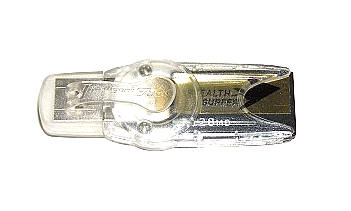

When encased in its plastic USB sheath, the StealthSurfer (SS) is 2 6/8" long
x 7/8" wide and weighs just 0.2 ounces. Inside the plastic USB housing is a
solid state drive ranging in size from 64MB to 1GB. The SS may remind you of the
Intelligent Stick USB Drive
that I had reviewed last year, however you shouldn’t be fooled into thinking
that this device is just a simple memory card. It is quite a bit more.
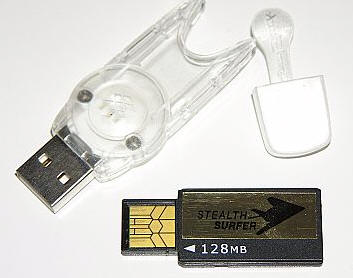
The dismantled StealthSurfer
Built into the StealthSurfer is everything needed for private surfing as well
as storage for the web debris that comes with it.
There are no drivers, no additional software to load, and you can plug it
into any Windows ME, 2000 or XP device. On the flip side, if your workplace uses
NT or an older operating system, then you are out of luck.

Once the device is plugged in, a Removable Disk window will pop up
acknowledging that there is now an additional drive added to the computer…

Clicking on the StealthLock icon will bring up the password screen. My
StealthSurfer arrived pre-registered, I just needed to create a password.
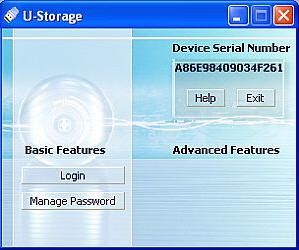

Once I had entered my choice, I was directed to login…
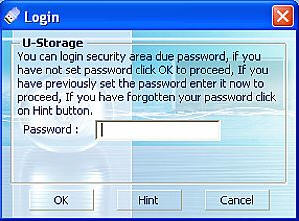

As soon as the correct password was entered, a StealthSurfer icon appeared in
my system tray, showing that it was enabled.

The following window also appeared, which is the actual gateway to the
internet once the start icon is clicked.

However, clicking the Stealth Netscape icon will reveal all of the
system folders and files stored in the SS’s memory, as well as those generated
by any web-surfing session.

Assuming the start icon is clicked, the SS contained Netscape 7.0
Browser will prepare to open and you will see a progress bar…

A Netscape Browser window then opens…and you are now in what can be
referred to as the privacy zone. You know you are looking at it, but the
computer you are accessing the content from has no clue. Amusingly enough, as
the page loads a stealth fighter will continue to take off from the side of the
browser screen.
While in Netscape, I set The Gadgeteer as my homepage (obviously).

It was easy to transfer some of my browser favorites over from Internet
Explore to Netscape, and with that done – I was now able to access my sites from
other computers. However, sitting at my own, I really had no way to prove that
anything I saw while surfing was actually staying on the StealthSurfer, as these
were my regular hang-outs.
First, I used System Mechanic to delete my
computer’s temporary internet storage files and to clean out my cookie file, and
then I decided a sure way to test the device…
I Googled the phrase "bad porn." Yah, yah, I know none of you would think to
do this for the sake of an experiment either, but since I don’t generally go to
such sites I figured this would be a definite way to tell if I was picking up
trash or not.
After looking at a few pages of vapid naked people through the StealthSurfer,
I figured that the cache folder should now have plenty of cookies and other trash. I went into the stealthprofile folder from the
stealthnetscape/Netscape icon, found the cache folder and had a look.

Sure enough, once inside I found 521 new items, totaling over 4MB.

I compared the StealthSurfer’s files to my hard drive’s freshly scrubbed
temporary files, and saw that there was nothing new. Just to be safe, I
did a search of all files, including hidden, for anything that had the word
"temp" or "cache." Nothing new had appeared during the times I was surfing
through Netscape, so it would appear that the device does perform as advertised.
Score a major one for the StealthSurfer.
However, this gadget is not without its quirks…
While surfing, I needed to add a couple of entries in our "Show
Us Your Space" contest. I found that when I tried to open my
FTP program, all of my
settings were gone and the program showed as an unregistered version as it was
closed. This was not the only glitch. I tried to add an entry to my desktop
diet diary
while the Netscape window was open, only to find that all of my preferences were
gone and the program was acting as if I had never opened it before. These
anomalies only occurred while the Netscape window was open, and disappeared as
soon as the window was closed. However, new folders appeared in my
stealthprofile entitled Visicom Media (the FTP program) and Calorie King.com
(the diet diary). I am not quite sure why this happened.

This was the only issue I had while using the StealthSurfer, and I consider
it minor as the problem was resolved the moment I was no longer using the
Browser.
So who is this product going to attract? Well, the obvious clichéd answer
would be those that want to check their favorite porn sites and web-based email
while at work, or people who want to surf sites that would offend their spouses
without getting busted. While the StealthSurfer will definitely please those
folks, it is also a great product for those who need to carry their favorite
sites and needed files with them from computer to computer. Because of its
password protection, it will not be the end of the world if the
StealthSurfer falls into "enemy hands." If you have a need for privacy while
surfing, and if you like the idea of having everything you need to accomplish
that in one tiny gadget, then you should try the StealthSurfer.
You can view the FAQ database
here. The user guide is
here.
Price: $99.95 for 128MB
Pros:
Password protected memory card storage
Built-in browser and cache files to trap all surfing activity
Ability to carry favorites from computer to computer
Privacy
Cons:
Not compatible with NT
Password protection is not compatible with MAC computers
Negatively impacts certain registered programs while plugged in



Gadgeteer Comment Policy - Please read before commenting
Post your comments here on the StealthSurfer.
http://www.the-gadgeteer.com/stealthsurfer-review.html
Just click the POST REPLY button on this page.
While this device sounds pretty good for home use, in a big company all data is passed through a firewall. And if the IT folks are any good, they are producing reports based on traffic, not what files are left on your hard drive.
For example, we produce monthly reports of the biggest “surfers” in the company. And the firewall logs just about everything you’d ever want to know about were they visit.
Big brother is real! 🙂
I agree 100%. As always, the best advice for visiting “questionable” sites at work is simple: Don’t. Do whatever you want in the privacy of your own home, but don’t jeopardize your job by thinking that products like this will prevent you from being monitored.
Of course, a legitimate use for this would be wanting to surf websites and retain bookmarks and history everywhere you go.
But why pay $99.95 for a glorified 128MB USB Memory stick running a fixed version of Netscape? Why not instead buy a normal 128 MB USB Memory stick (starting at $25 at buy.com) and run Mozilla Firefox off of it with this tip:
http://texturizer.net/firefox/tips.html#oth_usb