Product Requirements:
Device:
Microsoft Windows 98, 98SE,
ME, 2000, or XP
1 free USB port
Do you feel lost without a remote in your hand? If there was an Olympic event
for button pushing, would you win the gold medal? Same here! I’m constantly
switching songs on my stereo and have wondered what it might be like to have
that same capability on my PC, when I’m not sitting directly in front of it in
the same room. The Streamzap PC Remote
will let you do just that. While it looks remarkably like your standard TV
remote, this is a USB remote for your desktop PC.
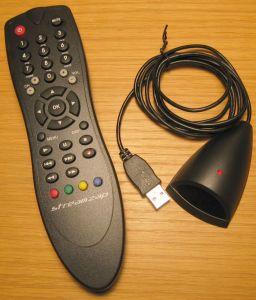
The Streamzap is actually made up of two components. The handheld remote, and
the IR receiver that plugs into the desktop. The IR receiver is a small plastic
blob that plugs into a free USB port. Before you can use it (and before you even
plug it into the PC), you have to install the Streamzap software that is
included on a CD. Installation is fast and easy. A multimedia demo is also
included that walks you through the different features on the remote.
The remote is made of black plastic and is nicely balanced which makes it
comfortable to hold and use. 2 AAA batteries are required to power the remote.
Unfortunately, batteries aren’t included in the package. The remote has 35
individual rubber buttons that are labeled with bold lettering which is pretty
easy to read.
Out of the box, the Streamzap supports the following applications: Winamp,
Microsoft Media Player, ATI MultiMediaCenter, RealOne, RealPlayer, RealJukebox,
SnapStream, Windows Picture and Fax Viewer, Hauppage WinTV (WinTV2000, WinTV32)
& WinTV-Radio, Microsoft PowerPoint, MusicMatch Jukebox, QuickTime, Sonique,
Cyberlink PowerDVD, PowerVCR II, InterVideo WinDVD, ATI DVD Player, JazzSteps
Radio, Ravisent CineMaster DVD, Mediamatics DVD Express, Creative PC-DVD Encore,
Lotus Freelance, FreeAmp, RealMagic DVD, SonicFoundry Siren Jukebox, Xing DVD
Player, TheaterTek DVD, HiDTV Pro, JRiver MediaJukebox, DivX Player. According
to the website, more are being added all the time.
From up to 40ft away, you can control these applications using the buttons on
the remote. I conducted my tests using Microsoft Media Player and Winamp (which
is included with Streamzap). The Play, Stop, Next, Prev, Pause buttons all
worked as expected while the application was visible on the screen (not
minimized). The Volume up/down and Mute buttons work regardless if the
application is visible or not.
When you press any of the other buttons, the Streamzap application will try
to guess which desktop app you’re wanting to control. I did a test having both
Microsoft Media Player and Winamp running at the same time. In this case, it
controlled the application in the foreground.
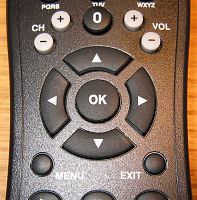
In the middle of the remote is an OK button with four direction buttons
around it. These buttons allow you to move the cursor / mouse around on the
screen. This works ok, but can be frustrating as the acceleration of the cursor
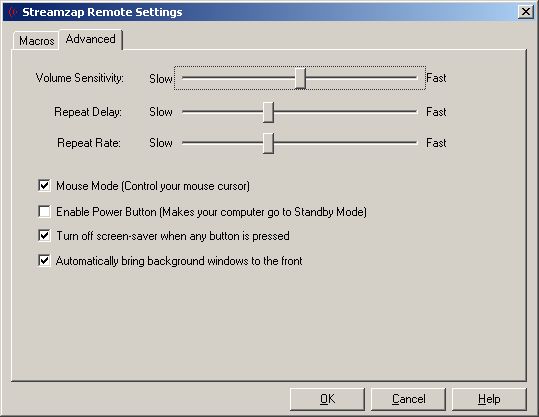
movement almost always makes you overshoot your target. You can change the
repeat delay and repeat rates, but it is still awkward to use. Pressing the OK
button in the center, is the equivalent of pressing the left mouse button on
your mouse. This gives you the ability to pretty much control most aspects of
your PC from a distance. The only thing you can’t do is type or input data with
the remote. Although there is a phone style numeric / alphabetic pad, pressing
the buttons does nothing in the apps I tested during the review.
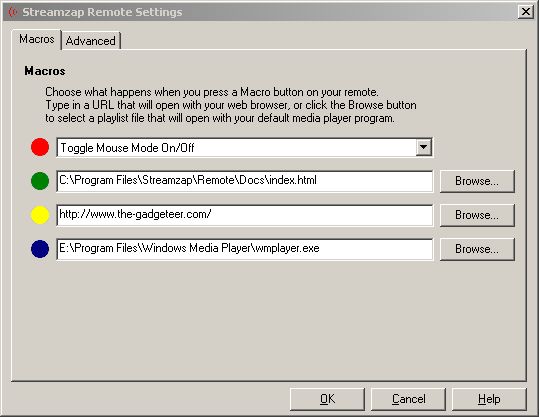
The four colored buttons at the bottom of the remote are user definable. They
can be set to launch a specific application or open your browser to a favorite
website. Too bad that there are only four of these buttons… This remote would
be so much better if there was a macro record mode as well.
Depending on your computer, the power button on the remote can put your PC in
standby mode. Unfortunately, my PC didn’t support this feature.
The Streamzap is inexpensive remote that is easy to setup, and easy to use.
It is not a super gee whiz gadget, but if you need a way to control various PC
applications while sitting away from your computer, but still in a line of sight
to it, this infrared remote just might be a solution to that need.
Price: $39.95
Pros:
Controls a pretty good selection of applications right out of the box
Good range
Easy to setup
Cons:
Only 4 macro buttons
Can’t input text/numbers using phone style pad on remote
Batteries are not included