
Some days it seems as if my desktop is lit up like a veritable Christmas
Tree, and I don’t see it getting any better anytime soon. I have green LEDs
glowing for my desktop speakers, wireless mouse, PPC-6700 cradle and wireless
router. Blue LEDs glow from my external hard drive, iPod charger / card reader
and keyboard, and every other color in the spectrum is represented by my USB
hub. Well, now I can add a couple more lights – hey, it’s all for a good cause
and the more the merrier, right?
Today I am going to take a look at the USB
Geek Wireless
Optical Liquid Mouse, a variation of the other liquid and floating character
filled mice I have reviewed in the past. This one is the next logical step in
the evolutionary chain – it is wireless.
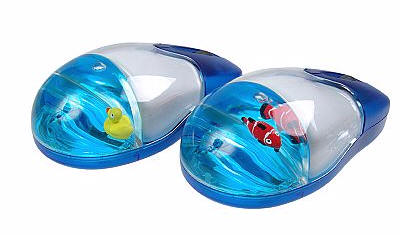
Compatible with any Mac or Windows PC with a spare USB port or two, the
Wireless Optical Mouse may be ordered with a floating rubber ducky or an orange
clownfish that resembles a certain Disney fish which shall remain nameless.
picture courtesy of the USB Geek site
Included in the package is the mouse, a USB receiver…

picture courtesy of the USB Geek site
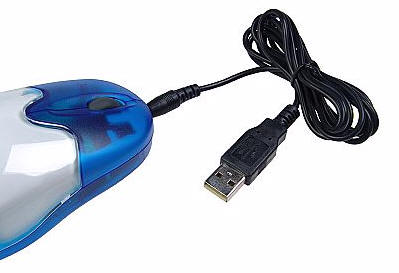
…and a USB charging cable which plugs into the forward end of the mouse.
There is also an instruction sheet which walks the user through the mouse’s
setup.
The mouse is composed of transparent blue plastic on its forward end,
bottom and sides, with clear plastic for the remainder of the upper body. The
rear end, where the user’s palm will rest, has a small rubber ducky bobbing in
the blue tinted oil and water mixture. The mouse measures approximately 4.5"
long x 2.25" wide x 1.5" thick. Without the cable attached it weighs 4.3 ounces.
picture courtesy of the USB Geek site
Before using the mouse, the USB cable must be plugged into a free USB port on
the computer and into the end of the mouse, allowing for at least two hours of
charging. After this period the cable can be removed, and the mouse will be
ready for operation.
Specifications
Interface: USB
Mouse Structure: Optical
Resolution: 800dpi
Radio Frequency (RF) wireless transmission technology
Powered by two built-in rechargeable Ni-MH (1.2V, 650mAh) batteries
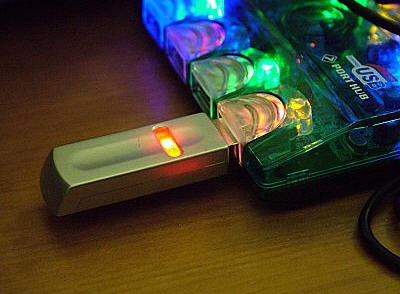
The wireless receiver must be plugged into an available USB port within
approximately six feet (two meters) of where the mouse will be operated. The
receiver has a red LED lighted button on it’s top which shines when it is
plugged into an available port. Here you can see it plugged right into the
colorful
Sprinters USB hub which is kept on my desk. It’s all quite…festive,
wouldn’t you say? ;0)
When the mouse is charged, a connection between it and the receiver is made
by pressing the receiver’s button and by sticking a paper-clip end into the
button on the under side of the mouse.

Once the connection has been established, the mouse can be operated with or
without the cable. This is a very handy feature if the user is forgetful about
regularly charging their mouse – as I can be.
When fully charged, the mouse seems to stay powered for quite a while. I will
generally use mine for a day or two before I will remember that it should be
charged. This can be for periods of use approaching eight or nine hours at a
time off and on each day, and it has not died on me yet.
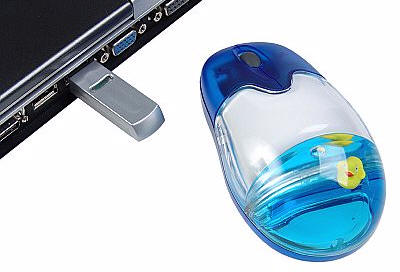
The mouse can also be used with a laptop computer, which makes it a handy
portable wireless travel option.
picture courtesy of the USB Geek site
Probably the best thing about this mouse – besides its reasonable price and
the fact that it is wireless – is the fact that it can be used with or without
its charging cable. I for one am notorious about forgetting to charge the
Logitech wireless mouse I generally keep on my desktop. When its battery dies, I
am hosed – and I will generally have to pull out a second backup mouse which I
keep in my desktop’s drawer for this very purpose. I think it is amazing that a
mouse costing a fraction of its price can be used at any time and in a variety
of configurations.
If you would like to add a wireless mouse to your desktop or portable
computer, and you don’t want to spend a lot of money, then the
USB Geek
Wireless Optical
Liquid Mouse would be a practical and cute solution.





Gadgeteer Comment Policy - Please read before commenting
I lost my usb receiver i need help
Still available in 2020?