
Read my review of the newer Jawbone 2 headset.
When you’re a gadget geek like us, it’s always a quest to find the perfect mobile phone, PDA, computer, gear bag, stylus, etc., etc. It goes on and on and on. We’re never satisfied. We’re constantly searching out the best device and accessories. That’s the way it has been for me with Bluetooth headsets. While I’ll admit that I don’t really use one all that often, I still want the most comfortable and best sounding one I can find. And hey, if I really could find one that matches both of those criteria, I might just use one way more often. Well I’m happy to report that I think I’ve found the holy grail of headsets with Aliph’s Jawbone Bluetooth headset.
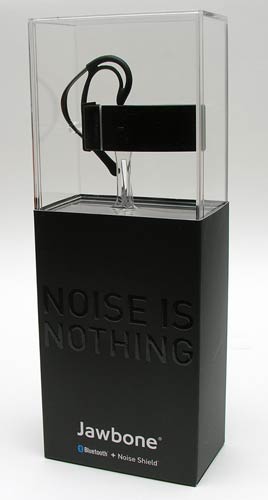
You can tell by the box that it ships in, that this headset is something special. And you know the old saying that you can’t judge a book by its cover? Well forget all that…
Hardware Specs
Weight: 1 oz (with ear hook)
Bluetooth version: 1.2
Battery Type: Rechargeable
Talk time: up to 6 hours
Standby time: up to 120 hrs
Range: Up to 33 ft (10 meters)
Charging time: 2 hours
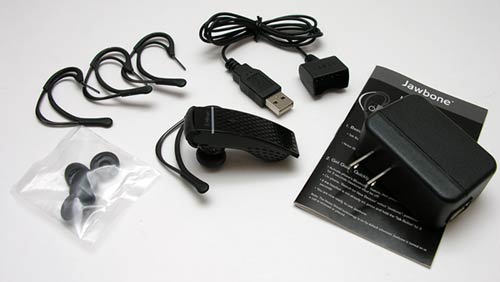
Package Contents
Headset
4 adjustable ear hooks
5 ear pads
USB charge cable
Travel USB Charger
User’s Guide
The Jawbone is a sleek looking headset. Although it looks like lacquered metal, it’s actually made of a light weight plastic. Available in your choice of Black, Red and Silver, I was sent the Black version.
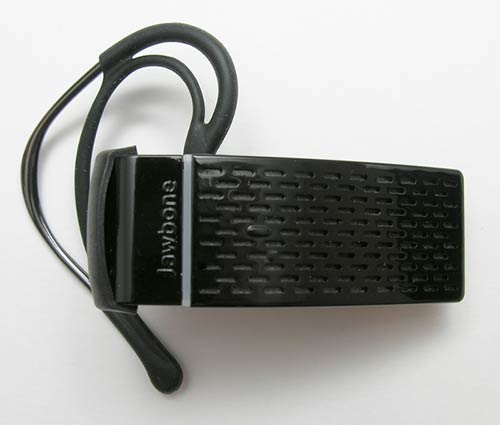
The design of this headset is contemporary without being over the top goofy. The word Jawbone is embossed on the face, but blends in with the design due to being the same color as the plastic. A vertical LED underlines the name of the headset and is also the division between two buttons. What buttons you ask? The buttons are hidden under the plastic. The button on the back part of the headset (over the word Jawbone) toggles the Noise Shield feature, device pairing and also controls volume levels. The button under the main part of the headset is the power button as well as answer call, end call, voice dial and redial.
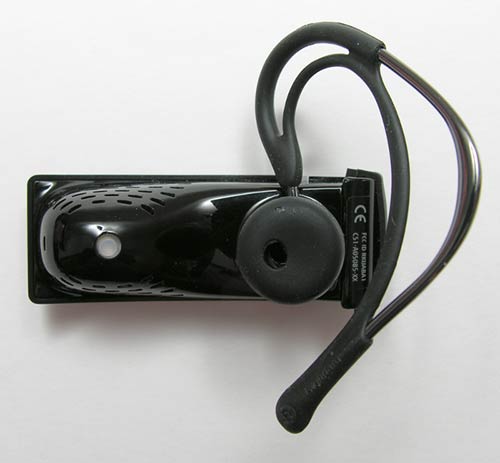
Turn the headset over and you see the ear hook, ear pad and voice activity sensor. The activity sensor has to touch your face. I guess that’s where they get the name Jawbone.
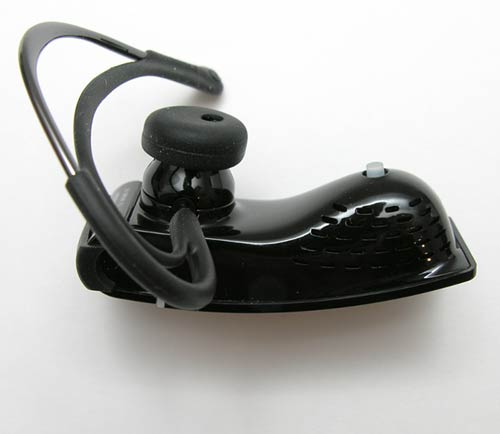
The Jawbone comes with 4 different ear hooks. There are 2 for each ear. The hooks are made of metal with a rubber covering and a flexible band. They are easy to remove and insert. Although the ear hooks are pretty comfortable, I didn’t like that it takes some effort to get the headset situated on my ear. I found it a bit awkward to get my ear through the hook and then get the ear pad seated into my ear. Before I even made my first call, I almost was going to discount the Jawbone because of the ear hook. But then I noticed something…
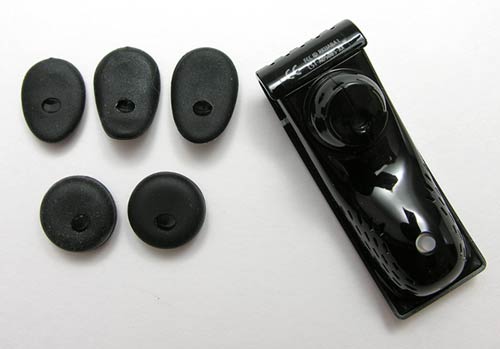
The Jawbone comes with 5 different ear pads. 2 are round and the other 3 are more tear drop shaped.
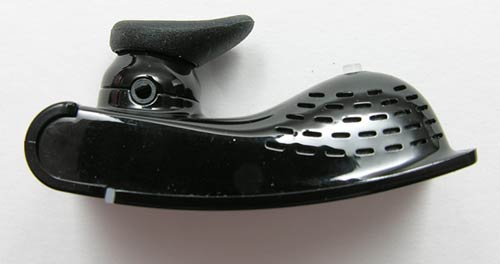
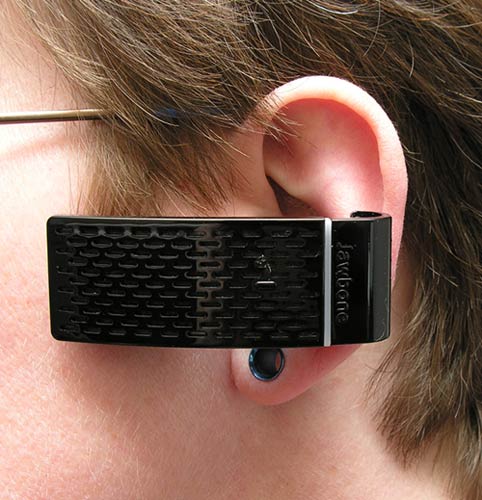
I wasn’t even going to try the oval ones at first, but then I decided to go ahead and did so with the ear hook removed. Eureka! What a difference and no ear hook is needed. I find that I can just point the microphone down, put the ear pad in my ear and then twist the headset up and it’s seated and ready to go in one quick and effortless motion. Nice!
Here is the Jawbone sans ear hook.
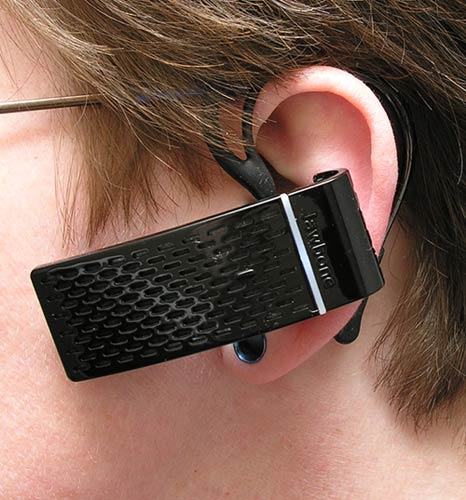
And here it is with the ear hook. Both ways are equally comfortable, but without the ear hook, it’s so much easier to put it on.
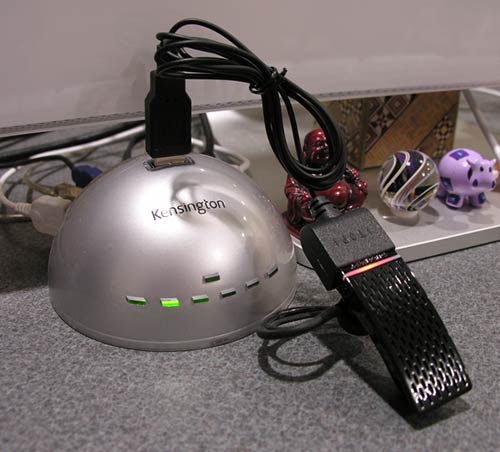
Before you can start using the Jawbone, you’ll need to charge it. The headset ships with a USB cable that has a special connector on the end. This connector mates with the back part of the headset. You can also plug the USB cable into the included AC adapter to charge through a wall outlet.
Ok, time for the sound tests! Below are two audio clips of the Jawbone headset in action. This will give you an idea of what it sounds like to receive a call from someone using this headset. I used the free voicemail / fax service from K7.net for these tests. I signed up for a free account, got a phone number and called it using a BlackBerry Pearl while using the Jawbone headset. The resulting voicemails are then emailed to you. Pretty nifty! At test time, the phone had full signal strength. Click to listen.
Driving Test (152k .WAV file)
Inside Test 1 (336k .WAV file)
Inside Test 2 (476k .WAV file)
Outside Test (272k .WAV file)
The sound tests really show how great this headset is at blocking out background noise. It’s amazing! It’s hard to believe how well it works until you try it yourself. I did other tests where I turned the radio in my car up full blast (mine goes to 11) and asked the people I was talking to if they could still hear me. They had no problems at all. The noise shield feature is on by default, but you can turn it off if you want to by holding down the back button. I’m not sure why you would ever want to do that though. Also, everytime you place a call or power cycle the headset, it turns the noise shielding feature back on.
The only thing this phone doesn’t seem to be able to do is block out wind noise. At least it didn’t do very well with the outside sound test where I was right over my AC unit ;o) Another issue is that this headset does not have up and down volume buttons. The headset has special software that adjusts the volume automatically whenever it needs to be raised or lowered. There are 2 ways to adjust the volume manually though. You can adjust it directly on your phone, or you can use the rear button (under the Jawbone name) to raise the volume up one level at a time. Each time you press the button, the volume will go up one level (there are 6 levels). Once you reach the maximum level, the next press will start the volume at the lowest level. I found the automatic volume levels to be just fine for me.
Everyone I called with this headset said that it was the best sounding one that they had heard me try so far. I agree and have just made the Jawbone my new favorite Bluetooth headset. Get one, you won’t be disappointed!
Beelink EQI13 Pro Mini PC W11 Pro, i5-13500H(12C/16T up to 4.7 GHz), 32GB DDR4 500GB SSD with Intel UHD Graphics Built in PSU WiFi 6/BT5.2/2*1000MB/S LAN, Support 2*HDMI Dual Display Mini PC Computer
(as of April 15, 2026 11:44 GMT -05:00 - More infoProduct prices and availability are accurate as of the date/time indicated and are subject to change. Any price and availability information displayed on [relevant Amazon Site(s), as applicable] at the time of purchase will apply to the purchase of this product.)
Getorli Mini PC, AMD 3550H(Max 3.7GHz), Mini Computers 16GB DDR4 RAM 512GB SSD, Mini Desktop Computer 4K 60Hz Displays/Dual HDMI/Type-C&USB3.2 Ports/LAN RJ45/WiFi 5/BT5.0 for Home/Office/Business
(as of April 15, 2026 12:08 GMT -05:00 - More infoProduct prices and availability are accurate as of the date/time indicated and are subject to change. Any price and availability information displayed on [relevant Amazon Site(s), as applicable] at the time of purchase will apply to the purchase of this product.)Product Information
| Price: | 119.99 |
| Manufacturer: | Jawbone |
| Retailer: | Jawbone |
| Pros: |
|
| Cons: |
|

Gadgeteer Comment Policy - Please read before commenting
Post your comments on the Aliph’s Jawbone Bluetooth Headset review.
http://www.the-gadgeteer.com/review/aliph_s_jawbone_bluetooth_headset
Just click the POST REPLY button on this page.
I’ve had one for a month or so now, and it is great. I bought it at a large Cingular store, and the guy said that everybody who works in the store used it. I called around to 4-5 stores before I found one, and they had only one and held it for me for two hours until I could get there.
Only thing missing is a case of some type because I don’t use the headset regularly and would feel more comfortable if it were in a hard case when in my briefcase.
Leo
I’ve been patiently waiting for this review. The looks of the Jawbone were almost enough to inspire ordering it. Now I’m sold. Can hardly wait until it arrives. Thanks,
i have this headset too and really like it as well. just like you, i found that using it with an earloop didn’t work for me – i couldn’t get the loop to sit properly with the earpiece positioned properly, or vice versa. i removed the earloop and now use just one of the oval-ish earpieces and it’s perfect.
my only gripe is the rubber cover for the charging points – it came off so easily in my purse or in just handling it. in fact, i lost it about 3 weeks after i got the headset. i’ve been meaning to write to aliph to suggest that they fix that, and to see about buying a replacement cover. 😀
bjs:
Let me know what you think of the headset after you get a chance to use it 🙂
r6girl:
I forgot to mention in the review that I pulled off the little charger boot and stuck it back in it back in the box. I don’t think it’s really needed and it detracts from the look 🙂
Julie,
Thanx for this review. I’ll be ordering my Aliph headset asap. Have you tried it with the Treo 680?
Hellenek:
No, I haven’t used the Jawbone with my 680 as I’ve been using the Blackberry mostly the past 2 weeks, but I doubt the results will be much different. 🙂
i have a treo 680 and the jawbone works perfectly with it! i only wish the treo had voice dialing (built in – i tried the free trial of the voice dialing software that came with it, but didn’t like it) to utilize the jawbone even more…
Julie,
Thanks so much for reviewing this. I can’t wait to go buy one. Waiting for Amazon to get them, because I’ve got boat loads of gift certs on their site.
One think I remember reading in the consumer reviews on Cnet, was that the metal part of the ear loop can be bent, and it seems that once done people found it very comfortable.
As LeoB mentions, it would be nice if it had a small compact carry case. I travel a lot and I really don’t want to stuff it into a tight jeans pocket for fear of ruining that little jaw sensing rubber nub. Hopefully they will make a nice plastic case for it so you can safely pop it into a pocket, briefcase, the security bins at the airport, etc.
Steve
My RED Jawbone arrived yesterday. It is everything Julie said it was. Contemporary, functional, elegant, comfortable…. I could hardly wait for it to charge. I have an old Motorola Bluetooth that doesn’t work well with my Treo 680 so was hoping the Jawbone would be better. It is excellent. Paired easily. Fits perfectly in my ear. Easy to use. No voice fade. No noise. My search for the Holy Grail of Bluetooths is over (at least for a day or two). This is the best.
bjs:
Great, glad you like it too! 😀
I’ve had the Jawbone since Dec 30th. Bought it at Cingular store for half price with my FAN discount through work. It is an excellent headset, but I wish they made a holder/case for it. I broke several of the ear loops while carrying it in my pocket. I had to purchase additional ear loops from ALIPH and I now keep the headset in my car. My everyday headset is a Samsung WEP200. The WEP200 does not require an ear loop and I carry it in its charger/case. This eliminates any chance of it getting turned on while in my pocket. I wish the WEP200 and Jawbone could be merged into one! Small Size, case and noise cancellation in one package.
Excellent! Now this brings us to recommended cases. I’m based in Africa and cannot expect to buy replacement parts.
Any ideas?
I’m going to talk to the folks at Aliph and see if they might have a solution in the works. 🙂 If not, I think I can probably find something readily available to recommend. It must might take me a few days to find one.
Julie,
Treonauts have reviewed the Nite Ize Tooth Ferry Bluetooth Headset Case (http://blog.treonauts.com/2007/04/nite_ize_tooth_.html) and used this headset as an example.
Does it protect the the bits that easily break? Would you use it?
Hellenek:
The case is interesting, but with the earpiece just hanging out there like that, I know I’d accidently rake it on something and break it off. I’d rather have a hard case for mine.
The folks at Aliph have not replied to my email asking about a storage solution…
I’ve been looking for a case solution for carrying around the rather large headset. My Krussel headset holder is way too small and not very protective (even less so than the Nite Ize holder mentioned above). While I haven’t come upon a perfect solution, I’ve been using the hard case that came with my Ultimate Ears headphones as a temporary solution. Here’s the link: [HTML]http://www.ultimateears.com/superfi/super-fi-metallic-case.htm [/HTML] It is slightly larger than I’d prefer (and why I never used it to carry the headphones), but it does work.
I noticed on the Aliph website that their wired “PC edition” Jawbone, comes with a carrying case. There are no pictures of the case, but I wonder whether it would work with the Bluetooth Jawbone, too. I hope you can find out when you speak with the Aliph folks.
I finally heard back from my media contact at Aliph. I’m afraid that I don’t have good news though. They can’t recommend a case for the Jawbone… 🙁 I’m going to keep looking as there has to be something out there that will work.
I am looking to buy my first bluetooth headset and am very interested in the Jawbone. Almost every review I have seen likes it (except maybe for the fit), but criticizes it for its inablity to handle wind. How meaningful a criticism is this? Are there other headsets that cancel wind noise significantly better? Do cell phones (without a headset) tend to handle wind better? Or is this a generic problem which has not yet been solved by any means?
Thanks.
SgtScamper:
It’s only meaningful if you tend to walk around talking to people when it’s windy 😉 Yes, it’s true that the Jawbone doesn’t really block out wind noises. The only headset that I know of that touts that ability is the Gennum nXZEN:
http://the-gadgeteer.com/review/gennum_nxzen_plus_5500_bluetooth_headset
I’ve had a Jawbone headset for about a month now. The performance is excellant, the “wow” factor is cool, however, I am not impressed with the construction. Recently I could not get the charger to connect and noticed that the black plastic “crown” where the charger connects has come loose. Pretty dissapointing for something that costs as much as the Jawbone.
So I am back to the workhorse, a Plantronics Voyager until I can get to the Cingular store and return. 🙁
Julie,
I’ve had my Jawbone for about 3 weeks now. I’m still struggling a bit with the ear seating. Trying to get it to fit in my ear comfortably has been a challenge. Anyway, I hope to work that out soon. The real problem I’m having with the Jawbone is wind noise. Wind noise seems to be a major drawback. And, for me, that’s a big one, because I drive a convertible. Actually, my driving a convertible is the sole reason I decided to invest in the Jawbone in the first place. So, to say the least, I’m in a bit of a quandary as to whether to keep it or send it back. So, that’s my take on it.
Tampares:
Yes, unfortunately that is the primary drawback of this headset. It is excellent at blocking even the loudest noises, but is helpless when it comes to wind. 🙁
Wait, are you seriously telling me that you tried to use the charger <u>through</u> the plastic cap? Plastic is an electrical insulator! Furthermore, that cap was designed to come off. You’d have noticed this if you saw the intended metal contacts beneath it. I registered this account just to post this because your story was so unbelievable. Add to that the fact that nobody here called you on it yet. The Jawbone is fairly advanced stuff, but not so groundbreaking as to defy the laws of physics 😉
I got a Jawbone with the hope of reducing the ambient noises on a phone call. I have two daughters (1 and 3 years old), a Miata convertible, ride my bicycle and I am a consultant who ends up getting calls at all hours – but usually when I am in restaurants or Starbucks (is that a restuarant or does it deserve a special category?). So there is constant noise around me, except for the little time I am actually locked in the office, when I don’t need bluetooth. I end up with the headset in my ear 60-80% of the time I am not in the office or at home.
So I needed a very comfortable headset that blocked out noises. And it had to be easy to use one-handed, as I am usually carrying a child or a phone or a bag or something else, if I need to be using the BT headset.
My phone is currently a Treo 650 with it’s poor bluetooth performance. Previously, I used the Jabra FS200, Moto HS810, Jabra FS250v and Scala 500. I was quite happy with the Scala, but some of my callers could not hear me so well, especially in noisy environments.
So I now have the Jawbone, and I am quite disappointed with it.
-Ergonomically, it is a mess. The earloops are big and due to the metal/rubber construction get in the way of getting it on the ear. It absolutely requires two hands if you use the loops. The buds do not work alone in my ears – they are all the same diameter, even if three of them have different size “horns”. So if your ear canal (actually the outer portion of the ear) is a different size from the diameter of the bud, it will not be a good fit.
Even with the loops, the earpiece tends to rotate, as it is so big and unbalanced (mass at the end of a pendulum). I have rebent several of the loops to try to improve ease-of-insertion, or ability to stick in ear, but those two objectives are at odds with each other. Because the loops are not fixed, but are on a spring-mounted swivel, they cannot be precisely adjusted. In fact, the net effect of the loop spring is to push the earpiece away from the ear itself. If one of the horned buds is used, this can help to lock the earpice in place, but this is a tenuous assertion – I am trying this way now.
I have also tried several sizes of Jabra eargels, but these did not work for me, as they expanded too large when placed over the Jawbone bud end. Jabra eargels work great from me in the Jabra earpices but on the Jawbone, they are 10-20% too wide, as they are stretched out.
– The Noise Cancellation does not work! Sure, I can test it out by turning it off, and this does make a huge difference. But with it on, all of my callers can still hear my children singing in the background, the road noise in the car and the baristas calling out the orders. Even when I am not talking, and yes, the silly white jaw button is pressed into my cheek.
Back to back with the Scala, the callers could not tell the difference. So what is the point – for me, the noise cancellation on the Scala is as effective as the Jawbone. Those two are still better than the Motorola or the Jabra pair, but not a huge difference.
– Wind performance is horrible. This earpiece sticks out so far from my face that it is much more in the windstream than any other earpice I have used. When it gets windy, the headset seems to become half duplex – I cannot even listen to a conversation if wind is hitting the microphone(s). Among the BT headsets I have used, the Motorola HS810 was the best at wind performance, mostly because it’s microphone is closest to the face. The Jawbone is unusable is any location with more than 10 mph of wind, so playgrounds, the miata, and the downtown canyons of any city are pretty much off limits.
– Ease of use is bad. I cannot put this headset in my pocket, as I would never be able to get it out to answer a call. The ear loops grip to everything in my pocket and also fall of easily. It does turn on relatively quickly (3 seconds on a button), but does not always immediately pick up a call, so I have to answer with the the phone to be sure of answering at all – then turn on the headset – hoping the caller can wait. So this is another earpiece that has to stay on my ear if even one hand is full (remember the kids..) The Motorola is the clear winner in this category – it is very small and turns on immediately by opening the boom – and always picks up the call within a single ring.
BTW, altough I may love gadgets, I do not enjoy displaying them. So I do not have any cases and everything needs to fit in my pockets (Treo included). I feel self-conscious about having an earpiece all of the time, and the Jawbone is a big ostentatious one.
There is no audible indication of common actions. For instance, I frequently redial, which requires two button presses on the Jawbone. But you get no indication on either of the presses or when the redial actually starts. Only if you hear ringing 5 seconds later do you have any feedback. If the earpiece is in your ear, you have no idea if it is on – on the Scala and Jabras, a single click of the multifunction buttons will beep – nothing on the Jawbone (I have a Treo 650 which does not support voice dialing). If you hold the call button for a few seconds you can turn it on or off, but you have no idea which – the same tone is used for turning it on or off – you would have to take the earpiece off and look at it to see if the light flashes white (on) or red (off) while you press the button.
-Summary: I will try the Jawbone for a few more weeks (I have had it for two now), but I will probably go back to the Scala as the fulltime earpiece. When I switch phones to the Nokia N75 (one is on order), I will likely move to the Motorola HS850 or H9 – they do not work on a Treo.
Julie – you probably like the Jawbone because the earbuds work for you. If forced to use the earloops, this earpiece does not provide the same experience.
chull:
Wow, I’m sorry that you don’t like the Jawbone! I am afriad to ask if my review prompted to buy one. I would hate to be the cause of your frustration.
I still love mine and yes, I would agree that because the earbud fits my ears, that I’m happier with it than if I had to use the ear loop.
I also agree with you that the Jawbone is useless for cutting out wind noise. But I’m really surprised that the noise cancellation feature isn’t working for you. Did you listen to my sound tests? I wonder if you would try some similar tests and see what happens. Maybe the nature of the noise that you’re trying to block is the problem? I’m curious… Maybe the Jawbone doesn’t know how to block quick random noises unlike constant ones.
I did indeed listen to your tests. But more importantly, I recorded voice mails to my own phone using the Jawbone and the Cardo Scala 500. For the tests, I had music playing softly in the background, I was drumming on my desk with my fingertips, and there was a truck idling outside my double-insulated second-story window. This was a very quiet environment compared to outside or Starbucks.
Jawbone – Very good, but with a whistling sound overheard that was not in the source. Could not hear music, or truck, but the drumming was heard faintly.
Jawbone with Noise Reduction off – Music and truck both heard quite clearly, although drumming was not heard. I would not want to make a business call in this environment, and this was my normal office (including the drumming).
Scala – Also good, with no music or truck. The drumming was more pronounced than the Jawbone, but still acceptable. But there was no whistling sound. Nearly the quality of the Jawbone.
In summary, I can attest that the Jawbone nose reduction does work, but it does not provide substantial benefits over other headsets with noise reduction. And if wind is viewed as a noise, then the Jawbone fails.
I have not tried the same controlled tests in very noisy environments, but I can attest that my wife was able to hear our daughters and the Barista again this morning, so I would have to rate that environment a failure. I told her that I was already in the office, and although she was topdown in the Miata on her way to work (listening through her SE T610/Moto HS810 combo), she heard the Barista from 30 feet and knew I was pulling her leg. A few seconds later she heard our one-year old and offered to drop the call, as it sounded like I had my hands full. This is not the impression noise cancellation technology is supposed to make.
BTW, you were not the reason I have the Jawbone. My father read all of the reviews for it, and thought that I needed this, so he bought it for me for my birthday. I was always calling him on the go, so he thought this would help.
chull:
Well it sounds like you are giving the Jawbone a thorough test. I’m sorry that it is not working out for you.
I purchased a brand new Jawbone at my local Cingular store yesterday. I find that the Charger cable will not stay connected. There are other reports of this on the internet. So, I contacted Aliph via their web site. This was the response:
“It sounds as though you may have a damaged charger cable. Because of the wide range of usage patterns, we do not cover the charger under the warranty plan.”
They did offer to inspect the charger cable if I sent it to them, at my expense.
So beware – if you get one with this problem, you’re on your own!
William
Chull, nice information. I have a Moto H700 and just bought the jawbone to test it out. I feel the same as you do. Also, mine fell apart the 2nd time I charged it. When I pulled off the charger, it came apart!
I made serveral calls to the same person trying both the H700 (which uses motorola’s noice cancellation) and the jawbone. Using the jawbone with noice cancellation off, the motorola performed better. With the jawbone noice cancellation on, it was slightly better than the motorola, said my friend on the other end. BUT, it’s super hard to use, hard to turn off and off, and trying to answer a call fast when it’s in your pocket, well, you end up missing the call.
I do have a question for you though. I also have a convertible, and you think the H700 would perform as good as your HS850 did? They are pretty similiar. Also, why not got with a H700 for the new phone that’s on order?
Thanks for your review. I just got a Jawbone today. However, I don’t believe it is working correctly. When I talk on it, I hear an echo of myself in the earpiece. There is no echo on the other end. Also, the noise cancellation has some effect but not a lot. I can hear the music quite easily and it seems to pulse in and out. Does this sound like a defective headset?
It does sound like it might be defective. I never noticed that type of reaction with mine.
Have to say that I really wanted to be happy with this Jawbone after the reviews and putting down the cash. The fit was just completely aggravating!
I found the fix it trick using the eargels, and it worked great for a week or two, then the eargels ripped and after replacing I found (in my experience) these last 1 week on average and I can’t just keep buying them over and over.
The “wind” issue really shocked me. I figured “Military Grade” noise cancelling would take out the wind noise at least as well as the other ones I have owned.
It would be great to find an earpiece that I can use and be functional and efficient.
I am much like the previous poster with the same problems:
Don’t like hardware hanging off my head; small or inconspicous is better.
Fit is as important as quality.
As a Construction Engineer for the City of Fort Worth, I have a wide variety of greatly varying conditions I wear it in, from on the jobsite with heavy equipment running, traffic whizzing by, yelling and carrying on of the workers (sometimes I really don’t want what a construction worker is yelling across the jobsite to carry over the call, at times it can be very colorful language). The other end of the spectrum is in my office working on the computer or running a pre-construction conference, I need it to work and be practical and secure/comforatable enough to allow me to use it all day.
Anyone PLEASE have a suggestion? There has to be one out there at some price that will do it all.
Thanks for helping a newbie here on gadgeteer!
I ordered one from Aliph last week. So far I am very happy with it. All my coworkers have commented on how clear I sound.
I ordered one for my engineer and one for my wife, they just got them today and are like kids at Christmas!
I spent some time bending and twisting the ear loop to make a perfect fit, all was going well until I tried to bend the wrong spot and snaped the very end off the ear loop! So, I tried it without the ear loop and it works fine for me, I just need to get used to it.
Noise reduction is great. I have kids and you can hear them as clear as you can hear me. No magic here, they still need to be quite while I am on the phone! However, if they are in the other room people only hear me.
Noise from the car, train or on the street is greatly reduced and in most of my tests no one knew I was not in my office.
I would say it is 80% effective which is better then anything else I have used.
Update on my problem.
I contacted their customer service at Aliph and they responded back via email fairly quickly. They determined that the Jawbone is not compatible with my phone and service. I have a low end Nokia and Verizon. Not sure if other phones on Verizon would work. So they asked that I contact their return number and get a RMA.
It seems that some have had differing experiences with the Jawbone Bluetooth.
I have used a variety of Bluetooth Headsets for the past 2 0r 3 years.Usually in my auto with an older Nokia phone. I place the phone on the dashboard with it to automatically answer after 2 rings when I say “Hello”.
All of the Bluetooth Headsets worked fine inside the auto. However, if inside a restaurant or outside some people had difficulty understanding me and usually I had to walk to a quiet corner or an isolated place.
I had not yet read your review, but read reviews of several other writers that gave the Jawbone rave reviews. I purchase the Jawbone a few months ago and experienced some of the gripes in your threads. I had to try a different gel earpiece and found it difficult to put on. however, with a little practice I can place it on with one hand.
I don’t ride in an topless auto or stand over an air conditioner during my calls.
However, I placed test calls to friends in Japan and Taiwan. During these tests I stood next to a road with busy truck traffic and in extremely noisy restaurants. In all cases the listeners reported dramatic changes with the Noise Shield “On” or “Off”. With the Shield “Off” I could not be heard as with my other Bluetooth Earpieces. With the Noise Shield “On” I was asked if I had gone inside to a quiet place.
After the test to Japan to an engineer, he answered, “You have a winner there”.
In addition I have had none of the breakage or other problems some others have experienced.
As a Registered Professional Engineer in the State of California I can state without reservation that it works for me.
William
Gadgeteer did a review of the Cardo Scala 500 and gave it their best rating.
Compared to the Cardo Scala and a Motorola H700, how does the Jawbone compare in sound quality, battery life, and size?
Thanks in advance.
EDIT: Looks like you answered those questions here: http://the-gadgeteer.com/review/cardo_systems_scala_700_bluetooth_headset
The Jawbone is the winner now…
Looks like I still won’t go wrong with the Cardo.
fil:
Yes, I would say that the Jawbone has better sound quality over the Cardo. Hard to tell with battery life since I tend to charge often.
Thanks Julie.
I had a Cardo Scala 500 for a few months and then lost it.
The Motorola H700 just seems pretty to me and has great reviews on CNet, so it was on my list until I read your Jawbone review.
The Jawbone just seems a little expensive since I’ve already lost 2 Bluetooth headsets.
Is there a way that others have made sure that they don’t lose these things?
I just received my ( actually my wife’s) Red Jawbone, and while charging it, the connection came loose. I used a rubber band to hold the earpiece in the charger. Did a Google search and found that several others had the same problem. Also,they had a hard time getting satifaction with Jawbone Cust Service.
I just called Jawbone (Aliph) and told the lady in Cust Ser about the problem. No hassle, no problem. She said that it was probably a bad charger, took my name and address, and said that a new one will go out maybe today, but no later than tomorrow.
If anyone had a hard time getting results, I might suggest calling back and maybe geting a different person. I haven’t tried it yet, but as far as I am concerned, they stand behind their product.
I bought a Jawbone and am returning it after only a week of use.
QUALITY
——–
Very poor.
1. Rubber cover for Charging Hole–Flimsy rubber that I can see coming loose and losing. This thing is a complete waste.
2. Swappable Ear fittings–require a 1/4 turn connection and was flimsy. I can see these things breaking in a short period of time.
3. Over ear hangers–made of rigid metal and a rubber band-like custom fit…I don’t even know where to begin on how weird it was to fit these and then to consistently put on and take off this headset. It’s just weird. I’ve used Cardo Scala and Moto H7/8xx series headsets that were natural to wear and take off, but the Jawbone was ear gymnastics trying to wear it.
SOUND QUALITY
—————-
Everyone that I spoke with thought that I sounded tinny and they also sounded odd.
There always seemed to be a constant wind sound as others have mentioned.
FIT
—
This headset was just BIG, bulky, and ugly.
I looked like a geek wearing this HUGE rectangular device on my face.
I also mentioned above how odd it was to put on and take off this headset. It was unnatural feeling.
As for bulky, it was a combination of the ear gels and how far it protudes or is stuck in your ear that I didn’t like.
OVERALL
———
I’m going back to my Cardo Scala 500 or check out the 700.
The $100 price I paid for this headset was not worth it.
Hi – Ive just bought one for my Nokia N95 and two weeks later taken it back. When it works it is really great but for me I was constantly having to tweak its position to stop it clipping my voice at the end of sentences.
The other fault is then I often like to turn on the loundspeaker on my phone when I am in the office or wish to share a conversation and the Jawbone always re-connects after a few seconds meaning you have to power off to work like this.
My last gripe is in the UK they have chosen to resell though Car Phone wharehouse which limits supply and has bad customer satisfaction. Two months and many phone calls later they still have not refunded me.
I am so looking for the a great performing headset – I thought I had found it….. time for the Germans to step in
I’ll say it again, I steer quite clear of awkward and un-adjustable earpieces. Thanks to everyone for the reviews and feedback!
I like my Jawbone better than most I’ve used (and returned).
Pros: The sound quality is good enough that it fools people into thinking that I am not on a headset. Pretty comfortable. In Washington State it becomes manditory to wear a headset while talking on a cell phone while driving after 7/1/08.
Cons: I’ve had two ear hooks break just swinging them onto my ear. Not forcing them the hooks broke right at the join between the headset and the hook. That part of the hook is not metal (the earhook is) just a tiny slice of plastic. Now down to my last two hooks. Unlike Jabra or Plantronic, you cannot purchase replacement hooks for cheap. Doesn’t come with case of any kind so I use a small camera case and it stores my charger too. Does not cut wind noise, one of the main reasons I bought it.
Skip Jawbone if you want to use this on XP (or will want to make Skype/SIP/VoIP calls on XP). Even XP SP2 doesn’t support Bluetooth headsets, and Jawbone has elected not to do what most other manufacturers do (license and release the third-party Widcomm driver).
So it won’t work on XP; Jawbone support says “We do not have an XP SP2 Widcomm Bluetooth driver available as we do not support PC/MAC compatibility at this time.”
No good or bad blame, just info that you should know before buying.
Thanks for a great review! I use the Jawbone 2 with my LG VX10000 and I love it. My jawbone offers the best sound and it fits my ear perfectly. I use this along with the Discovery 925 from Plantronics and I think the sound is better on my Jawbone for sure.
I wasn’t aware that it won’t work on XP, and I’ve heard rumors that it won’t work for multipoint, but I know that it does work for multipoint through my personal use. I wish it came with a carrying case, but other than that I’m just so pleased with my Bluetooth.
jawbone headset
The Volume on my Jawbona will not increase. Very hard to hear. Had good volume for about 3 months. Now everything sounds like the volume is down to one or 2. Can I adjust volume? Please Help Thanks!
I really like the Jawbone I that I own, except that as Leo pointed out on 3.31.07, it really needs to be protected in a briefcase. I use the long earbud and I’ve already snapped 2 of them off (rubber separates from metal bezel), along with having both large earloops snap off. Aliph was extremely generous offering one set of replacement earbuds (can’t get multiples of the same size, only one original 4-piece kit) as a courtesy. They’ve also apparently had a quality control problem with the earloop wire diameter where it enters the body of the unit, so available replacements are limited in quantity (which is the task that brought me here now). I’ve just called Aliph and the very pleasant customer service rep there is sending me one replacement earloop (Thank you Katrina!).
I just saw one video on AOL regarding replacing the earloops, and the poster quoted the poor Aliph customer service. My experience in two calls separated by 6 months or so was exactly opposite. They’ve been professional, gracious and helpful to me.
I love my jawbone bluetooth head set, it’s one of the finest products I have ever bought! It works great, the sound quality is amazing, and its extremely comfortable. I found a great deal on one at http://www.BuyJawboneBluetooth.com . Now I can drive and talk with no problems.
I really need a op manual for my jaw bone, can anyone help??
I realy need a ear hook for my rigth side,both of mine are broke,where can I buy one? or someone has extras one and want to sell,mail me,thanks,Jose.
I can’t recommend any Jawbones, after having the first two (among various other high-end, low-performance BT headests).
*** FOR CONVERTIBLE DRIVERS ***
All I can recommend is the Shure Quietspot boom mic headset (with the small foam thing on the end of the boom). Yes, it’s wired, so you look like a dork instead of a prick. Is that worse? You don’t have to charge it, it costs less, and it actually DOES what all these expensive bluetooth headsets only claim to do. I drive with the top down *on the freeway*, and people don’t even know I’m driving at all.
It has a 2.5 plug, so you might need an adapter. Also, it’s only available at a limited number of locations (not Amazon, but I think the Shure website still sells it).
I have used my jawbone bluetooth on occasion. Everytime I use it, it doesn’t hold a charge for very hold. It’s suppose to stay charged for at least 4 hours; I’m lucky if I get a half hour. I’m not convinced on this bluetooth. As far as I’m concerned it’s a piece of junk
Why doesnt my iPhone 4 pick up its signal doesn’t even acknowledge it’s there