
See my review of Apple’s 2ng generation nano here.
09/20/07 Please also read my review of Apple’s 3rd generation iPod nano fatty.
It’s no secret that I am a card carrying member of Apple’s cult of iPod. Although it took me awhile to become inducted (my first iPod was a 3rd generation model), once I did, I’ve remained faithful. I followed up my 3rd gen unit with a 4th gen model and then more recently with a shuffle. I was never too interested in the mini as it would not hold my entire music collection (38gb and growing), and the Photo versions didn’t have a big enough hard drive capacity to make me want to upgrade. But 20 minutes after I saw the nano, I placed an order for the 4gb version. To heck with the fact that it would only hold a small subset of my tune library. It was sexy, and I had to have it. I just told myself that most of the time I would listen to my newer tunes anyway ;o)
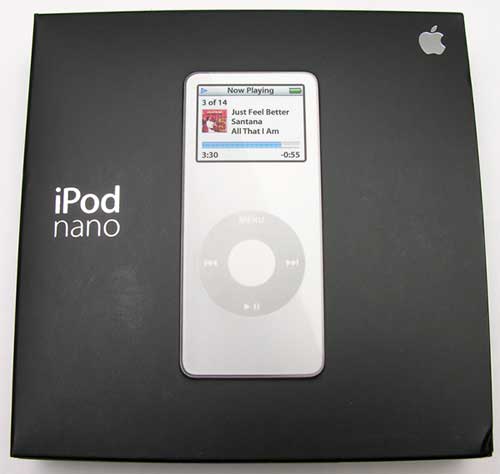
Hardware Specs
Display: 1.5 in. (176 x 132 pixel) diagonal color screen with LED backlight
Storage capacity: 2GB or 4GB flash drive which holds 500 to 1000 songs in 128-Kbps AAC format or up to 25,000 nano-viewable photos
Audio formats: 20Hz to 20,000Hz, AAC (16 to 320 Kbps), Protected AAC (from iTunes Music Store), MP3 (16 to 320 Kbps), MP3 VBR, Audible (formats 2, 3 and 4), Apple Lossless, AIFF and WAV
Headphones: Earbud-style headphones with 18-mm drivers using Neodymium transducer magnets
Frequency response: 20Hz to 20,000Hz
Impedance: 32 ohms
Operating temperature: 32-95 degrees F (0-35 degrees C)
Non operating temperature: -4-113 degrees F (-20-45 degrees C)
Relative humidity: 5% to 95% non-condensing
Maximum operating altitude: 10,000 feet (3000 m)
Power and battery: Built-in rechargeable lithium ion battery with playtime up to 14 hours when fully charged
Size: 3.5 x 1.6 x 0.27 in.
Weight: 1.5 oz
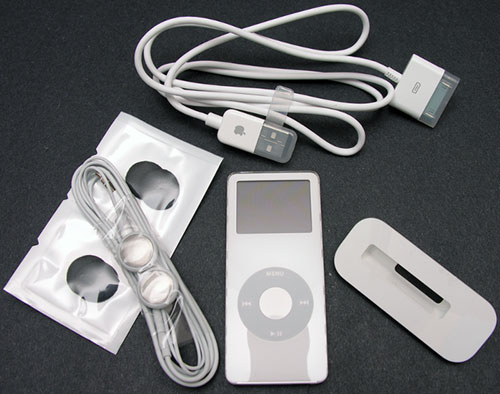
Package Contents
Earbuds with 2 sets of foam covers
USB cable
Dock adapter
User’s Guide, warranty info
iTunes software on CD
2 Apple stickers
Yes, I’ll be the first one to admit that I’m a sucker for sexy hardware. Wave something sleek and shiny in front of me, and I’m a goner. The nano definitely fits that description. It is amazing that they could fit a color display, 4gb of flash ram, full size stereo earphone jack and a nice sized touch wheel into such a thin little package.
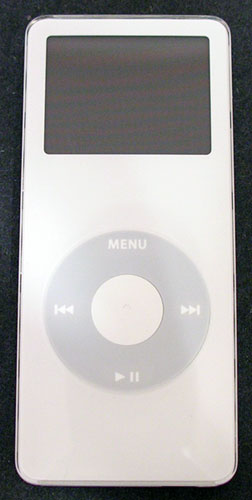
Like all the iPods that have come before (well except for the shuffle…), the nano is gorgeous. In my opinion, it looks like a full sized iPod that went on the South Beach diet for a few months. When I compare it to my 4th gen iPod, it has the same milky white face (there’s a black version of the nano too…) with a shiny chrome back. And just like the previous models, the nano is a fingerprint / smudge magnet. And if that weren’t annoying enough, the nano seems to scratch even more easily that my previous players. I just noticed tonight while talking product pictures that my totally pampered, less than 2 week old nano already has scratches on the display. :o( I knew it would be inevitable, but jeez! I’ve had it in a soft leather pouch the whole time. It really would have been nice if some sort of protective sleeve/case would have been included with this player.
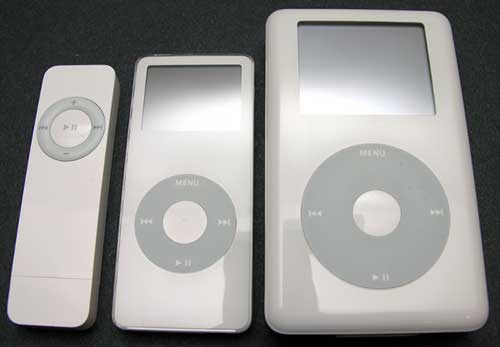
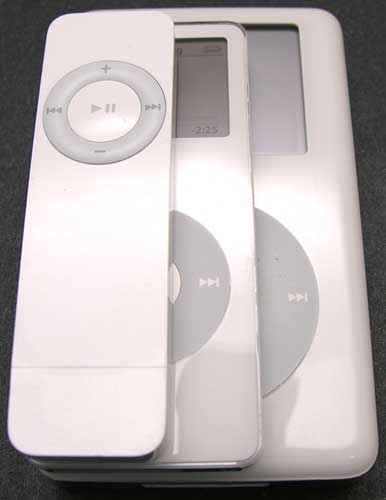
Left to right: shuffle, nano, 4th gen iPod
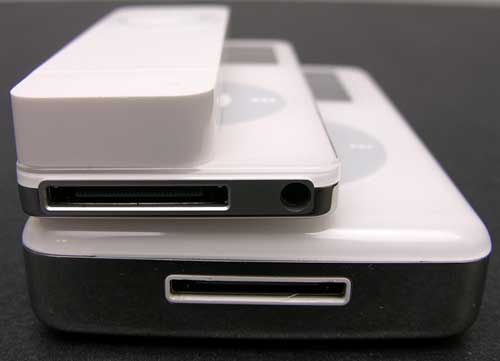
Top to bottom: shuffle, nano, 4th gen iPod
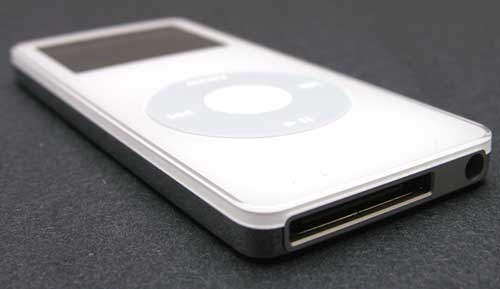
You can see from the images above, just how small the nano really is. And no, I don’t think it’s too small. The touch wheel is a smaller version of the same thing on the larger iPods, and the 1.5 inch display is bright and easy to read. There are only 2 real differences between the larger iPods and the nano (besides the size…). The first difference is that the nano does not have a physical hard drive built into it. Instead flash memory is used. That means no moving parts to wear out. It also keeps the design thin and power efficient. The other difference with the nano is that the earphone jack is now located on the bottom of the player instead of the top. I really don’t like the new location. It just feels upside down to me. Especially when I use the nano with a cassette adapter in my vehicle. The adapter plugs into the earphone jack, then if I lay the nano on the seat beside me right side up. The cord gets in the way.
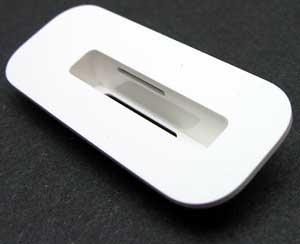
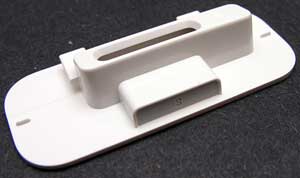
Because the nano is so thin, Apple saw fit to include a dock adapter with the purchase of this player. When I first saw it, I was happy because I thought I would be able to use it with my regular iPod dock to convert it for use with the nano. The nano only comes with a cable, no dock. But guess what? This adapter doesn’t work with a standard dock. I think I spent 1 or 2 minutes trying to figure out how the heck it was supposed to snap into it… I finally realized that it didn’t! This adapter actually doesn’t work with anything right now… It really baffles me why it was even included.
Speaking of the sync / charge cable. Apple seems to be moving away from firewire compatibility with iPods. The cable included with the nano is USB 2.0. If you try to plug in a firewire cable, you’ll see a notice on the display telling you that you can only charge with firewire. You can not sync with it…
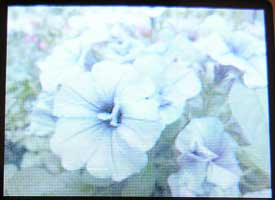
This is my first color iPod. I have to say that the whole idea of viewing photos on my digital audio device still doesn’t really appeal to me, but if that feature floats your boat, you’ll be happy to learn that the nano can do it just fine. You’ll just need a magnifying glass to see the pics ;o) It is kind of cool to use the slide show feature to display a bunch of images though. It’s like having a tiny digital frame on your desk.
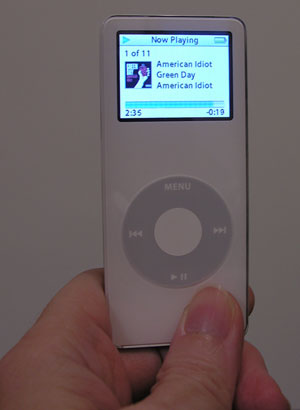
Another benefit of the color display is being able to see the album art while playing tunes. I know it doesn’t add all that much value to the listening experience, but it still makes me happy.
As far as the user interface, there aren’t many (if any) differences that I’m noticing when I compare with my older iPod. This time around, I decided to finally give the light weight PIM features a try. In iTunes, you can specify that the nano will sync with your contacts, calendar and to-do list. Using this feature, I synced with the stock Mac PIM applications. Windows users can do this with Outlook.
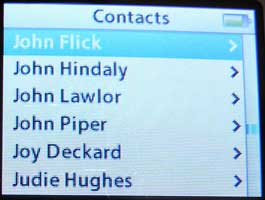
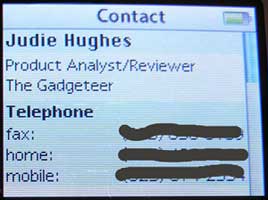
Using the nano as a phone book is surprisingly easy and quick due to the touch wheel. Quite a bit of information is transferred (the image above is only showing part of the info) including address and notes about the contact. You can’t enter or edit information though, it’s view only.
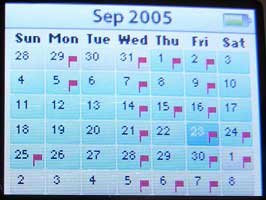
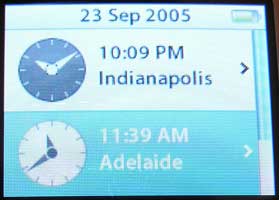
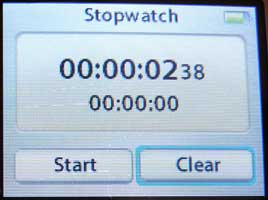
The calendar app is very basic, but alarms will actually go off with a beep. I’m just showing the month view here, but you can scroll around on the calendar and select a date to view any events and details. You can’t enter or edit this information either, it’s view only. There is also a 2 city world clock and a stop watch built into the nano.
You can also use view text files in the Notes feature of the nano. To do this, you just copy text files into the Notes folder at the root of the nano when it is mounted on your PC or Mac. You can even copy HTML files into this directory. All the formatting will be stripped out leaving just the plain text. It is possible that you could use the nano as an itty bitty book reader. I really don’t think it would be all that comfortable to read on a 1.5 inch display, but the ability is there.
Audio book and Podcast fans will be happy to learn that bookmarking now syncs back and forth with your computer. So if you happen to listen to a podcast for a few minutes on the nano and then sync back to your computer, the next time you listen to the podcast on the computer, you’ll start at the point where you left off on the nano. Pretty nifty. The same goes for audio books.
I haven’t done any scientific battery life tests yet, but I’ve had no problems playing music for a full 8hrs during a work day. Since I work at a computer, if I did run out of juice, I wouldn’t have a problem plugging the nano into a USB slot to recharge.
I’ve really become attached to this little player. You can’t help but love the physical design and the sound quality is very good. That doesn’t mean I won’t hesitate to place an order the second that a 100gb full size iPod is announced, but the nano is my current favorite digital audio player. It has that same great iPod flavor, but with out the fat.
Product Information
| Price: | 249.0 |
| Manufacturer: | Apple |
| Pros: |
|
| Cons: |
|

Gadgeteer Comment Policy - Please read before commenting
Post your comments here on the Apple iPod Nano Review.
http://www.the-gadgeteer.com/review/apple_ipod_nano
Just click the POST REPLY button on this page.
Great review, as always. I am glad you ordered the white one, as I have heard that the black is outselling the white by something like an 8 to 1 margin. To me, white just looks more “ipody” to me.
With the nano, black is the new black 🙂
Here’s more information from Apple about the dock adapter.
http://docs.info.apple.com/article.html?artnum=302272
—————
iPod nano: About the Dock Adapter
iPod nano comes with a iPod nano Dock Adapter, which allows iPod nano to fit accessories made by third-party companies who are part of the Made for iPod program.
Some accessories (such as docks and certain speaker systems) are designed around the iPod dimensions, which can vary from model to model. Instead of having to release multiple versions of an accessory for each iPod size, companies can release one that works with different size dock adapters.
Note: The iPod nano Dock Adapter will not work with docks designed for earlier iPod models, including iPod with color display and iPod mini.
Wow the full-size iPod looks like an obese monster in comparison! 😉
Also, I read somewhere that with the next generation of full-size iPods, Apple will only make one dock for ALL dockable iPods (nano included). Each new iPod will then ship with an adapter so it will fit in the new universal dock. Not sure if that’s just speculation or truth, but I do remember reading that. 😉
So, it does everything of the full iPod right….namely it does Sound Check?
Which is my biggest disappointment in the Shuffle….
Perhaps I will have to reconsider and get one….my birthday is coming up in about a month…perhaps that’ll work as an excuse….
…sufficient to overcome the fact that I’m about to be out of work….
The Dreamer.
TheDreamer:
Yes, the nano has the sound check feature. I just found it and turned it on 🙂
Wow, I wonder how this thing is going to look in comparison to my Creative Zen Micro? I love my Zen Micro, but after seeing and hearing about the Nano I had to get one. I’m not much of an Apple person (especially with their restrictive DRM issues) but the size and functionality blew me away. Hey, I love the fact my Zen is smaller then an iPod Mini but as everyone in the gadget world knows; smaller is better.
As for the screen scratching so easily I’m not surprised by this. Seeing the design and reading early reviews I knew it would be a scratch magnet. It is, design wise, too much like the first gen iPods. My Zen Micro, despite living most of its sheltered life in a leather case, is covered in small scratches. For the Nano, I think I’ll get one of my spare Tapwave Zodiac screen covers, cut it down and apply it. I also want to get those rubber skins/condoms, but they aren’t out yet.
I received an email from http://www.pdair.com about their nano leather case. I may ask for one to review. 🙂
Very cool product, Apple knows how to make a damn sexy product.
I almost divorced my PSP, but I love the PSP screen too much. Sorry Apple, my 1 GIG Sandisk Duo is working just fine on my PSP.
F.
The nano is definitely desirable. It’s apparently a magnet for more than scratches and fingerprints. Even though I have no real need for one (my 3g 30gb handles my needs just fine) it’s exerting some kind of mysterious pull on my wallet.
As far as scratches go, I covered the front and back of my 4G 20Gb iPod with WriteRights (Palm screen protectors). They work fine, don’t affect the clickwheel’s function, and are barely noticeable unless you’re looking for them. Best of all — no scratches, not even any fingerprints on the ridiculously shiny back. My only regret is that I didn’t think to do it until after I’d had the iPod for a week and there were already a few scratches. When I get the nano (not if 🙂 ), I won’t hesitate to do it again.
The DRM was an issue for me too since I use Linux on my desktop. I didn’t want to buy music from iTMS that I wouldn’t be able to play on all my computers. Luckily I found JHymn which allows me to exercise my fair-use rights without all that tedious burning to CD and re-importing. The converted files sound just as good as the originals and have no DRM.
Still, I wish Apple would support Ogg/Vorbis!
I divorced my PSP after having screen issues, such as dead pixels, dust under the screen and that. To top it off, Sony even states dead pixels within small numbers are tolerable and to be expected in the PSP’s manual. Inexcusable.
I enjoyed the PSP, but I didn’t see it very practical for a true handheld gaming system. Don’t get me wrong, I thought the design was awesome, but it was a bit heavy (for extended play & use) and the battery life was less then impressive. MP3 playback on it was less then stellar and cumbersome to say the least to manage. I expect Sony to redesign the PSP a bit by the time the PS3 comes out. In fact, with some of the problems I’ve had with Sony products in general (game systems, TVs, electronics, PDAs) I’m not as big of a fan as I used to be. I had either hit-or-miss type experiences with Sony PDAs.
For my current PDA, I use a Tapwave Zodiac 2 and I couldn’t be happier. It works great and performs great. I love its screen, and its gobs of internal RAM. I wish it had FLASH RAM, which would help to improve its already great battery life. Also, its two SD slots are invaluable and I usually have 512MB combined in there. I tried using it as a MP3 player, but it was too large to be easily pocketable and portable.
As for the Nano, and back on topic, I need at least a 4GB player. My Zen Micro (5GB) works great but I’d still like something smaller. I want something even more portable. Ben S, thanks for the WriteRight suggestion. I think I may have some spares around somewhere from my old Sony PDA days. Clear vinyl may also work but probably won’t look as good. I definitely want to protect my Nano as much as I can.
I did something a bit impulsive yesterday, while at the airport about to board a flight to Japan….I bought one of these little beauties!! I had only seen pics, and read reviews (inc. this one), but holding it in hand just made my wallet open 😛
So far, mine is already scratched (yes, 1 day old 🙁 ), but it definately is beautiful. Out of the white and black I had to choose black. Just liked it better. Not surprised it is selling better than white. You should see this sitting next to my PSP :wow: :wow: They were made for each other.
Works great, just like a fullsize iPod!!
Just an FYI – some users are posting complaints about how fragile the screens are on the nano. Apple hasn’t yet identified this as a design flaw (and they may never) but there is some concern over how easily the nano’s screen cracks…
http://www.ipodnn.com/news/05/09/23/ipod.flaw/
When will we learn that after we spend a few hundred dollars on something there will be a new model out in a few months?
John
digital843:
Any day now probably 😉
The way I always explain it to people is that technology is like a rushing river – you just gotta jump in and grab the biggest branch you can find – and hold on. Once you are floating downstream – you’ll always see a bigger, nicer branch that you “should’ve” grabbed….
SQLDba:
Excellent analogy!
I am hopeful no one thought my last comment about new products coming out just after you spend hundreds of dollars on the previous model was directed at Julie. Actually, I read her columns religiously and like the way she sets out everything in detail, complete with pictures and ends up with a summary of the pros and cons. Nothing is more disappointiong than all these people on the Web who parrot the press releases from the manufacturer praising the product to the heavens and a few months later finding serious reviewers and users in the forums noting all the problems.Have purchased several items after readinbg Julie’s reviews and never disappointed.
John
They have now.
From Yahoo news…………
[b]Apple Reportedly Offers to Fix iPod Nanos
Wed Sep 28,11:10 AM ET
NEW YORK – Three weeks after introducing the pencil-thin iPod Nano portable music player, Apple Computer is reportedly ready to respond to complaints about defective screens.
ADVERTISEMENT
The Wall Street Journal reports Apple will offer to replace the screens that cracked too easily. Users have been posting complaints on the Internet about cracked screens and scratched cases.
Apple has high hopes for the Nano music player designed to replace the iPod mini and the product, which sells for about $200 and up. It has received largely favorable reviews.
A spokesman for Apple tells the Journal that the problem has affected less than 0.1 percent of the devices shipped.
Last quarter, Apple sold more than six million iPods, the market’s leading portable music player.[/b]
Story
I have fallen victom to the second display problem: scratches. I took my new iPod out of my pocket (where is was all by itself), and it had a 1.5mm by 3mm scratch in the top left corner of the display. Simply put, it looks dreadful. I am holding high hopes that this problem is widespread enough that Apple will offer to fix displays that are scratched. I didn’ do anything to it to cause this.
Mine is 5 days old 🙁
Looks like the Nano’s not compatible with hard rock (or even soft pockets.)
reidme:
That was realllllly bad 😉
Guilty. 😮
🙁 :wacko: :wacko: :unsure:
😀 😀 😀 😀 😀 😀
I have a 3rd Generation Apple iPod 15 GB. I really love it, BUT I was wondering if the Ipod Nano or if any of the newer iPods have better sound qaulity that it does. Does anybody know?
That has been true for quite some time with Audible’s audiobooks. It worked with iTunes 4.9 and my 3G iPod–and I think it worked OK with iTunes 4.7. There is also a way on a Mac to enable bookmarking on any AAC file.
OTOH, my 3G iPod doesn’t support bookmarking podcasts unless they are AAC format and have bookmarking enabled. (There are scripts for the Mac that will turn bookmarking on and off on AAC files. It changes the file type in Mac OS X. That probably wouldn’t do anything in iTunes for Windows, though.) iTunes 5 supports bookmarks on Podcasts that it gets through its Podcast function, but not those that are loaded like songs.
[B] After reading Julie’s review and learning that Apple would replace any unit with the defective glass I purchased a white Nano. The setup was relatively simple. The unit was frozen when I plugged it in and I looked for a reset button. Not finding one I consulted the instructions and found you had to push the middle button and the menu together. I tried this 3 times and nothing happened so I was about to return the Nano but the fourth time it did work and no subsequent problems. I easily downloaded some 1000 pics and over 200 music and ebook files. The Nano noted 1 of each could not be downloaded which I put down to corrupted files. Today when I was typing on a computer with the Nano in my shirt pocket the volume kept going down but when I carry it in a small case on my belt no such problem. I put this down to the Nano’s sensitive click screen. I have not tried downloading Calendar and Contacts since I could never transfer these on my original iPod but the performance on the whole has been very good. I give it a 9.5 out of 10. John
Could be. Also, iTunes can play some files that an iPod can’t. For example, iTunes can play midi files, but an iPod can’t. If you have video podcasts (vodcasts), those also won’t transfer. (In my experience, vodcasts can cause iTunes to crash.)
Wow, this is coming about 4 years late, but…thanks for the review and analysis. I’m purchasing a new mp3 player and I’m thinking about switching over to an iPod (I’ve tried to resist jumping on the ‘bandwagon’). Now I’ve just got to see if I can afford it! 😛