
Finding the most convenient way to listen to the tunes on your Apple iPod, while in your vehicle can sometimes be a daunting task. Do you lay it beside you on the seat and route the audio through your car stereo using a cassette adapter? Or maybe you use a separate FM transmitter like the iTrip? While both of these methods will work, neither will charge your iPod while it plays music, and neither will securely cradle your iPod in a comfortable viewing angle like DLO’s TransPod. Available in Black, White and Silver, this cradle / charger / FM transmitter is compatible with 3rd gen, 4th gen, mini and nano models.

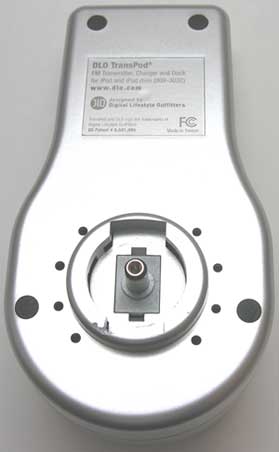
Hardware Specs
Modulation: FM Stereo
RF Output Frequency Range: 88.1 – 107.9 MHz
Default Preset Frequencies (MHz): 87.9, 94.9, 100.9, and 107.9
Frequency Adjustment: 0.1 MHz per step
Frequency Response: 5Hz ~ 20KHz
Transmitter Power: 1.5 Watts
Transmitter Range: Up to 30 feet (9M)
Input Voltage: 12 – 16 VDC
Input Current: <300mA @ DC12V~16V
Direct Output: 3.5mm Stereo Mini jack
Direct Input: 3.5mm Stereo Mini jack
Storage Temperature: -20° to 120° F (-29° to 45° C)
Operating Temperature: -4° to 113° F (-20° to 45° C)
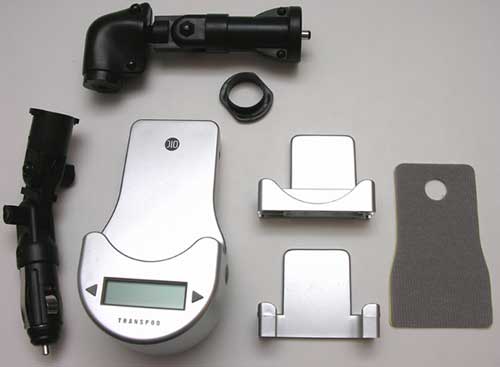
Package Contents
TransPod Cradle
Charger Arm
Extension Arm
iPod mini Insert
iPod nano Insert
Fit Pads (x2)
User Guide
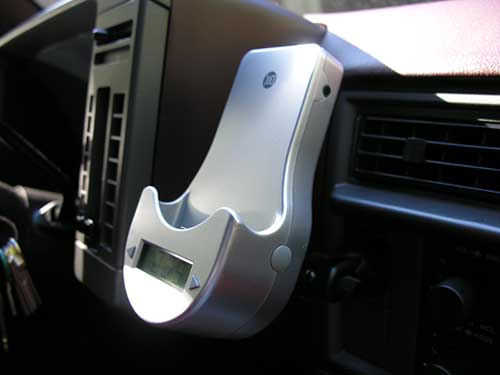
The TransPod is about as plug and play easy as you can get. Depending on the location of your cigarette lighter adapter, you will either plug the charger arm into the pod, or also use the extension arm. Lucky for me, my adapter is located right beside my radio. Both arms are adjustable so that you can customize the viewing angle of your iPod while it is connected to the TransPod.
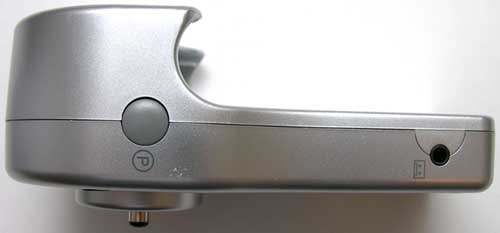
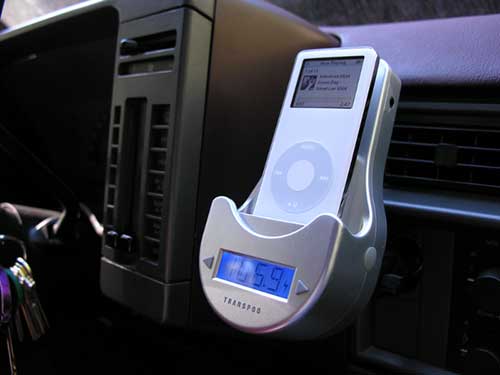
The pod itself is made of plastic and is available in White, Black and Silver. In case you can’t tell from the photos, I was sent the Silver version. The front of the Pod has an Indigo Blue backlit LCD display with two arrow buttons on either side. The sole purpose of this display is to show the current FM transmitter frequency. The buttons allow you to adjust that frequency up and down by 1MHz increments. You can access and save up to 4 channel presets by pressing the P button on the right side of the TransPod. Pressing the button quickly will cycle through the saved presets (by default these are: 88.1, 94.9, 100.9, 107.9MHz). Pressing the P button for a few seconds will overwrite the current preset with the currently tuned frequency.
The right side of the TransPod also has a line-out jack (designated with a cassette icon). If for some reason you prefer not to use the built-in FM transmitter in the TransPod to broadcast your tunes through your car stereo, you can connect either to a cassette adapter or to the line-in / auxiliary input jack of your car stereo.
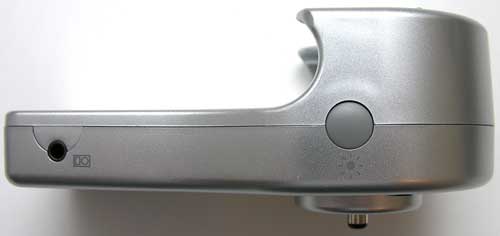
The left side of the TransPod has a backlight toggle button for the LCD display. Pressing the button while the LCD is already lit, will turn the backlight off. Pressing the button when the backlight is off, will toggle it on until you press it again to turn it off. By default, the backlight will stay lit for 2 minutes when you power up the TransPod or whenever you change frequencies.
This side of the TransPod also has a line-in jack so that you can use it with other MP3 players, portable DVD players, game devices etc. You’ll need a male-to-male 3.5mm mini cable, which not included, to connect the devices.

TransPod with fit pad
The great thing about the TransPod is that it is able to accommodate 3rd gen, 4th gen, mini and nano models by using the slide in plastic inserts. Included with the device is an insert for the iPod mini and nano. Without the insert, you can directly plug in 3rd and 4th generation players. With my 40gb 4th gen player, I did have to use the included fit pad. This is a soft padded spacer that keeps the back of the player from rattling against the TransPod when you’re driving down a bumpy road. This pad can be permanently attached to the back plate of the TransPod by removing the self adhesive backing. Since I have both a regular sized iPod and a nano, I opted not to attach it.
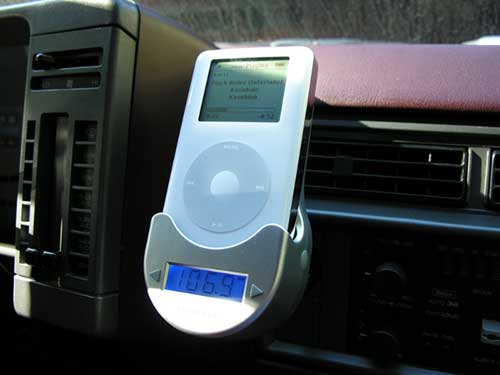
Interacting with the iPod while it is in the TransPod is pretty much no different than any other time. All of the click wheel functions operate as normal. The only difference that you should be aware of has to do with adjusting the volume levels. This is not accomplished by using the click wheel. Instead you use your car stereo to adjust the volume as it is getting the levels through the line-out audio from the bottom of the iPod. You can even turn the volume on the iPod completely off and it will have no effect on the volume that you’ll hear through your car stereo’s speakers.

TransPod with nano insert
For my nano, I just slid the plastic nano insert into the Pod and then plugged the nano right in. The plastic insert has a snug fit, so that you don’t have to hold on to it when you want to remove the nano from the Pod.
I’ve never been a real big fan of FM transmitters, because they always seem to either sound flat, or static filled. I was pleasantly surprised by the TransPod. Even using the higher frequencies above 100MHz, the sound was very clear. This beats using a cassette adapter any day. In addition to transmitting your tunes through your car stereo, this product will also charge your iPod’s batteries. So, no need to worry about running out of juice for those long car rides.
The TransPod has intelligent power control. This means that it will not drain your car’s battery if you leave it plugged into your cigarette lighter while the car is not running. It automatically shuts off the power after 2 minutes of inactivity. Plugging in an iPod automatically powers it back on. If you want to manually power down the TransPod, you can hold down the backlight button on the left side for a few seconds.
I really have enjoyed using the DLO TransPod. $100 may be somewhat pricey, but it seems worth it for wireless plug and play convenience. I’m leaving mine plugged in 24/7.




Gadgeteer Comment Policy - Please read before commenting
Post your comments on the DLO TransPod review.
http://www.the-gadgeteer.com/review/dlo_transpod
Just click the POST REPLY button on this page.
Great review – I ordered one yesterday to use with my black Ipod Nano. Hopefully, my experience will be just as enjoyable as it appears your’s is.
I never knew that this DLO company existed – that’s why I keep visting here – you gal’s find all of this stuff.
Keep up the good work.
Richard:
Please do post your comments about this product after you have had a chance to try it out (even if you don’t agree with me). Which iPod model will you be using with the DLO? I just realized that if I use the mini insert and my nano, that I bet I could could keep the nano in a case and still use it with the TransPod. I’ll be trying that tomorrow since I just received several nano cases and skins.
Miss Julie, your “scanning” as stated in my original post – it’s a black ipod nano. 😉
I should have the Transpod on Tuesday or Wednesday and will get a trip to Las Vegas shortly thereafter to attend the AAPEX show so when I get back – it’ll be road trial review time.
I received, yesterday, a sliver metallic case from PDair – I’m somewhat hopeful that I too might be able to leave it in the case and have it work in the Transpod – but since the hinge is on the right side of the case – doubtful. It may fit but….only time will tell.
The folks at PDair sent along a clear silicone skin – that might prove to be better but it doesn’t have a cover over the screen ala the metal case. And it’s got to two “connector ears” for the lanyard that might also get in the way.
I’ll just have to try them when the Transpod arrives.
BTW- quick shot of both is attached.
Richard:
Sorry for scanning … bad habit 😉
I received the same metal nono case from PDAir. I will give it a try tomorrow. I’m sure it will fit just fine with no sizing insert in the TransPod, or the mini insert.
I’ve been known to be guilty of the same thing……. 😉
If you get a chance – not that it will make much difference since I’ve ordered the TPod – try it tomorrow with the metal case and let me know if there are any issues? Might make me stomach my $99 purchase decision a little easier if it does.
Tested the TransPod, Nano and PDAir metal case this morning. A sizing insert is not required. However, I did have problems with the audio cutting out (not static, just silence). If I pressed the Nano down into the connector, the music would come back. It’s just the added thickness of the aluminum case and neoprene lining that causes the problem. A regular skin case would probably not have this problem. I will try one tomorrow.
Thanks – I suspected that might be an issue after our discussion. Getting the nano out of the case isn’t that bad and I’ll only use it on long trips (more than a couple of hours) so I’ll probably use the insert and just hassle the in and out of the case.
Thanks again.
The skin case from Brando / PDAir worked MUCH better than PDAir’s aluminum case in the TransPod. Didn’t loose connection even once.
Mine arrived today and doesn’t work.
We are going to find out how good their C.S. is tomorrow.
Richard Greene:
Oh no! It’s DOA completely, or what? Crap, I hate when that happens… 🙁
Please keep us posted.
Well not exactly dead. I get the FM screen showing me the frequency tune to one of the presets….no sound. Tried multiple frequencies through the spectrum nothing. Launching the DLO on a frequency that has a radio station will blank it’s volume so the transmitter is working. It’s not pickup up the volume or sound from the Pod.
Tried 3 different vehicles……..same in all three. So I eliminated a conflict possibility.
Tech/C.S. in the AM. I will advise. I’d like a replacment by noon on Saturday so I can benefit from my labor in loading the nano last weekend. I’m driving to Las Vegas around 1:00PM that day.
Update:
Seems that my black transpod was one of the “older” models. In revieiwing the pictures of the sliver one versus the black one – massive difference. And now the current black unit is out of stock. (according to their customer service – it did have issues). New replacement unit will not be here until the end of November as they are not yet in stock and the old style is also out.
I’ve been assured that the replacement unit doesn’t have the same issues and they will ship it to me no charge with a return label when it is available so I really can’t complain – except I won’t have it for this trip. 🙁
Richard:
Well phooey! Sorry to hear that you have to wait. Hopefully it will be worth it for you.
New issue – It’s not the DLO. It’s the nano. I went to Best Buy and picked up a white DLO and it too wouldn’t work.
Then Best Buy had a stereo player for pods – hooked into it…..no good. So the connector or something else has gone bad on the nano. First they put out bad screens and now I’ve got a bad unit.
Picked up a earphone connection FM unit and it works so now to find my Apple info and contact them for a replacement.
Richard:
Well at least I’m reading that Apple will replace 5th gen players without much hassle…
I feel your pain. Keep us posted.
Update –
Two Points:
1. Love Apple – nano is fixed and with my personalized back returned. Of course the unit was void of music but that’s ok. Maybe some scratches on the screen that weren’t there before but …..unit was shipped to Elk Grove, CA arrived on Wednesday and was shipped out Friday.
2. Hate DHL – package was marked for Saturday delivery and it didn’t make it until Monday. I have learned to really despise DHL in the last year because of their poor service. This is the second package for Saturday delivery in 4 months that didn’t make it as scheduled. Also, they require a signature: even though I’ve signed off – each time they require a signature. I also had two other packages this year that were shipped by DHL that didn’t come close to arriving on time because and I quote: “The driver couldn’t find the address”.
One other minor note about DHL – their tracking system never picked up the “free” return of the unit to Elk Grove. I had the tracking number and was checking it from Tuesday on and it was never in their system yet obviously the package got to Elk Grove. Now Elk Grove is only about an hour from Modesto so they may have just skipped the scan process and since it was a freebie….not a big deal. Except that Apple made it very clear to keep a copy of the tracking number to insure delivery etc.
And the bigger rub is that I physically handed the package to the DHL branch manager……..
Wasn’t this post originally about DLO and not DHL….my apologies.
Now that the product seems to be working correctly, I don’t want anyone to think that I overly slammed DLO……they are still going to send me a replacement unit for this one I have because at the time I ordered it, they had changed the web site but didn’t correctly display that the unit I was getting was “old” technology.
Apple and DLO are ok in my book.
Now if Apple would just use either FedEx or UPS instead – they be 100%.
Apple uses FedEx at least for their regular shipping… That’s how all my stuff from them has been delivered. Received the Mac Mini that way a couple weeks ago…
Glad you are happy now.
You hate DHL, I hate Airborn Express. They’ve actually left my packages in the middle of the freaking road before… No, I am NOT kidding! Grrrrr.
I empathize with you on Airborne as well…….DHL stepped into last place just because of this non-Saturday delivery. Airborne was right there with them. 😉
Regarding the “charger arm” not the extension arm, can the charger arm pivot left to right?
Thanks for your help,
Evan
Regarding the “charger arm” not the extension arm, can the charger arm pivot left to right?
Thanks for your help,
Evan
Well it will rotate in the cig adapter and it does also have a pivot point that’s locked so yes!
if you rotate the cig adapter so the arm can pivit left to right instead of up and down, then the ipod will no longer be verticle — it’ll be horizontal. Give it a try and you’ll see what I mean.
I want to be able to pivit the ipod to the left, so I can see it. These arm extension only work well for an open dashboard such as those in the reviewed photos.
Evan
Apple uses FedEx to ship AppleStore orders, and DHL to handle returns.
I’m interested in the TransPod. The notion that it will work with any iPod intrigues me, as it’s a good chance I’ll upgrade in the future :). A tape adapter is really a pain if you ask me. Chalk this puppy onto my Christmas list 🙂
Does it work with 5th gen iPods?
It works fine with the Video iPod. You do need to use the included bumper pad to keep it from rattling in the cradle though.
I have had this unit for about 6 years now. All of my friends have different units and not one of them is as powerful as this one. We use it on the boat a lot so when we go to the local island here we use the Transpod to broadcast to other boats around us. I have had up to 8 boats on each side of me that were able to pick up the station clearly. I have also used it at tailgate parties so that other cars around me could tune in to the same music. This is the best unit there is out there, especially for the money. I would reccomend this unit to everyone who ever asked which Ipod transmitter to buy.
I just got the transpod for Christmas. I have a nice, clear signal, but it will not charge my 4th gen. nano… The iPod display actually said something like, “will not charge with this accessory”. Has anyone else encountered this, or am I doing something wrong???
my transpod has stopped showing the frequency and as far as i can tell isn’t connected. the light goes on but it doesn’t play. Anyone else encounter this problem and more important have a solution?