
11/17/06 Update (see info in Red)
Trying to find my perfect smartphone has been causing me the same frustration as trying to find my perfect gear bag. The quest just never ends because I’ve come to realize that there isn’t any one perfect phone (or gear bag) out there for me. The whole trick is to find one that comes as close as possible. This review is for the Hewlett Packard iPAQ hw6945 Mobile Messenger; a Windows Mobile 5 Pocket PC phone. The question is, will it become my new “perfect” smartphone?
(I have also created an audio review of this phone in The Gadgeteer Podcast #2. This written review should be considered as a companion to it.)
Hardware Specs
Processor: Intel PXA270 processor 416MHz
Operating system: Windows Mobile 5.0 for Pocket PC, Phone Edition, with Messaging and Security Feature Pack
Memory: User Available 45MB available for persistent user storage 64MB SDRAM for running applications
Display: 3.0 inch (75 mm) Transflective TFT, 64K Colors
Built-in camera: 1.3 megapixel, 1280 x 1024 resolution
Battery: Removable, rechargeable Lithium-Ion (1200 mAh)
Expansion: Integrated mini-SD slot
Audio: Voice recording, built-in speakerphone, microphone, one 2.5 mm stereo headphone/microphone jack
Dimensions: 4.65″ x 2.8″ x 0.71″ (118 mm x 71 mm x 18 mm)
Weight: 6.33 oz. (179.45g) with battery; 5.28 oz. (149.69g) without battery
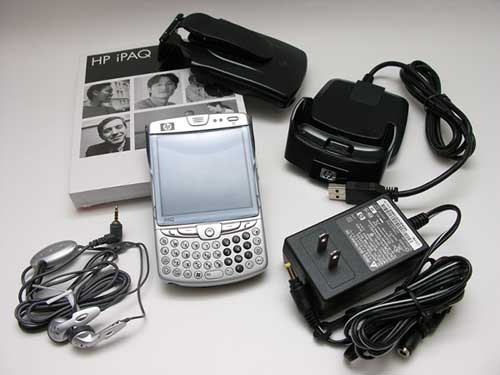
Package Contents
hw6945 Mobile Messenger
Universal cradle/charger
AC adapter
Flip cover
Holster
Wired ear bud headphones
HP product information guide
Software: Microsoft Outlook 2002, ActiveSync 4.1, HP ProtectTools, HP Photosmart Premier, HP Navigation Maps (60 day trial)
With WiFi, Bluetooth, a camera and even a GPS built in, the hw6945 has a lot of features packed into a relatively compact package. Let’s take a closer look.
Hardware Design
Front
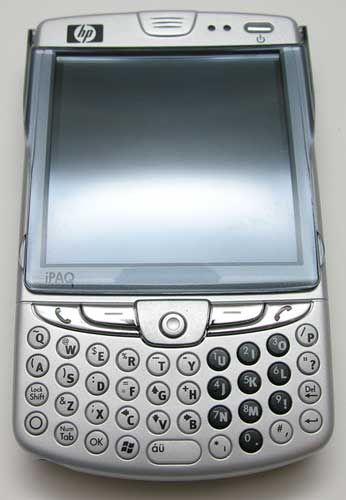
Made of silver and dark grey plastic, this smartphone has a similar appearance to a Treo, due to the small thumb-board keyboard located directly below the display.
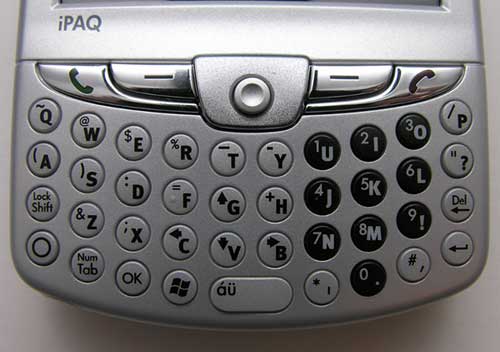
The keyboard has small flat hard plastic keys that exhibit good tactile feedback. Even though the keys are small and are practically flush with the face of the phone, they are still easy to press with your thumb tips.
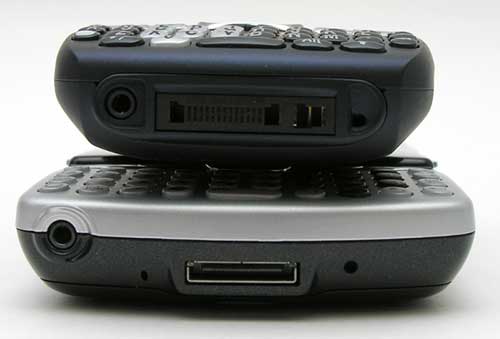
Notice how flat the keys are on the HP phone compared to the Treo 750v seen stacked on top of the HP in the picture above.
Situated above the keyboard are 5 additional buttons. The outside buttons start and end calls, while the inside buttons map to the onscreen command buttons. Centered between them is a small joystick type button that allows scrolling in 4 directions and also selects items when pressed in.
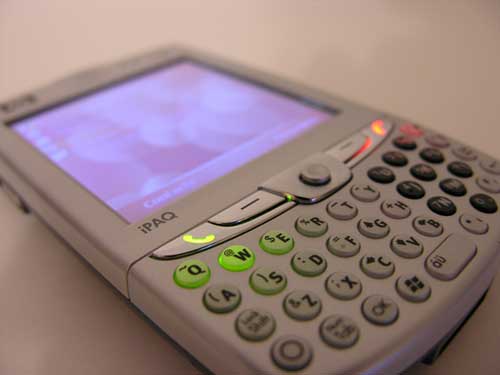
The start and end buttons are backlit, but unfortunately the keyboard is not. However, the light from the start and end buttons does sort of leak through to the buttons beneath the phone buttons.
The keyboard does in fact light up. I had the “Disable all buttons except power button” setting turned on in the buttons settings dialog box. Apparently when this setting is on, it keeps the keyboard from lighting up…
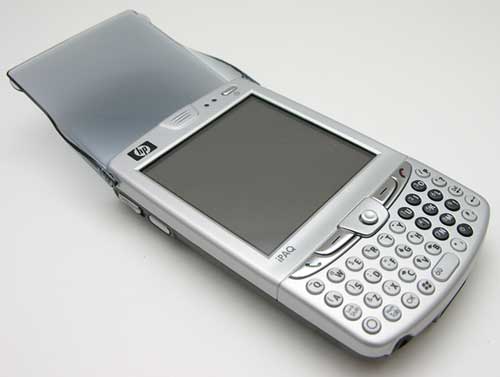
Included with the phone is a plastic flip cover. Kinda retro huh? It does do a pretty good job as a screen protector if you aren’t the type of person to put your phone in a case.
Also located on the front of the hw6945 is the power button (top right corner) and two status LEDs beside it. One big problem that I have with this phone is the fact that the power button is the only way to power this device on. Pressing any of the other buttons including the green talk button has no effect. As a result, if you want to make an outgoing call when the device is turned off, you will have to press a minimum of 3 buttons. 1. Press the power button, 2. Press the green call button, 3. Press a speed dial key. You will also notice that the power button and green call button are separated by a good distance. Not very ergonomic at all.
Other buttons will in fact power on this device. I had the “Disable all buttons except power button” setting turned on in the buttons settings dialog box. This is apparently the default setting. Unchecking this option allows pressing of the Green call button to turn on the device and go directly to the phone / dial screen.
I’ve found the whole phone experience to be lacking when using this phone. Not only physically, but with the interface and reception. During calls, I will hear static in the background (people on the other end of the conversation have commented on hearing static too), and I have found that the signal strength is not as strong as other phones I have used.
Left Side
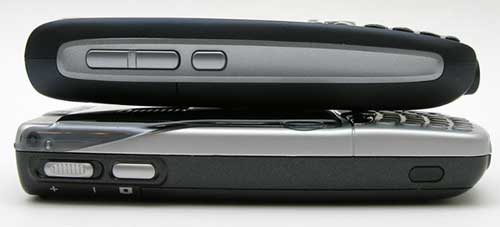
On the left side of the phone, you’ll find the volume adjustment slider switch, camera button and IR port. In the image above, you see the hw6945 on the bottom, with the Treo 750v on top. This gives you an idea of how the two phones compare in thickness.
Right Side
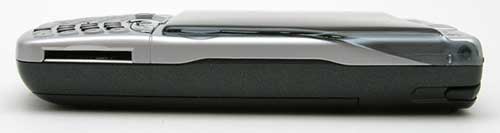
A mini-SD slot is located on the right side of the device. The stylus slot is also located on this side.
Back
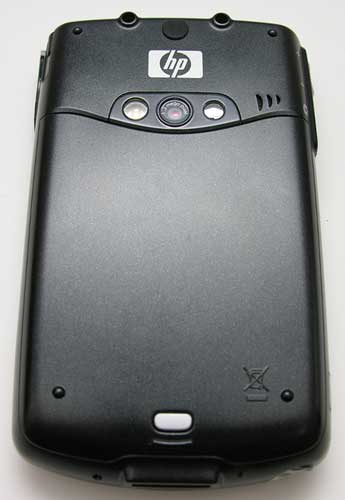
On the back you will find the built in camera lens, self portrait mirror and LED flash. Next to the camera is the speaker grill.
The 1.3mp camera is only just so-so as far as picture quality goes. You will definitely NOT be using this device as your primary camera.
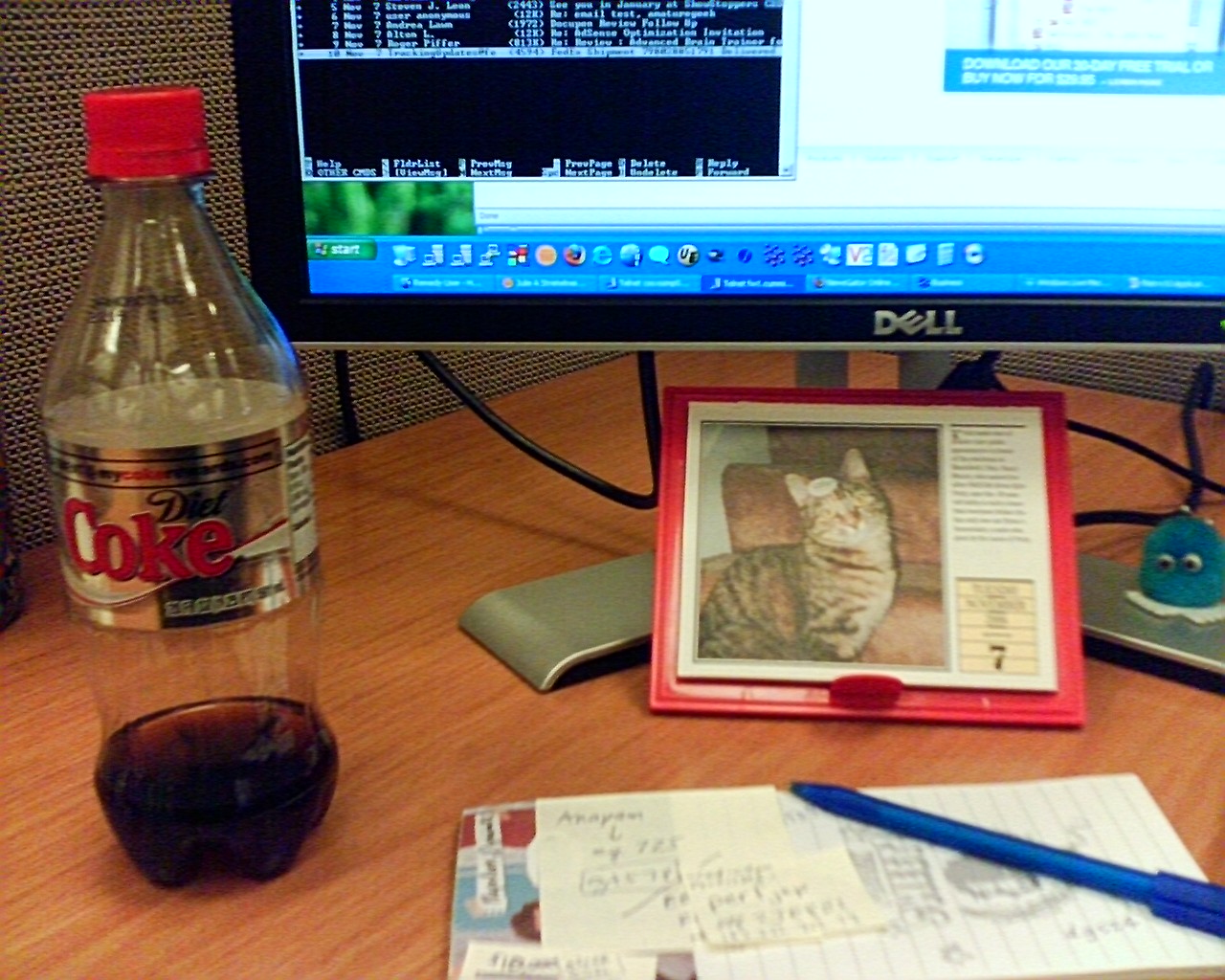

Click thumbnail to see full-size images
As you can see, the images are pretty fuzzy. The biggest problem though is that the camera software is slow. VERY slow. If you need to take a quick snapshot, you’ll most likely miss it. More about the image capture software later in the review. It is nice to have a flash for the camera though, even if it doesn’t flash automatically. You have to tap on the display to turn it on and off.
Bottom
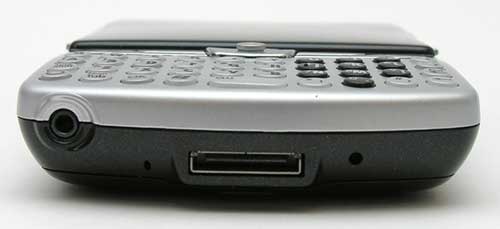
A 2.5mm stereo headphone jack, microphone, charge/sync port and reset switch can be found along the bottom edge of the phone.
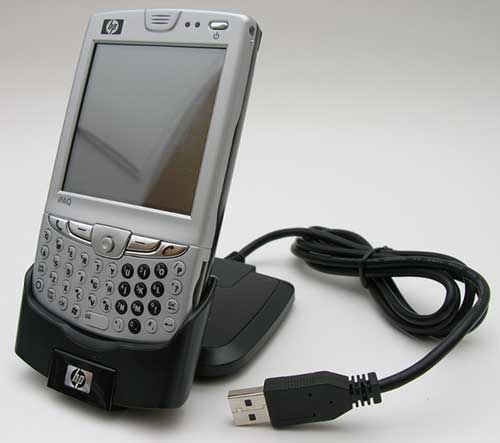
HP included a nice charge / sync cradle for the hw6945. You don’t see cradles being included with PDAs or phones these days, so I consider this a nice ‘gift’.
In hand, this phone feels pretty large. While it’s somewhat thinner than a Treo, it’s wider. The added width makes it look more like a PDA than a phone in my opinion.
Build quality is very good and this smartphone doesn’t have any problems passing the Gadgeteer squeeze / creak test.
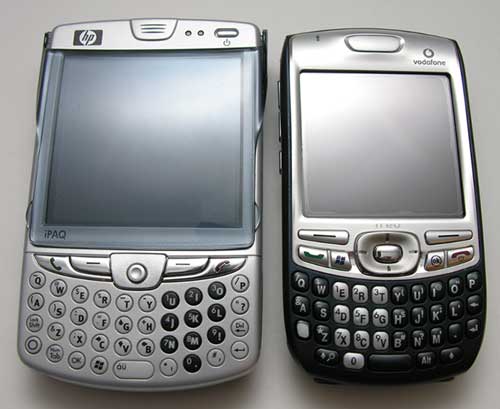
Above you can see the hw6945 and the Treo 750v. The display on both devices has 240 x 240 pixel resolution, but the HP’s display is noticeably larger.

The display is crisp and easy to read, but it’s not quite as bright and vibrant as the Treo 750v’s display as shown below

Left to Right: hw6945, Treo 750v
This picture was taken without a flash and with both devices side by side and set to their individual highest brightness levels. Even though HP does have a dimmer screen, it isn’t something that you will notice without having another device with a brighter screen next to it to compare. So I don’t have much to complain about as far as the display goes, except for the 240 x 240 resolution.
One hardware feature that I have so far been unable to test, is the built-in GPS receiver. Out of the box, this device does not have any mapping software built in. The only feature that takes advantage of the GPS is the image capturing software. There is a setting to have it stamp coordinates on your pictures. If you want to use the GPS for mapping, you can install the 60-day trial software that is included on CD. It’s HP’s navigation software. Of course, it’s a Windows application, so I wasn’t able to install it at home using my iMac. I did try installing it with my XP laptop at work, and didn’t have a very good experience. The software has to connect to the HP in order to sync maps. When I would try this step, it continued to say that it could not find the device ID. I didn’t have any problem syncing with ActiveSync though… The software app did install on the HP, but it caused the phone/PDA to run extremely slow. I checked and had sufficient memory available, but the only way to fix the problem was to do a hard reset. My confidence level in the GPS / software went down the tubes at this point. I would be interested in hearing from hw6945 owners that have had a better experience than I have.
As far as power, I haven’t had any real issues with battery life while using this phone. For several calls, a little WiFi surfing, a few snapshots, etc. it will easily last the entire day with plenty of juice left over.
To wrap up the hardware section of this review, I would say that this device is more of a PDA, than a phone. I suppose that this might be beneficial to some people, but for me, I want a great phone that just happens to also have excellent PDA features. This one falls short in my opinion.
Software Installed on Device
ActiveSync
Bubble Breaker
Calculator
Download Agent
Internet Explorer Mobile
File Explorer
Get Good
Java
Microsoft Office Outlook Mobile
– Email
– Calendar
– Contacts
– Tasks
– Notes
Microsoft Office Mobile
– Word Mobile
– Excel Mobile
– PowerPoint Mobile
Modem Link
Phone
Photosmart Camera
Photosmart Mobile
Search
SIM Manager
Solitaire
Terminal Services
Windows Media Player 10 Mobile
Software Installed on CD
Adobe Reader (link for your desktop)
ActiveSync 4.2 (for your desktop)
Audible (link)
Avvenu (link)
Dynomite! By Astraware
Outlook 2002 (for your desktop)
Spritesoft Backup and restore
User Guide pdf
The today screen that comes pre-configured has a few plug-ins that allow you to easy see the status of your battery, free memory, free storage space and brightness level.
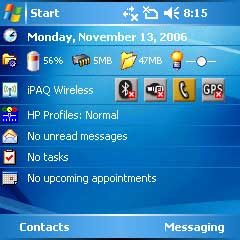
While the today screen looks pretty slick with these plugins, they really make the system sluggish. My advice is to just turn them off.
The hw6945 has a built-in 1.3mp camera. The camera software launch button / shutter button is mapped to the button on the left side of the phone.

When you press the button, the camera interface starts up and is flipped so that you have to turn the PDA 90 degrees clockwise. This makes the HP feel like a camera because the shutter button is then in the upper right corner. The interface itself is simple to use as you can see from the image above. But it’s also very slow…


There is a nice selection of user customizable settings available…

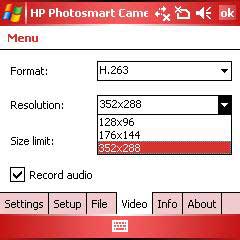
Too bad the image quality is only mediocre.

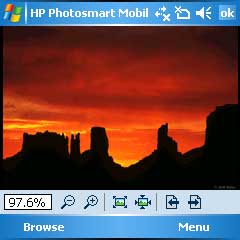
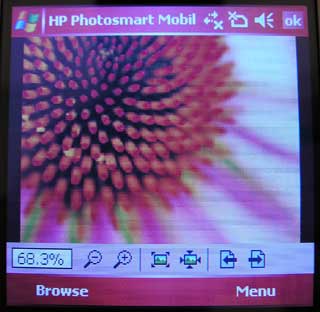
HP also includes a image viewer application. Nothing too special, but better than nothing.


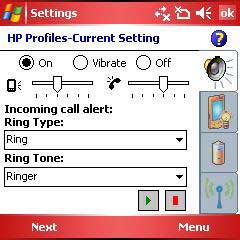
There is also a phone setting manager app, ring tone app and profile setting application. All three are simple to use.

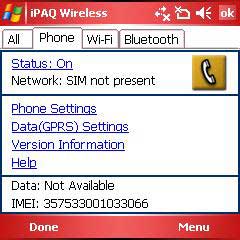
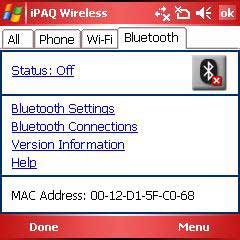
The iPAQ Wireless interface combines the phone, WiFi and Bluetooth setting dialogs all into one convenient location.

It’s hard to gripe about this product because it has so much to offer as far as features. But my whole problem with it is that it tries to be everything to everyone and doesn’t do a great job at any one thing. It’s not a great phone because it’s too big and has crummy ergonomics. It’s not a great PDA because the screen is small and has low resolution. It’s not a good camera because the interface is too slow and the pictures are not sharp enough. As far as the GPS feature goes, I can’t comment because I was unable to get the software to work. In a nut shell, I am disappointed with the hw6945 and am setting off again on my search for my perfect smartphone…



Gadgeteer Comment Policy - Please read before commenting
Post your comments on the HP iPAQ hw6945 Mobile Messenger review.
http://www.the-gadgeteer.com/review/hp_ipaq_hw6945_mobile_messenger
Just click the POST REPLY button on this page.
Have you (or are you planning to) tried the Cingular 8125, Cingular 8225, or T-Mobile Dash perchance?
I’m currently using a Nokia 6600 (a few years old) which I really like, but Symbian smart phones are hard to find in the US and the grey market import prices are very high. Considering switching to one of the better-reviewed Windows smartphones consequently.
Diego
Julie, you said in your review that:
According to the MobileTechReview that I read (and numerous other things prior) says that it does???
http://www.mobiletechreview.com/HP-iPAQ-hw6915.htm
Diego:
I’ve not tried the 8125, but I have a HTC TyTN to review next. I might try to get my hands on the Dash too 🙂
Mitchell:
Unless I’m missing a setting somewhere to turn on the keyboard backlight, you can see in the picture linked below, how mine lights up:
http://www.the-gadgeteer.com/assets/hp-ipaq-hw6945-12.jpg
I don’t have the phone with me today to double check…
It might be that the phone is defective. the keyboard is supposed to light up auto-magically…
I just recently jumped from a Palm TX and Moto V551 to the iPAQ 6945. I couldn’t be happier.
Having a single device with GPS (MS Streets is FREE and works great), WiFi (better signal strength than my old TX), Bluetooth and GSM (unlocked) is about all I could ever ask.
I am learning to adjust to a new operating system but that is only a small hurdle. I have loaded a few of my apps to supplement the included apps but overall, the iPAQ is very complete right out of the box.
Annoyances are few:
1. Sync’ing files to the miniSD card is not possible without a 3rd party software app. Worthwhile tradeoff considering my TX could not run any apps from expansion cards if they needed a conduit. The iPAQ allows all apps to run from the miniSD card.
2. ZipLinq does not yet have a USB Charger/sync cable for the iPAQ 6945. IrDA is an ugly way to sync when traveling and carrying around transformers is not ideal.
3. Not all apps work on the 240 x 240 screen. I have found a handful of apps that do not understand that there is a keyboard present and that the screen is not the size of a traditional WM5 device. Definately drives the need for “trial” versions. I figure that’s the price for being early on the curve.
Beyond that, $500 was a great deal for all the connectivity and apps. I’d do it again tomorrow.
mryanaz:
Thank you for your comments. I’m very glad that someone likes this device! It just wasn’t for me…
BTW: what do you think of the phone experience? Does the size bother you?
The 6945 is just too big for me. Treo is about as big a phone as I think I could carry around. I’m interested in Julie’s impression of the TyTN, however. That appears to be just slightly larger than the Treo.
Regarding the size, I have big hands so that is not a problem. I also use my bluetooth headset a lot so the size is even less of an issue. My calls involve lots of scheduling and providing names / numbers so being able to navigate while staying on the phone is vital.
I still have my V551 which I use on weekends when I do not need all the PDA functions. Simple swap of the SIM card and I go from PDA to flip-phone and back.
Is there any way anybody could test it head – to – head with a Fujitsu – Siemens LOOX T830? That would be interesting…
mryanaz, you might try a similar product to the ZipLinq from a company called Emerge Technologies. http://www.emergeretail.com. I got their retactable USB-Mini USB cable from Fry’s and have been using it to sync/charge my HP 5915. Works like a champ.
The TyTN (AKA Cingular 8525) is the same size as the Treo 750. It’s a smidgen smaller than my 650.
I am also looking for a new phone. Looked at the Samsung Blackjack, but no touch screen, and the keyboard is not as nice as the Treo. The 680 is a no-go, as I want HSDPA – or some kind of real 3G – and Palm OS is DOA. The 8525 looks promising, but it is clearly a PDA first, and phone second. The 750 may work – but 240×240 screen, and the Treo 650 issues I have been facing make me wary.
I just got my HW6945 yesterday direct from HP. I had the older 6500 series (for a couple days), and I have currently a Nokia E61, Cingular 3125, had the Treo 650 etc etc… I must say. This HW6945 from a quality perspective is the cheapest of them all.. period.
The plastics on this are so thin and cheap it is almost a marvel how they were engineered. The battery cover is paper thin and is easily flexed. I will not be surprised when the plastic slide tabs break off the battery cover.
The Nav button is sharp on the edges, has a very _toy-like feel and is also extrmely cheap feeling. The “click” to the plastic feeling keys is also cheap. The Program lag when opening is almost unbearable for me, right down to the phone function buttons which have that same WM5 lag. If I hang up a call, it will take 3 seconds AFTER I press the red hang up button for the call to officially end!! Just make sure you dont say anything your caller may hear until you confirm that the call has ended.. and thats NOT after you press the red button!… same goes for the Green “send” button. horribly slow.
The Bluetooth manager paired with each of my Bluetooth headsets (Jabra JX10, Nokia 800, and Plantronics 940) NONE of them worked with the 6945 after pairing. I mean did NOT work. period. The paired and did not receive or send information back/forth. (and yes, I had eveything set up correctly, I even resorted to hard resetting.. still nothing, I called HP,… No help.. seems I either got a strange Bluetooth radio or it just plain doesnt work.. I chaulked it up to another fantastic HP Quality control.
The Camera Lag was devastating.. you can forget that Quick candid snapshot… youll need 2 minutes of waiting to compose that picture!!
postives?? a well lit keyboard ( sure it should be, the plastics are so paper thin any light can shine through!)
Wifi works
screen colors are good and good daylight viewing
call quality is alot better than previous editions of Ipaq phones still not as good as my E61
The obvious plethera of 3rd party applications is always a plus, but cant load too many as the memory is once again pathetic! For $600.00USD you would think HP could include 128 of usable memory.
I am returning my HW6945 for many reasons.
I’ll stick with my superbly made Nokia E61 with built in Voice control, a bluetooth that works very very very well, The best voice phone of any phone Ive used, fantastic keyboard, screen, best speaker i have ever heard.. SMS, Email, and oh.. syncs with Outlook every time and includes a built in backup for the desktop. etc…
HP.. why cant you produce a usable PDA?Phone?? WM5 is just plain horrible, active sync is a joke,
{update}
just to throw salt in the wound, HP ‘s technical support ( after an hour on the phone) say they are going to “escalate” my case to upper support and will be in touch within FOUR.. yes 4 days to arrange for the replacement!! What??? Why cant you arrange for the replacement of the defective unit right now??? The reply you ask?? I’m sorry sir, this is our policy.. I will do my best.. so.. in four days I canhope for a call… return shipping, replacement shipping… oh.. say 10 days later or more I should recieve my $600.00 Ipaq… Nice Job HP!!!!
I have a 6945 and it really worked well. Concerning the GPS, I have the HP GPS full software by Nav Tec. The GPS works well with turn by turn voice directions, however they can be a little slow in responsiveness to you driving speeds. One thing I can tell you is that if you are going to use the GPS you had better have a car charger that can fully charge fast. This GPS really sucks battery life badly. I have a stock double the miliamphours battery and would not even think of using the GPS for longer than 15 minutes. When I use the GPS I must have a car charger. I would drain a reqular size battery in just a few minutes.
I have also checked on several battery drain problems that the unit can have. If you are using the phone and you provider’s signal is lost or weak the HP will increase the wattage the phone attenna is using from 4 watts to 8 watts and is very agressive about doing this. In addition the blue tooth does the same thing. So if you were to have your phone in an area where the signal was weak and your blue tooth headset was too far away or if you forgot and left the bluetooth on with no headset you could be consuming 16 watts of power and the battery will be empty in a very short time.
In addition just recently my phone broke connection during a call and shut down. When I brought it back up it was hung in startup screen and would not reboot either from a soft or hard reboot. I sent it to HP and they had to fix it. But they honored my warranty and fixed it for free! They really do stand behind their products.
I’ve had The HP IPAQ HW6945 for a few years now. One thing I haven’t been able to figure out is, sometimes I get a message when I’m online that says, “You must have flash player on this device to view this page”…. Can someone please tell me how to fix this. Thanks
Cory
i want to buy 6945 model but i want to know the price in indian currency
@Manoj That’s an old device. It’s no longer being sold by HP.
Hi Any one having cd software of hp ipaq hw6945 please forward it to my email id
Hi, Julie
Where can i buy an hp ipaq hw6945 in the States. Is online shopping safe and how long will it take to ship it to Southern Africa? How much does it cost nowards inspite of the fact its now an old model and is it true that 6945 and 6925 models are the same technicaly and spesifications-wise?
@Dolph This device is no longer being made by HP… Your best best if you really want one is to check eBay.
i have one, the whole package and i want to sell it. How is it value nowdays?
@aphsa No idea 🙂 Your best advice is to check the prices on ebay for closed auctions on this device.