
04/13/07 See update at bottom of review.
People reading this site are no doubt well aware of my love for all things iPod. I’ve been a fan for years now, and have eight of them (various models) strewn around my house in drawers and gear bags. Although I’ve tested many other brands of digital audio players, I always come back to the iPod as my favorite. Today I’m going to tell you about the Insignia NS-DV2G and NS-DA1G players from Best Buy. These are great alternatives… dare I say that they might even be a better choice than the iPod Nano and iPod Shuffle!
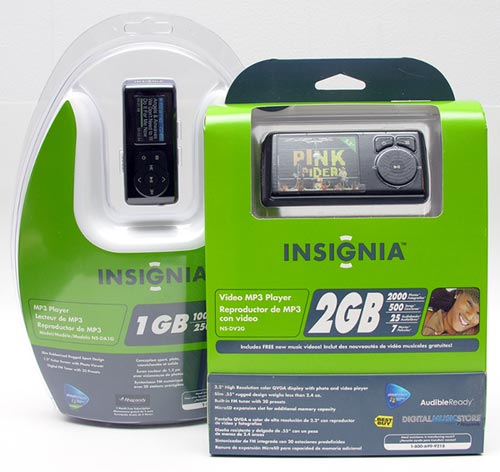
Let’s take a look at the NS-DV2G Video MP3 Player first…
Hardware Specs
2.2″ resolution LCD color display
2G Flash memory
Photo formats: BMP, JPEG, TIFF, GIF, PNG, PCX, TGA, FPX, and PCD
Music formats: MP3, WMA, WAV, and RA
Video formats: AVI, MPEG-1, MPEG-4, DVD(*.VOD), QuickTime MOV, WMV, and RM
Built-in FM tuner with 20 presets
microSD expansion slot
Rechargeable lithium-ion battery
Size: 4.0 x 1.8 x 0.6 inches
Weight: 2.4 oz.
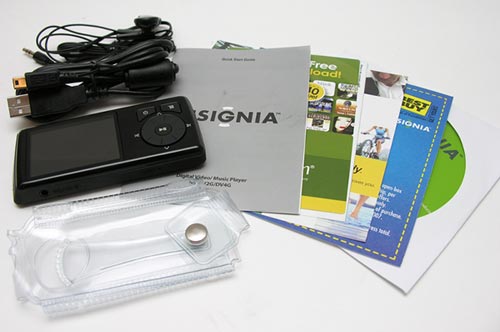
Package Contents
NS-DV2G player
Earbuds
USB charge / sync cable
Clear vinyl case
Quick Start Guide
Software CD
Coupon for 1 free Audible.com book download
Coupon for 2 free months and 5 free downloads of Rhapsody access
$2 off Best Buy coupon for music CDs (specific CDs)
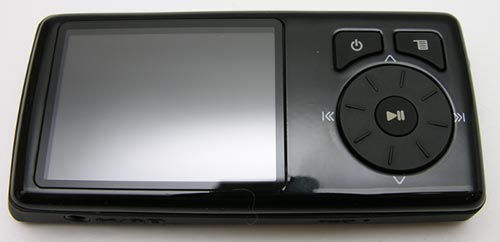
This player is similar in size to the Apple iPod nano if you stack two nanos on top of each other. It has a glossy Black face and a rubberized back. Most of the front surface is taken up by the 2.2″ color display. Next to are 2 buttons (power and menu). Below them is a rotating wheel that is used to adjust volume, scroll through menu picks and navigate backwards and forwards through tracks. In addition to pressing the wheel up, down, left and right, it can also physically rotate. Located in the center of the wheel is the play/pause button. The buttons and wheel have good tactile feedback. The only button that I had a slight problem with is the Play/Pause button. I found that I would sometimes need to press it more than once for it register my command.
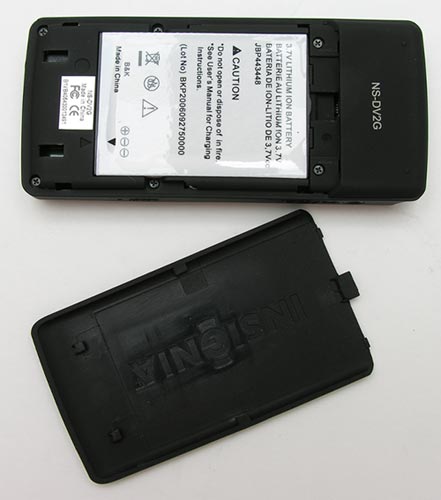
The back of the player slides off to reveal the lithium-ion rechargeable battery, which very much resembles a cellphone battery. According to the specs (I have not conducted any specific battery life tests), on a full charge, this battery will pay continuously for 20hrs. Charge time is approximately 2.5hrs when totally depleted.

On the left side of the player you will find an earphone / line in jack and a reset switch.

On the right side there is a hold switch and a MicroSD flash card slot. The player itself has 2gb of flash memory, but the ability to add to that with a MicroSD card, is pretty nice.
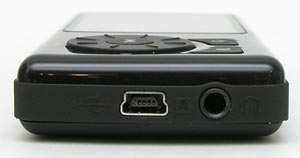
Along the bottom edge you see a mini USB port which is used for both charging and syncing to a PC or Mac. Next to the USB port is an earphone jack. Wait, didn’t we already see an earphone jack on the left side of this device? Yes, we did; the NS-DV2G has 2 earphone jacks. The better to share with…
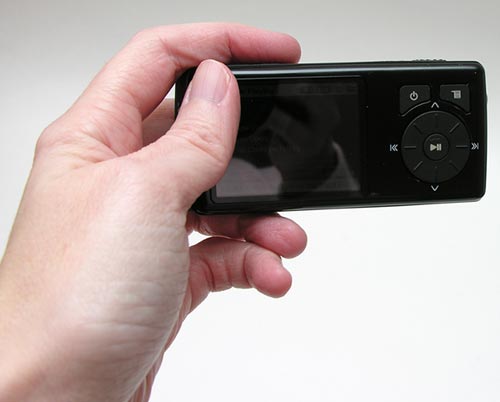
This player is not too big and not too small. It has a nice solid feel to it. A quick gadgeteer squeeze test yielded no flexing, rattles or squeaks. The only real complaint that I have hardware-wise is that the glossy front surface is a fingerprint magnet.
After you charge the battery and turn the device on, you’ll be greeted by a wonderfully bright, vivid, crisp color display. The pictures below do not do it justice at all.

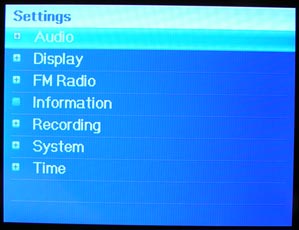
Pressing the menu button will bring up an animated menu arranged in a circular pattern. Rotating the wheel lets you cycle through choices consisting of: Now Playing, Music Library, Audible Books, Video, Photos, FM Radio, Record, and Settings.

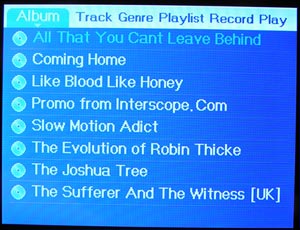
Navigating your music library is not difficult as music is arranged by Artist, Album, Track, Genre, and Playlist. Using the wheel, you switch between these different categorization methods. You then click the wheel up and down to scroll through the entries in the specific list. Clicking left or right will go into and out of the menu for an artist and album. Like most players, you can just click PLay on an artist’s name and it will play all the music in all the albums for that artist.

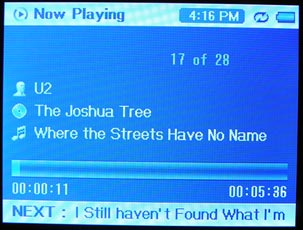
While it is playing a song, it will display the album art, artist name, album name, current track name and next track name. If the track doesn’t have any album art, it will display the info as shown in the image above on the right.
Listening to music through this player is great. No complaints at all. Using the default audio settings, music has just the right amount of treble and bass. If you want to make changes, you can change the built in equalizer from normal to rock, jazz or classical settings.
The NS-DV2G has another trick up its sleeve. It can display photos and play video. Yeah, the screen is small, but watching a TV show on this little guy is surprisingly comfortable and fun. The picture is really clear and video is smooth and blur free.

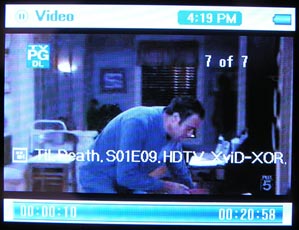
The player comes with several sample music videos and I converted one of my favorite sitcoms to see how it would ‘feel’ to watch it on such a small device. I have to say, that I didn’t really have a problem with it… well except that depending on where you might find yourself, the glossy surface over the display is prone to glare. Other than that, fun! People at work were pretty wowed by it as well. It’s always good to be able to wow.
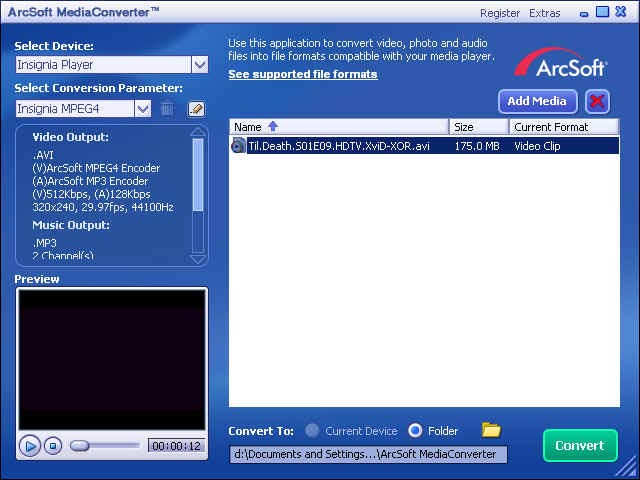
Click thumbnail to see full size image
Included on the CD is a video conversion program. Just drag and drop video files and it will convert and copy them into the player. Easy.

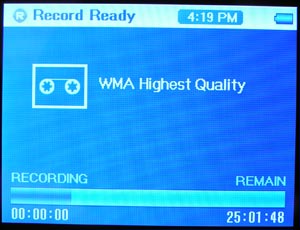
In addition to playing music and video files, this device also has a built-in FM radio. I was really amazed how well it was able to pull in stations even in my basement. Having 20 presets is nice too.
You can also use the NS-DV2G as a recording device. You have to plug a microphone into the line-in jack on the side of the device as there isn’t a mic built-in.
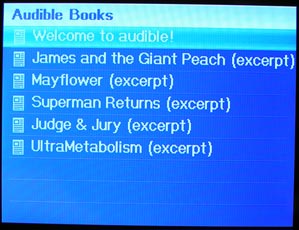
Did you think I was done? You can also listen to Audible books on this device. The device can hold multiple audio books and will keep your place in each one, even through multiple power toggles.
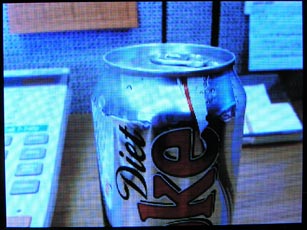
And last but not least, you can even store and view images on the device (or MicroSD card). Using the wheel and play/pause button, you can zoom in on various details in pictures. You can also continue to listen to music and audio books while you view images. The only thing missing is a slide show feature. Instead you have to manually pick an image to view, then using the wheel, click backward and forwards through other pictures.
All of the built in features make this digital player a real winner. Of course there are a few things I noticed about it that can be somewhat annoying. Nothing major, but worth mentioning. If you use the MicroSD card and have quite a bit of info stored on it, it makes boot up time during power on, a little lengthy as the device has to create an index of all the music, videos and photos. Another issue is that while music is playing, scrolling through lists will cause some slight audio glitches. And last but not least, I don’t like that you have to start over from scratch when you want to navigate through music. For example, If I navigated to a specific song under the artist name of Snow Patrol, into one of their albums, if I wanted to go back into one of their other albums, I can’t just press the menu button and go back up a level to navigate into it. I have to start over and select the artist name etc.
Other than those 3 minor issues, the NS-DV2G is a fantastic little digital media player that could give the iPod nano a run for it’s money!
The Insignia NS-DV2G is available at Best Buy in two versions: 2gb – $119.99 and 4gb – $149.99.
Now let’s check out the baby brother of the NS-DV2G, the NS-DA1G MP3 player.
Hardware Specs
1.2″ OLED color display
1G Flash memory (also available with 2G)
Music formats: MP3, WMA, WMA-DRM
Photo formats: JPEG
Built-in FM tuner
Rechargeable lithium-ion battery
Size: 3.1 x 1.3 x 0.5 inches
Weight: 1.2 oz.
Package Contents
NS-DA1G player
Earbuds
USB charge / sync cable
Clear vinyl case
Quick Start Guide
Software CD
Coupon for 1 free Audible.com book download
Coupon for 2 free months and 5 free downloads of Rhapsody access
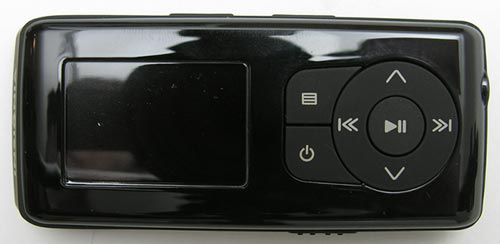
Like its larger sibling, this player has a glossy black front and a slightly rubberized back. Both surfaces attract smudges and fingerprints. The button layout for this device is similar to the NS-DV2G. There is a power button, menu button, up/down list navigation buttons and prev/next track buttons. On the top edge of the player are 2 small up/down volume buttons and on the opposite side there is a hold switch. Along the bottom edge is a mini USB port for charging / syncing and an earphone jack.
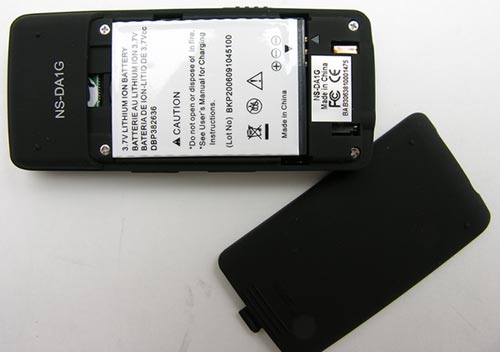
The back cover slides off to reveal a small flat cellphone-like rechargeable battery. Specs say that the battery should play up to 18hrs per charge.
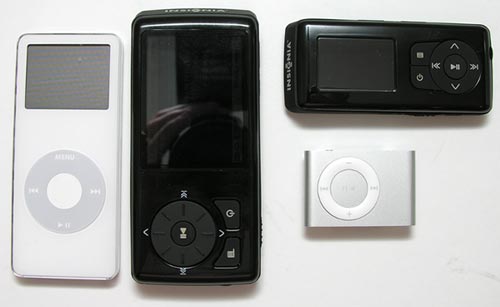
Here you can see both players and how they compare in size to an Apple iPod nano (1st gen) and iPod Shuffle (2nd gen).
The display on this device is bright and crisp. Due to OLED it has an awesome viewing angle too.

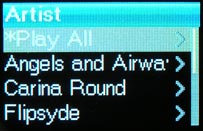
The menu system is easy to navigate. Basically you can browse the stored music by Artist, Album, Track or Genre.

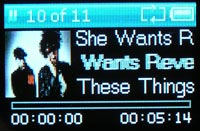
During song playback, you can have it just display the song info, or also the album art.
Like the larger player, this one also has a built-in FM radio and the ability to display photos. The radio in this player isn’t as nice as the larger player. Reception isn’t quite as good and there are no channel presets.
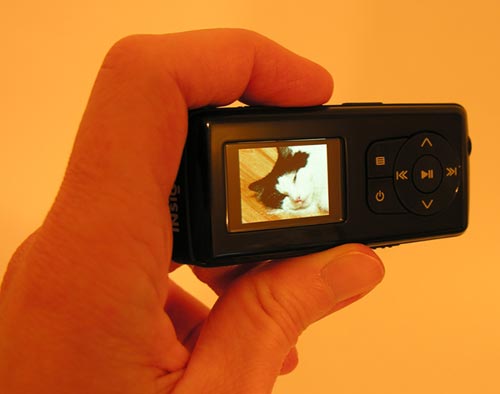
As for viewing photos on the NS-DA1G, It’s basically a novelty since the screen is so tiny…
Now you may be wondering just how you go about getting content (songs, videos, photos and audio books) into these players. It’s actually quite easy as these players are both plug and play for PCs and Macs. Just plug in the USB cable and drag and drop into the provided folders. Music can be stored in hierarchical folders such as Artist > Album > Songs.
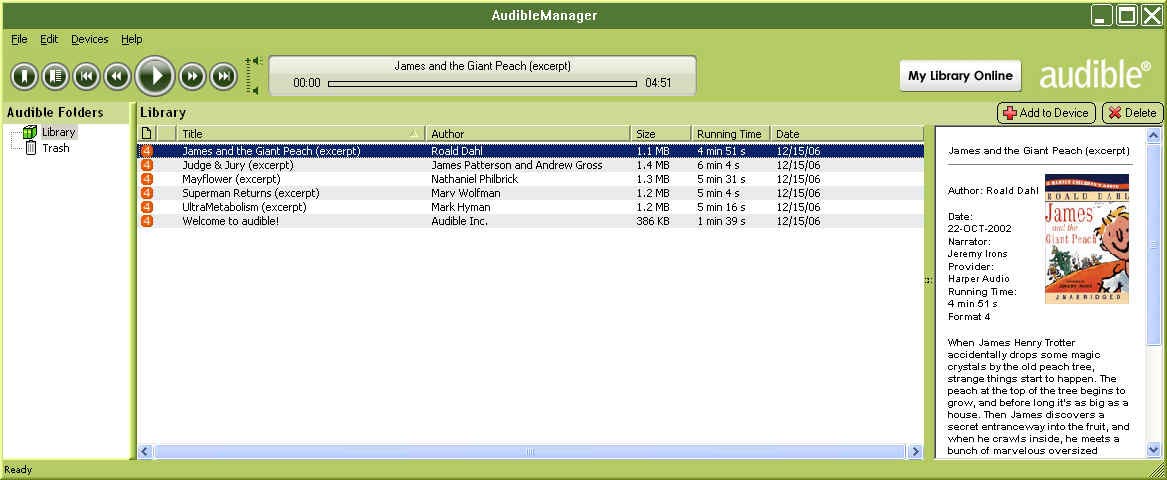
Both players come with audible.com manager software, and Rhapsody download manager. I was able to install the audible software, but after several tries installing Rhapsody, I gave up. It would get to 99% and freeze everytime. In a nutshell, Rhapsody is a service sort of like iTunes. But with Rhapsody, pay a monthly subscription fee.
Click thumbnail to see full size image
For the price, this player is comparable to the iPod shuffle. Personally, I’d rather have this device even though it’s twice as large. I really like having the display to see song titles and the built-in FM radio is a nice addition.
The NS-DA1G is available at Best Buy in two versions: 1gb – $79.99 and 2gb – $99.99.
04/13/07 Update: A reader sent in a tip to remedy the complaint that I had about the menu system. You can actually hold the Menu button down for a couple of seconds and it will go back to the previous menu screen instead of to the top level menu screen. This is a GREAT tip and makes this player so much easier to use.
Auto Amazon Links: No products found.
Product Information
| Price: | |
| Manufacturer: | Insignia |
| Retailer: | Best Buy |
| Requirements: |
|
| Pros: |
|
| Cons: |
|

Gadgeteer Comment Policy - Please read before commenting
Post your comments on the Insignia NS-DV2G and NS-DA1G Digital Media Players review.
http://www.the-gadgeteer.com/review/insignia_ns_dv2g_and_ns_da1g_digital_media_players
Just click the POST REPLY button on this page.
Di you have to use their special software to get stuff onto the players, or can you copy music/movies to them as a USB Mass Storage device in your favorite file manager?
quasar:
Both devices are plug/play, drag/drop and appear just like any regular flash drive. You can copy music by dragging and dropping. But videos do require conversion. The sample files that came on the device are .AVI format, but I’ve been unable to get the player to display .AVI files that I already had without converting them first. You’ll also need the Audible manager for audio books.
A customer of mine came in my store with one of these looking to upgrade their earbuds.
I was impressed by the smooth playback and very good image quality.
I didn’t get to hear it.
The low capacity for the price is irksome however, which is why I personally ended up getting my wife and I matching Sandisk Sansa e280s for Christmas this year.
It was a little bit of a trade off in that the Sansa has a smaller screen and is less optimal for video, but how could I argue with an 8GB flash player for 200.00 dollars retail?
To be fair the Insignia players are priced about where they should be for their capacity, may be even a little lower than some other players.
These newer generation players are leaving iPods far behind in the features for the buck arena.
Happy Holidays all you Gadgeteers!
May your days be merry and bright! 😀
I use Windows 98SE.
I bought an Insignia NS-DA1G because it states on the packaging, and on best buy’s website, and on Insignia’s website AND in the store… that this player is compatible with Windows 98 and up ….
Well the CD it comes with does NOT have drivers for Windows 98. The Insignia website has NO drivers for Windows 98.
When you plug the Insignia NS-DA1G in, a Win98 popup box asks for a driver for the “Insignia Music Player”. Of course no such driver exists, so you get an “unknown device” question mark in your Device Manager.
I have called the Insignia help toll free number on five different occasions. No one has a clue about this. They run me through hoops and in the end tell me its a “Microsoft” problem. Yea right.
IS THERE A WINDOWS 98 DRIVER FOR THE INSIGNIA SPORT NS-DA1G MP3 PLAYER OR NOT????????????????
If NOT then someone at Best Buy or Insignia please fess up to the FALSE claims on their packaging and on their websites the the Insignia Sport 1GB NS-DA1G Mp3 player is Windows 98 compatible!!!!!!!!!!!!!!
I’ve spent at LEAST 6 hours on hold calling the Insignia help line trying to find out the TRUTH!!!!!!!!!!!!
To say I’m mad is an understatement. Best Buy has made MY holiday so cheerful.
I bought this mp3 player for Christmas and now I want to know if there is an a/v cable for view the videos and pictures on tv. I know that IPOD and ZUNE have cables, but I haven’t found any for the Insignia.:( Thanks for anyone’s help.:)
I have a Insignia NS-DV2G Video/MP3 player and it stopped working. When I turn it on or when I connect it into the computer it comes up with a box that says “File System Failed” Format File System. But how are you supposed to format the player if it can’t connect to the computer or turn on, all the way. I’m usually very good at getting things to work, but this problem with the player, I don’t know. I mean I tryed the reset button but that doesn’t work, so I would like to get some opinions if at all possible.
I have one of these NS-DA1G mp3 players and it doesn’t work at all.
when I plug it in I get an autorun box which has options to copy mp3 files to it using window media player and real audio player.
it never creates a drive on my computer like a flash drive. I’ve looked several times, and there is nothing there. I tried going into the drive management controls and seeing if it was there without a drive letter (I’ve seen a flash drive do this before) but there was nothing there.
I tried copying mp3 files to it using media player. It appears to copy. I get a progress on each file, the mp3 player says that files are being copied. when its done I can see the mp3 files in the list on the right side of media player. when I disconnect the mp3 player it says rebuilding the library, please wait. when its done, no matter how many songs I copied onto it, it always says there are 11, they are the original songs which came with the thing. if I plug back in I can see the mp3’s I copied over there through media player, but I can never play them.
I was able to copy a song successfully on to it using the bundled rhapsody software. however once I installed Rhapsody my computer would no longer boot windows and I had to restore it from a backup. I do not want to put that software back on my machine again. this should work by copying files over through windows explorer or media player or any other normal way. but it doesn’t. the files show up, but the player insists that they don’t exist. please help!
Yikes! I haven’t had any of the problems you all are complaining about with your players. I gave one (the small one) to my sister for Christmas and so far she has not mentioned any issues with it.
I’m able to just connect my players to my computer with USB and drag and drop MP3’s to it. The only thing I used the included applications for was to convert video.
Did any of you try to return your players to Best Buy for a replacement?
As far as connecting it to a TV to show the videos / pictures, there isn’t a cable available to do that that I am aware of. These are pretty inexpensive players with no video output features.
Julie, it’s not that the Insignia NS-DA1G doesn’t work. It does work well after updating the firmware (listed on the Insignia website) and using Windows XP / Media Player 11,
but it explicitly states on the packaging, in the Best Buy store, and on the Insignia website that the Insignia NS-DA1G also works using Windows 98SE. IT DOES NOT!
The reason for this is Windows 98SE demands a driver be installed for the Insignia NS-DA1G device, but as of 1-20-2007 I have NOT found one. Neither has Insignia’s help line, or anyone at the Best Buy Stores.
Why am I making such a fuss over this. Well I bought the Insignia NS-DA1G solely on the basis it would work under Windows 98SE. Before I bought this product I read the specs on Best Buy’s website, on Insignia’s website, and finally before I bought the Insignia NS-DA1G at my local Best Buy, I read the actual packaging. All of which state the Insignia NS-DA1G works with Windows 98SE.
This is false and misleading advertising. That’s a serious thing. I wasted days trying to make it work. Neither Best Buy or Insignia will offer me an answer to why the proper Windows 98 drivers were NOT included on the install CD or on the Insignia website or why there store, store website, and Insignia’s website STILL state the the Insignia NS-DA1G is Windows 98 compatable!!!!!!!!!!!!
I guess alienating a few Windows 98 consumers doesn’t mean much to the executives of Best Buy.
Well when I buy my first big screen this year, this consumer will look somewhere else.
SPTech
I have forwarded the link to this forum topic to the person that sent me the players asking him to feed this back to his contacts at Best Buy.
Hi there,
Saw a couple of issues on this thread that I would like to address.
1) The format error issue. The way to fix this is to go into the System menu on the device and do an Erase all, this will erase the flash memory and clear the database.
2) Win 98SE support. I am getting a clean 98 SE build to verify this and will provide the necessary information to get the player working with 98 SE. I will update this thread with that information. I am sorry for the inconvenience caused by this issue and once the solution is verified we will make sure the tech support people are aware of the information.
Thanks.
Insignia MP3 Team
digitaldel:
Thank you for your support. It is much appreciated! 🙂
How do you get the album art to show up on the NS-DA1G (aka the little 1GB one)
Thanks Much!
pdspatrick:
1. Update your Insignia NS-DA1G to the NEW FIRMWARE V2..03 at:
http://www.insignia-products.com/pc-173-22-insignia-sport-1gb-mp3-player–black.aspx
Follow the directions CAREFULLY when updating the firmware!!!!… because if you make a mistake you can damage the unit!!!!!!
2. Use Windows Media Player 11 to rip your CD’s and download the CD information including CD artwork.
3. Upload using Windows Media Player 11 to the Insignia NS-DA1G
When viewing the Song info… you must press the up or down arrow button to see the CD artwork…
SPTech
Thanks…I Kept on embedding the album art INTO the mp3s….i guess it wants the separate files…lol
I need to know if there is a cd ready for my mp3 player. I have a insigna mp3 player. however there is no cd for installing the correct software for windows98. can someone please help? thanks lawrence
I have the same problem. the thing is I’m blind and it makes me mad to be lied to. yes I called microsoft and they told me to contact insingia and I did. yes I got the run around as well. if anyone has any imformation as far as where I can get the proper software for windows98 please email me at [email protected] Do I send this mp3 player back for a refund?? or do I just keep it in hopes someone will come up with the proper software so I can use it/?? thanks. cordially lawrence
playfull-puppy
Yes yes yes
WHERE ARE THE INSIGNIA NS-DV2G AND NS-DA1G DRIVERS FOR WINDOWS 98?
WHY ARE INSIGNIA AND BEST BUY STILL ADVERTISING THE INSIGNIA NS-DV2G and NS-DA1G AS WINDOWS 98 COMPATIBLE WHEN THEY DO NOT SUPPLY THE REQUIRED DRIVER? BEST BUY OR BEST LIE?
WHY DOES THE PACKAGING FOR THE INSIGNIA NS-DV2G and NS-DA1G STATE THAT THEY ARE WINDOWS 98 COMPATIBLE WHEN THEY ARE NOT WITHOUT THE REQUIRED DRIVER?
WHY DOES THE INSIGNIA TELEPHONE SUPPORT SAY “CALL MICROSOFT” OR “IT’S A MICROSOFT PROBLEM” OR “IT’S ON YOUR WINDOWS 98 CD”? (I have gotten all three answers from Insignia’s support line, all of which are BOGUS!)
I GUESS BEST BUY DOESN’T CARE ABOUT A FEW WINDOWS 98 CUSTOMERS, WELL….
This Windows 98 customer will be VERY hard pressed to buy anything from BEST BUY again.
I am lucky to now have access to a friends Windows XP machine to upload songs to my Insignia NS-DA1G. BUT I have Windows 98 at home and I specifically bought my Insignia NS-DA1G because it was advertised on the box, in the store, on the internet, to be compatible with Windows 98. But it doesn’t work with Windows 98 without a driver and there is NO DRIVER!
SPTech
Seams that there was a poast on this list from someone from the insignia teck team. I wonder why they havn’t gotten back with us as window98 users?? Why is it that when I call insignia they have no clue who I’m talking about/? I explained in several phone calls that there was someone from there teck support team working on the correct drivers for there mp3 players for windows98. Yes I know I need to upgrade my computer, however my wife and I are blind and I don’t have the money to do so. “”and don’t us as windows98 users have the same rites as others?? why do I have to upgrade?? when it should be up to insigna company to create the correct drivers. that or they need to quit making fauls clames. yes I do aggree, that best buy should be renamed to “”best lies. Why hasn’t someone called they knews media/? and why isn’t this kind of fauls advertisement made public for all to see on tv? I am sick and tired of beeing lied to, and I do wish that someone from insignia or best buy would come forth and for once tell the truth it is in my own opinion that it is really sad what some fokes will do for money. cordially lawrence
I realize this is taking longer than you would like, but I do want to re-assure you that there will be a solution forth coming on the 98SE driver issue. I will post a further update this week.
I apologize for all your inconvenience and please check back on this site for a further update.
Thanks
friend first off of all, I really hope you can create the correct drivers for windows98 se. secondly, I feel you should contact best buy and insignia and let them know the latest. there is nothing like making a phone and beeing told “”we have no idea as for what you are talking about or “”it is a micro soft problem, or “”the drivers you need is on your “”windows98 se”” instalation disk””. if you can when you update all of us on this issue would you be so kind to give us a link where we can download the correct drivers for windows98 se/? thank you so much. cordially lawrence
Sorry for the delay in answering this question. Please use the driver below and your device should work correctly in 98SE.
http://www.technical-assistance.co.uk/drivers/nusb24e.exe
Thanks,
P.S. This will be added to the Insignia web page support as a notice to Win 98 users.
just a quick note for the drivers for windows98 se users. at first I could not get the drivers to work. so I formated my hard drive, then reloaded windows. now the drivers are working correctly. I wonder if I could have saved my self allot of trouble by disabling my anti virus program. if any one has any more helpfull tips to pass along please do so by all means. cordially lawrence
Hello, my name is Candace (aka aspiegirl2), and I have an Insignia NS-DV2G. The audio still works great but after going running my dog jumped up on me and I dropped my Insignia and the inside screen is now cracked. Is there any way to replace the screen on the inside or do I just have to buy another Insignia?
Candace
My guess is that you would need to buy another mp3 player. however not sure. the problem I’m having is that the drivers don’
t like my screan reader. however the best way to deal with this problem is to just press enter when my computer reboots up. for some strange reason when I reboot and windows comes up, before I can get my screen reader to work there is a message that says “”can’t create hook. adjust your curser. if there is anyone on this list who is also blind or if someone has any ideas on how to go about fixing this problem please let me know. thanks lawrence
Hi. I recently bought the NS-DV1G. I’m not having any real trouble with it but I’d like to order extra batteries or an A/C adapter. I can find no info about this at insignia’s site or best buy. Are these accessories available? Also When I try to download the latest firmware (http://insignia-products.com/t-New%20Sport%20MP3%20Firmware.aspx) I get the page cann not be found error. Is the firmware no longer available?
you know I’m not sure what model I have, and beeing blind I would have to get someone sighted to look for the model number for me. however I know my mp3 player is 2 gigs it has a fm radio and usess a rechargable battery. I called best buy asking about extra batteries and a adapter and they seam not to have them. as far as the site, I will have to check and see if it is down or not. last time I tryed to go to insignia’s web site I could not get my screan reader to read the links on the page.
If you have the insignia brand and it is the 2 gig model then you may have the NS-DV2G or the NS-DA2G model..
If you have a network drive configured for your system you will need to move that drive ID to a different letter. I have found that XP has some trouble adding USB devices by drive letters if you have network drives. Leave a blank drive identifier (C, D, E, etc) and then add your network drive in another slot. Z usually works well.
LE
Help! My kids and I have Insignia NS-DV2G MP3 players and we can’t seem to get videos to convert. I’ve tried to load a DVD of an old TV show I bought at WalMart and I can get the audio to work, but no video. I know of people with other brands of MP3 players that can get these types of videos to convert.:confused:
Additional question, does anyone know where to get an AC charger – rather than the USB port. Another thought, has anyone built or rigged up an AC charger?
due to the facts I’m blind I have no clue as far as the video, however the 1 big problem I’m having, is with the audio. some songs seam to studder when I play them. my question is now can I turn my mp3 player in for a replacement?? or did I weight to long/? perhaps I need to send it back to the insignia company. I am not sure what kind of return policies best buy has. cordially lawrence
I have an Insignia mp3 video player NS-DV2G. After loading mp3 music it’s starts
“Building library…” and hung on song Nr. 47. Restart and reset did the same –
nothing. Every time appears the message “Building library…” and player hungs.
I can’t reach menu items in order to erase all. In Windows Explorer player is not
visible. PC can’t see it. I have tryed connect in “Files and Folders” mode and in “Media Manager” mode – out come the same. On my e-mail to Insignia I get replay with toll free number, but I can’t use it because I’m not in US.
I will appreciate any advise!
hello there. sorry I can’t help you with your problem. however, I had a big problem with my insigna mp3 player so I got rid of it. I was so disappointed, I finally put it away and got another mp3 player. believe the name is kasy or something like that, beeing blind I can not read the brand name, however a friend got it for me and it does work with windows98se. cordially playfull-puppy
I found the drivers for Windows 98 on this website: http://www.insignia-products.com/pc-227-22-insignia-sport-1gb-mp3-player-black.aspx
If you scroll down on the page under product drivers it had windows 98 users please click here. Hope that helps.:)
There drivers for windows98se. if you can’t find them, please email me at the following email address and I can send them to you. I have them stored on another drive. [email protected] by the way the mp3 player I have is made by kaser. it will work with windows98se. a friend got it for me at frys, and it is a 2 gig. thanks. cordially playfull-puppy
Hello,
How does one determine the software version on their player?
I am hoping the newer software will fix an issue but I don’t want to do it if it’s not needed.
What mass storage software can I use other than the stuff that come with it.
According to this review It will play DIVX and more .
Review: http://tinyurl.com/yuhfsf
I have 2 nearly Identically set up computers. Both XP Por, both with partitioned hard drives.
One of them sees the Insignia and everything works perfectly. The 2nd makes the dingDING chime when I connect to the comp. The unit them promptly shuts off and can not be turned on until disconnected. The computer does not create a drive letter. I have uninstalled and reinstalled the drivers many times.
The drive will appear for a few seconds after a fresh install. then poof.
The Device manager says “This device cannot start. (Code 10)”
Thanks much
mitch
Try Reinstalling Windows Media Player (at http://www.microsoft.com/downloads/details.aspx?FamilyID=1d224714-e238-4e45-8668-5166114010ca&displaylang=en)….the drivers that it should use are in that install…for some reason if you change it to a different driver/uninstall the driver tyou need to reinstall WMP….*voice of experience*….had the same problemwith another player on a friend’s machine
I currently have the NS-DV2G and the NS-DV4G both work great and share all the same firmware. These mp3 players support micro SD cards for extra memory. Recently 4GB micro SD cards have become available but they are not readable in theses devices. Does insignia plan to upgrade their firmware for this? If so, When? If not, WHY?
I have an insignia ns-dag1, and I was wondering, will it work with iTunes?
@Old mp3player person: No, the Insignia players will not work with iTunes. They have their own proprietary software that comes with the player, that you can use to load music files.
I have INSIGNIA NS-DV2G, there every thing is ok, but it does not response when i use voice recording, and playing vidieos, plz help me
my player worked perfect for a year and a few months. suddenly, it won’t connect to my computer. it charges (VERY slowly) but doesnt allow me to find it on my computer, therefore, i can’t add or edit music. I also have a rhapsody subsription but it is unable to connect to rhapsody to find out that i have renewed the subscription for the month. the player works fine in terms of playback and functioning. but without connecting to the computer, it looses its value as an mp3 player. i am unable to find my orginal cd to try redownloading it. please please help.
how do i turn one the ns-dv2g. or were can i get a new battery
hi my name is israel and i am in love with this mp3 player please please can you send me the price and where can iget it in sanfranscico of the insignia mp3 player the one you show me on the top please please please thank you
hi i am going to buy insignia ns-du 2g digital mp3 media player please can you send the brand new price and used price by this email adress([email protected]) thank you
@Israel We don’t sell products here on The Gadgeteer. You can find Insignia products at Best Buy.
I have a Insignia Sport NS-DA1G w/vers. 2.004 firmware. It works great. It has always been in a protective case. And looks brand new when pulled out. Battery life is fine,sound is fine,FM reception is fine,etc. I bought it in March 2007. 1 month ago the equalizer stopped working.
I tried restarting,pressing the reset button on the side,system restore(default settings),removing the battery,re-installing and draining the battery,then giving it a full re-charge,deleted all files,etc.
I don’t know what went wrong. It wasn’t dropped. Stepped on,etc.
How can I get the equalizer to start working again? Thanks, THRILL
I have the NS-DA1G that I “inherited” from my wife. She had subscribed to Rhapsody for the first year then let it lapse. I had to clear everything and then download my music. Problem is that occasionally a song will be playing and then will start making satanic-like noises. I have to turn the player off and then back on for the music to resume. This is sporadic and not tied to any particular song that I can tell. Today at the gym it did it for three songs in a row but played ok for the most part. I just recharged the battery last night. Anybody have this problem…any suggestions? If not, I’ll probably go buy a SanDisk
quisiera saber si hay refacciones en monterrey mexico de insignia ns dv 2g en donde podria comprar un display o pantalla para ese equipo gracias
Please could someone help I’m a computer illiterate moron we bought my daughter a Insignia NS-DV4G over 2yrs ago but have never been able to download any movies to it, this was one of the reasons I got it and not the ipod she really wanted. So if there is anyone kind enough to give me some pointers (not too technical please I am a dummy!) just what we need to do right now the computer we have won’t even play a dvd so obviously thats an issue although it has in the past! go figure??
Thanks so much.
I have a insignia NSDV2G MY COMPUTER TERMINATED WITH THE RECORDING PROGRAM.I WANT TO INSTALL THE I POD WITH MY NEW COMPUTER I HAVE NO DISK.HOW DO I MANAGE THAT PROBLEM THANK YOU
dear sir; could you give me some technical advice concerning my i-pod (which is a similar model to the insignia ns-dv4g model, but only has a earphone jack next to the computer port.) it was given to me as a friendship gift. it’s called the model number: ns-4v17, i am able to download short video clips from my files on windows media player (which is a windows media version 10) i can sync them to it, but not my DVDS even if the dvd is smaller than 1GB in length. what do i do?
can you update the player without the disc cuz i dont have the disc?