
Last Fall Palm
introduced the Tungsten | T5
model PDA. Now one year later, they have released the TX model. The T5
and
the TX share quite a few similar features including the same body case
size and style. That should come as good news for T5 owners looking
to upgrade to the latest and greatest Palm device as they will not need
to buy new styli, cases, etc. They should all go out and buy the TX
today, right? Well, let’s
just hold off answering that question for a few minutes; because
sometimes a company’s newest
device isn’t always the best device.
Hardware Specs
Processor: 312MHz ARM-based Processor
Operating System: Palm OS software version Garnet v5.4.9
Memory: Total 128 MB (100MB accessible to user)
Display: TFT color display with backlight, 320 x 480, 65,000 colors
Audio: Speaker and standard 3.5mm stereo headphone jack
Interface: USB (for HotSync operation), Infrared, Bluetooth
1.1, Wi-Fi 802.11b
Dimensions and Weight: 4.76 x 3.08 x 0.61in, 5 oz. (including
stylus and SD card)
Power: 108-32VAC, 60Hz, 100mA (US and Canada only AC Adapter)
Battery: 1250mHa Lithium-ion polymer rechargeable battery (internal –
non user removable)
Expansion: SD card slot (Secure Digital), supports MMC and SDIO cards
Package Contents
Palm TX PDA
Stylus
Flip cover
USB cable with sync button
AC adapter
Graffiti 2 sticker
Software Installation CD
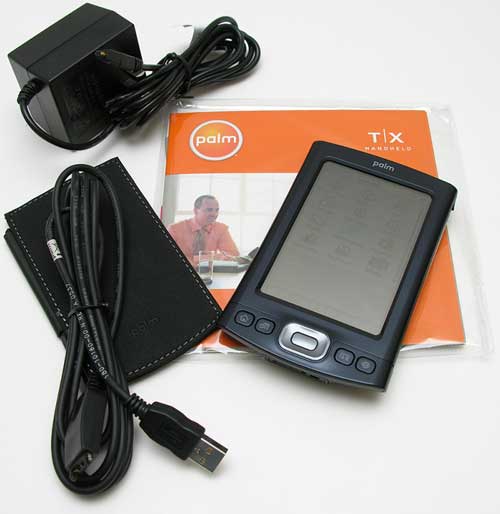
Like I said before, the new TX is the same size, shape and
weight as the T5. The main difference is that the TX has a darker
almost blue looking gun metal colored case. The case looks
like metal and even sort of feels like it, but I believe it’s really
plastic. Even so, the TX passed the patent pending Gadgeteer
creak test with flying colors. I detected no creaking, flexing, or
rattling. Unlike the T5, the TX does not show finger prints
or smudges.
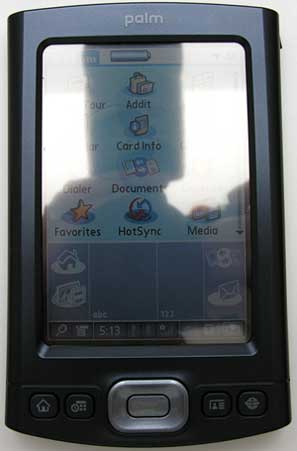
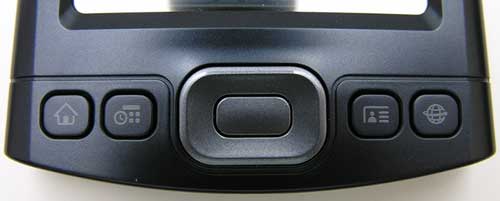
On the front of the PDA there are 4 application buttons, the
5-way navigation pad and the color display. The buttons have the same
layout as the ones on the T5. They are small, flat and square with good
tactile feedback. From left to right, the application buttons are
assigned to the Home, Calendar, Contacts and Web Browser applications.
Like other models before this one, the buttons can be reassigned to
launch other applications by modifying their preferences.
I’m not sure if it is just my particular review unit, but I
noticed that the application buttons and the power button would all
sometimes require 2 presses to activate the desired function. I’ve had
Palm PDAs exhibit this behavior before, and it’s annoying to say the
least. I’m curious if any other TX owners reading this have noticed
this problem. That said, I didn’t have any problems with the 5-way
navigation pad. Playing games with it is not a problem at all.
Although I don’t have a T5 to compare with, I find the 3.8in display on the TX to be very nice. It is bright and the colors are vivid. Reading eBooks, surfing the web, viewing photos and watching movies using the built in media application are all an enjoyable experience with this PDA. Even so, someone that buys this PDA will probably want to download the freeware player TCPMP which can play quite a few other video formats.
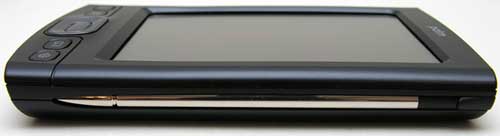
The left side of the TX has a slot for the included screen cover, while the right side has the stylus silo. The included stylus is better than your average plastic toothpick stylus. It has a polished metal barrel that is thick and heavy. The top screws off to reveal a reset pin.
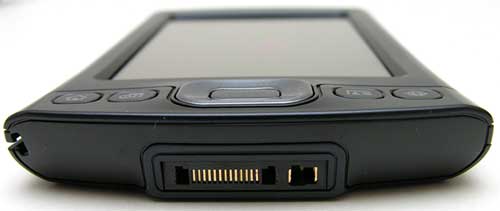
The bottom of the PDA has the same Multi-Connector that the T5 and LifeDrive have. The TX does not come with a cradle… big surprise… Instead a USB sync cable with an integrated hotsync button is included. The cable offers a trickle charge to the PDA battery, but if you want to quick charge, you’ll have to plug in the separately included AC adapter. Unlike the cable supplied with the T5, this one does not plug into the USB cable. It plugs directly into the PDA.
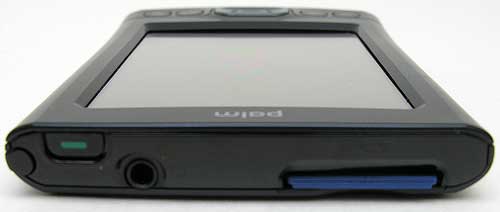
The top of the PDA has the IR port, SD slot, power button and earphone jack. In some quick tests, I found that I was able to beam an address to a Zire 31 from the TX at a maximum of 5.3 ft. Much better than the 3.5 ft. distance in the same test with a T5.
Listening to MP3s using Pocket Tunes through earphones (none of which are included with the purchase of this PDA), is a treat. The max volume level on this PDA is way loud. Like the T5, the TX is one of the loudest PDAs that I’ve reviewed. For me a comfortable volume level in a quiet room was at less than 10% of maximum. Like the T5, I noticed when earphones are plugged in but no music is playing, you can hear some white noise…
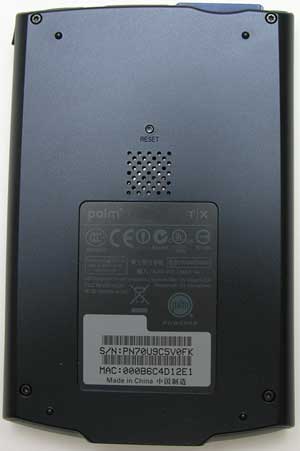
The back of the TX has the reset switch and speaker grill. Speaker volume is impressive. You can easily use this PDA as an alarm clock.
Like the T5, the TX has non-volatile ROM. That means that if you happen to run the battery down to nothing, you won’t lose your applications or data. The problem is, that you only get 100MB available to you. The T5 has 60 more megabytes. The T5 also has a faster processor and a little bit larger battery (1300mHa vs. 1250mHa). So what the heck do you get with the TX that you don’t with the T5? WiFi. Yeah, that’s about the extent of it.
Using WiFi with the TX is easy and painless. At least I found that to be the case with connecting to my access point to surf the web. It was as easy as clicking the WiFi icon on the menu bar, clicking the scan button so it could find the network, and then selecting the network and clicking the connect button. I was surfing pages in less than 10 seconds. I’m not sure I’ve ever been able to do that with a Pocket PC.
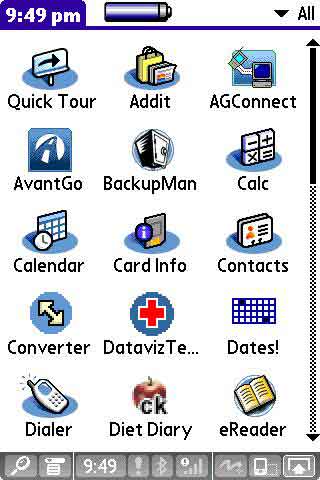
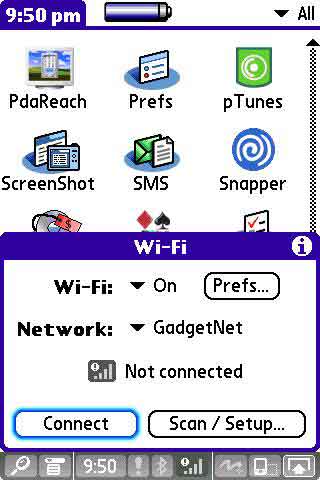
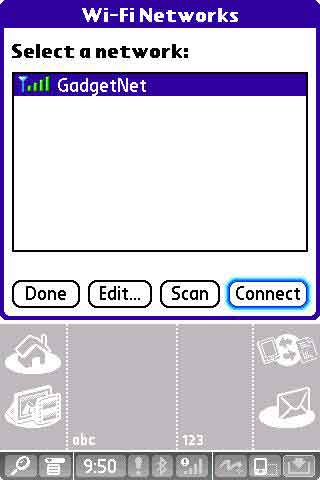
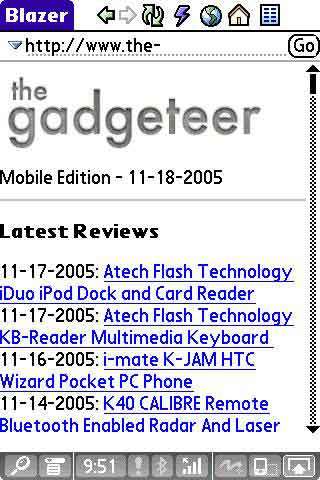
Actually surfing non mobile optimized sites on this PDA is not as painful as doing the same on my Treo 650. The large rotating display really makes a big difference. I’d still rather surf on a laptop or desktop, but doing so on the TX is actually pretty fun.
As far as system speed, even though this PDA is has a slower processor than the T5, I’ve not noticed any real lag. Even when writing Graffiti.
Software-wise, the TX comes with pretty much the same bundle that the T5 came with.
Included in ROM:
Addit software catalog
Blazer web browser
Bluetooth Manager
Calculator
Calendar
Contacts
DataViz Documents To Go Professional Edition
Expense
Favorites
Media
Memos
Note Pad
Pocket Tunes MP3 player
Quick Tour
Security
SMS Messaging
Solitaire by Handmark
Tasks
VersaMail email client
Wi-Fi Manager
World Clock
Included on the CD:
Adobe Acrobat Reader – PDF file viewer
Audible (URL)
Enterprise Solutions (URL)
eReader – My favorite eBook Reader
Media Desktop
Microsoft Outlook Conduits (Windows only)
Palm Desktop 4.1 for PC and Mac
Real Rhapsody Desktop
WiFile LT
Windows Media Player/DirectX
The most notable omission in the software bundle is the built in Files file manager application that was included with the T5. I’m really stumped as to why Palm decided to leave that one out. It’s not a real big deal though as you can download a better free app called Filez. Palm also swamped the RealPlayer audio player with Pocket Tunes which I have no complaints about.
The bottom line is that the Palm TX is a nice PDA. It’s solidly built, has a nice display, snappy performance, built in Bluetooth and WiFi. But if you already own the T5, I don’t see a real reason to upgrade. Doing so will give you a slower processor and less memory. Yes, you’ll gain WiFi, but you could do that by purchasing Palm’s $99 SD WiFi card.
I’ve been a fan of Palm based PDAs off and on since the very beginning. I still appreciate their ‘it just works’ OS. Right now my main PDA is the Treo 650. But having said that, Palm seems to be circling the drain as far as non-smarpthone devices go. I don’t know why they even decided to release the TX. Despite the addition of WiFi, it really seems to be a step backwards from the T5, instead of forwards. In my opinion, they should have concentrated their efforts on making a thinner, faster LifeDrive instead of wasting time with the TX.



Gadgeteer Comment Policy - Please read before commenting
Post your comments on the Palm T|X review.
http://www.the-gadgeteer.com/review/palm_t_x
Just click the POST REPLY button on this page.
Over all your review seemed fairly positive. I am a T|X owner and obvious palm fanatic (6 palm OS devices since 2000). I think the T|X was a step forward from the T5. Obviously it has built in WiFi which is an absolute must right now. The big step forward is such a solidly built and complete package for only $299 (online as cheap as $250). It really is a great PDA at a great price.
Of course palm is not exciting and is definitely not going to pull a Sony. Their whole business is producing the middle of the line PDA. One can not argue with that philosophy as uber geek PDA’s (ex: Sony UX50) were expensive and did not sell well.
Palm “swamped” RealPlayer and Pocket Tunes 😉
Seriously,
I have wondered before what would have happened if Palm could have somehow only released their best devices and illiminated the incremental upgrades, releasing only the:
Palm Pilot 5000
IIIxe
Vx
Palm VIIx
m515
m105
Zire 22
Zire 72
Zire 31
Tungsten T2
Tungsten E
Tungsten X
Tungsten C and W
the Treos
and left out (for example)
The III and IIIx
m100
m125
m500
m505
Palm VII
Palm V
IIIe
Tungsten E2 (I have a personal bias against this one for being so slow).
Tungsten T3
Tungsten T5
In other words, what if each device that came out was really a leap forward instead of a smaller “upgrade?” I am sure there are some problems with this from an economic standpoint, but it’s worth thinking about.
Have a nice weekend (or better yet a nice WeekendX or even a Weekend Xe)
🙂
unlike my wife, i don’t use the phone much, so i opted for the TX vs. a Treo 650 (still got to play with hers in the evenings). TX uses the same charger (as should be the case). slower processor (relatively) does not affect my use, yeah, docs to go takes a second or two to boot but not noticeable when scrolling spreadsheets – even works well with MP3’s playing in background. with the current price of SD cards, have no problem with the limited in built storage available.
pros:
bright wide screen (believe it’s the same as the life-drive one)
as mentioned by julie, fun to surf with & good wifi connectivity
cons:
– the buttons (which can be activated with a little pressure on the flap)
– battery life’s not great
BUT, given the price and features, am VERY pleased with it.
a bug: after loading all the software provided on the CD, versa mail re-starts when I attempt to delete emails from the TX (when off-line). My wife’s Treo 650 also does the same when all software is loaded AND/OR her versa mailbox starts getting full. very annoying given that we rely on it heavily for our business.
am deducing that it’s a versa mail/palm issue when running out of storage space. any suggestions for a fix or alternative bug-free heavy-duty-capable email options?
the TX was offered here in Beijing at a price only slightly higher than the rest of the world (new models used to be delayed and at a significant mark-up). as with the treo, the hot-swappable Chinese/English OS interface works well in the asian version available in this region.
here’s hoping palm & its disowned OS prosper (please Access) & propogate. have not been impressed with the alternative PDA OS’s – especially for those of us with large numbers of contacts & wanting functionality over (apparent) bells & whistles.
I’d happily trade my LifeDrive for a T|X for one simple reason: the 90-second reset time. It’s a killer when you’re in a meeting and your Palm decides to take a powder (which has happened to me on more than one occasion). I find I really don’t need the 4GB of space on the LifeDrive (although having a couple of movies AND the entire WikiPedia on my PDA is pretty cool!); I could probably get by with a 2GB SD card though.
I am actually really interested in the T|X. The main reason WiFi being integrated is the same reason I paid the extra $100 when I ordered my mini to get built-in WiFi, BT, and more HDD space. Sure you could get all those items in an external fashion, but It wouldn’t be as sleek or (more importantly) all my USB and FireWire ports would be taken up. Same with the T|X. An external WiFi card would block your only way to upgrade to more memory, since the T|X isn’t compatible with the SanDisk WiFi+256MB card. I know you can trade cards, but that’s a pain.
I’m not saying the T|X is a bad PDA. I just do not feel that it is advantageous to upgrade from the T5 to it. 🙂
“Palm also swamped the RealPlayer audio player with Pocket Tunes which I have no complaints about.”
I’m sure you mean swapped.
The TX is a pretty nice device for the price. I was initially skeptical but with the lower price and the addition of Wi-Fi I’ve been enjoying mine. I do agree that they should have aimed for a thinner Lifedrive style PDA but I think without the hard drive.
Whatever happened to that famous Palm reliability? My guess is that its the result of the Franken OS that has been patched over and over again.
Great review, ladies. I have been waiting to upgrade from my Zire 72, and this unit fit the bill perfectly. I agree with you about the limited changes from the T5 to the TX; if I had a T5, I’d just be ticked about the drop in price with the extra features.
But, for those of us patiently waiting for something more affordable with WiFi and more real estate than 320 x 320, this is a fantastic unit. I love it.
Nice review.
FYI: I too sometimes have to press the application buttons twice to get the unit to respond. But only when it’s off. If it’s already powered on, they seem to work fine on the first press.
Versa-mail will cause the unit to stop responding if my mail server chokes on the password for some reason (happens from time to time with SBC Yahoo mail) requiring a soft re-set. Once, and only once, it choked so hard it basically did the equivalent of a hard re-set (though without losing any data thanks to no-volatile memory). This caused its own problems as it also lost the handheld’s sync name. Basically had to restore.
For anyone who’s interested, MarkSpace recently released The Missing Sync for Palm OS (Mac OS X), which I highly recommend. Syncs the Palm with iCal and Address book on the Mac, and finally supports categories and extended PIM information! Also allows WiFi sync with the Mac which Palm, for some reason, does not support in the Palm Desktop. (Until I defected to the Mac camp early this year, Palm Desktop was always fine by me, but the Mac version is just plain ugly)
Since I don’t see an upgrade to the T|C coming anytime soon I’m considering the T|X – appreciate the review.
My only concern is going back to Graffiti – I was pretty good with 1 but never got the hang of 2. Anyone know if the fix of loading the old files will work to have Graffiti1 on the T|X?
The G1 trick will work but sometimes it interfers with Blazer. Its a trade off and I choose G1 😀
In your review, you say that the T5 has 60 MB more memory. It does, but only 55 MB of its total memory is available for programs and files. The rest is for the internal drive. The TX on the other hand, has 100 MB available for programs and files. So, the TX has 45 MB more by that calculation.
The TX also reportedly has a better screen and somewhat longer battery life. And, users report that the slower processor is not noticeable. I’ve also seen comments that the internal WiFi on the TX works better.
The TX lists for $299, the T5 for $349. Add a WiFi card to the T5, and you are up to $449 and you lose the use of the SD slot. So, while you could argue that upgrading from the T5 to the TX does not make sense, it is pretty clear to me at least that you get more for you money with the TX, especially if you do not need the internal drive.
Jeff
A T|X with a 128MB memory card: $315 or so, if you shop around for the SD card. a T5 with a WiFi card: $450. The T|X is clearly the better deal. But, I agree, there isn’t much of a point in upgrading for T5 users, unless you need WiFi and more external memory at the same time…
Julie, did you sync this PDA with your Mac? How did it work? I am seriously considering buying one in the near future and I’d like to know. Also, does anyone know of any good IM clients for PalmOS?
Tyler:
Yes, I had no problem syncing with the Mac. I just used the Palm Desktop and iSync, not Missing Sync this time.
I was a long time PALM user, then I switched to the Dell Axim X30 (high) to get the built in WiFi. With the new TX, I’m considering coming back.
Any thoughts from users that have already moved back and forth?
Is there something great about the X30 that the TX doesn’t give me?
Thanks
I find it strange that you compare this unit to the T5 only. I upgraded from a T3, and am certainly pleased: the wifi reception on the T/X is far more sensitive than what I got with the wifi card which of course is the same card used with the T5 – as a result I now use wifi a lot, whereas with the T3 (and, I assume, the T5 if I had owned one) I was reluctant to waste the time; the battery life is far better than with the T3; and the screen is just as good. There may be no good reason to upgrade from a T5, but there certainly is when it comes to a T3.
I have noticed that 2-push button problem, and I had no idea, till I read your review, that it was a known Palm problem. Occasionally I also get screen clicks when I press on the screen, and I have seen comments about that elsewhere. Have you noticed that?
I have a lot of software installed but had only two problems (with Zlauncher and Zagattogo) but both have been corrected by the developers.
I find Palm’s failure to include a cradle ridiculous, and I bought one.
I am, BTW, delighted that Palm did not choose to upgrade the LifeDrive, a unit that I think should be discarded: it is bulky, heavy, and incredibly in this day of solid state memory uses a hard drive. Bad idea!
Cheers, Philippe Radley
Thanks for the great review, Julie;
I convinced my boss to buy a T|X for me here at work, and I love it. The device itself feels very comfortable to hold and work with, the WiFi (the main reason for getting this model, IMHO, is that is has built-in WiFi and Bluetooth) was setup and on the network in a minute (or less), and it is reliable.
A couple things to note:
http://www.ludustech.com/download.php?file=http://www.ludustech.com/files/SharkTXfix.zip Ludus Technologies has a program called SharkTX Fix that will replace the “find” icon with the “home” icon. I know that was something I missed with the TX…thankfully, their program (free) does exactly what it’s supposed to do, and you don’t have to constantly fumble for the hard button. (To use the “find” feature, tap on the button and draw up.)
Another excellent program that’s on the CD is WiFileLT. You can use it to access a server network share, which in our environment, really helps. So far, though, I’ve only been able to use it to map to a share on the server, not my personal workstation. Might be a port issue…I’m working on that.
All in all, I’d recommend this to anyone looking to upgrade from an old Palm, even the T5, if only for the convience of built-in wireless.
I compared the TX to the T5 mainly because they are so similar. I wanted T5 owners to know that they probably shouldn’t upgrade to the TX.
I still would like to see a thinner LifeDrive…
A LifeDrive that uses Flash memory (ala the Nano) wouldn’t be too bad, but the hard drive’s access “lag” annoyed me to no end…
Since Palm can’t sell as many LifeDrives as Apple can Nanos, it’s highly unlikely Palm would be able to switch to flash memory and keep it under $500. The only reason the 4GB nano is $250 is Apple worked out a special deal with Samsung for lower pricing. Palm would have to sell at least half a million or perhaps more LifeDrives in order to get special treatment like that.
As a die-hard consumer of Palm OS, I must comment that the new T/X has been an ongoing headache. I am now on my second unit, thinking that the first one had a battery problem with its black-outs. Actually, in my daily trouble-shooting exercises, I have discovered that the new updated OS is very unfriendly to third-party software. My trusty Tungsten 3 had more than a dozen programs running happily. The T/X, however, has now morphed into a read-only unit, and can be updated only via computer hotsync, despite five hard resets and total removal of other programs. It cannot write to my SD card, or move files either. The only thing working satisfactorily is the beautiful Vaja case I ordered in advance! I was excited to have a new Palm with Wi-Fi, but am so embattled with this misbehaving PDA, and can only now consider whether I should jump ship completely and defect to the PC. Has anyone else had these problems with instability on the T/X?
I too am a long time Palm user. My original Pilot was one of the first 200 on the street. I remember exchanging tech support e-mails with the founders. I’ve had my TX of a week and so far so good. I have the same double button press issue as others have reported. The display is excellent and it’s a lot faster than the Tungsten E from which I have migrated. For anyone concerned about the size, I feel no difference in a jacket pocket when compared with the “E”. I haven’t had much opportunity to travel with it yet. I’m wondering if anyone can compare the WiFi sensitivity/range with that of a typical laptop? I’m looking forward to using it for e-mail occassionally. Also does anyone have an e-mail program that they find superior to the Versamail that comes installed?
mark
One of the screen shots shows an icon called “Dates!” I tried searching for this in a couple of catalogs, but couldn’t find it. (Much too common of a word.)
I’m guessing this is some sort of alternate calendar program. What is this app and where can it be found? Thanks.
“Dates!” is an app that allows one to calculate the number of days between two dates or similarly the date resulting form adding a number of day or a date. Look at enteract.com
enteract.com is a blank page. Am I missing something?
the app that I’m thinking of is Dates! by marty Wilber. [email protected]. if he doesn’t respond, I probably have the original download. that’s all that I know.
Mark
I have owned the Palm Vx and the CLie SJ/22 and decided to buy the Palm TX and I love it. Wifi access on this device is excellent. I enjoy the screen, and pocket tunes.
I also found that you can use the Palm Vx cases to fit ‘barely’. I had a Dooney& Bourke case that I was able to use with this device. I removed the metal ‘nail’ and slipped the leather hinge inside the slot where cover is intended. I then slipped a paper clip inside the leather hinge inside the slot to hold in place. It looks quite nice with perhaps 1 or 2 mm exposed on the top center.
I have had the TX for a few weeks now after upgrading from a Tungsten E which was a temporary replacement for a Tungsten T3 that died on me. So far it has been a great handheld; good battery life (esp. compared to the T|E and T|T3), wifi is super easy to use, relatively stable (only had to reset once due to a Shadow Plan issue), one handed use is pretty good.
I do experience the issue with having to press a navigation button twice before the device responds. Also, there was a graffiti lag between writing it in the graffiti area and when it would show up on the screen, but this disappeared once graffiti 1 was installed. Also miss the vibrating alarm feature and cradle.
I actually wanted to upgrade to a Tungsten C but I can’t find anyone selling them new; has anyone heard of whether or not Palm is going to be coming out with a sequel to the T|C?
There may be some available through Office Depot. Amazon had at least one new one for sale. I have a Tungsten C, but will probably get a T|X soon. I think that I damaged the power management circuit in the Tungsten C (long story). The charging light stays on, even when the PDA is not being charged, until the battery is rather low. It does work, but I don’t get a lot of warning about the battery condition.
I’ve always had trouble with the browser that came with the Tungsten C. It would always crash when I tried to type in an URL. Palm’s support was of no help. They essentially denied that it could possibly happen.
I’m a new member and am glad to have a place to read what others know about PDAs. I have never owned one, and am considering the Palm TX. After reading the review, it sounds like it would suit me well. I need an organizer, but also would love to have WiFi access for road trips (I have two scheduled in the next few months — a Southeastern states tour, and also a visit to Utah). Also, I’m a web developer by profession, and want to understand more about developing pages specifically for WiFi users.
I’m a bit confused about two things I’ve read about the battery: one, that it is not user replaceable (how often would that come up?), and the other that the battery is rechargeable (is the equipment to recharge the battery included when you buy it?). Where would one go to replace the battery, if that should ever be necessary? A bricks and mortar store? I’m planning to buy online, so I’m not sure how that would work.
Thanks for this site. Now that I’m diving into the world of gadgets, I’m sure I will be relying on this as a source of information.
Tacky Julie
Yes, you do get a charger to charge via USB and via a standard wall receptacle.
The need for a replaceable battery is two-folded. One, when you’re traveling without a power source, you could swap out your dead battery for a fully charged one. The other is if the battery ever dies completely. It isn’t a question of if, it’s when. Batteries fail. But, it’s likely the battery will hold an acceptable charge for 2-3 years, so it’s sort of a moot point. If you need to replace the battery, you could buy one online, crack open the unit and do it yourself (it will be out of warranty by the time it needs a new one), or ship it off to Palm and pay about 2x the price, or ship it to many other pda repair places. The rates are fairly reasonable.
Julie,
I would have to agree that the T5 and TX are an unfair upgrade. I did the same thing. I started with a T5 and thought I wanted WiFi so a TX is mine. However from my standpoint, the loss of “Drive Mode” by the TX is a waste (BTW have found no way to send files directly into SD). Plus the thought of “Must add WiFi Switch to home because Drive Mode is absent” takes the cost of the TX back to the cost of T5. Have tried placing the files used by T5 for Drive Mode onto the TX … no good. Have also tried commercially available software (fail to recall name) that emulates drive mode into TX … no good. Another detraction for me was the loss of the “Home” icon within the toolbar which was replaced with a “Find” icon. Yes a wonderful replacement can be installed and noticed a reference to it within this forum. I guess a lessor detraction for me was the seeing for the first time a web page in the 320×480 or 480×320. I knew what 320×480 would do to a web site … not smaller items on a page but less items within the screen. So lets get back to comparing apples to apples and oranges to oranges. Now, what is simular in capability to the TX. Don’t let me put the TX under the bus, it’s a great tool where needed. I simply THOUGHT I needed it at the time. But the wife has the T5 now … and may have the TX in the future.
Tom
Comparing the Palm TX to the Axim x51v
I just purchased a Dell Axim 51v with the GPS blue tooth navigator through Costco ($600 plus tax). The device was a terrible disappointment. The alarm function was completely unreliable. Alarms set on the calendar would work for a few days and then stop working. The PDA required what is termed a hard reset in order for the alarms to function again. A hard reset is a time consuming operation. It takes about an hour to completely back up and restore the files deleted by a hard reset. I had never owned any type of PDA before, But I naively believed that a simple reliable alarm clock and audible appointment notifier would be included in the programs. I was wrong.
As an indication of the poor quality of service at Dell, one of their agents told me that the company was doing me a favor by giving free support, and that they really didn’t have to provide any support at all.
The Axim x51v originally accepted voice recordings for calendar appointments, but that function also stopped working correctly. After a few days, whenever I tried to record for the calendar appointment, the PDA would switch to the notebook program and put the recording in the wrong place. There is an option in the notebook program to force the recording to stay in an existing program, but that option no longer worked. The folks at Dell repeated the mantra of soft reset, hard reset, and reinstallation of Outlook and the Sync program. Doing such did not permanently fix either the alarm or recording problems. They continued to randomly recur.
I returned the Axim 51v to Costco after trying to get it to work for three weeks. I think the Microsoft Mobile 5 operating system and/or Outlook program are too buggy for a reliable PDA. I consider the reminder programs the most important on a PDA and the only reason one would purchase the device..
I purchased a TX from a local Office Max store that offered a free wireless keyboard (supposedly $70 retail) and a 256mb Sandisk card with some software and Rolling Stones music preprogrammed on the card; moreover, OfficeMax price-matched Circuit City’s $270 sale price. I couldn’t pass up the chance to try the discounted TX since I desperately needed a good PDA.
The first thing that I noticed is that the TX came with no case at all, only a flimsy little flip cover. The x51 came with a pretty poor cloth sack that offered no protection for the top of the unit, but it did protect the rest of the unit from dust and abrasion. I would say that a decent case is a necessary requirement for both units.
The Palm stylus is much nicer as the Gadgeteer reviewer noted. The stylus on the x51 is only about 1/8″in diameter so it is difficult to grip well. The TX case is slimmer and lighter than the x51’s case. The case appeared to be well constructed on both units, and they both look nice.
The X51 had several features lacking on the TX. The x51 will accept flash cards as well as SD cards. The Axim X51 has a replaceable battery.
The TX cannot use extra batteries because the battery is not user replaceable.
As a side note, many vendors on the Internet offer replacement batteries for the TX so that one can replace the battery if it fails after the warranty has expired. The replacement battery comes in a kit with instructions and the Torque drivers necessary to disassemble the TX.
After initially testing the Palm alarms for a few days, I decided that the TX was a keeper. The notification system was easy to use and it worked flawlessly. I went ahead and purchased a Toshiba 1gb SD memory card to test out the PDA’s media storage and media playing functions.
After evaluating the TX, in my opinion the Palm PDA is infinitely superior to the Axim x51 in regards to reliability. The TX so far has never had any problems whatsoever and that feat has occurred despite an inexperienced user entering data and playing with the programs. In the first week that I had the Axim, I found it necessary to perform three hard resets and about six soft resets because of crashes in the Windows Mobile 5 operating system. In contrast to the Dell programs, the TX calendar notifiers and task alarms are easy to use and the audible alarms have been completely reliable.
In general, I found the Palm TX operating system much more convenient even though I have been using the Windows operating system for many years and the Palm programming was completely new to me.
The TX comes with one of the most comprehensive help systems that I have ever seen. One can download a 690 page Adobe PDF manual that covers just about anything one would ever want to know about using the TX!
I haven’t yet read that huge manual, and I probably never will. So far I haven’t needed any help from the manual, or from a User’s Forum, or from the Palm customer service folks. I obviously cannot compare Palm and Dell in the customer service department since I haven’t needed any customer service from Palm. I can definitely assert that Dell’s customer support is terrible as I described previously.
To operate the TX, I used the help files and menu directions built into the PDA for any details that I was unsure about. The only area where I was a little confused even with the pop-up help file was in the transfer of contacts from my address book in Outlook Express to the TX. The Palm instructions often referenced Outlook but I saw nothing about Outlook Express. After some fumbling around, I discovered that I could export my OE address book as a comma separated file to my desktop, and then import that file directly into the TX Contacts program. All of the fields that I used were correctly transferred to the TX using this method. Names, addresses, phone numbers, and e-mail addresses synchronized perfectly. Probably somewhere in that huge manual there is a description of how to import data directly from Outlook Express, but my way works nicely, and it is fast and easy once one knows the procedure.
The TX Pocket Tunes music player and Rhapsody music cataloging and transfer systems worked flawlessly.
The TX music player permits a variable volume boost, a feature that I could not find on the Handheld version of Windows Media Player on the Axim.
Both PDA’s played most music well, although the Axim could not perform a volume boost for MP-3’s that had a low recording level for very soft music.
Soft passages were inaudible on the Axim speaker with the volume control at maximum. Cataloging was difficult on the Axim PDA because the library insisted on importing all of the voice commands installed by the GPS navigation system when searching for music files.
The TX reproduced the music perfectly from Mp-3 recordings cut from old vinyl records. For some reason, The Windows program on the Axim did not suppress the irritating needle hiss on MP-3 recordings of old vinyl cuts. I think that the TX is the winner at music storage and reproduction.
Photos were well displayed on screen by both systems, but the TX had an intuitively easier system for cataloging and showing photos. Both the Axim and the TX have nice screens that accurately reproduce color, and both PDA’s offer more than enough resolution for the small PDA screens. The Axim sync system for music and photos was buggy and difficult to use so I turned it off. Because any information on the Axim expansion card is not accessible during the long process engendered by a hard reset, the x51v isn’t reliable enough for a professional whose responsibility might entail a photo slide show for an important occasion. The TX is the better PDA for storing and presenting photos in my opinion.
The Axim has a potentially useful feature that is lacking in the TX. The x51v accepts recorded messages. Unfortunately, I found the recording system to be unworkable for calendar appointments where it would be most useful to me. The buggy program worked for a few days, and then it would arbitrarily refuse to allow voice recordings in the calendar notes. Whenever I pressed the record button, the recorder jumped out of the calendar and went to the notebook so it put the messages in the wrong place. The recording to the calendar feature could only be restored by a hard reset. Essentially, the voice recorder is useless except for making a short note.
The Axim includes a good dictionary and spell checker and can suggest word completion after the entry of a few letters. I believe that Palm should charge a few dollars more if necessary and include a dictionary, Thesaurus, and a grammar/spell checker. The Axim is far superior out of the box as a word processor.
I fooled around with the Palm Grafitti handwriting recognition system for a bit, and it actually could read my lousy handwriting that left the Axim clueless. I suspect that the better performance by the TX in character recognition may simply be a result of the fact that the TX stylus is larger in diameter and more comfortably suited to handwriting. In any event, I still continue to use the on-screen touch keyboard, and I prefer the Axim’s. For one thing, it has a delete key. For another, the keyboard can optionally be resized to a larger format.
In conclusion, I personally believe that the Palm TX is a well designed tool that does what a PDA should do. The Axim x51v is an expensive toy that has too many system and/or program crashes to be suitable for serious work.
I currently have a Palm m505 and am thinking of going for the Palm TX (since Palm don’t seem likely to produce anything stellar in the near future).
My Palm has a simple book case that was shipped with it, which attaches to a groove on the left side of the PDA (A bit like a stylus silo).
Does anyone know of a similar, simple case for the T|X (I note that the standard flip cover has nothing to protect the back of the TX)?
The T|X comes with the flip cover, but there are many other cases available. The most protective cases, I expect, are the metal cases that, as with your m505, attach to the groove on the left of the T|X. Mine is by Innopocket, though it’s a different color–gunmetal blue, much like the T|X–than the ones I’ve seen online recently. It’s available from several sources–do a Google search on “Innopocket” to find them. It is quite trim and form-fitting. It does leave the SD-card slot, the headphone jack, reset button and the docking connector easily accessible, along with the top of the stylus silo. There are two SD-card slots in the cover.
I started using metal cases after I fell with my Tungsten C in my pocket. It has the “flip cover” it came with, but the screen was still cracked. I replaced it through Palm’s replacement program (it cost about half the price of a new one, if I recall correctly–their warranty does not cover the screen). I also ordered a metal case. The one I got (I can’t remember from where) is a bulkier than the Innopocket T|X case I have now.
Cases.com has several cases for the T|X, including leather book-style cases and aluminum cases. Stylus Central has an aluminum case and other accessories. Palm, itself, sells several cases, though their prices tend to be high. ExtremePDA has several cases, including the Innopocket metal case. Vaja has a very nice-looking leather case (I think that there’s a layer of ABSplastic in the cover to provide extra protection) that you can get in a large number of colors and combinations of colors, with several other options (e.g., with or without the belt clip). They’re not cheap, but they are exceptionally well-made and gorgeous. (I’ve had Vaja cases for a Handspring Visor Deluxe, a Nokia phone, and two iPods.)
You can probably find more if you nose around. Some cases open from the bottom, others from the right side. Some are leather (of varying quality–and cost!), others are metal. It just depends upon what you want.
Informative and useful review. Clear and free of jargon.
Before I order a TX, I have two questions:
1) I’m replacing a Tungsten E whose screen cracked when I fell on it after bouncing off a car that cut in front of my bicycle. I hadn’t heard of the Innopocket cover before reading about here–sounds like what I should have had. Does the Innopocket cover slide into the slot used by the cover that comes with the TX?
2) I live in France. My current Tungsten E (which I bought in the states) came with a univeral power charger that I can use in the States or here in Europe. The charge for my wife’s E that I also bought in the US only works on US voltage and current. So, if I buy a TX in the states, will my E power charger (the universal one) also work on the TX, i.e., are the plugs the same?
Thanks for any input,
Harvey
1) Yes. There is a hole in the back cover to access the reset button, but you can flip the TX out of the back cover for access, as well. There are three openings at the top for the memory card, headphones & IR, and the power switch and stylus and on the bottom for the sync & power connectors.
2) The connectors for the Tungsten E and the TX seem to be different. It looks like the Tungsten E uses something like a mini-USB data connector and a round power connector. The TX uses a proprietary Palm data connector and a square power connector. (They are sometimes combined into one piece.) See this page for pictures of the connectors–better than you can find on Palm’s site. Check the fourth down (Tungsten E) and the sixth (TX).
If you have the Tungsten E2, on the other hand, the connector should work on the TX.
1) Yes. There is a hole in the back cover to access the reset button, but you can flip the TX out of the back cover for access, as well. There are three openings at the top for the memory card, headphones & IR, and the power switch and stylus and on the bottom for the sync & power connectors. I’ve had no reason to take my TX out of the case.
2) The connectors for the Tungsten E and the TX seem to be different. It looks like the Tungsten E uses something like a mini-USB data connector and a round power connector. The TX uses a proprietary Palm data connector and a square power connector. (They are sometimes combined into one piece.) See this page for pictures of the connectors–better than you can find on Palm’s site. Check the fourth down (Tungsten E) and the sixth (TX).
If you have the Tungsten E2, on the other hand, the connector should work on the TX.
Palm does have a travel charger that would work in France. You may be able to find others, as well. I use a USB connector like the Zip-Linq and USB AC & auto power adaptors when I’m not at home. The Boxwave VersaCharger PRO can be bought with US or European plugs. (There’s also an adaptor kit available.) Boxwave also sells the miniSync , a nice retractable cable, and a bundle with the VersaCharger PRO and miniSync for the TX. Check around their site–they have several useful accessories.
Thanks for responding so quickly.
That’s a definite DRAT! about the connectors. I suppose I’d better buy a TX here in France to be sure I have a charger that works here. Unfortunately with the dollar weakening against the euro and and electronics normally costing 25% to 50% more than in the US, that’s a bummer!
Harvey
Check my edited/revised message for other solutions.
Thanks for the update. I’ll do a little more research on chargers for the TX. Buying one in the US and having it shipped here is worth the effort financially.
Harvey
I don’t see a lot of posts about this, so I may just have a bad battery. While it was new, battery life was ok, not great (I could use it for two days, moderate usage, it could sit unused for about 4 or 5 days.
I have had the TX for a bit over a year now. I can now get about one day of moderate use, but it can only sit overnight before the battery is dead. This is with all radio (wifi and bluetooth) turned off.
Just a warning not to expect great battery life. I no longer trust the battery and don’t use my TX much anymore.
In addition, I have added software, but the TX also need a soft reset at least twice a day.
This is my 4th palm and the first that I have had these problems with. The same software is installed on the TX as on my Tungteen E (which seldom needed a reset).
I bought the TX last week to replace the cumbersome Dell laptop & charger I have been lugging around. Also, I’ve been using a Windows Smartphone, Cingular version w/Edge network, and while it gets me on the Inet, it’s still pretty limited. I wanted to be able to use Wifi to get email & surf the net. I bought the TX & the wireless keyboard. It’s been *wonderful*. A true replacement for almost everything I do on my laptop. I don’t care about whether the unit has a phone, as my PDA cell still gets the job done. However, the PDA phones are very limited and hard to enter data into, as well as it’s very limited for internet access, while also being slow. I still use a desktop w/21″ monitor. But the TX has good battery life, and allows me to do about everything I need to do in wifi access points, at pretty normal wifi speeds. I’ve had a reset or two, especially when I try & access my email while surfing. Hopefully this won’t be a common occurance. However, the unit recovers quickly & without data loss. Other wishes: ability to work on the file system to move files around.
I have had PDA’s & cell PDAs since the mid 90’s. This is the most useable unit that I have used since the beginning. If they actually merged the phone w/wifi & battery life, I’d go to one unit. Until then, I’m going to use two units, since I was using two anyway before this.
I’ll post problems as I find them.
I finally bought one here in Europe. When I did the research, there wasn’t enough of a savings to justify getting a TX in the US when you add in the cost of getting an int’l charger.
I’ve had it a couple of weeks now, and it works like a charm. Dislike the cover that comes with it and will get a replacement one of these day–something hard to better protect the screen. Was panicked after the first hot-sync where I had preserved all the apps on the TE I was replacing–it kept resetting. After a quick search at Google on the problem, went back and did a clean install, then re-installed the key apps. Fixed the problem. [large smile, accompanied by ‘whew’ of relief]
Harvey
I currently have a Powerbook 12″, but due to some issues with iTunes DRM and my growing frustration with DRM in general, am switching to Linux on a ultra small form factor PC (like a Mini, but less cool and more useful).
As a result, I’m losing the portable nature of my Powerbook and hope to replace much of it with a Palm T|X. The T|X seems to have what I need most (.ogg vorbis support, text editing, wi-fi, browsing), but I’m concerned about an extended day of taking notes with it. There is a package with the Palm Bluetooth keyboard included at my local tech shop and while the keyboard seemed pretty good, that PDA screen is mighty small for a long day of writing. Anyone have any experience with it that can advise on whether this is a good option or whether I should stick with a notebook?
I would be writing at seminars. They are full day and happen about 1 every 2-3 weeks, so not on a daily basis.
Hi gaki,
I purchased a Lifedrive and infrared keyboard a year and a half ago whilst in hospital, so that I could “talk” to the surgeons, nurses and family/friends as my jaw was wired shut following a horrendous accident. This was a life saver for the three months that I was wired. As a touch typist I found the keyboard very easy to operate and the screen was surprisingly easy on the eye. My Surgeon even complained that I was talking too much on it and could it be confiscated! Unfortunately my Lifedrive hard drive failed three months ago. Without hesitation I purchased the TX as a replacement (mainly because I couldn’t find another Lifedrive) after reading its specs.
IMHO The TX far out performs the Lifedrive. The screen is, if anything, even easier to read; bearing in mind that I also lost an eye in the accident; I now use it as my main method for reading books.
It’s just the gadget to go to seminars with. My only reservation as far as you are concerned is to whether you’d be better off with an infrared keyboard rather than the Bluetooth as I presume the Bluetooth may be more power hungry. I don’t have any experience with Bluetooth keyboards as yet.
Hi Everyone—I am so GLAD to have found this forum.
I have a Palm T|X and really love it except for a few little problems that I cannot seem to get quality help on from Palm.
I upgraded from a Palm Tungsten E that the bought the farm from abuse…decided to upgrade so I would have the wi-fi, etc.
The problems:
1) There seem to be BUNCHES of “private tasks” set up and everyday all day long it is ding-ding-ding beeping at me to take care of them. It is driving me nuts. I have NEVER set up any private task…never had them in my old Tungsten E and haven’t set them up in the new T|X…HELP! I cannot figure out how to get rid of them…it let’s me see them in the “reminders” when it alarms, but I cannot find them anywhere else to delete them…
2) The graffiti doesn’t work well, even when I slowly write and do it perfectly…any suggestions?
Thanks for any help you can offer!
I also have a T|X. I’m not sure what you mean by “private tasks.” Are these scheduled events, to-dos, alarms from some other software–or what? Some software that works on the Tungsten E will not work properly on the T|X. I had a Tungsten C. When I switched to the T|X, Mapopolis no longer worked. The developers either couldn’t make it work or decided that it wasn’t worth the trouble–more likely the former, according to their emails.
I don’t use Graffiti, as I’ve found it slower and more cumbersome than using the virtual keyboard. Try that for a while–it will take some getting used to.
Well, I am not exactly sure what they are or where they came from-my old Tungsten E had a thing called “private tasks” where you could put in a task and mark it private, which I think meant so no one else could see it…but I never used that function…and can’t even find a similiar function on the T|X. I have never actually installed any outside software except what came with it-MS Office…Doc’s to Go and such.
Glad I am not the only one that has a time with the Graffiti…guess I will go to the keyboard and work with that! Just seems like the Graffiti on the old Tungsten E was much easier to use…
Any other suggestion on the private task issue???
I have had this palm for awhile. I really want to learn how to use it.
I just need the disk that came with it that since has been misplaced.
How do I get another?
signed me…La
@lanette: You can download the Palm Desktop application from http://palm.com
hello, i bought a palm tx, if you need to find out anything about the unit get PALM ORGANIZERS they told me more than the people at palm could, how to input & delete stuff you may have put in accidently, its beat out my ipaq 1910, tx & wireless keyboard are a great duo. don’t forget book, visual quickstart guide 4th ed. jeff carlson / agen g.n. schmitz.
It appears that Palm have discontinued their handhelds. I can not find anywhere in the UK to buy a new one. As a committed Palm user, I am not quite sure how I would survive without my M505, this has sent me into a mild panic and I am now looking to buy a Tungsten E2 or T/X.
Does anyone know how easy it will be to transfer my data to the new machine given that I have been working with Palm OS 4.1 for years. I am really hoping I can put my Palm backup SD card in the new machine and down load all the data, but some how I feel it will not be that easy.
Many thanks
@Angela If you’ve been syncing your old PDA with the Palm Desktop, it will copy everything over when you sync the new one.
i had lost my operating (palm t5 ) driver cd , plz send the software so that i can download it from here. hope u will send the software as soon as possible . thanking u
@sreeji You can find the Palm Desktop software on Palm’s site: http://kb.palm.com/wps/portal/kb/na/tungsten/t5/unlocked/home/page_en.html
can the palm tx be used as a phone?i havea palm tx and i live in in jamaica can it be used as a phone ..our phone networks are digicel,lime and claro
@sheka Sorry, the TX can not be used as a phone.