
Although I have had a Microsoft PocketPC since my Phillips Nino
days in 1998, I am new to the PocketPC Phone Edition – Windows
Mobile 5 world. I purchased an imate JasJar (aka the HTC
Universal) this past summer on eBay. I got it mostly for the
PocketPC side of things and thought I’d toy with the Phone side
when I had the time but that didn’t last long…say two days!
I wondered just what kind of new software was out there for the
PocketPC Phone Edition so I started “Googling”, scouring all the
PDA software sites and reading the “Best of List” from our friends
at PocketPC
Magazine. That’s when I came upon their software category for
“Phone and Fax”. One caught my eye and it was called
phoneAlarm from pocketMax Software but I couldn’t
quite put my finger on what it exactly did. As usual, I see
there’s a trial version available from the developer so I bravely
loaded it that very minute.
Being new to the PDA/Phone combination, I was not sure why
phoneAlarm was so highly recommended in all those
user software reviews you read over at Handango.com or PocketGear.com, that is until I
discovered the profiles portion of the program and that’s when it
clicked! While the today screen plug-in was a nice way to show me
calls that I missed, emails in my inbox or the convenient
battery/phone signal strength meters, it was the profiles that
truly made this program extremely useful. Here’s the way it looks
on your Today Screen…
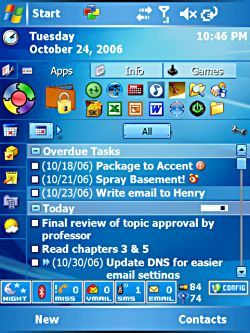
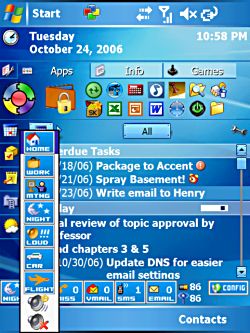
The Today Screen plug-in at the bottom of the screen shows the active profile
(Night), Bluetooth On/Off Indicator (Off), Messages, Voicemails,
SMS, Email, Battery, Cell Carrier Signal and Options Access.
This is the default
VGA skin for the plug-in as well as the view of all the profiles
that you can select by tapping the profile button. Each profile
can be programmed and we’ll go through all those options a little
further down!
Now at the touch of a profile button (see second panel above),
phoneAlarm can change all kinds of system settings
into a pre-set device profile of your choosing. Not only can you
change profiles manually but you can also change those profiles
automatically based on the system clock on your device or where you
are currently located.
Here is what sold me…I now had a way for my JasJar to set
itself to “Night” mode so that all sound was mute, phone ring would
go to vibrate, backlight was at it’s next to lowest setting and
would shut it off after 30 seconds. No longer was a stray task
alarm on my JasJar going off in the middle of the night or some SMS
alerts that I have set up with some financial service sites
interrupting my sleep!
That got me to thinking…this is a VERY useful feature that is
needed on all Phone Editions and Smartphones as well as a limited
version for all PocketPCs in general. Why didn’t Microsoft ever
think of this in the first place! Then again, I’ve said that about
the built-in file explorer and task management system to name just
a few. Instead of beating that dead horse, let’s dive right in and
take a closer look at pocketMax’s phoneAlarm.
phoneAlarm Features
There are two versions of phoneAlarm: a “Full”
version and a “Lite” version. The feature list below for both
versions comes directly from the pocketMax Software web
site:
Features found in both Full and Lite versions:
- Provides repeating alarms on new SMS, Email, missed calls &
voice messages - 7 Custom Phone profiles with manual / time-based automatic
switching. - Alarm notification on weak battery and phone signal (WM 5.0
only) - Customize sound, volume and options for each alarm type in each
profile - Mute device and phone volume
- Skinnable user interface (How to create skins)
- Bluetooth and Flight mode control via profiles (also for
Widcomm/Broadcomm stack) - Auto-profile change on <‘ActiveSync’> (Work) and
<‘Power – no ActiveSync’> (Car), also based on time or
Appointment category - 1-hand skin navigation and quick-dialer for last 10 numbers
(only for WM 5.0 & WM 2003 SE) - Icons provide direct access to Inbox, missed call history
etc. - Task-switcher pop-up to close running applications
- Option to cycle radio (off/on) to change user on dual SIM
- English, German, French, Italian, Spanish, Danish, Norwegian,
Dutch, Czech, Hungarian, Russian and Chinese user interface - Supports VGA display
- Optimized for fast performance and maximum platform
support - Simple installation
Additional features ONLY in Full version:
- Billing calculation – keep track of your phone costs
- Detailed GPRS volume tracking
- Location-based information (change profile dependent on current
location!) - Call and SMS forwarding support in each profile WLAN control
via profiles - Skin rotator element to display actual information
More phoneAlarm Options:
As I alluded to earlier, the power of phoneAlarm
is in the profiles and the options that you can program for each
profile is where the fun really begins!
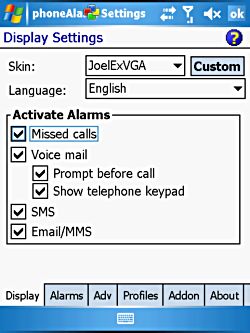
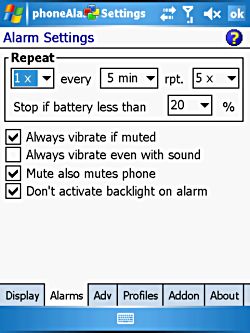
This is the “Display” screen where you can select the skins as well as the alarms you
want to receive. There are lots of alarm options!
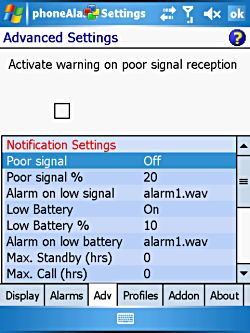
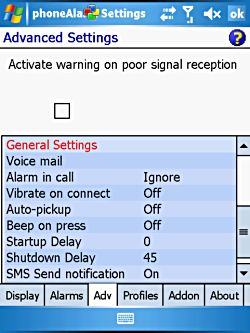
Advanced Settings – Page 1 and 2
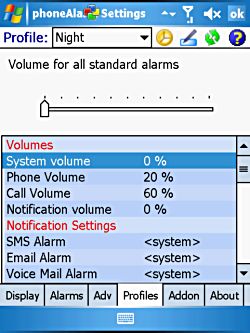
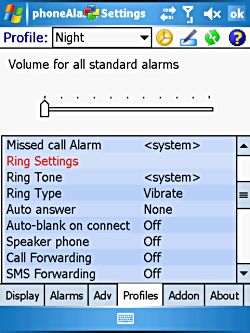
Here’s where you program the settings for each Profile. Lots of options…trust me!
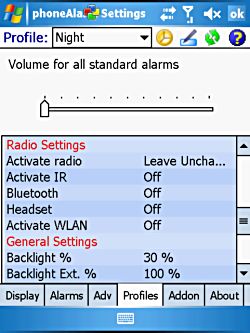
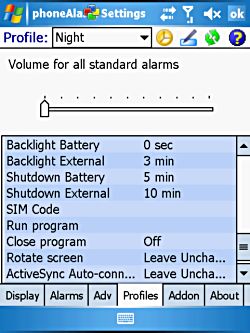
And more… That’s quite a bit of customization that you can put into a specific
“Profile”.
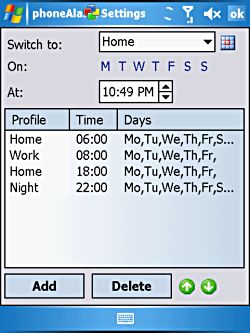
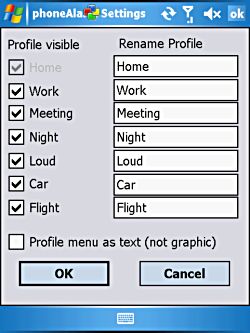
Each profile can be
set to be automatically activated based on time/day. Here I’ve got
it set so all week it goes quiet at night (Night) and awaken in the
morning (Home) with a daytime weekdays setting (Work).
You can also
customize the name of the profile so based on your need for
profiles, I could see lots of variations on their uses and your own
PDA/Phone usage.
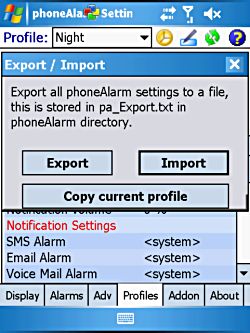
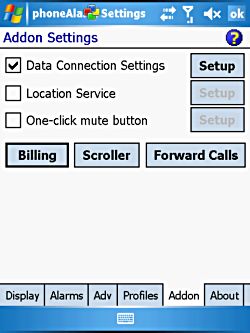
Nice feature here – you can import and export your settings. I’ve used there several
times when resetting. I haven’t really used
the Data Connections Setting yet as I don’t have the GPRS service
turned on but there are some advanced setting functionality
here.
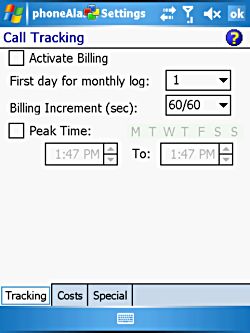
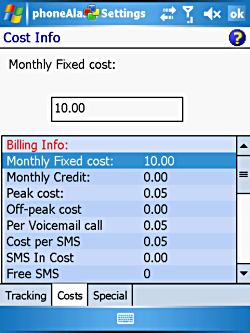
If you want to track your carrier cost, input the cost structure from your carrier
contract here and… More cost input required!
I could keep going on and on about the options one can choose with
phoneAlarm but I think you get my point. There is so
much more to this program than what I have touched on here so I
would encourage you to review the User Guide posted on
pocketMax’s web site or just install the trial version to
see it for yourself.
I should also mention before closing out this review that there
multiple Today Screen skins available for the
phoneAlarm plug-in and are downloadable from
pocketMax. There come in a variety of colors, sizes and displayed
functions (meters, alerts, etc.) including some that work well with
higher resolution VGA screens. pocketMax has even provided a skin
editing tool if you are so inclined. I tried it and it does work
but the editing tool takes a little patience and lots of
trial-and-error testing. Whether you create your own skins or
download the works of others, this is a wonderful feature.
Installation
phoneAlarm installation .exe file (364KB) is relatively
straight-forward with an .exe setup file containing the CAB
installation file and setup.ini file that installs under the MS
ActiveSync directory on your PC by default. They also have
downloadable CAB files with the “Full” version running at 864KB and
the “Lite” version at 752KB for those that prefer that means of
installation. While phoneAlarm can be installed on
internal or external memory, it is highly recommended that you
install it on the internal memory. I had some issues with the
program installed on the card and seemed much more stable on
internal memory.
This program installs to two locations on your PDA, one under
it’s own directory (264KB) and under the Windows directory (269KB).
I didn’t see any huge chunks of memory being eaten up by
phoneAlarm while in operation. So other than installing
phoneAlarm on your internal memory, it seemed to have
little impact on the processes, CPU or services of my PDA.
Conclusions
I have to say that if you own a PocketPC-Phone Edition device,
phoneAlarm is a “must-have” program and one of the
first to be loaded on any device. It really adds to the overall
functionality of any PDA/Phone combination and probably something
Microsoft should consider adding as a default feature for future
version of the OS. While there are two versions but I recommend
getting the Full version ($24.95) over the Lite version ($18.95) as
it adds two more features that I think are useful: 1) Profiles that
change based on your location and 2) the Call/SMS forwarding
function. Lastly, I really like the skinnable feature of the
plug-in because I see more and more of the phoneAlarm
community adding new and exciting features to the Today Screen
plug-in on a regular basis. If this were a movie, I’d give it a
big TWO THUMBS UP!
Full Version is $24.95 and Lite Version is $18.95
Product Information
| Price: | 24.95 |
| Manufacturer: | pocketMax Software |
| Retailer: | pocketMax Software |
| Requirements: |
|
| Pros: |
|
| Cons: |
|

Gadgeteer Comment Policy - Please read before commenting
Post your comments on the phoneAlarm – Windows Mobile Utility review.
http://www.the-gadgeteer.com/review/phonealarm_windows_mobile_utility
Just click the POST REPLY button on this page.
I loved this program!!! I had it on my XDA II Mini almost a year ago and it was so useful.
I agree that this is one of those “must haves’ for pocketpc phone for me and is now in the top 10 that I reload when I do a fresh install.
I dont know, it may be useful, but why is it when I see the top screen of a MS mobile product, it looks messy. And actually, I owned a NOkia E70 and E61 recently, and got rod of them for pretty much the same reason.
Functionality wise, they blew away my Danger Sidekick, but at the end of the day, simplicity rules.
But damn do I miss that WiFi 😛
Good luck with your HTC-U!
Zodiac – I understand your “simplicity rules” mindset but for me I like a little complexity being the gadget geek. It justifies my drive for the devices and makes my wife crazy in the process!