
If you play PC games, you probably know how important keyboard control is to many of them, especially in the real-time strategy, roleplaying, and shooter genres. But keyboards are designed for two hands, and in most games you’ll always have one hand on the mouse. The Saitek Pro Gamer Command Unit is a USB controller that aims to improve your control of keyboard-driven games with programmable action buttons located directly under your fingertips for quick access, plus a thumb-operated joystick.
The Pro Gamer Command Unit (which I will refer to as the PGCU from now on for the sake of brevity) has a total of twenty-one buttons, an analog stick, and a three-position mode switch. When you rest your hand on it, fourteen of the buttons are under your fingers, with four more on an angled row above. Two more buttons and the analog stick are positioned on an adjustable thumb cradle, and the final button is located on the palm rest under the base of your thumb. The PGCU is designed for use only with the left hand.
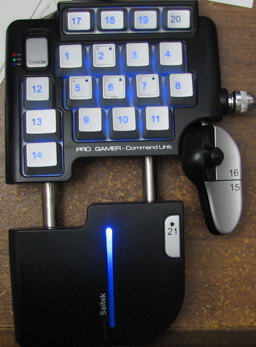
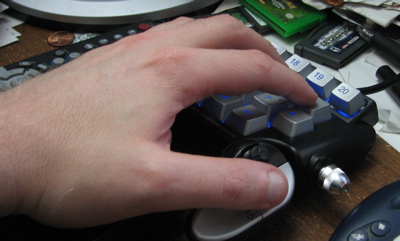
The mode switch allows you to select between three profiles (blue, green, and red) and the backlighting of the main keypad changes color to show its position. The keypad isn’t the only part of the PGCU that lights up; a stripe on the hand rest glows blue and a red Saitek logo is projected on the desk below your wrist. (What would a gadget be without a couple of pretty but completely unnecessary lights?)
Programming
The heart of the PGCU is its “SST” programming software for Windows 2000 and XP. If you don’t install the software, the PGCU will be recognized as a standard game controller with an analog stick and a lot of buttons. With the software, it becomes a fully programmable keyboard as well. The main programming interface is the profile editor, which lets you define actions for twenty of the buttons (#21, on the palm rest, is hard coded to shift between two sets of programming) and the thumb stick.
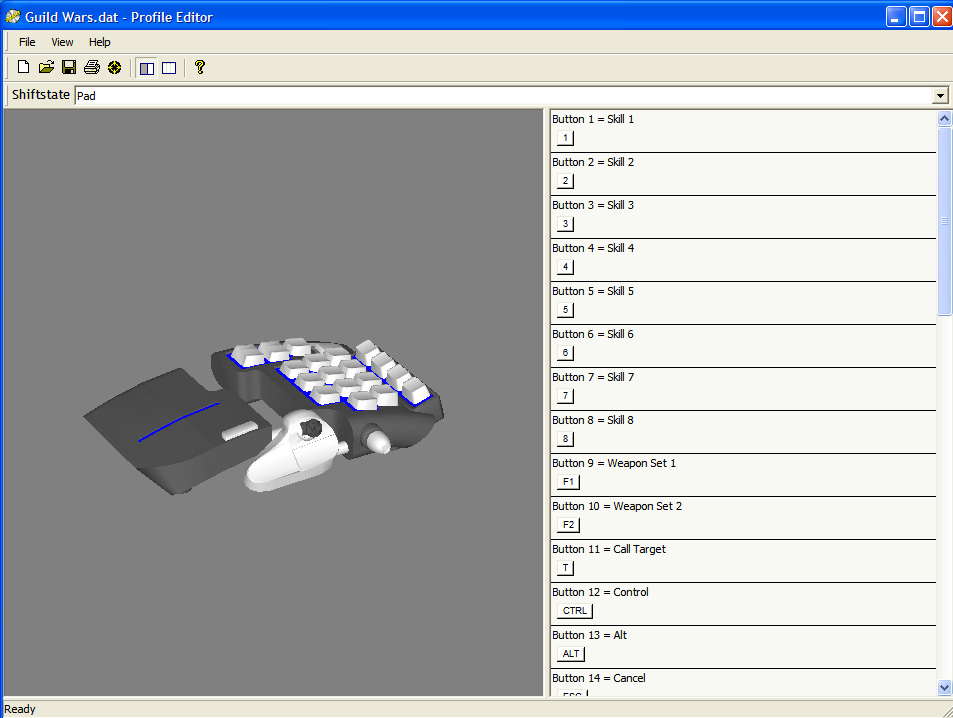
The screenshot above (click to see the full size image) shows the main programming view of the editor, which lets you define the unshifted “blue” profile. The “red” and “green” profiles are preloaded with setups for FPS and RTS gaming, so you can get started without having to program everything from scratch. The data view, shown below (click to see the full size image), lets you program actions for all three positions of the mode switch as well as the shifted actions for each.
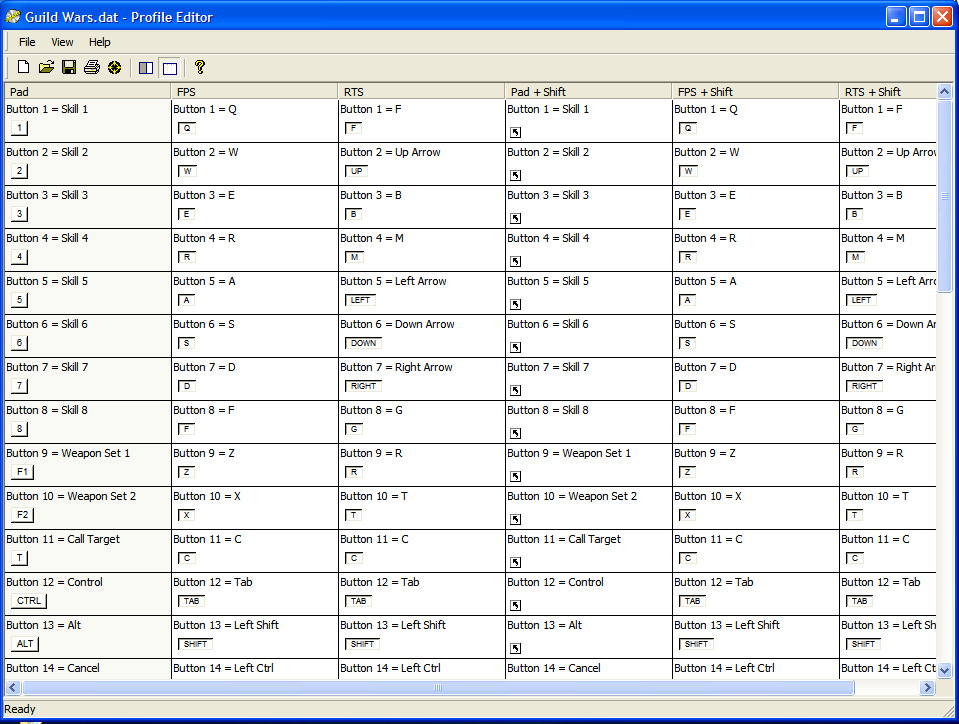
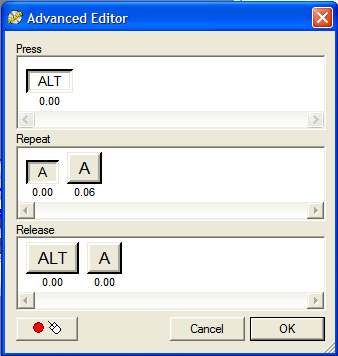
Programming button actions is very flexible. You can assign any sequence of keystrokes and mouse clicks to a button, with individually adjustable delays between each event. If you program multiple events, you can set them up to fire automatically with a single press or only while you hold the button down. You can also program separate actions for pressing, holding, and releasing a button. Whatever you can think of making a keyboard do, the PGCU software can probably handle it. Finally, if you leave the programming for a key blank, it is passed through to the game as a joystick button. (It’s your choice whether you want to program the PGCU to work with the game’s default controls, or bind the game’s controls to the PGCU.)
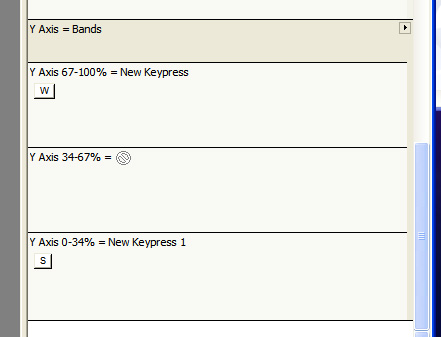
The thumbstick is an ordinary 2-axis analog controller, so if your game supports joystick motion you can leave it unprogrammed. But you can also set it — separately for each axis — to send mouse movements or keystrokes. You can even define bands with different actions. For example, if your game has one key for “walk” and another for “run”, you could set the joystick to send the “walk” keystroke when you press it halfway up and the “run” key when you push it all the way.
Once you’ve saved a custom profile, it appears in a system tray menu whenever the PGCU is plugged in. The software does not switch profiles automatically; you have to explicitly load the one you one from the menu when you want to change the PGCU’s programming.
The Competition
Before I received the PCGU I had used a Nostromo Speedpad N52 for over a year. The N52 is very similar in its overall design but it has a directional pad instead of the thumbstick, a scroll wheel, and five fewer buttons.
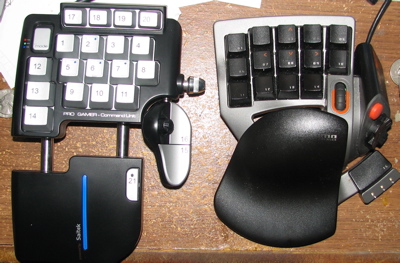
I like the PGCU’s layout better for a number of reasons. The analog stick and extra row of keys are, of course, a nice bonus, but in addition to that there are a few design differences I like. One is that the key layout is closer to that of a real keyboard, and in practice is easier to use. The leftmost column, especially, is a big improvement since you can actually reach all three buttons with your pinkie. The staggered main keys are also a bit more natural to use than the N52’s vertical columns.
I also like the PGCU’s shift key better than the equivalent function on the N52. The N52 actually has three shift states, and you can program any key to activate or toggle them. While this seems like it would be more flexible than the PGCU’s single shift and three-way mode switch, in practice I didn’t find it as useful as it might seem. In most games, I couldn’t afford to give up more than one key for shifting. More often than not the only one that made sense was the flat “space bar” under the directional pad, and that made it impossible to move and use a shifted key at the same time.
The PGCU’s programming capabilities are a bit more flexible than those of the N52. I haven’t used the more advanced options of the PGCU (separate press and release actions, for example) yet but it’s nice to know that the option is there. One difference I did notice immediately is that the PGCU’s software allows modifier combinations to be programmed as one key. In the N52’s profiler, if you want to send an Alt, Control, or Shift key combo you have to define a macro which contains the presses and releases of both keys; this has the side effect that there is no way to hold down modified keys programmed on a single button, not to mention being annoying to program for certain games that use a lot of them.
On the other hand, one feature of the N52’s software that I wish the PGCU had is the ability to automatically switch profiles when you start a game. It’s not a huge inconvenience to use the system tray menu to switch profiles, but it would be a nice feature for Saitek to add in the future.
Another feature of the N52 that the PGCU lacks is official Macintosh support; the N52 ships with profiling software for Mac OS X. Mac gamers need not despair, however, since the PGCU (and for that matter, the N52) works with ControllerMate, a $15 shareware application which is far more flexible and powerful than the Saitek or Nostromo profilers. It may also work with other similar software such as GamePad Companion or USB Overdrive, but I haven’t tried those. As such, I don’t consider the lack of Mac drivers for the PGCU to be a significant disadvantage.
In Use
I primarily play role-playing games, so I went straight for the profile editor and didn’t bother with the pre-defined FPS and RTS key sets. I am of the opinion that a secondary controller like the PGCU is especially effective for RPGs, because so many of them use the entire top row of the keyboard as an assignable action bar. Using an entire row of keys with one hand is inconvenient at best, especially when you also need to use W, A, S, and D for movement. It’s even worse in some skill-heavy games where it is not uncommon to have multiple action bars using Shift, Control, Alt, and possibly even combinations of those. World of Warcraft is a good example of this; in WoW it isn’t uncommon to have thirty or forty action buttons available, even with assistance from in-game macros and user interface modifications. If you use the PGCU’s thumbstick for movement, you can assign two (or possibly three or four, if you set up the in-game key assignments appropriately) full action bars to the main pad while leaving a few keys free for other things.
The PGCU is useful for RPGs with less-complicated control schemes as well. For example, Guild Wars has only eight action buttons, and it’s possible to define a useful profile for it without even using the shift button. Yet the PGCU still makes it easier to play because everything is right there with minimal finger motion.
I have also been playing EVE Online lately, and it highlights some of the differences between the PGCU and the N52 I used to use. EVE is primarily mouse-driven, and it does not allow assignment of unmodified keys. Other than the function keys (which serve essentially the same purpose as the action bar in more traditional RPGs) every keyboard command in EVE requires a Shift, Alt, or Control combo. This was easier to program on the PGCU, as I described earlier, and there were a couple of keys I couldn’t program at all on the N52 because they must be held down. The PGCU’s analog stick also comes in handy for EVE; I set it to work as a mouse, then defined the buttons next to it as right and left click, so if need be I can poke around the menus one-handed. (I wouldn’t recommend trying this in combat, of course.)
One potential disadvantage of a supplemental controller like PGCU is that you have to take your hand off it to type into a text chat window. But you have to do the same with your mouse hand too, and the overall reduction in movement during normal game play far outweighs this, at least for me and my aching carpal tunnels. Even with only a normal keyboard, text chat can be pretty inconvenient if you’re trying to do other things at the same time.
Conclusions
I quite like the Saitek Pro Gamer Command Unit. I have been using controllers of this type for a couple of years now — first the Microsoft Strategic Commander, then the Belkin Nostromo N52 — so I was already convinced of its general usefulness. I like the PGCU’s design and programming capabilities, even the somewhat oddly-placed shift key. If you’re looking for this type of controller the PGCU is well worth considering, and I think it compares very favorably to the N52.
If you have never used this kind of controller, I would recommend the PGCU with some reservations. It seems to me that this sort of thing is an acquired taste, and may take some getting used to. If you are used to using an ordinary keyboard, the utility of an extra keyboard controller may not be immediately obvious, especially compared to simply replacing your keyboard with one of the gaming-oriented models available now. Still, for an average price of under $40 online, trying the PGCU shouldn’t hurt your wallet too much. If you want to reduce hand motion because of RSI, or if you are sick of how many key combos your favorite game makes you use, I’d recommend giving it a try to see how you like it.
The Saitek Pro Gamer Command Unit is available from many retailers of computer accessories, or direct from Saitek for $39.99.
Auto Amazon Links: No products found.

Gadgeteer Comment Policy - Please read before commenting
Post your comments here on the Saitek Pro Gamer Command Unit review.
http://www.the-gadgeteer.com/review/saitek_pro_gamer_command_unit
Just click the POST REPLY button on this page.
Hope Rob’s still reading this…
I noticed that you mentioned using this for World of Warcraft. I’m curious, if you use the thumb joystick for movement, what button do you assign for jumping, and how do you jump and move at the same time?
Also, do you move much in the game? Playing a warrior as one of my two characters requires a fair amount of movement, so I’m a little uncertain if using the thumb joystick for movement will lead to any RSI in the long run.
I have a five button mouse, so I put jumping on one of the side buttons. I use the thumb stick for forward, back and strafing, and the mouse (with right button held down) to turn. This works pretty well for moving, jumping, and triggering actions… I’m not quite coordinated enough to reliably press three things at once with my left hand though, so I made sure to put anything that can be used while moving on the primary action bar. (I’ve thought about getting a set or two of rudder pedals and somehow mapping them to modifier keys 🙂 Although I don’t play WoW any more, I did move an awful lot… I played every class to 60 but my favorite and most developed character was a feral druid who usually ended up filling multiple roles in groups… between that and soloing as a cat, mobility was always a big plus.
In terms of RSI, I don’t think the thumbstick should be a problem as long as you remember to press it gently. I haven’t had any problems with it (or the d-pad on my N52) and for a while I was playing WoW for an average of about 10-12 hours a day.
–Rob
Hi
I’ve been reading about this little Saitek controller for quite a while but haven’t had the luck of finding one around here to try out.
I really liked it because of the thumb stick, but many complain about it being feeble, inaccurate and overall unreliable. Is this true? I’m mainly focused on FPS games and that thumb stick would be great for walking, backpedaling and strafing while keeping enough keys under my other fingers to perform any task I can think of, but I don’t want to have to think of not breaking it in the middle of Doom 3 for example.
Could any of you who has tried it extensively tell me if it’s capable of handling the stress of FPS games?
I’m not sure anyone else is actually subscribed to this thread, and unfortunately I don’t play FPSes, just MMOs and RPGs (eg. Oblivion). It’s held up well for a year of that with no sign of wear, but while I do like to play movement-heavy classes (eg. rogueish types who have to circle-strafe around behind the mob as it turns to face whichever sucker just drew aggro) that’s not really comparable to what you’ll put it through in an FPS. I’ve also been known to jam it so hard in one direction that it leaves a dent in my thumb, and it hasn’t broken off yet, but that doesn’t mean it won’t 🙂
Unfortunately I don’t know what else to tell you 🙁 I wish these were available in more stores to try out, but unfortunately most places seem to only have the Nostromo even though they have a bunch of other Saitek keyboards and flight controls and stuff…
Well, thanks for your quick reply, I’ll have to keep looking for one to test or some other options because that dent in your thumb playing only RPG’s doesn’t sound good once you use it in Quake 3.
I just read about the old Sidewinder Strategic Commander and seems to be a better option, unluckily not many people have tried it on FPS games.
Anyway, thanks.
Could be — I had one of those a few years back and switched away from it to the Nostromo due to a combination of driver issues due to its age, and needing more buttons for RPGs. The full hand movement was an interesting idea though, especially since it had a twist axis too.
I’m also wondering if you’ve seen the FPS-oriented mini keyboards, “Wolf Claw” I think is one brand, where it’s similar in principle to the Saitek and Nostromo, but it’s flat and has the keys arranged to be in what is supposed to be a FPS-friendly layout but easier to reach than on a linear keyboard. They have both a standalone and one integrated into a regular keyboard. Maybe that would be worth looking at… dunno though.
–Rob
Hallo I have buy this funny thing but I have lost my cd whit the softwear and I wonder I some one know where I can get It (download) legaly…
If any one know where I can get it I whoud be really happy I you can send a link (like “www.google.se”) or some thing like that…
-Kjusifist
@-==[Kjusifist]==- You can find the software here: http://www.saitekusa.com/down/drivers.htm
@kjusifist Julie’s got you covered on the link, but I thought I should warn you that at some point Saitek completely changed the software, and the new version doesn’t load the profiles from the old, so you might have to redo them. I did, at least…
Hi,
I have the Cyborg Command Unit and USB Overdrive works with it, so I think it’s safe to assume the pro would, too. However, the mode states are only programmable as keys, so you won’t get the 3 full profiles.
Just a quick question, is there any chance you would know any sites with premade profiles for the Cyborg Command Unit, as I’m finding it very hard to create any sort of profile with the current software. I mainly want to use it for guild wars, so i copied the start of your programming from the picture…
thanks
@polyd Unfortunately no, I haven’t seen profiles out there anywhere, especially after they changed the file format (which I found out unexpectedly after a software upgrade). Guild Wars was one that I didn’t recreate, because I haven’t really played it in about a year or more. Perhaps I can toss one together based on what I remember, and you can use that as a base for tweaking… check back here after Thanksgiving and maybe I’ll have something for you.
thqanks very much rob 🙂
I want to use this controller to play EQ I was wondering if you could tell me if it is capadable, I have the controller hooked up and it is reading as a controller and all the buttons work but the game is not recognizing it when i try to map keys
Hello! i would like a help from Rob Tillotson about my Saitek controller!
I tried to use it for Guildwars 2 and i wanted to program on the small joysrick the WASD and QE movings in game BUT i was unable to program it….al the other keys works but the joysstick is not….
Can you do the favour and send a profile where you show me how i have to calibrate and attach the WASD and QE keys to the joysticvk? thank you very much guys!
Unfortunately I have not used one of these for quite a while… I switched to the Logitech G13 a couple of years back. But I can tell you what I remember about setting up the joystick to send key presses:
What you have to do is go to the spot in the profiler where you set up the joystick, and right click (I think there is an icon for this or something) to set what kind of control it is — there is an option to divide the range of motion into sections which send a different key for each section.
What you want to do is create three sections so that you have like 0-30%, 30-70%, and 70-100%, then set up the keys accordingly so that the 0-30 and 70-100 ranges map to W and S (or Q and E or whatever) and the center one is a dead zone. (The splits don’t have to be at 30 and 70, adjust them for whatever sensitivity you want, but you need to leave a dead zone in the middle so you don’t move accidentally.)
Anyone use a Saitek Cyborg V3 Rumble Gamepad to Play Guild Wars? I am trying to set one up that I was recently given. I could use a profile thats fairly simple. I currently use a Trackball Mouse so should be fairly easy for me to use the Rumble pad.
Thank you Rob! i will try!
The shift-map 21 key makes sense on this unit, tho I wonder if it gets hit by accident on occasion. Also, does the position of the mode switcher ever result in accidentally shifting modes? That could be disastrous, and the switch seems to be placed :in harm;s way”, as it were.
I am also wondering abut the stick comfort, compared to the relative ease and certainty of direction afforded by hitting specific bars on the N52’s D-pad. I have heard innumerable complaints abt the G13’s stick, and some said that stick was actually better than the one on the CCU, which seems to be nearly the same as the PGCU. Ppl seem to mod their G13’s with XBox sticks, they consider it so annoying (and yet, Logitec still hasn’t listened to feedback and redesigned the G13 yet).
Just FYI, technically, the PGCU has only 2 more buttons than the N52/N52te/Nostromo (or 1, plus an addt’l “modifier” key), as the N52 series’s scrollwheel can be programmed as 3 buttons: CLICK on the wheel, SCROLL UP, and SCROLL DN. I actually find this useful as NEAREST/NEXT/PREVIOUS ENEMY, as it scrolls make the search/selection a fluid movement (tho sometimes you shoot past your intended target, it is so easy). N52s therefore have 19 buttons, plus D-Pad with a removable thumbstick (I prefer the pad due to the stick’s thumbrest being convex rather than concave).
hey, im trying to get the pro gamer command unit working on my windows 7. im having issues because i dont have the disk for it. anyone know how i can get this to work? i tried the link above and its a no go. my computer does recognize that the command pad is plugged in, but nothing i load to try to make it work sees it as a controller. any help would be greatly appreciated