
I’m sure you’ve lived this scenario… You’re listening to your
iPod through headphones or earbuds, and your cell phone rings. The
first thing you probably do is pause the music on your iPod,
disengage from the earbuds or headphones, put on a Bluetooth
headset, or just answer the phone. What if there was an accessory
for your iPod that simplified this process dramatically? There is
such a product: The myTalker ET7000 from Tekkeon.
myTalker is a Bluetooth gateway that turns your iPod or MP3
player into a Bluetooth headset. It plugs into the earphone jack of
your iPod, and then your earbuds or headphones plug into the
myTalker.
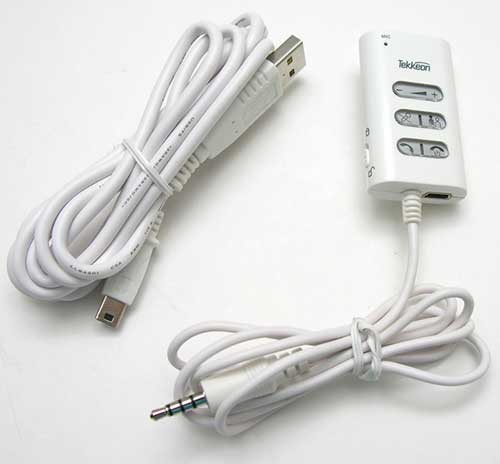
Package Contents
myTalker
USB charging cable
User guide
Hardware Design
Front
The whole myTalker module is pretty small (2.25 x 1.25 x .5
inches). Made of White plastic, it doesn’t look out of place
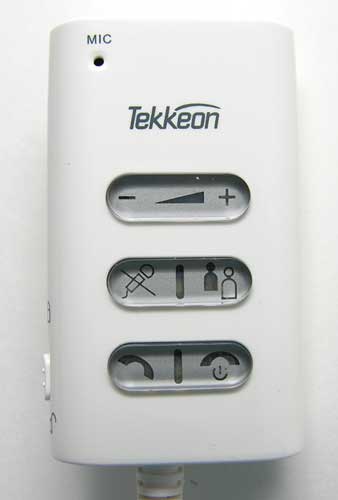
connected to an iPod. The front has a built in microphone and 3
toggle buttons. The top button allows you to adjust volume levels,
the middle button is for muting sound and for initiating a 3-way
call. The bottom button is the answer call button and power / end
call button. There is an LED positioned in the middle of the bottom
2 buttons. The LED in the middle button slowly flashes Blue to
indicate that the module is turned on and in standby mode. The LED
in the bottom button will flash Red every 32 seconds to indicate
that the battery level is low. Both LEDs will alternate when the
myTalker is in pairing mode.
Left Side
The left side of the my Talker has a HOLD switch. When in the
lock position, all button presses will be ignored.
Top
A standard 3.5mm earphone jack is located on the top of the
module. You can plug in the stock iPod earbuds or any other
earphones.
Bottom
A USB connection is located on the bottom edge of the myTalker.
Using the included USB cable, you can charge the internal battery.
When the myTalker is charging, the Red LED on the front of the
module will glow. When charging is complete, the LED will turn
off.
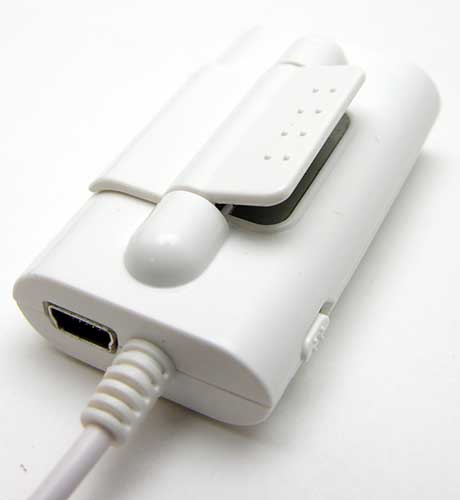
Attached to the bottom of the myTalker is a 36 inch cable with a
3.5mm audio plug. This is the plug that you connect to the earphone
jack of the iPod or other MP3 player.
Back
A spring loaded plastic clip is built into the back of the
myTalker. You can use this clip to attach the module to a lapel,
shirt front or collar. I ran into a slight an issue with the
orientation of the clip. As designed, the module is made to clip on
to a men’s shirt front, instead of a woman’s blouse front. Women’s
blouses have buttons on the left side, men have them on the right
side. So, if you clip the myTalker to a woman’s blouse, the back
side will face out and the microphone will face in. It would be a
nice if the clip were reversible. Alas, it is not.
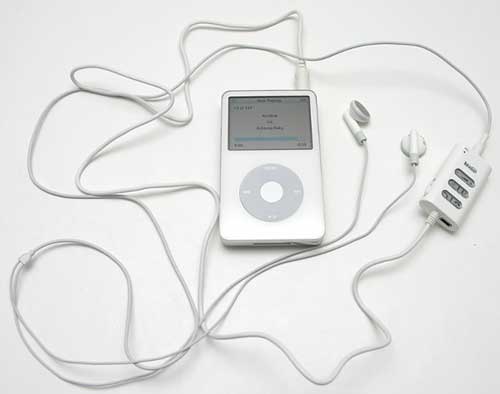
Connecting the myTalker to an iPod is a simple operation. Just
plug the cable coming out of the myTalker into the iPod’s earphone
jack, and then plug your earbuds into the top of the myTalker. The
next step is to pair the myTalker with your v1.1 or v1.2 Bluetooth
enabled mobile phone. This task is no different than pairing any
other headset with your phone. Like most headsets, you have to use
a passkey of 0000.
Once everything is paired and connected, you are ready to listen
to music on your iPod like normal. But, the next time your mobile
phone rings, you won’t need to remove your earbuds / headphones.
You just press the Talk button on the myTalker to answer the call.
You can then talk into its built in microphone and use the iPod’s
earbuds to hear the call. The music playing on the iPod will
continue to play (unless you remember to press the Pause button on
the iPod itself), but you’ll no longer hear it through the earbuds.
Once you hang up the call, the music from the iPod will un-mute and
play through the earbuds again.
According to the user guide, you are supposed to hear a tone in
the earbuds when a call comes in, for some reason I never heard
this tone. I would just hear my phone (Sony Ericsson Z520 ring, and
would then press the Talk button on the myTalker to answer the
call. If I didn’t want to answer the call, I would press the Power
/ End call button and the call would automatically route to my
voice mail. Nice!
Typical Bluetooth headset features are also built into the
myTalker. These include:
Last number redial
Voice dialing (has to be supported by your phone)
Reject a call
Transfer call back to the phone
Mute a call
Put a caller on hold
Answer a call waiting call
Initiate a 3way call
Call audio quality through earbuds seemed to be louder than most
headsets that I’ve tried in the past. Volume + / – buttons on the
myTalker allow you to adjust the volume, without changing the
iPod’s volume level. As long as you clip the myTalker relatively
high on your chest, people on the other side of your conversation
should be able to hear you just fine.
The Tekkeon myTalker ET7000 is an easy to use accessory that
allows you to keep your earbuds in your ears, when your phone
rings. But at $75, I’m not sure I would personally buy one for
myself. I’d rather spend a little more and get a totally wireless
solution… Hey, that’s just me though…


Gadgeteer Comment Policy - Please read before commenting
Post your comments on the Tekkeon myTalker ET7000 review.
http://www.the-gadgeteer.com/review/tekkeon_mytalker_et7000
Just click the POST REPLY button on this page.
Given my habit of $100 headphones, I’m thinking this would be an excellent accessory for me. Have you tried it with anything other than the Apple Earbuds? Perhaps you should try to get headphone.com to send you some review headphones, it should be an ear opening experience.
gremlin:
Good idea 🙂
Saved as a favorite, I really like your blog!