
When Brando sent me the USB 2.0 to IDE Cable a year ago, I didn’t think I’d ever have the opportunity to actually put it to use. However, I was wrong and was able to eventually put it through its paces for a review. But after that one use and review, this cable has stayed at the bottom of a drawer in my basement computer lair. That’s why a month or so ago, USBGeek.com asked if I would review version 2 of this same product, I was somewhat reluctant. But, being the push over that I am, I said ok. Joe sent the cable and it has sat on my desk until about a week ago when as luck (or non-luck depending on who you ask) would have it, I had the opportunity to give it a try.
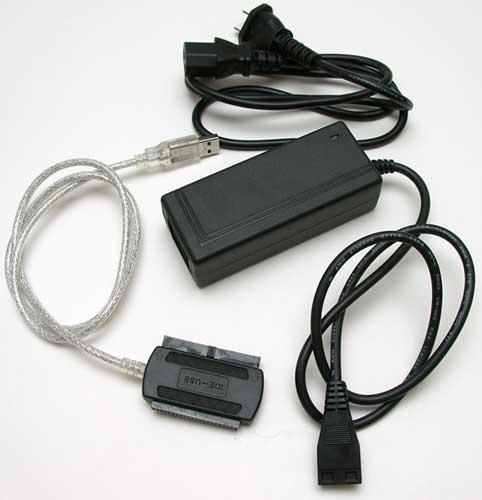
For those of you that might recall the first review, this is a cable that allows you to connect an IDE device to your computer via a USB port. Version 2 has the same features as the original version, but adds one important feature to the mix. The first version only allowed for connections to devices using a full-sized IDE connector. This new version has a double sided connector. One side is for 3.5 inch drives and the other is for 2.5 inch (notebook) drives. That’s really the only difference with this newer version and the older version.
Hardware Spec
Fully supports USB 2.0
480Mbps high speed data transfer rate
Supports 3.5, 2.5 Hard Disks, CD-ROM(max. 52x), CD-RW, DVD-ROM, DVD-RW, Combo device
AC Power Adapter input : 100 ~ 240V, 50/60HZ, 0.5A
AC Power Adapter output : 12V/2A, 5V/2A
My first test of this product, was to I pull the drive cage out of an old 800MHz Athlon desktop that I had laying around. I hadn’t booted up the computer in ages and didn’t even recall if I had copied all the files off the two 3.5 inch drives before retiring the computer.
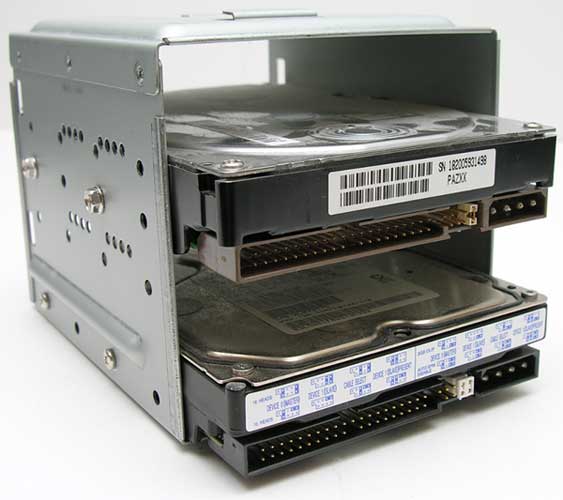
If you look closely at the picture above, you can see that the IDE connectors on the drives are keyed. There is a notch in the middle of plastic surrounding the pins. This notch is supposed to keep you from plugging in the IDE cable incorrectly, as the connector has a matching ‘key’ to the notch. Unfortunately, even with the ‘key’, you can still plug the connector in upside down. At least this was something that I was able to do with the 2 drives I tested it with. So, just make sure you pay attention to what you’re doing. You’ll also notice that there are little plastic jumpers to the right side of the IDE connector, and then to the right of the jumpers there is the power connector.
According to the very terse one page user manual (sheet) included with this cable, you are supposed to make sure the drive is in Master mode. That’s what the jumpers are for. The drive on the bottom in the picture above has a sticker that shows how to arrange the jumpers for Master or Slave mode. The drive on top doesn’t have any information for setting the jumpers. Was this a problem? Nope. I don’t think it really matters if the drive is set to Master or Slave, it worked fine for me either way.

Here you see the connector plugged into one of the drives, and the included power adapter plugged into the power port on the same drive. The correct way to connect the drive to your computer is to plug in the IDE cable to the drive, plug in the power to the drive and then plug the USB connector into the computer. This product is compatible with PCs and Macs. Another area where the user manual is wrong is where it tells you to install a driver if you want to use this product with a Mac. I tried it with my G5 iMac without installing this driver and it worked just fine.
After you plug the USB connector into your computer, the drive should show up automatically either under My Computer on your PC, or as a newly mounted drive on your Mac desktop. From there you can treat it like any other drive by dragging and dropping files.
I haven’t included any file transfer speed info in this review, because the results of such tests are dependent on the speed of the drive, speed of your computer, etc. I tried transferring several large files back and forth from drive to computer and visa versa, I had no real issues with speed.
After testing the 3.5 inch side of the cable, I didn’t think I’d have the opportunity to test the 2.5 inch connector on this product, but one Saturday afternoon I received a frantic phone call from my friend Bill of iPhotoSports.com. The conversation went something like this:
Julie: Hello?
Bill: My Sony card reader died while I was shooting a baseball game today!
Julie: Bummer.
Bill: I need to get the pictures off so I can post them on my site [sniff].
Julie: And this effects me how?
Bill: I was hoping that you had a way to copy the files off [whimper].
Julie: Do I look like a CompUSA?
Bill: But you’re The Gadgeteer! You can do anything!
Julie: This is true…
Bill: Well??? [whine]
Julie: Well what?
Bill: Do you have SOMETHING to copy the files from this 2.5 inch drive?!
Julie: Maybe I do gah!
Bill: Can I come over? Puhleeeeese?
Julie: I’m busy.
Bill: What are you doing?
Julie: I’m watching reruns of Xena Warrior Princess.
Bill: I hate you.
Julie: Ok, bye. [click]
Actually only the first 2 sentences of that conversation really happened. Bill does have a tendency to whine though… Anyway, he did bring over the defective Sony HDPS-M1, which we ended up destroying in the process of removing the drive.
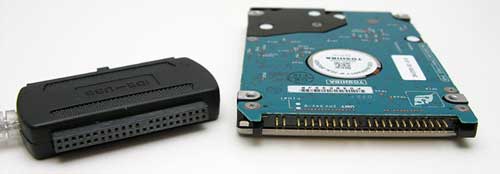
This isn’t the Sony drive, this is the drive out of Bill’s notebook computer that also died that same week… do we see a pattern here?
The smaller connector on this cable isn’t keyed in the same way that the 3.5 inch connector is. Instead of having a plastic ridge to mate with the channel in the IDE connector on the drive, the smaller connector has one pin opening closed. In the picture above, if you look at the pins on the drive and the holes in the connector, you’ll see what I’m talking about. At least you can’t plug this connector in upside down.
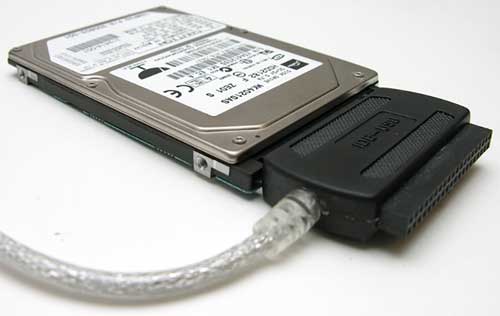
Once you plug it in, you’ll notice that there isn’t a place to plug in the power adapter. No worries though, the drive will receive power from the USB 2.0 port that you plug it into. Like the 3.5 inch drives, the new drive will show up under My Computer or on your Mac desktop. You gotta love plug and play products!
Price: $35.00
Pros:
Plug and play
Now works with both 3.5 and 2.5 inch drives
Cons:
Possible to plug the 3.5 inch connector in upside down
Auto Amazon Links: No products found.
Product Information
| Price: | 35.0 |
| Manufacturer: | USB Geek |
| Pros: |
|
| Cons: |
|

Gadgeteer Comment Policy - Please read before commenting
Post your comments here on the USB 2.0 to IDE Cable Version 2 review.
http://www.the-gadgeteer.com/review/usb_2_0_to_ide_cable_version_2
Just click the POST REPLY button on this page.
Hmmm… I might just have to get myself one of those. <glances pile hds of and corner cautiously very in the stacked well loose not at large>
I’ve had this product for half a year (from Singapore). Nothing fanciful but works as stated. However, new 2.5″ hard disk have different interface and it won’t work.
sigh:
Are the newer drives that you’re talking about still considered IDE? Or are they Serial ATA?
This looks like a terrific product, and I am in the process of ordering it, but I have to choose between:
“Flated pins power cord”
“Rounded pins power cord”
“UK type power cord”
I can rule out #3, being in Iowa, 🙂 , but if you could give advice on which of the other two I should pick I would be grateful.
Thanks!
John-Mark
You want the flat pins 🙂
Thanks, Julie. And thanks for all of those great reviews!
Not sure how this cable is any better than a 2.5″ HD enclosure that usually comes with a cable and can be found for about $10 these days.
I suppose a benefit is for hooking up to a standard-size IDE drive, but with that funky-looking power cable I’d imagine it would be about just as easy to connect it inside a computer case as a slave on an existing IDE channel. (And $35 cheaper.)
dmccarty:
Not every computer has a spare IDE channel, for instance most notebooks don’t even have room for another drive. As far as drive enclosures go, all of mine already have drives in them, I still have drives laying around that are not worth keeping in an enclosure but I don’t remember what files I have on them. And using an adapter like this is a lot quicker than installing a drive into an enclosure or into a computer.
This cable isn’t meant to be a permanent solution for mounting a drive. It is best suited to times when you need to get to the data NOW, or for times when nothing else is really convenient. (Are you really going to take a drive out of your enclosure just to use the enclosure on another drive from a failed computer for only a few minutes?)
Also, since it is so small and has a separate power supply, it is a versatile little device that doesn’t take up much space when you travel. I would much rather carry one of these over to a friends house than lug my friends computer back to my place for some open heart surgery. (Even more so if it requires me to turn of my computer to serve as the host.) If I know before I head out that I am not going to need the power supply at all, I can just shove the cable into a pocket and leave the brick at home.
This is one of those things that is not really meant for everyone. As long as one person in a group of people you know or work with has one there will probably never be any need for a second one. But for those people who it is meant for, it is REALLY useful. And yes, they probably could make it cheaper, but if they did it might not necessarily make it a better value. The good quality cable and plastic box around the adapter should make it durable enough to just drop into a tool box or gear bag without fear of destruction. An exposed circuit board might be cheaper, and work fine in a controlled lab or sitting on top of your desk, but it wouldn’t travel well or stand up to someone who is less than gentle with their equipment. <um>t a product that would be useful for you, but there are a lot of other people for whom it would come in mighty handy. And that was probably a lot longer of a reply that was really necessary to address your concerns. I really need to stop making these long winded posts. :p
I just keep it around as a ‘tool’ for those just-in-case times.
Do any of you folks have an idea how large a drive this supports? I ask because there’s another product on Brando http://usb.brando.com.hk/hispeedHDDcase.php that says it supports up to 160gb and as we all know the new hard drives get much larger.
PFloyd:
It should support any sized IDE drive.
I am referring to Serial ATA. Usually IDE is referred to as Parallel ATA. Just highlighting that this product does not support Serial ATA HDD.
sigh:
I’ve never heard of the term Parallel ATA…
I have heard of the term Parallel ATA, but it is far from what I would call a standard. The last time I heard it used was before anyone had ever released a SATA drive. Since then I have only heard IDE or ATA100/ATA133 used. I am not surprised to find out that the term is still in use though.
Although to address your original point Sigh, since the SATA standard already has provisions for hot swappable drives, I suspect that someone will eventually make a device like this that goes straight into the SATA port and won’t need to go through a USB port.
I have already seen motherboards that come with external pass through adapters for SATA drives. They just don’t have the hot swappable power plugs yet.
This seems to be the same exact product as a popular ide-usb device available on newegg.com made by Bytecc. http://www.newegg.com/Product/Product.asp?Item=N82E16812156101 Can anyone confirm this? The products seem identical.
This product seems identical to a ide->usb device on Newegg.com made by Bytecc. http://www.newegg.com/Product/Product.asp?Item=N82E16812156101 Can anyone confirm this? They seem identical.
mattaholic:
From the pictures on Newegg, I would have to agree. It does look identical to the product I reviewed.
Is it just me, or doesn’t the 3.5 connector shown in http://www.the-gadgeteer.com/assets/brando-usb2ide-cable-v2-5.jpg have a plug in one of the holes that would prevent you from plugging it in upside down?
comprocon:
Yes, the 2.5 inch connector is keyed so that you can’t accidently plug it in upside down.
This is my first post so be nice! I just bought one of the adapters but Windows will only recognize my external drive (A Maxtor D740X) as 4 removable drives. I read somewhere else that this adapter will not work with Windows Media Center Edition which is on my computer. Can anyone confirm that the adapter is persona non grata with Media Center Edition?
Sandyw54:
How do you have that drive partitioned?
Well I really couldn’t say. I did nothing to it while it was in my old computer but it was one my wife brought home from her work so it may have been partitioned there. I tried to install the adapter on my notebook which has Windows XP Home Edition SP2 but no luck there either. Windows will recognize it as a mass storage device but the installation fails to complete. And the notebook doesn’t see 4 removable devices like the desktop; just one. That’s weird. I’m thinking I could put the jumpers to slave and plug it directly into the motherboard where the CD is now. In the BIOS the CD was listed as the slave. At least temporarily to download the data. Even if that worked I’m out the cost of the adapter so I really would like to get it working.
Aren’t computers fun sometimes????? 🙂
I plugged it into the motherboard and it’s working perfectly. How can I see if it has been partitioned?
If you say that it is working perfectly when plugged into your motherboard and that you can access it and pull off data, then it’s partitioned. If it wasn’t partitioned, you wouldn’t be able to see files because an unpartitioned drive doesn’t have files.
That makes sense but the original problem still exists that neither of my computers will load the adapter. I appreciate your help though.
I finally called the manufacturer and got it all straightened out. It works like a charm!
Sandyw54:
What was the solution?
Hi Julie, I stumbled into your review while googling for any info on the said cable. This is my first post here in this forum also.:)
I bought this cable from Hong Kong last summer and have not found time to use this since I haven’t had the need for it. Like you said, it’s nice to have something like this around just in case. I am using an iBook 12″ 1 Ghz G4 processor by the way.
Here goes my question:
I saved up enough cash and bought a Pioneer A10 DVD+- Writer 2 nights ago and am trying to hook it up with my iBook. The iBook didn’t detect it. I haven’t tried this on a hard drive yet. Would this work with an external DVD writer trying to connect to a Mac? Would it need drivers? Saw in the box that it’s supposed to be Plug and Play.:confused:
The reason I bought this was so I won’t have to buy 2 external drive enclosures for a DVD Writer and an external HDD. It’s more compact and easier to store.:D
I bought this around 6 months ago and couldn’t recall whether it came with any installation driver software.
Thanks and more power!
I have only tested this cable with external hard drives. I’ve just sent an email to Brando to see if he might have the answer. I’ll post what I find out.
Brando got back with me regarding using the cable with the Mac and said that it should work. But, he doesn’t have access to a Powerbook or the specific DVD that you have. Sorry…
Hi Julie, thanks for the very quick replies. Ok, so it should work. I will just have to tinker with it more.
Will keep you posted with future developments.
Happy Holidays! 🙂
Does the LED on the power brick light up when you plug it in? Can you feel the drive spin up?
Hi Julie,
I tried to do some more research and I was able to make it work.
But first, to answer your questions earlier. Yes the power brick’s LED light up and the drive is working. I can actually open and close the tray.
now, what I did. I read in a thread from Engadget posted by DefMan to plug the IDE, then plug the power brick first. Wait for 10 to 15 seconds before plugging the USB. It worked!
I was able to burn some files but it didn’t finish the job. I will tinker with it some more.
Btw, what I was burning was some music files. Used a CD-R and not a DVD. Will try to use a DVD later or tomorrow. Just got the blank DVDs yesterday. Hehe!
I am quite positive that I will be able to make it work. Thanks for the help Julie.:)
Will keep you posted.
Sabonis:
Thanks for the update and glad that you’re making progress 🙂
Hi Julie,
It’s me again and I’ve got good news for everyone.:D I made it work both for CD-r and DVD.
I read from a review by Dansdata.com that you should only use 32x for CD-r and 4x for dvds. That’s a major factor and will explain in a little while but the main kicker is that I downloaded patchburn from http://www.patchburn.de and installed this into my ibook. This actually fixed the profile of my Pioneer DVR 110-D and made it appear native (I think:confused: ).
Now going back to the write speeds. This is the most that the cable can accomodate. I tried using the max speed in writing and they didn’t finish. I tried 32x in a CD-r and it went on smoothly. I tried it on a DVD+r (HP 8x) and it finished but didn’t complete verifying. But upon checking the data burned, they were all there.
The DVD contains 2.4 Gig of pictures from my iPhoto library which I am backing up.
This cable is worth every penny I spent on it plus more!!!
We did it!:wow:
Thanks for all the help.
Happy holidays!:)
I think the key here was the 4 drive letters showing up and whether or not it was partitioned into 1 or multiple partitions. Not whether it was partitioned or unpartitioned.
I have the original version, but I can just see from the picture in the review that the same holds true for the new version. In the middle of one side of the long edge for the 3.5 inch connector, you will see a little tab of plastic sticking out. If you look at 3.5 inch drives, you will see a notch in the plastic that surrounds the pins. The tab fits in the notch. If you try to connect it the wrong way, the tab will hit the plastic surrounding the pins and won’t let you plug it in. This is to prevent plugging the cable in upside down, so this really isn’t a con.
Kursplat:
Actually, if something can be done wrong, I’ll be the one to do it… I was able to insert the plug in upside down. The plastic surrounding the connector on my drive wasn’t close enough to the pins to keep the connector / tab from being inserted incorrectly.
OK. Say the drive has been partitioned with more than one partition. I’m able to successfully access apparently the first 5G partition but the vast majority of the rest of the drive is unreachable. What methods and or products must I use to gain access to those other partitions?
Hey hello, I don’t know if this thread is still active but I don’t lose nothing. I just want to coment that I already acquired the usb-ide adapter and I am having a lot of troubles trying to make it working as an usb 2.0 device. When I plug it on my computer (win xp sp2) it said that the device could work faster if I plug it on an usb 2.0 indeed all my usbs are 2.0. My computer is a notebook dell inspiron 1300. I tried to use it on an inspiron 640m and other computer (all with usb 2.0) getting the same results. So the adapter is working like a usb 1.1 device so it gets to slow when i want to transffer some data…..
If anyone could help me with this.. I’ll be really glad..
greeting from Chile
I’m also hoping this thread is still active.
I have an 80GB IDE drive that won’t show up when connected to my Mac via the USB to IDE cable.
The drive is formatted and works fine in an external USB/Firewire case that I have.
I’ve tried Sabonis’ trick of powering up the drive for 10-15 secs before plugging in the USB but it didn’t work.
I’ve seen several reviews on the web using this cable with Mac OS X and yet I can’t get it to work. Very frustrating!
Regards,
Andrew
rony.bertuzzi & apd:
Are you both using the AC adapter?
Julie,
Yes, I’m using the AC adapter.
I’ve now tried the cable with a SATA drive and it works fine. It appears that it’s just the IDE port on the cable not working. Disappointing.
Thanks for your reply.
Andrew
Actually, in addition to the IDE problem, there also seems to be a problem with the USB part of it.
The next time I turned on my Mac after using the IDE/USB cable, my keyboard/mouse wasn’t working. I had to unplug the IDE/USB cable and unplug/replug the keyboard/mouse USB. This happened with the SATA drive and the IDE drive.
It’s a minor annoyance but one that I’d like to remedy.
apd:
To me it sounds like a defect cable. Can you exchange for another one?
Yep, hopefully I can.
The shop will charge AU$33 for testing if it turns out not to be faulty. The cable cost me AU$29 so I want to make sure it really isn’t working.
Andrew
Yes.. I connect the power to the hdd.. Actually I tested another cable from another manufacturer and used this AC.. with the same results..
I tried to transfer a 2 G file with both cables, with the ide-usb 2 it took like 1 hour and with the other just 12 minutes.
Have anyone tested the transfer speed.. does it really work like usb 2.0 ?
Rony,
A few of reviews elsewhere measured it as 33MB/s, 24MB/s and 24MB/s.
I notice the second review mentions the IDE interface being DOA which seems to be my problem. Glad I’m not the only one.
Anyway, at 24MB/s, it should only take a couple of minutes to copy a 2GB file (hope I’ve done my maths right…)
OK, seems I’m a complete goose.
The damn IDE port is working now. It started working after I reformated the IDE drive I was using as an MS-DOS drive using Disk Utility in Mac OS X. I’m sure this didn’t actually trigger the cable to work. I probably just did things in a different sequence or held my tongue in the correct position.
Anyway, I have confirmed that it will NOT work if you have the USB cable plugged in when you power up the drive. You have to plug in the USB *after* powering up. This is annoying but I can live with it.
apd:
Yay! Glad you finally had a success! 😀
Dear All,
I try to connect via USB-IDE cable my HDD Samsung SP1604N (taken out of my desktop, containing many files) and my notebook Toshiba L30-134.
HDD appears in Windows Explorer, but after clicking on this new “Disc E:” I get the message: “HDD is not formatted. Format it?”
“Properties” say, the disk is 32 Gb large. It has to be 160 gb though.
The notebook is bought 2007. Win XP SP2…
Have you ever experienced this too? How did you solve the problem?
Thank you very much in advance!
Julie – Thanks lots for your clear review/testing with USB-SATA/IDE disks. I just bought the TekGems version. If problems, will let you know! :rolleyes:
Tony
i recently bought the cable to retrieve files from my failed notebook hardrive. hp actually reccomended it to me when i contacted them to get a new harddrive. anyway, i did the hookup as you showed in Julie’s review. however, the desktop is not recognizing the usb attachment. it’s like i haven’t even plugged it in.
i tried rebooting the desktop with the notebook harddrive hooked up, and it recognized it for a moment, saying ‘the drive may not run correctly’; then it disappeared from the application bar.
does anyone have suggestions?????
desperate for data:(
cmhelv:
It almost sounds like the drive isn’t spinning up… maybe… Can you tell if it’s spinning? I have you tried to connect the drive and USB cable combo to another computer?
You say it disappears from the application bar. Do you mean that it disappears from the list of mounted drives in the My Computer listing?
Hi.
I tried to use this cable with a 2.5” fujitsu 30gb, and it doesn’t work. It’s recognized by windows, so i see that message popping on the right bottom corner, but i won’t see it in the explorer. What’s wrong?
Do i need a y-shaped usb cable?
(the cable is new and worked well with a 3.5” drive; the 2.5” drive is also working well in a laptop).
Thanks.
yercygo:
I’m not sure why it’s not working… You might try to contact the people that make this product.
I was wondering if the same sort of adapter exists for IDE to USB 2.0. I am thinking of taking out the HD of my DVD Recorder, installing it in a “Icy Box”. The adapter IDE side would be connected in place of the HD in the DVD Recorder and the USB side would plug into the “Icy Box” making my HD external. The DVD Recorder wouldn’t know the HD is external would he? Now suposing I have a special software on my PC (Vista) I could plug the “Icy Box” to the PC and do whatever I would want with the files I find there. Thank you for any comments.
gibama:
What exactly is an Icy Box? Is it just an external holder with special cooling? Couldn’t you just use an IDE extension cable of some sort?
It’s a <external enclosure 3 for>http://www.icybox.de
The IDE connector is made to be connected to the HD (the connector of the HD is a MALE connector – while the connector of the so-called IDE connector is a FEMALE one). The connector in the DVD Recorder is also FEMALE. You see my problem. The connector should be able to connect instead of the HD. So the IDE-side of the IDE/USB adapter should be MALE like if it was a HD. Does anything like it exist or do I have to get back to my soldering iron?
It’s possible something like that exists… I just don’t know where you would find it…
I own this product and uhm i wish i would have read this review before using it i plugged in the IDE cord upside down while the drive was powered up and the usb was plugged in now the drive sounds like its spinning but catching on something because it goes click-click, click-click can you help me im sure there is a way to fix it its just a machine
Do you have the power plugged in? I’ve heard that sound before with small USB hard drives that have a USB Y cable and only one leg of the Y is plugged in.
Tengo un cable usb a IDE (R-Driver II), pero al conectarlo en mi nuevo computador, no aparece nada en la pantalla de Windows Vista.
¿Será que es incompatible con este S.O. o debo realizar alguna configuración?
¿Puede alguien ayudarme?
Le estarÃa infinitamente agradecido.
[email protected]
Hi,
The drive shows up under disk management when i plug in my hdd with the ide to usb cable. But it does not assign a letter to it so i can open it like when it does if you plug in an external hdrive
Thanks ,
J. Beach
Using China made USB-2535, the one that comes with the marvelous manual, (all one page of it). I seem to be having the same problem with an IDE Seagate ST3655A HDD from an old desktop. Just wanted to play around with it, and maybe store some old files. Hooked up as per everyone’s suggestions, doesn’t show up anywhere, except in “unplug or eject hardware”, in the toolbar. Actually, options to eject hardware list it as a USB storage device, and as a Seagate HDD.
System is a IBM/Lenovo T-43 notebook.
Any further info needed, just ask, it’s bugging me no end. I’m going to disconnect it and try an old floppy I have laying around.
we use this cable in IDE Hard disk segat but this cable this cable no install the window, vista or windows7 we put driver cd but problum not solve
give me right way to install windows on this cable on IDE hard.
I need to get a picture of the inside ( both sides ) of this product, so i can fix mine, the wires are off !
Sendt it to: [email protected]
My “epro” USB to IDE/SATA work well on my PC, but when I connected to an HD, systems says that the HD is present but, when I saw to the drive what the computer has, it did not appear at all, I mean the “usb HD” seem does not exist. Why ?
I’ve been using this cable for a few years and everytime it’s worked. Recently though I hooked up my laptop hard drive and everything was fine. However, after I restarted with the drive still attached the PC wouldn’t boot correctly, probably b/c of some operating system conflict…so I unplugged the notebook drive and booted normally. After a successful boot (I use Windows Vista) I tried connecting the notebook drive again and I received a message saying that the driver for my new hardware failed to install. When I listen to the drive it seems that the drive isn’t spinning up. I tested the drive on another computer and the same thing happened. I then tested a 3.5” hard drive with the same cable. The drive was recognized and worked fine. Is it possible that the reboot somehow killed my notebook drive or that the 2.5” portion of the cable is damaged?
I have same problem with USB to ide converter, I have 2 seagate 80GB when I plug into my laptop both hdd can be detected by windows, but only one appears as one of my hard drive (Drive E) and working very well and the other one doesn’t appears at all but detected as mass storage device on my safety removal hardware. any one can help. thanks
For the record (and whoever asked) the home site of this device says
it can only hande drives up to 400Gbytes
If (like me) you were hoping to use it to archive DVD’s for menu selection and quick play this is a bit of a drawback especially as 2Tbyte drives are available now.
Does anyone know of any unlimited versions?
For what it’s worth the ByteCC site claims that their version of the device (BT200) handles IDE drives up to 750 Gb in size.
http://www.byteccusa.com/product/adapter/BT-200/BT-200.htm
Hi Julie
i was trying to connect an old hard drive to my laptop through this device. while my laptop detects the drive, it is unable to read it. When i check properties in the device manager, it says the under volume tab that disk type is unknown, status unredable and partition not applicable. Can you suggest some help?
Rgds
Atul
@Atul Razdan Was the drive in a Mac and you’re trying to read it on a Windows PC or visa versa? That’s the only thing I can think of other than that it might not be formatted or is defective.
Hi, I have the same story, trying to recover data from my old fashioned IDE drive (Ultra ATA), using this very same connector i bought here in Abu Dhabi. My problem is, when i plug it in (considering all the settings), it is shown that the USB is detected, so i directly check th My Computer if the IDE is there, but sadly no…I went to the Disk Management, and there the new Disk is found but with a status of, Unknown – Unreadable. When trying to connect it back to another desktop PC, configuring the BIOS setup and jumper connections (already tried all possibilities) it is there in BIOS, but it wont launch into windows desktop screen. I am still hopeful to recover my files. Currently, i am considering to retrieve my data by accessing it by DOS mode using a 3rd party data recovery softwares. Anyways, I only bought this connector for $17 here in Abu Dhabi.
Hi;
i have this produckt.
i need for this produckt windows 98 SE driver.
Thank you for your help….
Soner Varis From Türkei
I think you can download the Win98SE driver from the website:http://www.byteccusa.com/product/adapter/BT-200/BT-200.htm at the bottom og the page there is the download centre right there. I used this porduct to place some files on my laptop but then lately for some unknown reason Vista does not recognise it any longer! At one time I could see the 2 HDD partitions in Device Maanager from the HDD I connected but then I could not see these or access the data in from (My) ‘Computer’. The fact that the 3.5″ connector is not foolproof and can be connected the other way round by mistake is a potential problem! Any fixes anyone?
OMG! This thread is 4 years old and still going.
Btw, these adapters are no longer $35 as originally posted way before the recession. They can be found well under $10 from places like SlickDeals or FatWallet. They’re great for netbooks.
Have just received one of these from China – dirt cheap these days …
Couple of problems:
With 3.5″ – I’m finding that IDE drives are not recognised when set to Master. Cable Select (CS) DOES work however.
No problems when Reading/Writing to single partitions.
Multiple partitions are ok if all are FAT32, but if the primary partition is FAT16, then any operations on secondary FAT32 partitions will hang.
With 2.5″ – this adapter is no good if the laptop drive pulls more than 500mA. Works like a charm with Microdrive/CF cards via an adapter.
Conclusion: useful bit of kit, but not without some limitations.
Wow- I had to read through four years of this thread but it was worth it. Finally, I got this cable to work…..for now. I tried everything I could think before got the info. 1)plug the ide, 2)then power, wait a bit 3)then usb. I did have to play with the jumper. It was set different on all three drives I used. Thanks to Sabonis and all else.
these cables are out, get a Drive Toaster.
Hello
i am facing a problem in using USB 2.0 to IDE Cable Version 2
i have WinXp with sp3 i am using USB 2.0 to IDE Cable Version 2 but no IDE ,SONY DVD-RW notebook drive are not showing in Explorer (i set drives as master)
what can i do?
Hi
someone give a solution that is posted on http://www.sysopt.com/forum/showthread.php?threadid=203728
is
Go into SAFE MODE, Device manager, Expand the USB.
Remove all instances of USB. When all are removed, reboot to windows.
The OS should pick the usb and install the drivers.
Had to do that last weekend to get rid of the multi installs that was messing things up.
does it true or not? my e-mail is [email protected]
i have purchase a usb ide 2.0 device, but my ide hard disk not detect. i have check this device other pc, its working fine. only my pc its not detect, my hard disk is working.. what should i do.
hi Julie, i just bought this a little while ago to extract data from an oldish 160 GB IDE HDD.
The said drive showed a windows boot failure, (files were missing or corrupt)
After plugging it in, the drive gets recognized and i can begin copying files but the speed pretty much collapses and it takes forever to copy even 10 MB.
If i copy a single file individually it does so immediately. But you copy more than one file individually and its the same story.
I have switched jumper settings from slave to master but no dice.
Any ideas. A little pressed for time
cheers,
Gaurav
Any ideas?
@Gaurav Wish I could help, but I have no idea what would be causing an issue with copying multiple files. I guess you could write a little script to copy them one at a time.
Hi Julie,
I think i might know what it might be.
To experiment, i tried and successfullycopied 500Mb of data on to the HDD in 7-8 seconds. So i figured the HDD is fine as is the cable.
It might be a permissions issue. There were some restrictions on the permissions in the previous computer and they might have carried across.
What do you think?
Hi ,
I have a hannspree netbook. Since it does not have a DVD drive, can we use this cable to connect it to a IDE CD drive and install Linux from this.
Basically my question, can the BIOS detect an IDE CD Drive connected through this cable and hence be used a bootable device for installing OS (Fedora in my case)
Regards,
Pradeep.A
What is correct sequence of connections to make?
I’ve tried many ways but HDD won’t detect in Windows XP.
The USB Mass Storage is detected but my HDD (which works on IDE well) is not at all detected in device manager!
How long should I wait before connecting the USB cable?
Thanks in advance, at-least this is one thread where people report this adaptor working!
Is there a way of this thing to work with non NTFS formated drives? I plugged it into a ADAT drive, neither windows nor mac could recognize it.
1)PLUG AC ADAPTER TO THE WALL OUTLET
2)PLUG ADAPTER TO HD TURN IT ON & WAIT ABOUT 10-15 SEC.!!!!
3)PLUG YOUR USB ADAPTER TO HD AND WAIT ABOUT 5 SEC.
4)FINAL PLUG IT IN TO YOUR USB INLET ON YOUR LAPTOP OR DESKTOP AND LET IT DO ITS MAGIC(Dont see anything yet? Go to your device mang. and rescan your devices)
Hi All
I’ve this set I just need its driver, as I lost its CD
I have the oposite problem: I need to replace old CD drive with USB port. This is old car navigation system which reads maps from CD drive. Software is in eprom, I can’t change it. I need some adapter to plug instead of CD drive, and plug USB stick in it. Simple, but i didn’t find it.
Do you have any idea about that?
Thanks in advance
I bought 2 of these from ebay.
I formatted 2 SATA drives as 32bit drives to use in my PHILLIPS thingy that goes on the tv. only works in 32 bit. Sata drives were 120g + 500g.
Not having much luck with the IDE drives, no matter what the jumper settings are they aren’t registering. I WILL PERSIST (stubborn Aries child).
In the tiny weeny booklet that came with it it mentions using as master, doesn’t connect and drive spins madly. ANY SUGGESTIONS 🙂
Think I have sorted out the IDE drive, had cable in upside down. if you are trying to format these as 32bit using external windows program and it isn’t working do NTFS first then try 32bit program. worked for me. Now to do the last drive and maybe hunt down old laptop drive for extra fun 🙂
I need the drive to use the USB2.0 to IDE for Windows 7
TKS.